1. Einleitung
This manual provides essential information for the safe and efficient operation of your TCL 65P8K 65-inch 4K QLED Smart Google TV. Please read it thoroughly before using the product and retain it for future reference.
2. Sicherheitshinweise
Always follow basic safety precautions to reduce the risk of fire, electric shock, and injury. Do not expose the TV to rain or moisture. Do not open the TV casing; refer all servicing to qualified personnel. Ensure proper ventilation and avoid placing the TV near heat sources. Use only the power cord and accessories supplied by the manufacturer.
3. Lieferumfang
Prüfen Sie, ob alle Komponenten in der Verpackung vorhanden sind:
- TCL 65P8K 65-Zoll 4K QLED Smart Google TV
- Fernbedienung (mit Batterien)
- Netzkabel
- TV-Ständer (falls zutreffend)
- Schrauben für TV-Ständer
- Garantiekarte
- Benutzerhandbuch (dieses Dokument)
4. Einrichtung
4.1 Physische Installation
Before installation, ensure the TV is placed on a stable, level surface or securely mounted to a wall using a compatible VESA mount (sold separately). When installing the stand, align the stand with the mounting holes on the TV and secure with the provided screws.
Front view of the TCL 65P8K 65-inch 4K QLED Smart Google TV. This image shows the slim bezel design and the overall aesthetic of the television.
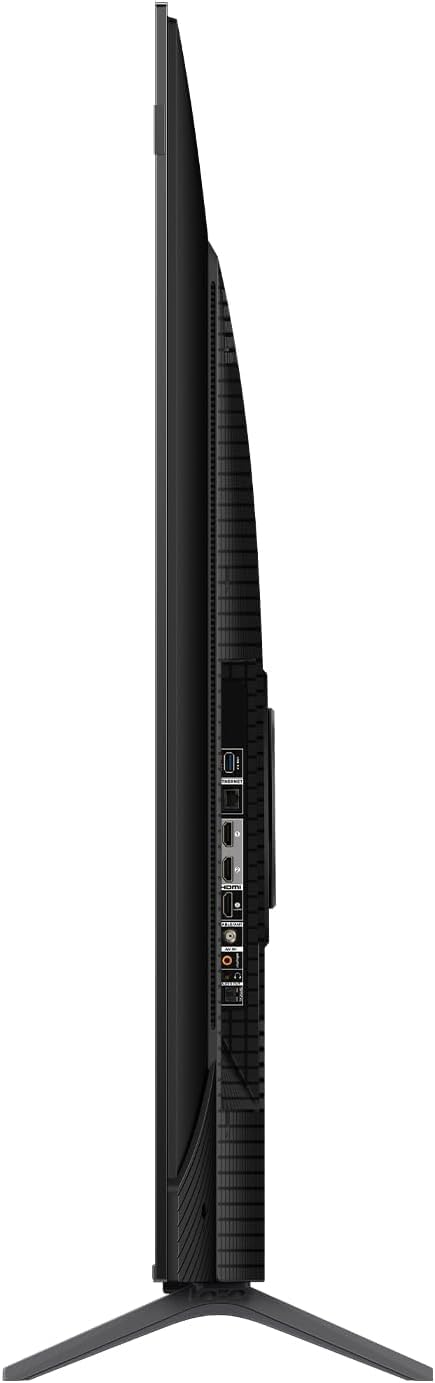
Seite view of the TCL 65P8K TV, highlighting the various input ports available on the side panel for easy access.
Hinteren view of the TCL 65P8K TV, showing the textured back panel and additional connection points.
4.2 Erstes Einschalten
- Schließen Sie das Netzkabel an den Fernseher und anschließend an eine Steckdose an.
- Drücken Sie den Ein-/Ausschalter am Fernseher oder auf der Fernbedienung, um den Fernseher einzuschalten.
- Folgen Sie den Anweisungen auf dem Bildschirm, um die Ersteinrichtung abzuschließen, einschließlich Sprachauswahl, Netzwerkverbindung und Einrichtung des Google TV-Kontos.
4.3 Netzwerkverbindung
Your TV supports both Wi-Fi (5G compatible) and wired LAN connections.
- W-lan: Navigieren Sie zu Einstellungen > Netzwerk & Internet, select your Wi-Fi network, and enter the password.
- LAN: Connect an Ethernet cable from your router to the LAN port on the TV. The TV will automatically detect the connection.
4.4 Eingangsverbindungen
Connect external devices such as gaming consoles, Blu-ray players, or sound systems to the TV using the appropriate ports.
- HDMI (2.1): 4 ports available, supporting eARC/ARC for enhanced audio return.
- USB (3.0): 1 port for media playback (video, photos, music).
- HF-Eingang: 1 digital input for antenna/cable connection.
- Optischer Audioausgang: 1 port for digital audio to external sound systems.
5. Bedienung des Fernsehers
5.1 Fernsteuerung überview
The remote control allows you to navigate the Google TV interface, adjust settings, and access various features. Familiarize yourself with the buttons for power, volume, channel, input selection, and smart assistant activation.
5.2 Google TV-Oberfläche
Your TCL 65P8K operates on the Google TV platform, providing a personalized experience with access to a wide range of apps and content. Use the remote to browse recommendations, search for titles, and manage your installed applications from the Google Play Store.
5.3 Bildeinstellungen
Optimieren Sie Ihre viewing experience by adjusting picture settings. Access these through the TV's settings menu.
- Bildmodi: Standard, Sports, Movie, Game.
- Farbtemperatur: Normal, Cool, Warm.
- HDR-Unterstützung: Dolby Vision, HDR10+, HDR10, HLG for enhanced contrast and color.
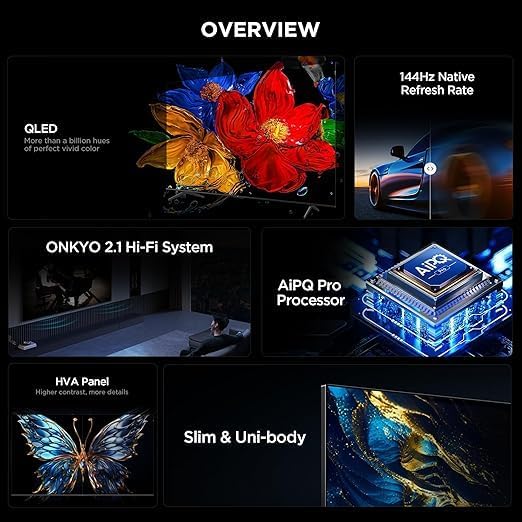
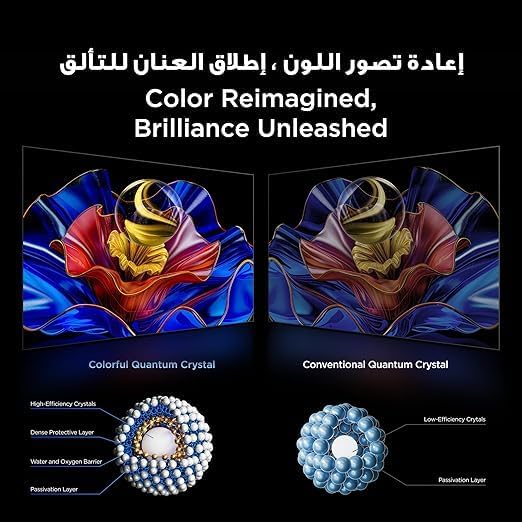
- QLED-Technologie: Delivers 93% DCI-P3 color gamut for vibrant and accurate colors.

This image demonstrates the 'Color Reimagined, Brilliance Unleashed' feature, showcasing the superior color reproduction of Colorful Quantum Crystals compared to conventional ones.
5.4 Toneinstellungen
The TV features an Onkyo 2.1 Hi-Fi Sound System for rich audio. Adjust sound settings to your preference.
- Audio-Ausgangsleistung: 10W x 2 speakers + 15W Onkyo subwoofer.
- Klangmodi: Dynamic, Standard, Sports, Movies, Music.
- Audiotechnologien: Dolby Atmos, Dolby Digital, DTS Studio Sound, DTS Virtual: X for immersive surround sound.

An image depicting the Onkyo 2.1 Sound System, illustrating its role in defining the standard for home theater audio with immersive sound waves.
5.5 Gaming-Funktionen
The TCL 65P8K is optimized for gaming with advanced features:
- Native 144Hz Refresh Rate: Provides ultra-smooth motion for fast-paced gaming and action scenes.
- Game Master Features: Includes FreeSync, VRR (Variable Refresh Rate), and ALLM (Auto Low Latency Mode) for a responsive gaming experience.

A visual comparison demonstrating the 'Smoother and clearer' motion provided by a 144Hz refresh rate versus a 60Hz refresh rate, ideal for gaming and fast-action content.
5.6 Intelligente Funktionen
Leverage the smart capabilities of your Google TV:
- Google Assistant: Use voice commands for search, control smart home devices, and more.
- Chromecast integriert: Übertragen Sie Inhalte von Ihrem Smartphone oder Tablet direkt auf den Fernseher.
- Luftspiel 2: Streamen Sie Inhalte von Apple-Geräten.
- Vorinstallierte Apps: Netflix, YouTube, Prime Video, Disney+, and access to the Google Play Store for more applications.
- AiPQ Pro Prozessor: AI-powered image processing enhances picture quality, ensuring realistic images with optimal contrast and color accuracy.

Ein Bild zeigtasing the AiPQ Pro Processor, highlighting its advanced capabilities in perceiving, thinking, and producing optimized visual content.

This image illustrates the smart way to control your TCL devices, showing the TV as a central hub for managing various smart home appliances.
6. Wartung
6.1 Reinigung
Um den Bildschirm zu reinigen, wischen Sie ihn vorsichtig mit einem weichen, fusselfreien Tuch ab. Für den Fernseher casing, use a soft, dry cloth. Avoid using abrasive cleaners, waxes, or solvents as they can damage the finish. Always unplug the TV before cleaning.
6.2 Softwareaktualisierungen
Your TV may receive software updates periodically to improve performance and add new features. Ensure your TV is connected to the internet to receive these updates. You can check for updates manually in Einstellungen > System > Info > Systemaktualisierung.
7. Fehlerbehebung
Sollten Sie Probleme mit Ihrem Fernseher haben, beachten Sie bitte die folgenden gängigen Lösungsansätze:
- Kein Strom: Check if the power cord is securely connected and the power outlet is working.
- Kein Bild/Ton: Vergewissern Sie sich, dass die richtige Eingangsquelle ausgewählt ist. Überprüfen Sie die Kabelverbindungen zu externen Geräten.
- Schlechte Bildqualität: Passen Sie die Bildeinstellungen an. Stellen Sie sicher, dass die Eingangsquelle ein qualitativ hochwertiges Signal liefert.
- Fernbedienung funktioniert nicht: Tauschen Sie die Batterien aus. Stellen Sie sicher, dass sich keine Hindernisse zwischen der Fernbedienung und dem Infrarotsensor des Fernsehers befinden.
- Netzwerkverbindungsprobleme: Restart your router and TV. Re-enter Wi-Fi password or check LAN cable.
Bei komplexeren Problemen wenden Sie sich bitte an den TCL-Support. webWebsite oder wenden Sie sich an den Kundendienst.
8. Spezifikationen
| Besonderheit | Spezifikation |
|---|---|
| Marke | TCL |
| Modellnummer | 65P8K |
| Bildschirmgröße | 65 Zoll |
| Display-Technologie | QLED |
| Auflösung | 3840 x 2160 (4K Ultra HD) |
| Bildwiederholrate | Nativ 144Hz |
| Seitenverhältnis | 16:9 |
| Viewing-Winkel | 178 Grad |
| Interner Speicher | 32 GB |
| Betriebssystem | Google TV |
| Prozessor | AiPQ Pro Prozessor |
| HDR-Unterstützung | Dolby Vision, HDR10+, HDR10, HLG |
| Audiosystem | Onkyo 2.1 Hi-Fi Sound System (10W x 2 + 15W Subwoofer) |
| Audiotechnologien | Dolby Atmos, Dolby Digital, DTS Studio Sound, DTS Virtual: X |
| HDMI-Anschlüsse | 4 (HDMI 2.1, eARC/ARC compatible) |
| USB-Anschlüsse | 1 (USB-3.0) |
| Konnektivität | Wi-Fi (5G), Bluetooth v5.4, LAN, RF Input, Optical Audio Output |
| Energieaufnahme | 180 Watts (Operating), <0.5 Watts (Standby) |
| Abmessungen (B x H x T) ohne Standfuß | 1444 x 831 x 69.5 mm |
| Abmessungen (B x H x T) mit Standfuß | 1444 x 893 x 295 mm |
| Nettogewicht | 17.4 kg |
| Ursprungsland | Ägypten |
9. Garantie und Support
Your TCL 65P8K TV comes with a full 2-year warranty from the date of purchase. Please retain your proof of purchase and the warranty card included in the box. For technical support, service requests, or warranty claims, please contact TCL customer service or visit the official TCL support website. Do not attempt to repair the product yourself, as this may void your warranty.