
GuliKit PC05
GuliKit Hyperlink 2 Wireless Controller Adapter – Benutzerhandbuch
Modell: PC05
Einführung
This manual provides comprehensive instructions for the GuliKit Hyperlink 2 Wireless Controller Adapter (Model PC05). It covers setup, operation, compatibility, and troubleshooting to ensure optimal performance with your gaming controllers and platforms.

Image: The GuliKit Hyperlink 2 Wireless Controller Adapter, a compact USB dongle.
Installationsanweisungen
The GuliKit Hyperlink 2 adapter is designed for instant plug-and-play functionality, requiring no software installation or driver updates for basic operation.
Pairing Your Controller
- Turn on the controller and enter pairing mode:
- For PS4 & PS5 controllers: Hold the AKTIE Und PS-Logo buttons simultaneously until the light bar flashes quickly.
- For other compatible controllers: Refer to your controller's manual for specific pairing instructions.
- Stecken Sie den Adapter ein: Insert the GuliKit Hyperlink 2 adapter into an available USB port on your PC or console. The adapter's indicator light will flash rapidly to automatically enter pairing mode. No button press is required on the adapter itself.
- Kopplung bestätigen: The adapter's indicator light will turn constant (solid) once pairing is successful.
Wichtiger Hinweis: Ensure you initiate pairing mode on your controller first, then insert the adapter into the USB port of your PC or console.

Image: The GuliKit Hyperlink 2 adapter connected to a USB port, illustrating its plug-and-play nature.
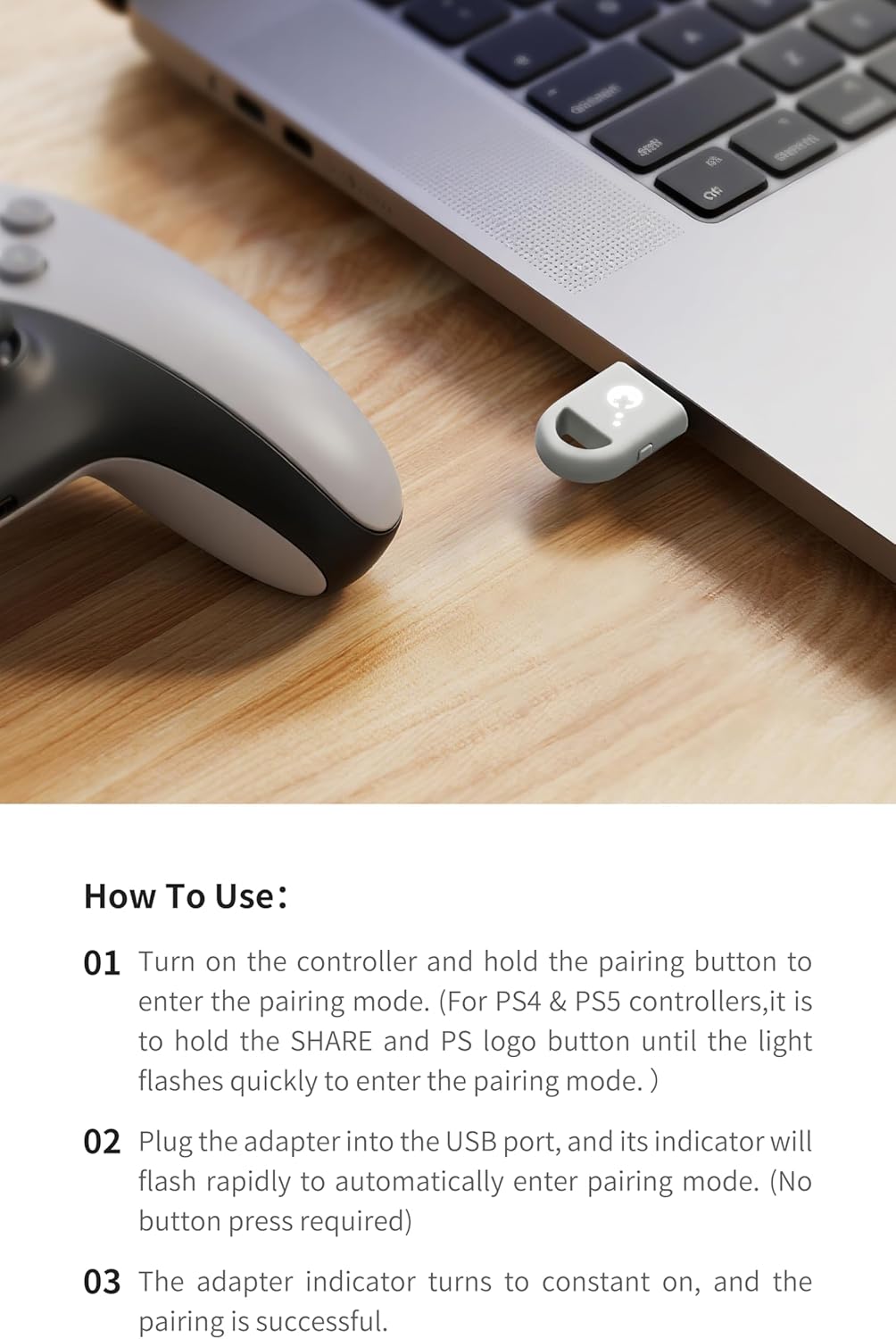
Image: A PS5 DualSense controller being paired with the GuliKit Hyperlink 2 adapter, which is plugged into a laptop.
Bedienungsanleitung
Leistung mit geringer Latenz
The GuliKit Hyperlink 2 utilizes HyperLink 2 technology to achieve ultra-low latency, significantly enhancing the polling rate for a responsive gaming experience. This technology reduces input delay by up to 50% compared to standard Bluetooth or 2.4G dongle connections.

Image: The GuliKit Hyperlink 2 adapter highlighting its 3.4ms latency performance.
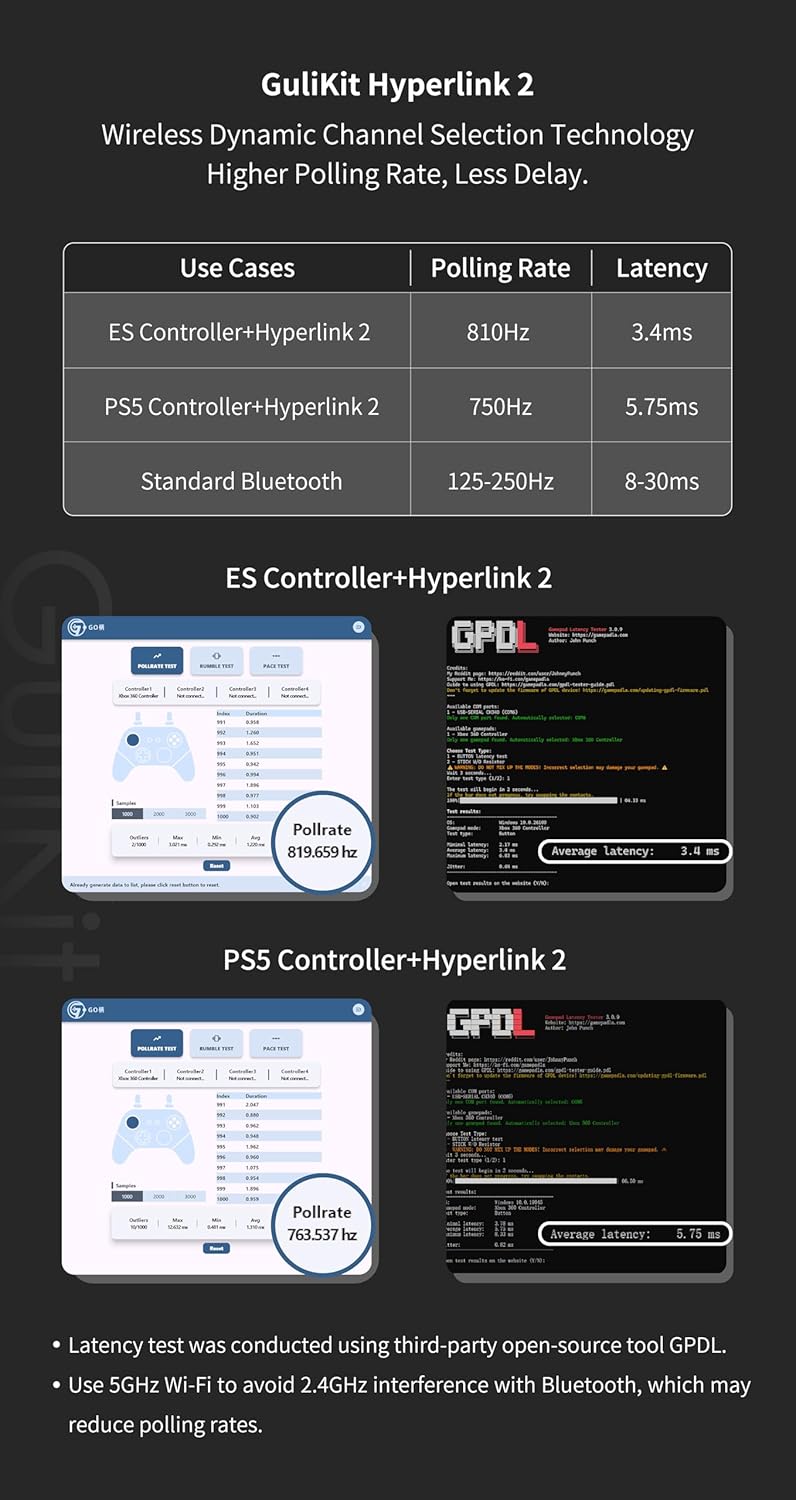
Image: A table illustrating the improved polling rate and reduced latency of GuliKit Hyperlink 2 compared to standard Bluetooth connections.
Bewegungssteuerung und Vibrationsunterstützung
When using PS4 or PS5 controllers, the adapter supports motion control and vibration features on Nintendo Switch and Switch 2 consoles. This functionality is not available for PC or Switch Lite platforms.

Image: PS4 and PS5 controllers shown alongside Nintendo Switch consoles, indicating support for motion control and vibration.
Kompatibilität
Controller-Kompatibilität
The GuliKit Hyperlink 2 adapter is compatible with a wide range of popular gaming controllers:
- Xbox One Bluetooth Controllers (models released after November 2015)
- Xbox Series Controller
- Xbox Elite Series 2 Controller
- PS5 DualSense Controllers
- PS5 DualSense Edge Controllers
- PS4 DualShock Controllers
- Nintendo Switch Pro Controllers
- GuliKit Controllers (Note: May not be compatible with GuliKit KingKong 3 Max, which requires its dedicated Hyperlink adapter)
Important Xbox Controller Note: Der Adapter ist nicht kompatibel with Xbox One controllers released between 2013 and 2015, or Xbox Elite wireless controllers that lack Bluetooth functionality. These older models can be identified by the shape around the Xbox logo (non-integrated face shell).

Image: A visual guide to controller compatibility, featuring various Xbox, PlayStation, Switch Pro, and GuliKit controllers.

Image: A detailed chart illustrating compatible and incompatible Xbox controller models with the adapter.
Plattformkompatibilität
The adapter supports the following operating systems and consoles:
- Windows 7 oder höher
- Android 9.0 oder höher
- Nintendo-Schalter
- Nintendo Switch 2 (Enable "Wired Pro Controller Connection" in System Settings)
- SteamOS 3.4 or later
Note for Handhelds: For use with Steam Deck, AYANEO handhelds, ROG Ally/Ally X, or Switch Lite, an additional OTG cable or adapter may be required.

Image: A visual representation of supported platforms including Windows, Android, Switch, and SteamOS.
Wartung
The GuliKit Hyperlink 2 Wireless Controller Adapter requires no specific user maintenance. Keep the device clean and dry. Avoid exposing it to extreme temperatures or moisture.
Fehlerbehebung
- Kopplungsprobleme: If the adapter does not pair immediately, unplug it and re-insert it. Ensure the controller is in pairing mode before inserting the adapter. Repeated attempts may be necessary for some controllers.
- Mehrere Controller: The adapter supports pairing with multiple controllers, but only one controller can be actively used at a time.
- Inconsistent Controller Recognition (DualSense): When switching between different controllers, especially DualSense, you may need to re-perform the pairing process.
- No Gyro Functionality (DualSense on PC/SteamOS): Gyro functionality for DualSense controllers is not supported on Windows or SteamOS/Bazzite platforms when using this adapter.
- DualSense Recognized as Xbox/Switch Controller: On SteamOS/Bazzite (Linux), a DualSense controller might occasionally be recognized as an Xbox or Switch controller, leading to incorrect button mapping. Unplugging and re-plugging the adapter usually resolves this.
- Dropped Inputs on Steam Deck (Docked): If experiencing dropped inputs with a docked Steam Deck, ensure there is a clear line of sight between the adapter and the controller. The Steam Deck's internal components may interfere with the signal if the adapter is plugged into the back.
- Android-Kompatibilität: Firmware updates may be required for optimal functionality with Android devices. Check the official GuliKit webWebsite für die neueste Firmware.
- Xbox Headphone Support: The adapter does not support Xbox headphone functionality.
- GuliKit KingKong 3 Max Controller: This adapter is not compatible with the GuliKit KingKong 3 Max controller, which requires its specific Hyperlink adapter.
Technische Daten
| Modellnummer | PC05 |
| Marke | GuliKit |
| Artikelgewicht | 0.317 Unzen |
| Verpackungsabmessungen | 2.64 x 2.6 x 0.79 Zoll |
| Steckertyp | USB Typ A |
| Anzahl der Ports | 1 |
| Kompatible Geräte | Gaming Console, PC, Android Devices |
Garantieinformationen
Specific warranty details for the GuliKit Hyperlink 2 Wireless Controller Adapter are not provided in this manual. Please refer to the official GuliKit website or contact GuliKit customer support for warranty terms and conditions.
Kundenservice
For further assistance, technical support, or to inquire about firmware updates, please visit the official GuliKit webSie können die Website besuchen oder sich an den Kundendienst wenden. Die Kontaktdaten finden Sie in der Regel auf der Produktverpackung oder beim Hersteller. webWebsite.
Ask a question about this manual
Ask about setup, troubleshooting, compatibility, parts, safety, or missing instructions. Manuals+ will review the question and use this page’s manual context to help answer it.