
1. Einführung und Endeview
The AOC ACG 2502 Wireless Gaming Headset is designed to provide a versatile and immersive audio experience across various gaming platforms and devices. Featuring dual-mode wireless connectivity (2.4GHz and Bluetooth 5.4), 7.1 virtual surround sound, and a noise-cancelling microphone, this headset offers high-quality audio and clear communication for extended gaming sessions.

Image: The AOC ACG 2502 Wireless Gaming Headset, showcasing its design and included connectivity accessories.
2. Lieferumfang
- 1 x ACG2502 Gaming Headset
- 1 x Typ-C Ladekabel
- 1 x USB Transmitter (2.4GHz wireless dongle)
- 1 x Type-C to 3.5mm Audio Cable
- 1 x Benutzerhandbuch
3. Produktmerkmale
- Dual-Mode Wireless with Ultra-Low Latency: Enjoy both 2.4 GHz and Bluetooth 5.4 connectivity with a guaranteed maximum latency of 20 ms for rock-solid audio synchronization.
- 4-in-1 Universal Connectivity: Equipped with USB-A, Type-C, Bluetooth 5.4, and 3.5 mm wired modes, allowing connection to consoles, mobile devices, and PCs. Note: Bluetooth modes are incompatible with PS5 and PS4. Only the 3.5mm wired mode is compatible with Xbox Series X/S; other Xbox models are not supported.
- High-Resolution 7.1 Virtual Surround Sound: Features dual acoustic chambers and 50 mm graphene diaphragms, plus a built-in DAC delivering 96 kHz/24-bit output for precise directional audio.
- Lightweight, Ergonomic Comfort: Weighing just 239 g, the headset includes protein-leather earcups with breathable foam and an adjustable headband for fatigue-free extended use.
- Long-Lasting Battery with Fast Charge: Provides up to 45 hours of gameplay on a single charge. A full recharge takes approximately 2 hours via USB-C, with the ability to game while charging.
- Triple-Stage Noise Cancelling Microphone: The boom mic features foam isolation, DSP filters for echo and background noise elimination, and AI-driven voice enhancement for clear communication.
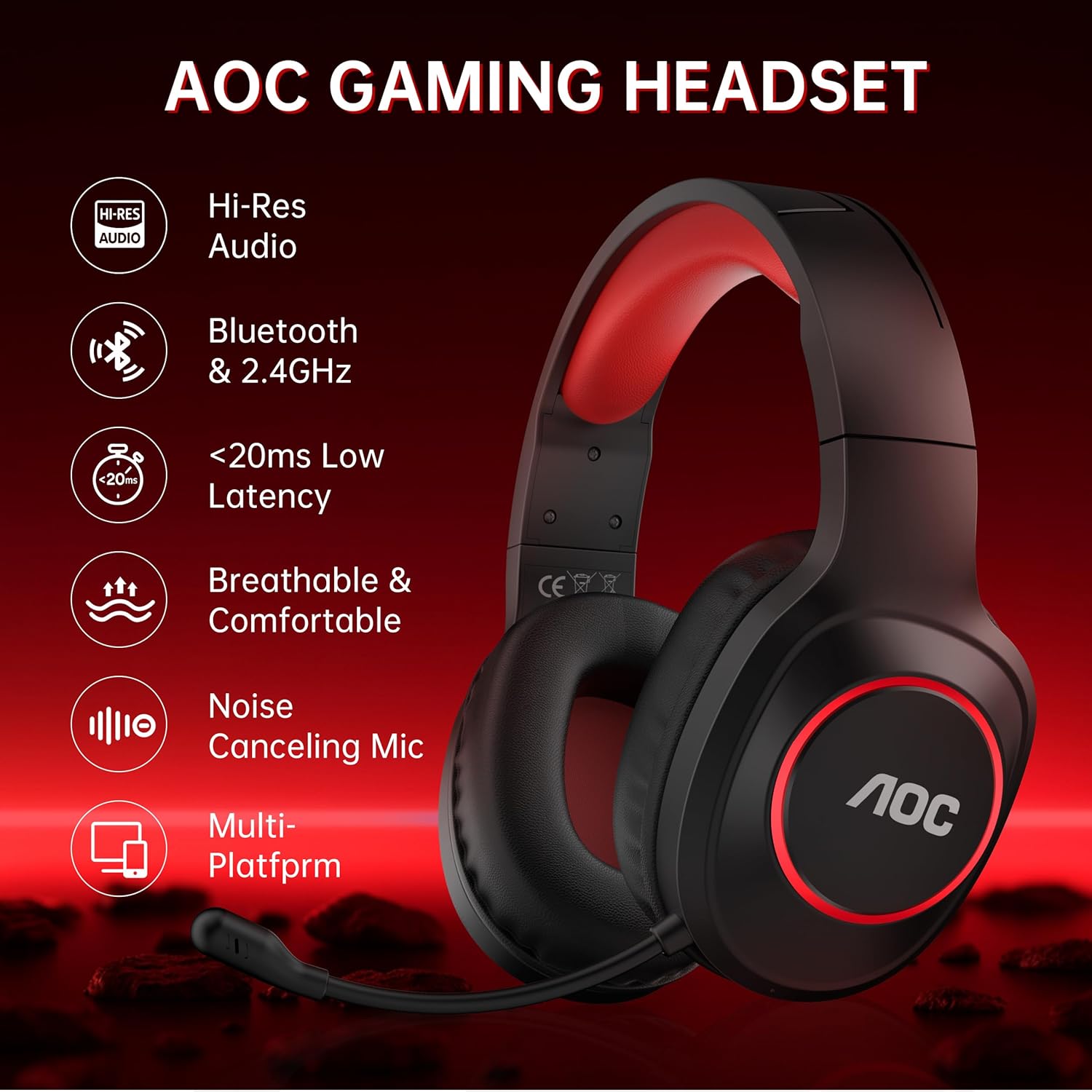
Image: Key features of the AOC Gaming Headset, including Hi-Res Audio and multi-platform compatibility.
4. Einrichtung und Konnektivität
4.1 Erstaufladung
Before first use, fully charge the headset. Connect the Type-C charging cable to the charging port on the headset and the other end to a USB power source. The indicator light will be red while charging and turn blue when fully charged. A full charge takes approximately 2.5 hours.
4.2 2.4GHz Wireless Connection (USB Transmitter)
- Plug the USB Transmitter into an available USB-A or Type-C port on your PC, PS5/PS4, or Nintendo Switch.
- Press and hold the Power Button on the headset for 3 seconds to turn it on.
- Double-click the Power Button to switch to "Adapter mode." The headset will announce "Adapter mode," and its indicator light will flash white.
- Once successfully connected, the headset's indicator light will turn solid white, and the transmitter's blue light will stay on.
Note: The microphone is disabled when connected to Nintendo Switch via 2.4GHz.

Image: The 2.4GHz USB wireless dongle, emphasizing low latency connectivity.
4.3 Bluetooth 5.4-Verbindung
- Press and hold the Power Button on the headset for 3 seconds to turn it on.
- Double-click the Power Button to switch to "Bluetooth mode." The headset will announce "Bluetooth mode," and the indicator light will blink blue, indicating it's in pairing mode.
- On your mobile device or PC, open Bluetooth settings and search for "AOC ACG2502" to connect.
- Nach erfolgreicher Kopplung können Sie Musik abspielen oder Sprachanrufe tätigen.
Note: Bluetooth modes are incompatible with PS5 and PS4.
4.4 3.5-mm-Drahtanschluss
Connect the Type-C to 3.5mm audio cable to the headset's Type-C port and the 3.5mm end to your device (e.g., Xbox Series X/S controller, PC, mobile device). This mode does not require battery power.
Note: Only the 3.5mm wired mode is compatible with Xbox Series X/S; all other Xbox models are not supported.

Image: Visual guide for connecting the headset to various platforms using different modes.
5. Bedienungsanleitung
The headset features intuitive controls located on the left earcup.
- Netzschalter:
- Press and hold for 3 seconds to power On/Off.
- Single click to play/pause audio or answer a call.
- Double click to end or reject a call.
- Double click to switch between 2.4GHz and Bluetooth modes.
- Lautstärke + Taste: Click to increase volume. Press and hold to continuously raise volume.
- Lautstärketaste: Click to decrease volume. Press and hold to continuously lower volume.
- Microphone & Light Switch:
- Single click to mute/unmute the microphone.
- Double click to toggle ambient RGB lighting On/Off.
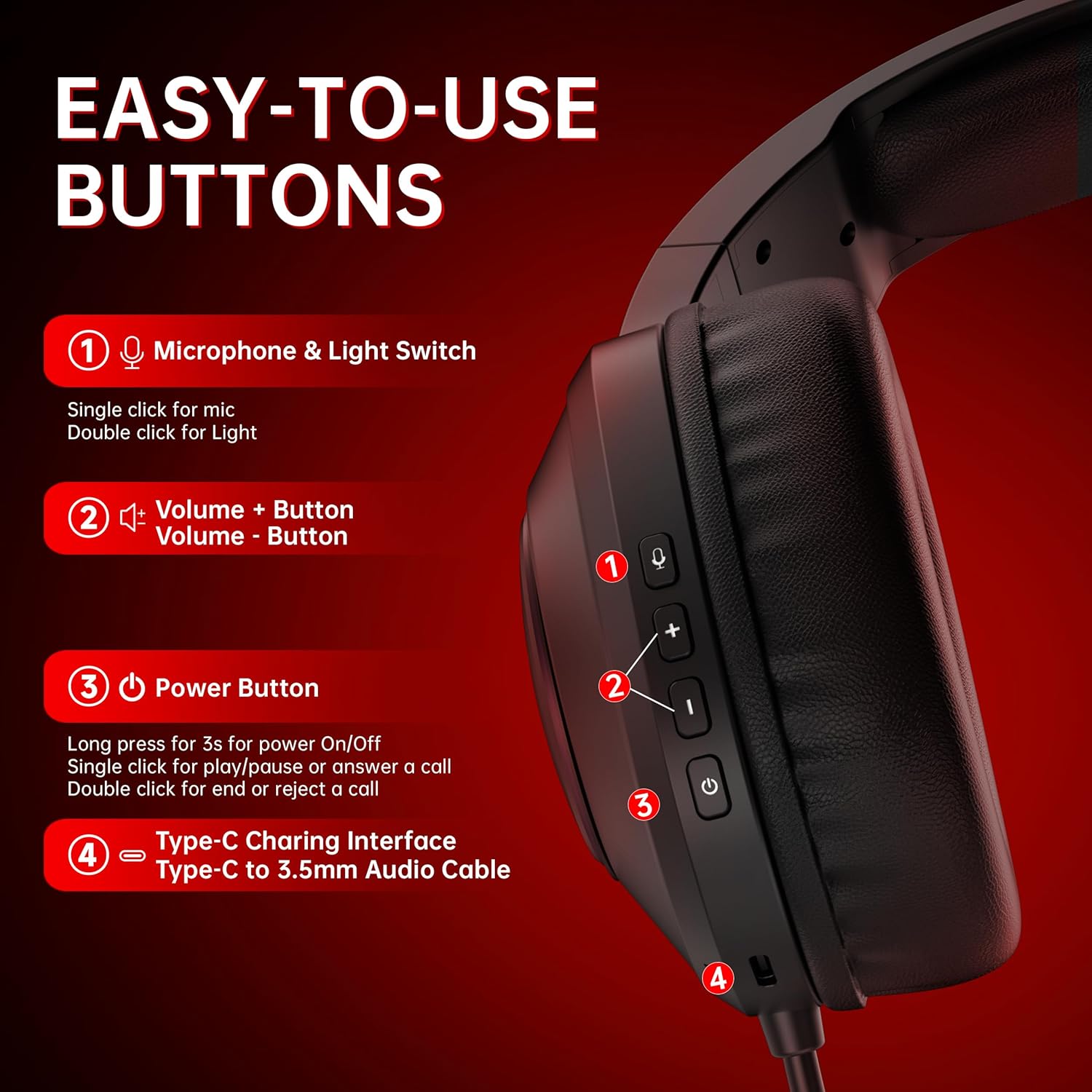
Bild: Detailliert view of the headset's control buttons for easy operation.
6. Aufladen
The headset offers up to 45 hours of battery life on a single charge. When the battery is low, the indicator light will flash red, and you will hear a "Battery low" sound. Connect the Type-C charging cable to recharge. The headset can be used while charging, ensuring uninterrupted gameplay.

Image: Illustration of the headset's 45-hour battery life.
7. Mikrofonnutzung
The detachable boom microphone features triple-stage noise cancelling technology to ensure clear voice transmission. This includes foam isolation to block ambient sounds, DSP filters to eliminate echo and background noise, and AI-driven voice enhancement. The microphone is adjustable and can be moved up or down as needed.
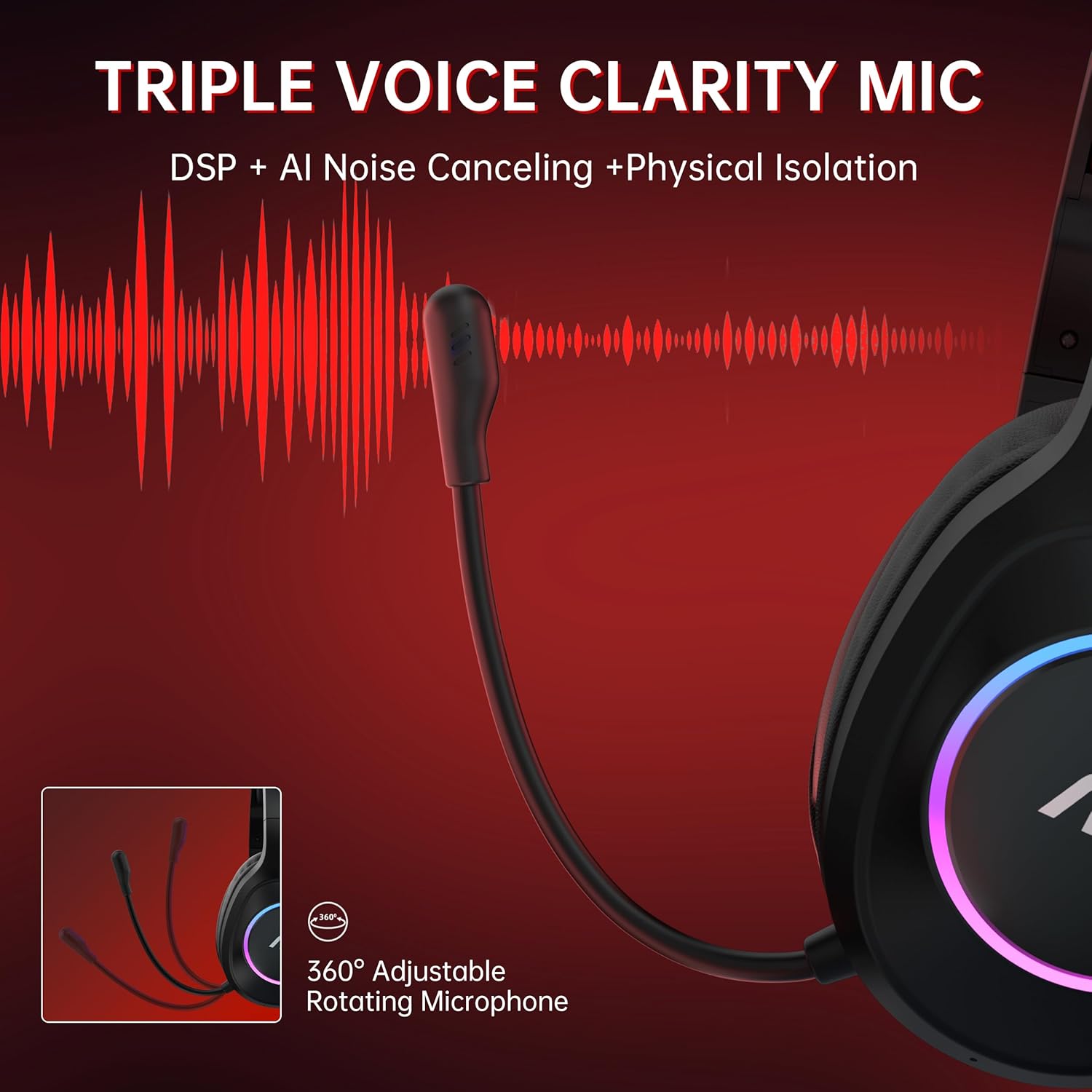
Image: The headset's adjustable microphone and its noise-cancelling capabilities.
8. Spezifikationen
| Besonderheit | Detail |
|---|---|
| Modellname | ACG 2502 |
| Konnektivitätstechnologie | 2.4GHz, Bluetooth 5.4, Wired (3.5mm) |
| Audio-Latenz | 20 Milliseconds (max) |
| Akkulaufzeit | Bis zu 45 Stunden |
| Ladezeit | Ca. 2.5 Stunden |
| Größe des Audiotreibers | 50 Millimeter |
| Lautsprecherimpedanz | 32 Ohm |
| Frequenzgang | 20 Hz - 20 kHz |
| Empfindlichkeit | 90 dB |
| Mikrofontyp | All-round, Noise Cancelling |
| Transmission Distance (2.4GHz) | 10 Meter |
| Bluetooth-Reichweite | 33 Fuß (ca. 10 Meter) |
| Gewicht | 15.2 Unzen (ca. 431 g) |
| Material | Acrylonitrile Butadiene Styrene (ABS), Polyurethane (PU) |
9. Wartung
- Reinigung: Reinigen Sie das Headset mit einem weichen, trockenen Tuch. Vermeiden Sie die Verwendung von scharfen Chemikalien oder scheuernden Materialien.
- Lagerung: Bewahren Sie das Headset an einem kühlen, trockenen Ort fern von direkter Sonneneinstrahlung und extremen Temperaturen auf.
- Batteriepflege: Um die Akkulaufzeit zu verlängern, sollten Sie das Headset nicht häufig vollständig entladen. Laden Sie es regelmäßig auf, auch wenn Sie es längere Zeit nicht benutzen.
- Kabelmanagement: Behandeln Sie die Kabel vorsichtig, um Beschädigungen zu vermeiden. Vermeiden Sie scharfe Knicke und starkes Ziehen.
10. Fehlerbehebung
- Kein Ton/Schlechte Tonqualität:
- Stellen Sie sicher, dass das Headset eingeschaltet und aufgeladen ist.
- Verify the correct connectivity mode (2.4GHz, Bluetooth, or Wired) is selected and properly connected to your device.
- Check device volume settings and headset volume controls.
- If using 2.4GHz, ensure the USB transmitter is securely plugged in and its indicator light is solid blue.
- If using Bluetooth, ensure the headset is paired and connected in your device's Bluetooth settings.
- Test with the 3.5mm wired connection to isolate if the issue is wireless-related.
- Mikrofon funktioniert nicht:
- Ensure the microphone is not muted (single click the Microphone & Light Switch).
- Verify the microphone is securely attached.
- Check your device's audio input settings to ensure the headset microphone is selected.
- Remember the microphone is disabled when connected to Nintendo Switch via 2.4GHz.
- Verbindung/Kopplung nicht möglich:
- Ensure the headset is in the correct pairing mode (flashing white for 2.4GHz, flashing blue for Bluetooth).
- Gehen Sie näher an das Gerät heran, um sicherzustellen, dass Sie sich in Reichweite befinden.
- Turn off and on both the headset and the device's wireless function.
- Clear previous Bluetooth pairings on your device and attempt to pair again.
- Batterie entlädt sich schnell:
- Stellen Sie sicher, dass das Headset vor der Verwendung vollständig aufgeladen ist.
- Reduce RGB lighting usage, as this consumes additional power.
- Wenn das Problem weiterhin besteht, wenden Sie sich an den Kundendienst.
11. Garantie und Support
The AOC ACG 2502 Wireless Gaming Headset comes with a 1-year free replacement or repair warranty. AOC also provides 24/7 Kundensupport und ein 60-Tage-Rückgaberecht ohne Probleme. For any issues or inquiries, please refer to the contact information provided in the included user manual or visit the official AOC support webWebsite.