
Einführung
This manual provides detailed instructions for the proper use and maintenance of your ORDRO M5 Handheld Camcorder. Please read this manual thoroughly before operating the device to ensure optimal performance and longevity.
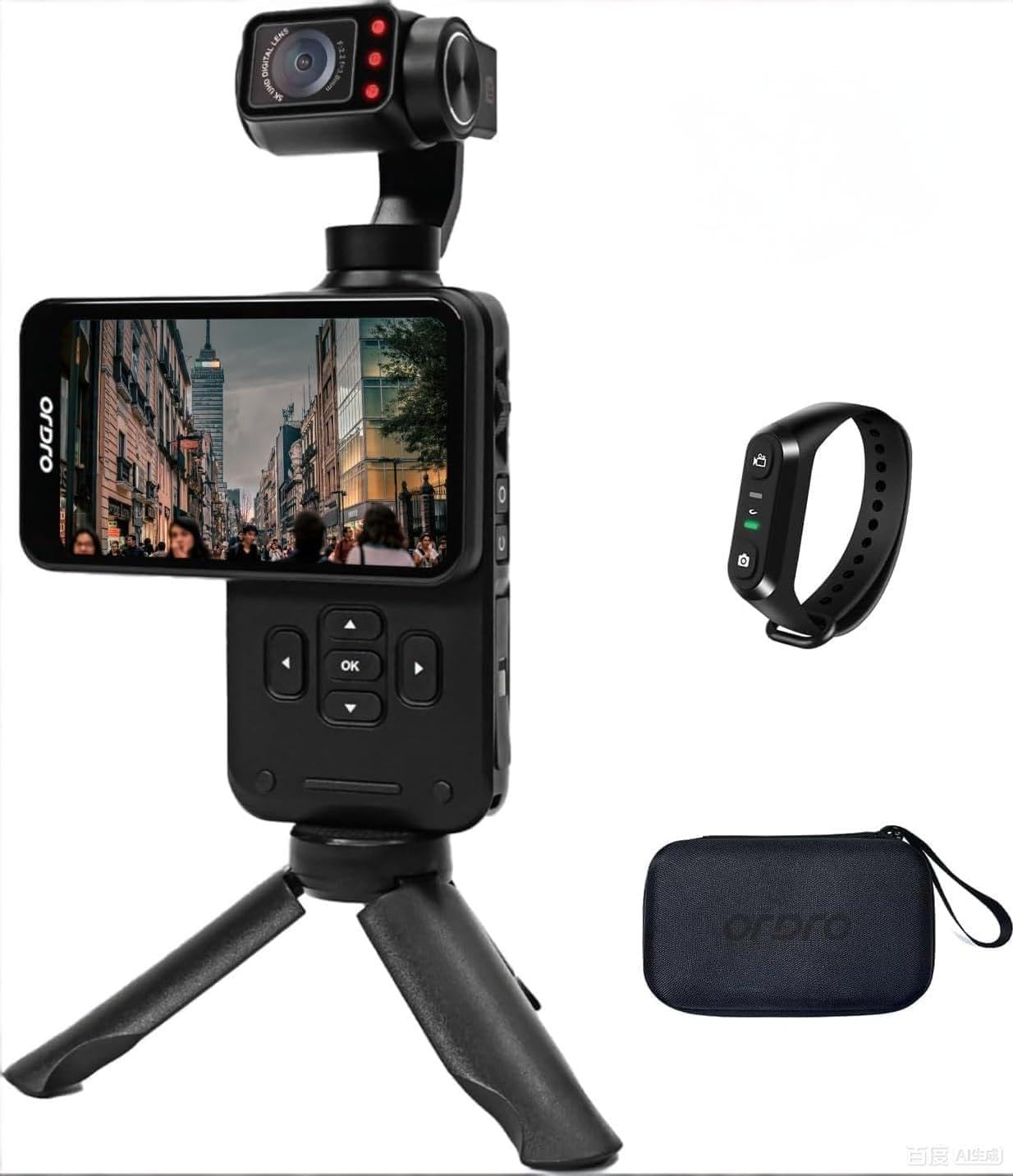
Figure 1: ORDRO M5 Handheld Camcorder Overview
1. Einrichtung
1.1 Laden des Akkus
The ORDRO M5 camcorder is equipped with a built-in battery. Before first use, fully charge the device. Connect the camcorder to a power source using the provided USB cable. The charging indicator will illuminate during charging and turn off when complete. A full charge provides approximately 150 minutes of 4K/60FPS recording time.

Figure 2: Charging the ORDRO M5 Camcorder
1.2 Einlegen einer Micro SD-Karte
The camcorder supports Micro SD cards for storage. Locate the Micro SD card slot, typically on the side or bottom of the device. Insert the card with the gold contacts facing down until it clicks into place. Ensure the card is rated V60 or higher for optimal 5K video recording performance. A 64GB card is typically included.
1.3 Ein-/Ausschalten
To power on the camcorder, press and hold the power button until the screen illuminates. To power off, press and hold the power button again until the device shuts down.
2. Bedienungsanleitung
2.1 Grundlegende Aufnahmefunktionen
After powering on, the camcorder enters standby mode. Press the record button to start recording. Press it again to stop. The device supports 5K at 30fps and 4K at 60fps video resolutions.
2.2 3.5-inch Rotating Touch Screen
The 3.5-inch IPS touch screen allows for intuitive control and framing. It can be rotated to switch between horizontal (16:9) and vertical (9:16) shooting orientations, ideal for various platforms like YouTube and TikTok.

Figure 3: Horizontal and Vertical Screen Rotation
2.3 3-Axis Mechanical Gimbal Stabilization
The integrated 3-axis mechanical gimbal provides stable and smooth video footage, even during movement such as hiking or running. This reduces camera shake significantly compared to electronic stabilization.

Figure 4: Gimbal Stabilization in Action
Gimbal-Modi:
- PF-Modus (Schwenkfolgemodus): The camera pans horizontally while maintaining a stable vertical axis.
- TF-Modus (Neigungsfolgemodus): The camera tilts vertically while maintaining a stable horizontal axis.
- L-Modus (Sperrmodus): The camera maintains a fixed orientation, locking both pan and tilt.
- POV-Modus (Vollständiges Folgen): The camera follows all movements of the handle (pan, tilt, roll).
- PTZ (Schwenk-Neige-Zoom): Allows for controlled movement of the camera's pan, tilt, and zoom functions. Speed settings include Smooth, Regular, and Sport.
2.4 Gesichtserkennung
Activate face tracking by touching the screen to select a face. The camcorder will then automatically lock onto and follow the detected face, keeping it centered in the frame.

Figure 5: Face Tracking Functionality
2.5 Infrarot-Nachtsicht
For recording in low-light or dark conditions, activate the infrared night vision function. The camcorder utilizes built-in IR lights to capture clear black and white footage in environments with minimal ambient light.

Figure 6: Infrared Night Vision Operation
2.6 Wide Dynamic Range (WDR) and AE-L Exposure Lock
- WDR: Enhances image quality by capturing more detail in both bright and dark areas of a scene, preventing overexposure in highlights and underexposure in shadows.
- AE-L (Exposure Lock): Locks the exposure settings to prevent automatic adjustments, useful in scenes with challenging lighting conditions or when consistent exposure is desired.
2.7 zusätzliche Funktionen
- 120°-Weitwinkelobjektiv: Erfasst ein breiteres Feld von view, suitable for vlogging, landscapes, and group shots.
- Zeitrafferaufnahmen: Records a sequence of images over time and compiles them into a video.
- Dauerfeuer: Nimmt mehrere Fotos in schneller Folge auf.
- Lange Exposition: Allows for extended shutter speeds to capture more light in dark environments or create motion blur effects.
- Weißabgleich: Adjusts color temperature to ensure accurate color reproduction under different lighting conditions.
- Zeitlupe: Nimmt Videos mit einer höheren Bildrate auf, um sie in Zeitlupe wiederzugeben.
- EV Exposure Compensation: Manually adjusts the exposure level to brighten or darken the image.
3. Wartung
3.1 Reinigung
- Verwenden Sie ein weiches, trockenes Tuch, um das Gehäuse des Camcorders zu reinigen.
- Verwenden Sie für Linse und Bildschirm ein spezielles Linsenreinigungstuch und eine entsprechende Reinigungslösung. Vermeiden Sie scheuernde Materialien.
- Verwenden Sie keine scharfen Reinigungsmittel oder Lösungsmittel.
3.2 Speicherung
- Bewahren Sie den Camcorder an einem kühlen, trockenen Ort fern von direkter Sonneneinstrahlung und extremen Temperaturen auf.
- Entfernen Sie die Micro-SD-Karte, wenn Sie die Karte über einen längeren Zeitraum aufbewahren.
- Um die Lebensdauer des Akkus zu erhalten, sollte dieser vor der Langzeitlagerung teilweise (etwa 50 %) geladen sein.
4. Fehlerbehebung
4.1 Häufige Probleme und Lösungen
- Camcorder lässt sich nicht einschalten:
- Stellen Sie sicher, dass der Akku vollständig geladen ist.
- Halten Sie die Einschalttaste mehrere Sekunden lang gedrückt.
- Videoaufnahme nicht möglich:
- Prüfen Sie, ob die Micro-SD-Karte richtig eingesetzt ist.
- Vergewissern Sie sich, dass auf der Micro-SD-Karte ausreichend freier Speicherplatz vorhanden ist.
- Ensure the Micro SD card is not write-protected.
- Video footage is shaky despite gimbal:
- Ensure the gimbal is calibrated correctly (refer to device settings).
- Avoid extreme or sudden movements that exceed the gimbal's stabilization capabilities.
- Schlechte Bildqualität bei schwachem Licht:
- Activate Infrared Night Vision mode.
- Adjust EV exposure compensation if necessary.
- Touchscreen reagiert nicht:
- Restart the camcorder.
- Stellen Sie sicher, dass der Bildschirm sauber und trocken ist.
5. Spezifikationen
| Besonderheit | Detail |
|---|---|
| Marke | ORDRO |
| Modellnummer | WXM5 |
| Auflösung der Videoaufnahme | 5K (5120 Pixels), 4K |
| Fotosensor-Technologie | CMOS (1/2.5 Zoll) |
| Effektive Standbildauflösung | 48 Megapixel |
| Bildstabilisierung | 3-Axis Mechanical Gimbal |
| Bildschirmgröße | 3.5-inch IPS Touch Screen (Rotatable) |
| Objektivtyp | 120° Wide Angle (Minimum/Maximum Focal Length: 3mm, Minimum/Maximum Aperture: 2.2f) |
| Flash-Speichertyp | Micro SD (V60, UHS Speed Class 3 recommended) |
| Videoaufnahmeformat | MP4 |
| Unterstütztes Audioformat | AAC, MP3 |
| Durchschnittliche Batterielebensdauer | 150 minutes (4K/60FPS) |
| Konnektivitätstechnologie | USB |
| Besondere Merkmale | IR Night Vision, WDR, Face Tracking, Time-Lapse, Continuous Shooting, AE-L Exposure Lock, Long Exposure, White Balance, Slow Motion, EV Exposure Compensation |
| Formfaktor | Handgerät |
| Wasserbeständigkeit | Nicht wasserfest |
6. Garantieinformationen
The ORDRO M5 Handheld Camcorder comes with a 1 Jahr Herstellergarantie Diese Garantie gilt ab Kaufdatum und deckt Material- und Verarbeitungsfehler bei normalem Gebrauch ab. Sie deckt keine Schäden ab, die durch Missbrauch, Unfälle, unbefugte Änderungen oder Naturkatastrophen verursacht wurden.
Please retain your proof of purchase for warranty claims. For detailed warranty terms and conditions, refer to the official ORDRO webWebsite oder wenden Sie sich an den Kundendienst.
7. Kundendienst
If you encounter any issues or have questions regarding your ORDRO M5 camcorder that are not addressed in this manual, please contact ORDRO customer support. Contact information can typically be found on the official ORDRO webauf der Website oder auf der Produktverpackung.
When contacting support, please have your product model number (WXM5) and purchase details ready.