
HUANUO TZESD7B-N1-US
HUANUO Electric Standing Desk
Bedienungsanleitung
Produkt überview
The HUANUO Electric Standing Desk is designed to provide a versatile and ergonomic workspace, allowing seamless transitions between sitting and standing positions. This desk features an electric lift system with memory presets for personalized height adjustments, a durable construction, and a quiet operation, making it suitable for various home and office environments.

Abbildung: Der elektrische Stehschreibtisch von HUANUO, ausgestelltasing its sleek design and integration into a contemporary workspace.
Einrichtung und Montage
Assembly of the HUANUO Electric Standing Desk is designed to be straightforward, with clear instructions and well-labeled parts to facilitate the process. Minimal lifting is required during setup.
- Packen Sie alle Komponenten aus und überprüfen Sie sie anhand der in der Verpackung enthaltenen Teileliste.
- Follow the step-by-step instructions for attaching the desk legs to the desktop. Ensure all screws are securely tightened.
- Connect the motor and control panel cables as indicated in the assembly guide.
- Place the desk in its desired location, ensuring it is on a flat, stable surface.

Image: A detailed diagram illustrating the dimensions of the desk, including height range (28.3" to 46.5"), width (48"), and depth (24").
Bedienungsanleitung
The HUANUO Electric Standing Desk features an intuitive control panel for easy height adjustments and memory settings.
Höhenverstellung:
- Verwenden Sie die Aufwärts (∧) Und Unten (∨) arrows on the control panel to smoothly raise or lower the desk to your desired height. The LED display will show the current height.
- The desk offers a wide adjustment range from 28.3 inches to 46.5 inches.

Image: Visual representation of the desk's height adjustment capabilities, demonstrating its range from a seated position (28.3") to a standing position (46.5").
Speichervoreinstellungen:
The desk allows you to save up to four preferred height settings for quick and convenient switching.
- Stellen Sie den Schreibtisch mithilfe der Auf-/Ab-Pfeile auf die gewünschte Höhe ein.
- Drücken Sie die "M" button (or "SAVE" button if labeled differently) on the control panel. The display may flash.
- Drücken Sie sofort eine der nummerierten voreingestellten Tasten (1, 2, 3 oder 4) um die aktuelle Höhe an dieser Position zu speichern.
- Um eine gespeicherte Höhe abzurufen, drücken Sie einfach die entsprechende nummerierte Voreinstellungstaste. Der Schreibtisch fährt automatisch in die gespeicherte Position.
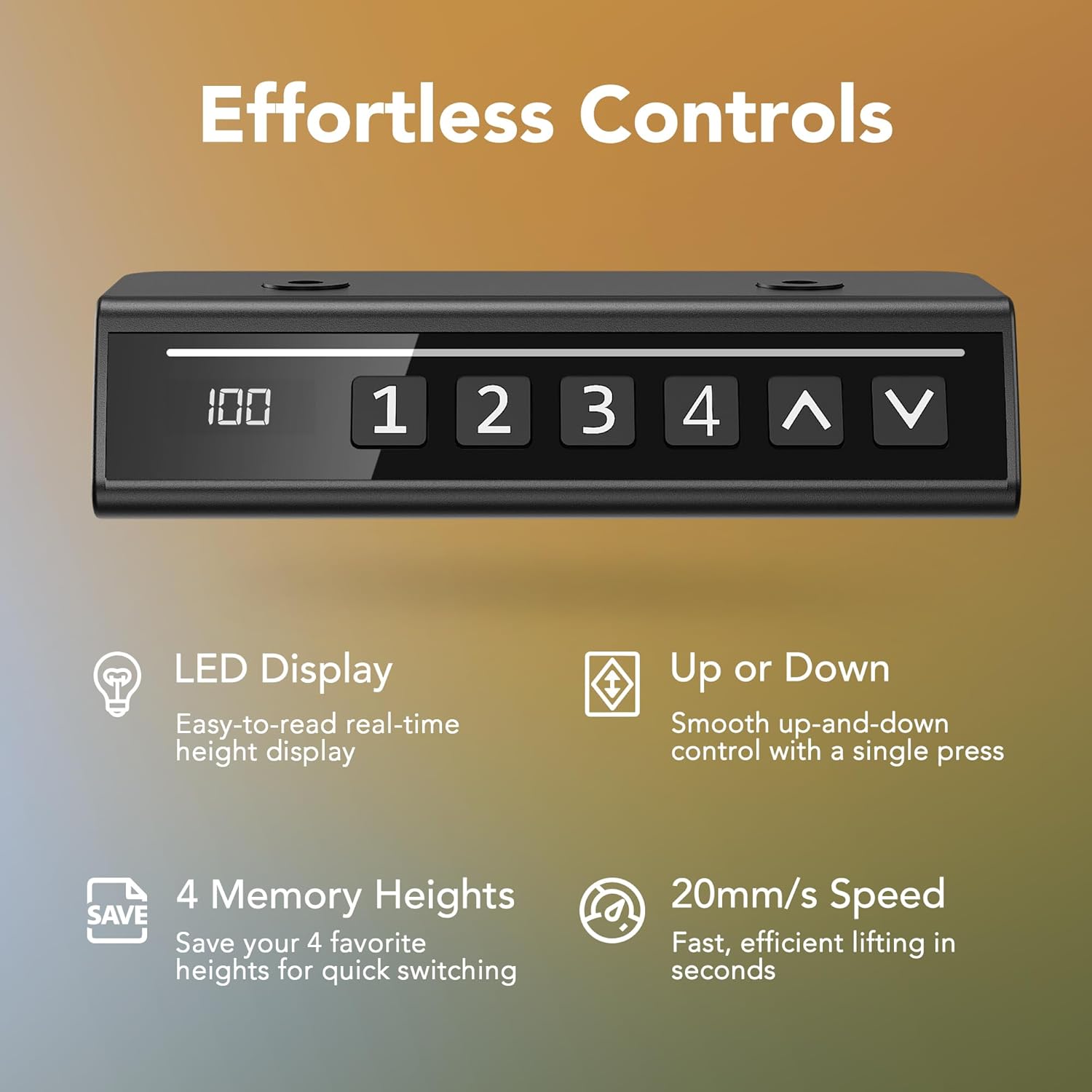
Bild: Eine Nahaufnahme view of the desk's control panel, highlighting the LED display, memory preset buttons (1-4), and up/down arrows for precise control.

Image: A visual comparison demonstrating the ease of the desk's smart one-press lift system compared to traditional manual knob controls.
Leiser Betrieb:
The electric motor operates at less than 50dB, ensuring a quiet environment during height adjustments.

Image: A graphic illustrating the ultra-quiet performance of the desk, comparing its sound level (less than 50dB) to common environmental noises like city traffic and talking.
Haltbarkeit und Design
The HUANUO Electric Standing Desk is constructed with high-quality steel, providing exceptional stability and durability. The two-piece spliced desktop features rounded corners for enhanced safety and a modern aesthetic.
- Rigorously tested to withstand 50,000 lift cycles at full capacity, ensuring long-lasting performance.
- Supports a weight capacity of up to 176 lbs.
- Available in multiple sizes and colors to fit various workspace needs and aesthetic preferences.

Image: A visual representation of the desk's reliable lifting mechanism, highlighting its 50,000 lift cycle testing and 176 lbs weight capacity.

Image: A collage of images demonstrating the versatility of the HUANUO Electric Standing Desk, showing it integrated into various home and office settings, including a yoga space and a treadmill workstation.
Technische Daten
| Besonderheit | Detail |
|---|---|
| Marke | HUANUO |
| Modellnummer | TZESD7B-N1-US |
| Technische Daten | 24"T x 48"B x 28.3"H |
| Farbe | Schwarz |
| Höhenverstellbereich | 28.3" bis 46.5" |
| Gewichtskapazität | 176 Pfund |
| Grundmaterial | Legierter Stahl |
| Top-Materialtyp | Holzwerkstoff |
| Besondere Merkmale | Adjustable, Adjustable Height, Electric, Ergonomic, Scratch Resistant |
| Hebemechanismus | Elektrisch |
| Geräuschpegel | <50 dB |
| Montage erforderlich | Ja |
Wartung
To ensure the longevity and optimal performance of your HUANUO Electric Standing Desk, follow these maintenance guidelines:
- Reinigung: Wischen Sie die Tischplatte und den Rahmen mit einem weichen, fusselfreien Tuch ab.amp Verwenden Sie kein scheuerndes Reinigungsmittel oder aggressive Chemikalien, die die Oberfläche beschädigen könnten.
- Kabelmanagement: Periodically check and organize cables to prevent tangling or interference with the lifting mechanism.
- Gewichtsverteilung: Distribute weight evenly across the desktop to prevent strain on the motor and frame. Do not exceed the maximum weight capacity of 176 lbs.
- Regelmäßige Inspektion: Überprüfen Sie gelegentlich alle Schrauben und Verbindungen, um sicherzustellen, dass sie fest sitzen. Ziehen Sie sie gegebenenfalls nach.
Fehlerbehebung
If you encounter any issues with your HUANUO Electric Standing Desk, refer to the following common troubleshooting tips:
- Schreibtisch bewegt sich nicht:
- Prüfen Sie, ob das Netzkabel sowohl am Schreibtisch als auch an einer funktionierenden Steckdose fest angeschlossen ist.
- Stellen Sie sicher, dass keine Hindernisse das Heben oder Senken des Schreibtisches verhindern.
- If the control panel displays an error code, refer to the full user manual for specific instructions or contact customer support.
- Ungleichmäßige Bewegung:
- Vergewissern Sie sich, dass der Schreibtisch auf einer ebenen Fläche steht.
- Ensure that the weight on the desk is evenly distributed.
- Ungewöhnliche Geräusche:
- A slight hum during operation is normal. If you hear grinding or loud noises, check for loose components or contact support.
For more complex issues or if troubleshooting steps do not resolve the problem, please contact HUANUO customer support.
Garantie und Support
HUANUO is committed to providing high-quality products and customer satisfaction. For any inquiries, technical assistance, or warranty claims, please reach out to our US-based technical support team.
- Kundendienst: Refer to the contact information provided in your product packaging or visit the official HUANUO webWebsite für Supportdetails.
- Garantieinformationen: Details regarding the product warranty period and coverage are typically included with your purchase documentation. Please retain your proof of purchase for warranty claims.
Weitere Ressourcen und Produktinformationen finden Sie unter HUANUO Store on Amazon.