
1. Einleitung
Thank you for choosing the MASTJUST 'lite' Bone Conduction Bluetooth Headphones. These headphones utilize advanced bone conduction technology to transmit sound directly to your inner ear through vibrations, allowing you to enjoy audio while remaining aware of your surroundings. The open-ear design ensures comfort during extended use and enhances safety in various environments.
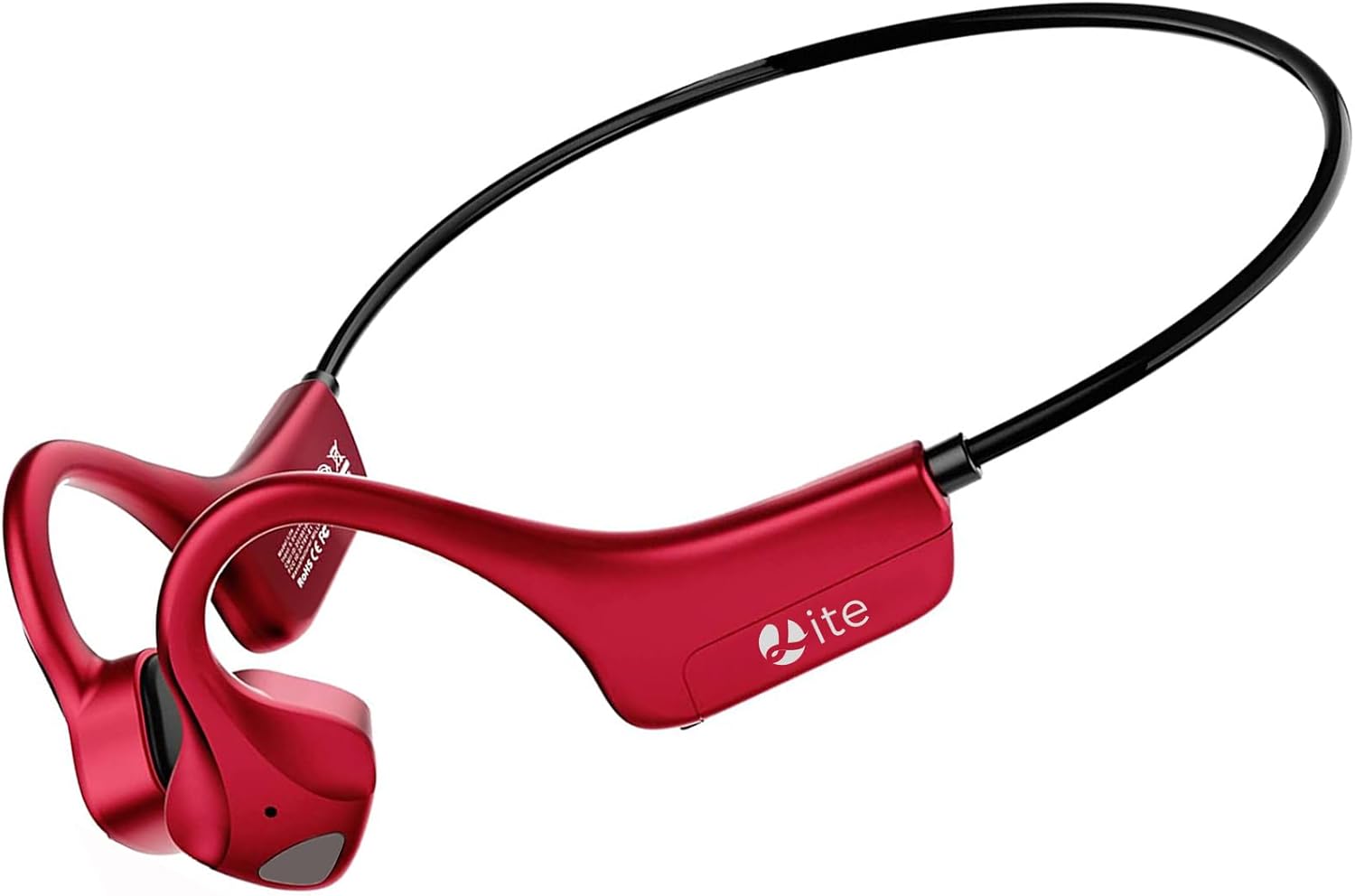
Figure 1: MASTJUST 'lite' Bone Conduction Bluetooth Headphones
2. Produktmerkmale
- Advanced Bone Conduction Technology: Delivers sound through bone vibrations, bypassing the eardrum for a unique listening experience.
- Offenes Ohr-Design: Keeps your ears open to ambient sounds, promoting safety during outdoor activities and comfort for long wear.
- IP67 wasserdicht und staubdicht: Designed to withstand sweat, rain, and dust, making them ideal for sports and various weather conditions.
- Bluetooth 5.2-Konnektivität: Ensures stable, fast, and efficient wireless connection with compatible devices.
- Schnellladung Typ C: Offers quick charging capabilities for minimal downtime.
- Integrated Microphone with Noise Cancellation: Provides clear hands-free calling, suitable for telework and online meetings.
- Leicht und sicherer Sitz: Weighing approximately 25g, the ergonomic ear-hook design ensures a comfortable and stable fit, even during intense activities.

Abbildung 2: Hauptmerkmale im Überblickview

Abbildung 3: IP67-konformes wasser- und staubdichtes Design
3. Packungsinhalt
- MASTJUST 'lite' Bone Conduction Bluetooth Headphones
- USB-Kabel Typ C.
- Benutzerhandbuch (dieses Dokument)
4. Geräteaufbau und Bedienelemente
The MASTJUST 'lite' headphones feature intuitive controls for easy operation. The main control buttons are located on the side of the headphone unit.
- Power Button / Volume +: Used to power the device on/off and increase volume.
- Lautstärketaste: Wird zum Verringern der Lautstärke verwendet.
- Multifunktionstaste: Controls playback (play/pause), call management (answer/end calls), and voice assistant activation.
- USB Ladeanschluss: Typ-C-Anschluss zum Aufladen des Geräts.
5. Einrichtung
5.1. Aufladen der Kopfhörer
Before first use, fully charge the headphones. Connect the provided USB Type-C charging cable to the charging port on the headphones and a compatible USB power source. The charging indicator will show the charging status.
- Ladezeit: Ungefähr 2 Stunden für eine vollständige Aufladung.
- Schnelle Ladung: A 10-minute quick charge can provide up to 1.5 hours of use.
5.2. Bluetooth-Kopplung
So verbinden Sie Ihre Kopfhörer mit einem Gerät:
- Stellen Sie sicher, dass die Kopfhörer ausgeschaltet sind.
- Halten Sie die Netzschalter until the indicator light flashes, indicating pairing mode.
- Aktivieren Sie auf Ihrem Gerät (Smartphone, Tablet, Laptop) Bluetooth und suchen Sie nach verfügbaren Geräten.
- Select "MASTJUST lite" from the list of found devices to connect.
- Sobald die Verbindung hergestellt ist, ändert sich die Kontrollleuchte und Sie hören einen Bestätigungston.
The headphones support automatic re-pairing. After the initial connection, they will automatically connect to the last paired device when powered on.

Figure 4: Automatic Pairing and Instant Connection
6. Bedienungsanleitung
6.1. Ein-/Ausschalten
- Einschalten: Halten Sie die Netzschalter etwa 3 Sekunden lang.
- Ausschalten: Halten Sie die Netzschalter etwa 5 Sekunden lang.
6.2. Musikwiedergabe
- Abspielen/Pause: Drücken Sie die Multifunktionstaste einmal.
- Nächster Titel: Drücken Sie zweimal die Multifunktionstaste.
- Vorheriges Lied: Drücken Sie dreimal die Multifunktionstaste.
6.3. Anrufverwaltung
- Anruf annehmen/beenden: Drücken Sie die Multifunktionstaste once during an incoming call or active call.
- Anruf ablehnen: Halten Sie die Multifunktionstaste für 2 Sekunden während eines eingehenden Anrufs.
- Sprachassistenten aktivieren: Halten Sie die Multifunktionstaste for 2 seconds when not on a call.
6.4. Lautstärkeregelung
- Lautstärke erhöhen: Drücken Sie die Lautstärke + Taste.
- Lautstärke verringern: Drücken Sie die Lautstärkeregler.

Figure 5: Awareness of Surroundings During Use

Figure 6: Extended Battery Life for Active Lifestyles
7. Wartung
To ensure the longevity and optimal performance of your MASTJUST 'lite' headphones, follow these maintenance guidelines:
- Reinigung: Reinigen Sie die Kopfhörer mit einem weichen, trockenen Tuch. Bei hartnäckigem Schmutz verwenden Sie ein leicht dämpfendes Tuch.amp Mit einem Tuch abwischen und anschließend gründlich trocknen lassen. Keine scharfen Chemikalien oder Scheuermittel verwenden.
- Wassereinwirkung: While the headphones are IP67 rated for water and dust resistance, avoid prolonged submersion in water. After exposure to sweat or rain, wipe them dry before charging.
- Lagerung: Bewahren Sie die Kopfhörer an einem kühlen, trockenen Ort fern von direkter Sonneneinstrahlung und extremen Temperaturen auf.
- Laden: Always use the provided USB Type-C cable or a certified equivalent for charging.
8. Fehlerbehebung
Sollten Sie Probleme mit Ihren Kopfhörern haben, beachten Sie bitte die folgenden gängigen Lösungsansätze:
- Kein Ton:
- Stellen Sie sicher, dass die Kopfhörer eingeschaltet und aufgeladen sind.
- Prüfen Sie, ob die Kopfhörer ordnungsgemäß mit Ihrem Gerät gekoppelt sind.
- Stellen Sie die Lautstärke sowohl an den Kopfhörern als auch an Ihrem angeschlossenen Gerät ein.
- Kopplung fehlgeschlagen:
- Stellen Sie sicher, dass Bluetooth auf Ihrem Gerät aktiviert ist.
- Stellen Sie sicher, dass sich die Kopfhörer im Kopplungsmodus befinden (Kontrollleuchte blinkt).
- Schalten Sie sowohl die Kopfhörer als auch Ihr Gerät aus und wieder ein und versuchen Sie dann erneut, die Kopplung herzustellen.
- Move closer to your device to ensure a strong Bluetooth signal.
- Schallverlust:
- Bone conduction technology inherently allows some sound to be audible to others at higher volumes. This is normal.
- Reduce the volume to minimize sound leakage.
- Consider using earplugs in conjunction with the headphones in noisy environments if privacy is a concern.
- Intermittent Connection/Sound Drops:
- Stellen Sie sicher, dass sich keine Hindernisse zwischen den Kopfhörern und Ihrem Gerät befinden.
- Meiden Sie Umgebungen mit starken elektromagnetischen Störungen.
- Keep the headphones within the effective Bluetooth range (typically 10 meters).
9. Spezifikationen
| Modellname | lite |
| Konnektivitätstechnologie | Kabellos (Bluetooth 5.2) |
| Lärmschutz | Aktive Geräuschunterdrückung (für Anrufe) |
| Platzierung des Ohrs | Offenes Ohr |
| Formfaktor der Kopfhörer | Echtes Wireless |
| Wasserdichtigkeit | IP67 |
| Artikelgewicht | 150 g |
| Ladezeit | 2 Stunden |
| Dauergebrauchszeit | 8 Stunden |
| Standby-Zeit | Up to 1 Week (480 Hours) |
| Impedanz | 8 Ohm |
| Material | Gummi, Kunststoff |
| Kompatible Geräte | Tablet, Laptop, Mobile Phone |
10. Garantie und Support
MASTJUST provides a reliable warranty and customer support for your product:
- 30-Day Free Exchange/Return/Refund: If you are not satisfied with the product within 30 days of purchase, you are eligible for a free exchange, return, or refund.
- 12-Month Long-Term Warranty: Für das Produkt gilt eine Garantie von 12 Monaten ab Kaufdatum.
- Kundendienst: If you encounter any issues or have questions during use, please contact us through your order history.
So kontaktieren Sie den Support:
- Go to "Your Account" > "Order History".
- Find your order for the MASTJUST 'lite' headphones.
- Click on "Sold by" > "Ask a question".
We are committed to providing the best possible service and support.