
1. Einleitung
This manual provides detailed instructions for the safe and effective use of your Retevis EZTalk 4S Waterproof Two Way Radio. Please read this manual thoroughly before operating the device and retain it for future reference.
1.1 Produktüberschussview
The Retevis EZTalk 4S is a robust, IP68-rated waterproof and floating GMRS two-way radio designed for outdoor activities such as kayaking, fishing, rafting, and boating. It features long-distance communication, a long-lasting battery, NOAA weather alerts, and an emergency alarm function.

Figure 1.1: Retevis EZTalk 4S Product Details and Components
1.2 Packungsinhalt
Bitte prüfen Sie, ob alle Artikel in Ihrem Paket enthalten sind. Sollten Artikel fehlen oder beschädigt sein, wenden Sie sich bitte an Ihren Händler.
- EZTalk 4S walkie talkie *2
- 2000mAh Li-ion Battery & Base charger *2
- Type-C Charging cable & Adapter *2
- Belt clip & Lanyard *2
- Benutzerhandbuch *1

Abbildung 1.2: Packungsinhalt
2. Produktmerkmale
2.1 IP68 Waterproof & Floating Design
The EZTalk 4S is rated IP68, providing complete protection against dust and water immersion up to 1 meter for 2 hours. Its floating design ensures that if dropped in water, the radio will float to the surface for easy retrieval.
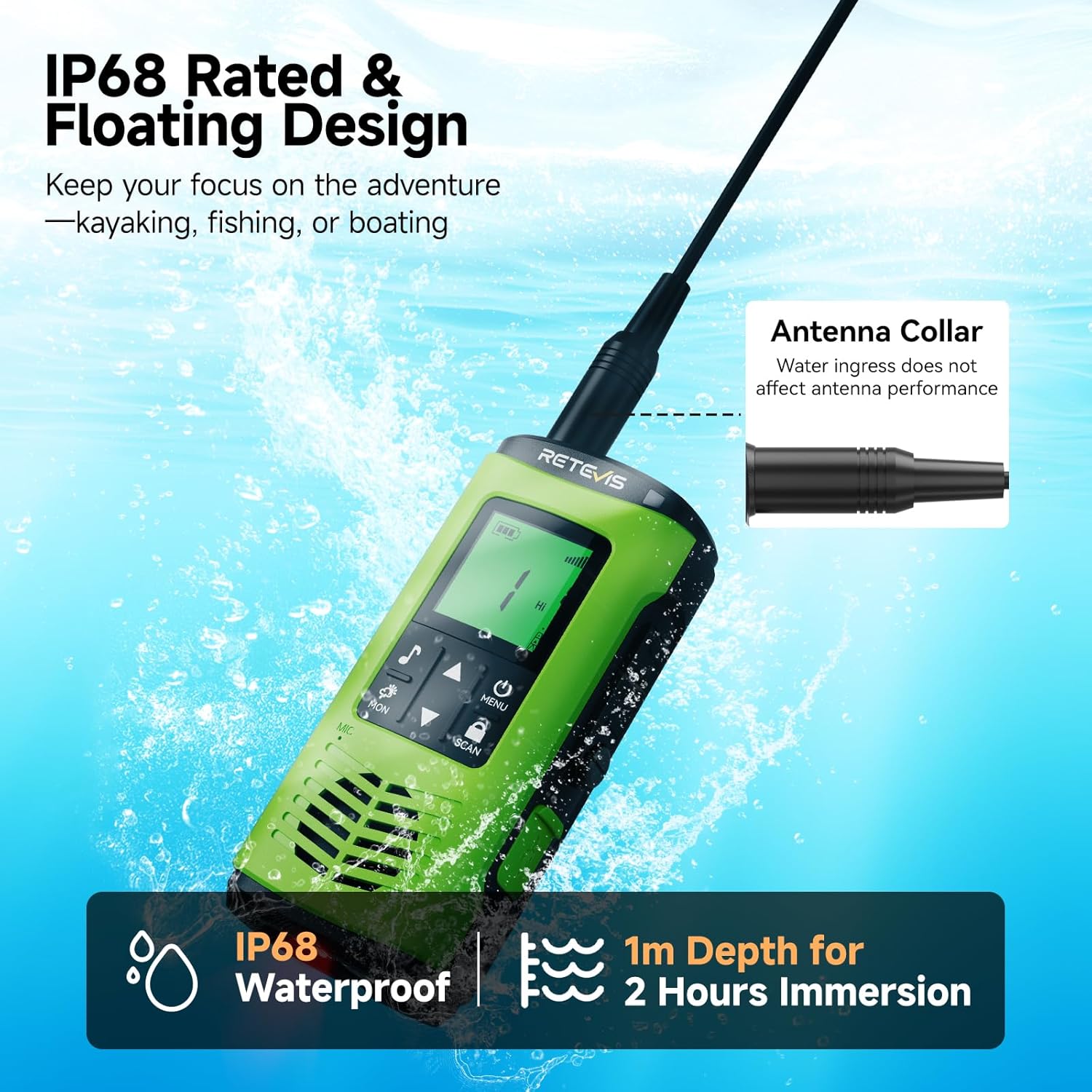
Figure 2.1: IP68 Waterproof and Floating Capability

Figure 2.2: Corrosion-Proof Design for Water Environments
Video 2.1: Demonstration of Retevis EZTalk 4S Waterproof and Floating Capabilities
2.2 Fernkommunikation
Experience clear and reliable communication over extended distances. The EZTalk 4S offers a communication range of up to 4.7 km in urban areas and an impressive 10 km on open water.

Abbildung 2.3: Erweiterte Kommunikationsreichweite
2.3 Long-Lasting Battery & Charging
Equipped with a 2000mAh battery, the radio provides over 17 hours of continuous use and up to 100 hours of standby time. It supports flexible charging options: direct Type-C cable charging or convenient dock charging.

Figure 2.4: Battery Life and Charging Options
Video 2.2: Demonstration of Dual Charging Options (Type-C and Base Charging)
2.4 NOAA-Wetterwarnungen
Stay informed about changing weather conditions with access to 12 NOAA weather channels, providing real-time updates and alerts.

Figure 2.5: NOAA Weather Alert Functionality
2.5 Notfallalarm
In emergency situations, activate the alarm function to alert others to your location or need for assistance.

Figure 2.6: Emergency Alarm Feature
2.6 Taschenlampe
The radio includes a built-in LED flashlight for illumination in low-light conditions. It also features a water-activated LED that lights up automatically if the radio falls into water, aiding in retrieval.

Abbildung 2.7: Eingebaute LED-Taschenlampe
2.7 Vibration Drainage
After submersion, the vibration drainage function can be activated to expel water from the speaker, ensuring clear audio quality.

Figure 2.8: Vibration Drainage Function
2.8 Tastensperre
Prevent accidental changes to settings by activating the key lock feature.

Figure 2.9: Key Lock Feature
2.9 High/Low Power Adjustment
Adjust the transmission power between High (for extended range) and Low (for longer battery life) as needed.

Figure 2.10: High/Low Power Adjustment
2.10 30 Channels
The radio supports 30 GMRS channels, allowing for flexible communication options.

Figure 2.11: 30 Available Channels
Video 2.3: Endeview of Retevis EZTalk 4S Features and Functions
3. Einrichtung
3.1 Batterieeinbau und -ladung
- Stellen Sie sicher, dass das Radio ausgeschaltet ist, bevor Sie die Batterie einlegen oder entnehmen.
- Richten Sie die Batterie an dem Batteriefach auf der Rückseite des Radios aus und drücken Sie sie fest, bis sie einrastet.
- To charge, connect the Type-C cable directly to the radio or place the radio in the charging dock. The LED indicator will show charging status.
- A full charge typically takes 3 hours via Type-C.
3.2 Attaching Belt Clip & Lanyard
- Befestigen Sie den Gürtelclip an dem dafür vorgesehenen Schlitz auf der Rückseite des Funkgeräts.
- Thread the lanyard through the loop on the radio for secure carrying.
4. Bedienungsanleitung
4.1 Ein-/Ausschalten
- Zum Einschalten halten Sie die Leistung/Menü Drücken Sie die Taste so lange, bis das Display aufleuchtet.
- Halten Sie zum Ausschalten die Taste gedrückt Leistung/Menü gedrückt, bis sich das Display ausschaltet.
4.2 Kanalauswahl
- Verwenden Sie die Up Und Runter arrow buttons to navigate through the available channels.
- Drücken Sie die Speisekarte button to confirm your selection or access further channel settings.
4.3 Lautstärke anpassen
- The volume can typically be adjusted using the Up Und Runter arrow buttons when not in menu mode.
4.4 Push-to-Talk (PTT)
- Zum Senden die Taste gedrückt halten PTT Die Taste befindet sich an der Seite des Funkgeräts. Sprechen Sie deutlich in das Mikrofon.
- Lassen Sie den PTT Taste zum Empfangen.
4.5 Monitoring Channels (MON)
- Drücken Sie die MO button to temporarily disable squelch and listen for weak signals on the current channel.
4.6 Scanning Channels (SCAN)
- Drücken Sie die SCAN button to activate channel scanning. The radio will cycle through active channels.
- Drücken SCAN Um den Scanvorgang erneut zu beenden.
4.7 Verwendung der Taschenlampe
- Drücken Sie kurz die Taschenlampenschlüssel (refer to Figure 1.1) to cycle through white light, red light, and off.
4.8 Activating Emergency Alarm
- Drücken Sie die entsprechende Notruftaste (refer to Figure 1.1) to activate the emergency alarm.
4.9 NOAA-Wetterradio
- Access NOAA weather channels through the menu to receive real-time weather updates and alerts. Consult the radio's on-screen menu for specific navigation.
4.10 Adjusting Power Level (High/Low)
- Navigate to the power setting in the menu to switch between High (Hi) and Low (Lo) transmission power.
4.11 Tastensperrfunktion
- Halten Sie die Scan/Lock button to lock or unlock the keypad. A lock icon will appear on the display when activated.
4.12 Vibration Drainage Function
- If the radio has been submerged, briefly press the side key (refer to Figure 1.1) to activate the vibration drainage function, which helps expel water from the speaker.
Video 4.1: Detailed Features and Operation of Retevis EZTalk 4S
5. Wartung
5.1 Reinigung
- Wischen Sie das Radio mit einem weichen, damp Tuch. Verwenden Sie keine scharfen Chemikalien oder Scheuermittel.
- Stellen Sie sicher, dass alle Anschlüsse trocken sind, bevor Sie das Gerät aufladen oder Zubehör verwenden.
5.2 Speicherung
- Bewahren Sie das Radio an einem kühlen, trockenen Ort fern von direkter Sonneneinstrahlung und extremen Temperaturen auf.
- If storing for extended periods, remove the battery.
5.3 Batteriepflege
- Vermeiden Sie ein Überladen oder vollständiges Entladen der Batterie.
- Um die Batterieleistung zu erhalten, laden Sie sie regelmäßig auf, auch wenn das Radio nicht häufig benutzt wird.
6. Fehlerbehebung
| Problem | Mögliche Ursache | Lösung |
|---|---|---|
| Das Radio lässt sich nicht einschalten | Low or dead battery; Battery not properly installed | Laden Sie den Akku auf; setzen Sie den Akku korrekt wieder ein. |
| Senden und Empfangen nicht möglich | Incorrect channel; Out of range; Low battery; Squelch level too high | Verify channel settings; Move closer to other radios; Charge battery; Adjust squelch level |
| Schlechte Audioqualität | Water in speaker; Out of range; Obstructions | Use vibration drainage; Move closer; Clear obstructions |
| Die Tastatur reagiert nicht | Schlüsselschloss ist aktiv | Deactivate key lock (refer to section 4.11) |
7. Spezifikationen
| Besonderheit | Detail |
|---|---|
| Modellnummer | EZTalk 4S |
| Artikelgewicht | 9.9 Unzen |
| Technische Daten | 1.61"T x 2.44"B x 5.35"H |
| Batterien | 2 C-Batterie erforderlich (im Lieferumfang enthalten) |
| Anzahl der Kanäle | 30 |
| Frequenzbereich | GMRS |
| Maximale Sprechreichweite | 3 Meilen (typisch, variiert je nach Gelände) |
| Wasserbeständigkeit | IP68 Wasserdicht |
| Bandtage | 7.4 Volt |
| Besondere Merkmale | 2000mAh rechargeable battery, Floating design, IP68 waterproof, Long Range GMRS, NOAA, Emergency Alarm, Type-C Charging |
8. Garantie und Support
8.1 Garantieinformationen
Retevis provides a 2-year warranty for the radio body and a 1-year warranty for accessories. A 30-day no-reason return policy is also available.
8.2 Post-Warranty Service
Beyond the warranty period, maintenance services are still offered. Buyers are responsible for any corresponding costs.
8.3 Kundendienst
Bei Fragen oder Problemen wenden Sie sich bitte an den Retevis-Kundenservice über Amazon. Sie erhalten in der Regel innerhalb von 12 Stunden eine Antwort.