
1. Einleitung
Thank you for choosing the VLH 32 Inch Portable Smart TV. This device combines a vibrant 1080P Full HD touchscreen with the versatility of Android 15, offering a seamless entertainment and productivity experience. Designed for mobility, its integrated wheels and adjustable display allow you to enjoy content anywhere in your home or outdoors. This manual provides essential information for setup, operation, maintenance, and troubleshooting to ensure optimal performance of your new smart TV.
2. Lieferumfang
Bitte vergewissern Sie sich beim Auspacken, dass alle Artikel vorhanden sind:
- VLH 32 inch Portable Smart TV
- Fernbedienung
- External Camera (5MP)
- Netzteil
- Benutzerhandbuch (dieses Dokument)
3. Aufbau und Montage
The VLH Portable Smart TV is designed for easy assembly. Follow these steps for initial setup:
- Auspacken: Entnehmen Sie vorsichtig alle Komponenten aus der Verpackung.
- Standmontage: Attach the screen to the mobile stand. The stand is designed for stability and smooth movement.
- Einschalten: Connect the power adapter to the TV and a power outlet. Press the power button to turn on the device.
- Anfangskonfiguration: Follow the on-screen prompts to set up your Android 15 operating system, including connecting to Wi-Fi and logging in with your Google account.
- Kameraaufsatz: The 5MP camera can be attached to the top of the screen via its USB connection.
The stand allows for easy adjustment of the screen's height, tilt, and rotation for optimal viewing.

Abbildung 3.1: Rückseite view of the VLH Portable Smart TV, highlighting the ports and the adjustable stand connection.
Video 3.1: Demonstrates the adjustable features of the VLH Portable Smart TV, including screen rotation, tilt, and height adjustment, along with a view of the connectivity ports.
4. Features & Controls
4.1 Anzeigefunktionen
- Ultra-Crisp 1080P FHD Touchscreen: Enjoy stunning visuals on a 32-inch display with vibrant 100% sRGB color accuracy.
- Reibungslose Leistung: Features a 60 Hz refresh rate and 6 milliseconds response time for fluid interaction.

Figure 4.1: The 32-inch Full HD In-cell Touch Screen with 60Hz refresh rate, 100% sRGB, and millisecond response, demonstrating touch and remote control options.
4.2 Mobility & Adjustability
- 360° Mobile Base: Equipped with 5 universal wheels, allowing the stand to roll smoothly between rooms or from indoor to outdoor settings.
- Versatile Screen Adjustment: Easily adjust the display with 90° pivot for portrait or landscape viewing, ±20° tilt, and a 20cm height lift.

Figure 4.2: The Intuitive Touchscreen Portable TV with hidden wheels and a built-in 38400mAh battery, designed for easy movement and use anywhere.
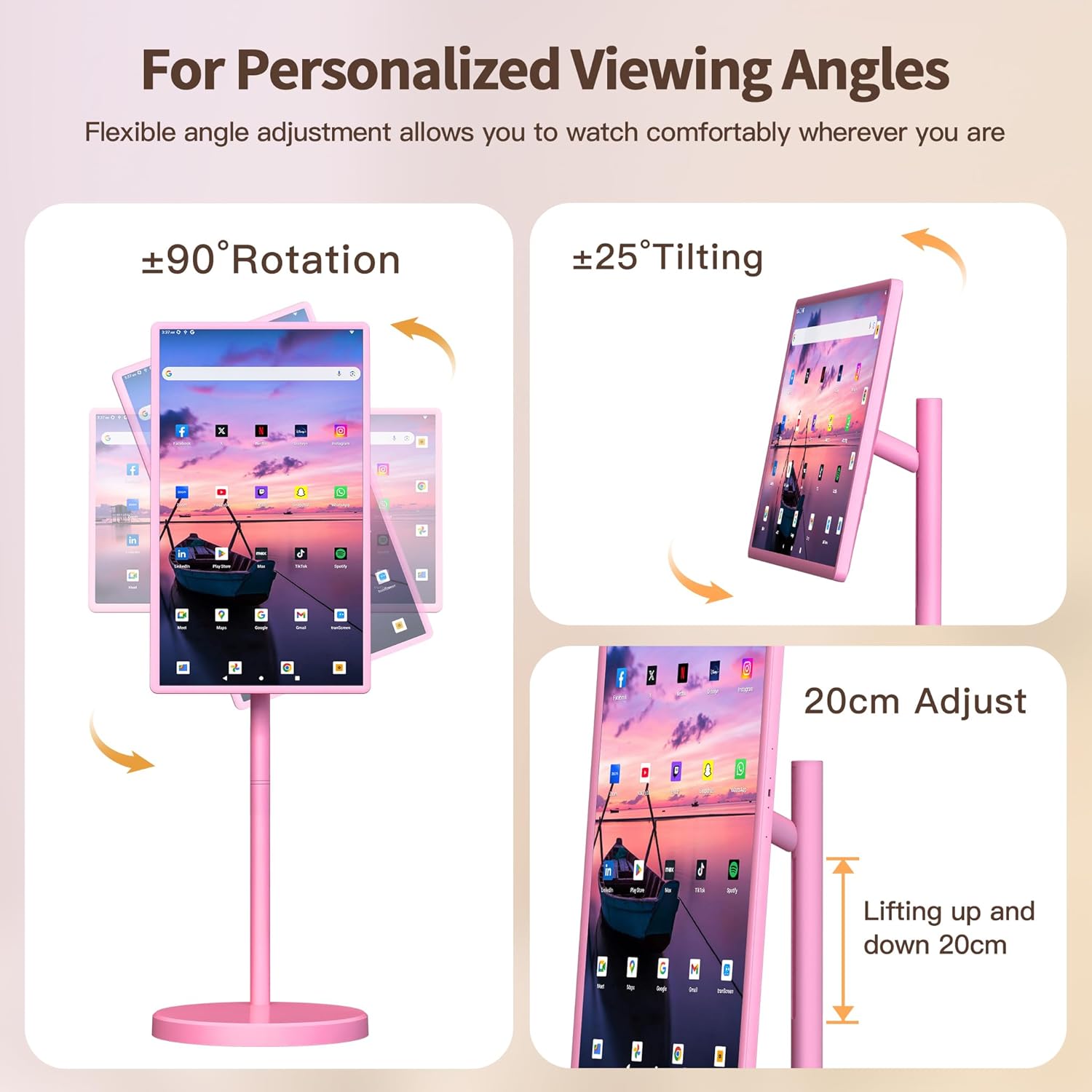
Figure 4.3: Flexible angle adjustment allows you to watch comfortably wherever you are, with options for rotation, tilting, and height adjustment.
4.3 Smart Functionality
- Android 15-Betriebssystem: Experience smooth navigation and access to a vast array of apps from the Google Play Store.
- Leistungsstarke Hardware: Equipped with 8GB RAM and 128GB ROM for lag-free multitasking and ample Speicher.
- 5MP Kamera: Enables crystal-clear video calls and live streaming. Note: Due to Android 15 OS, not all apps are compatible with the camera.

Figure 4.4: Easy access to your favorite apps with Android 15 and 8GB RAM + 128GB ROM for unlimited entertainment.
4.4 Steuerungsoptionen
- 10-Punkte-Touch: Interact directly with the screen like a tablet.
- Sprachbefehle: Use "Hey Google" for hands-free control.
- Precision Remote: Traditional tactile navigation.
- Air Mouse Gestures: Point and click mid-air for sofa control.
4.5 Power & Connectivity
- 38,400mAh Ultra-Long Battery Life: Enjoy 4-6 hours of wireless use on a full charge.
- Konnektivität: Supports Bluetooth, HDMI, USB Type-C, and Wi-Fi for versatile connections.

Figure 4.5: The VLH Portable Smart TV is battery operated, providing freedom to use it anywhere without being tethered to a power outlet.
5. Bedienungsanleitung
5.1 Navigating Android OS
The TV operates on Android 15. Use the touchscreen, remote, or voice commands to navigate the interface. Swipe left/right to access app drawers, tap icons to open applications, and use the back/home buttons for navigation.
5.2 App-Verwaltung
Access the Google Play Store to download and install your favorite streaming services, games, and productivity apps. Apps can be organized on the home screen for quick access.
5.3 Bildschirmspiegelung
The TV supports wireless screen mirroring. You can cast content from your smartphone, tablet, or laptop directly onto the screen. Refer to your device's screen mirroring instructions for connection details.
5.4 Video Calls
Utilize the 5MP external camera for video conferencing. Ensure the camera is properly connected via USB. Open your preferred video call application (e.g., Google Meet) and select the external camera as your video input.
Video 5.1: Showcases various usage scenarios of the VLH Portable Smart TV, demonstrating its versatility for entertainment, fitness, and productivity in different environments.
6. Wartung
6.1 Reinigung
Verwenden Sie zum Reinigen des Bildschirms ein weiches, fusselfreies Tuch. Hartnäckige Flecken können Sie mit einem leichten Tuch entfernen.ampen the cloth with water or a screen-safe cleaning solution. Avoid harsh chemicals or abrasive materials. Wipe the stand and body with a dry or slightly damp Tuch.
6.2 Batteriepflege
To prolong battery life, avoid fully discharging the battery frequently. Charge the device when the battery level is low. If storing the TV for an extended period, ensure it is charged to approximately 50% and stored in a cool, dry place.
7. Fehlerbehebung
If you encounter issues with your VLH Portable Smart TV, please refer to the following common problems and solutions:
- Fernbedienung reagiert nicht: Ensure the remote has fresh batteries and is paired correctly. For pairing, refer to the remote's instructions (often involves pressing a specific button combination).
- System Lag or Freezing: Restart the TV. If the issue persists, clear cache for problematic apps or perform a factory reset (Note: this will erase all data).
- Bildschirm lässt sich nicht einschalten: Check if the power adapter is securely connected and if the battery is charged. Try pressing and holding the power button for 10-15 seconds for a hard reset.
- Camera Incompatibility: As noted, some apps may not fully support the 5MP camera due to Android 15 OS. Try alternative video call applications.
Für weitere Unterstützung wenden Sie sich bitte an den Kundenservice.
8. Spezifikationen
| Besonderheit | Detail |
|---|---|
| Marke | VLH |
| Modellnummer | M01 |
| Bildschirmgröße | 32 Zoll |
| Auflösung | FHD 1080p (1920 x 1080 Pixel) |
| Betriebssystem | Android 15 |
| RAM | 8 GB |
| Lagerung | 128 GB ROM |
| Batteriekapazität | 38,400 mAh |
| Kamera | 5MP Front USB Camera |
| Konnektivität | Bluetooth 5, HDMI, USB 2.0, USB Type C, Wi-Fi |
| Bildwiederholrate | 60 Hz |
| Ansprechzeit | 6 Millisekunden |
| Anzeigetyp | LCD (IPS Technology) |
| Farbumfang | 100 % sRGB |
| Besondere Merkmale | Built-In Speakers, Height Adjustment, Portable, Tilt Adjustment, Touchscreen |
9. Garantie und Support
Your VLH 32 inch Portable Smart TV comes with a einjährige Produktgarantie. For any missing parts, installation queries, operational assistance, or other issues, please do not hesitate to contact our friendly customer service team. We are committed to providing a satisfied solution for any problem you may encounter.
Kundendienst: Please refer to the contact information provided with your product packaging or visit the official VLH webWebsite für Unterstützung.

Figure 9.1: VLH brand philosophy emphasizing innovative, mobile entertainment solutions.