
Einführung
This manual provides essential information for setting up, operating, maintaining, and troubleshooting your HP OMEN 16L TG03 Gaming Desktop. This high-performance system is equipped with an Intel Core Ultra 7 265F processor, NVIDIA GeForce RTX 5060 graphics, 64GB DDR5 RAM, and a 2TB SSD, designed for demanding gaming and creative tasks. It also includes a Thunderobot KG3089R Gaming Keyboard.
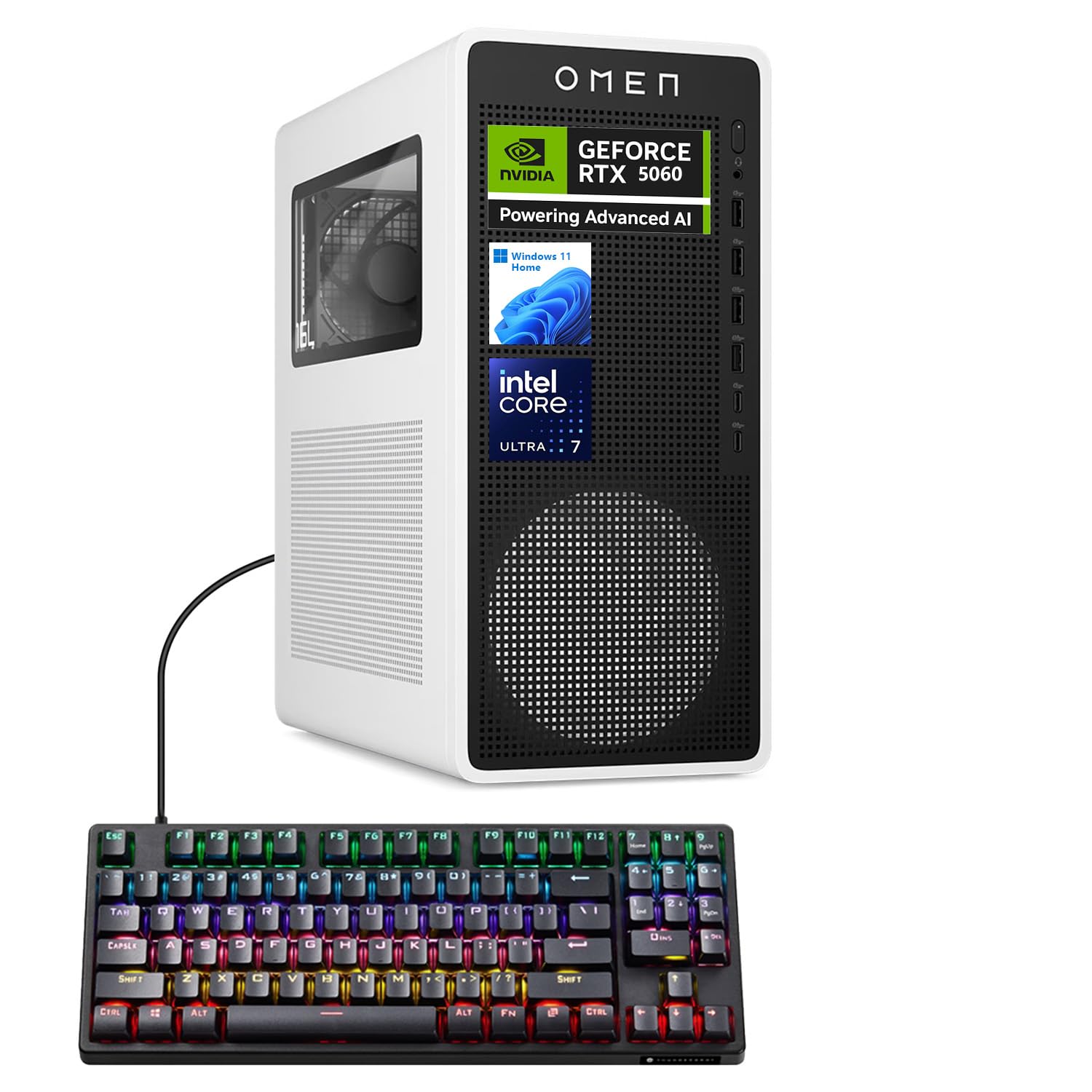
Figure 1: HP OMEN 16L TG03 Gaming Desktop with included Thunderobot Keyboard.
1. Installationsanleitung
1.1 Auspacken und Aufstellen
- Carefully remove all components from the packaging. Ensure all accessories, including the Thunderobot keyboard, are present.
- Place the desktop on a stable, flat surface with adequate ventilation. Avoid blocking air vents.
1.2 Anschließen von Peripheriegeräten
- Monitor: Connect your monitor to the graphics card's HDMI or DisplayPort outputs. The NVIDIA GeForce RTX 5060 supports multiple displays.
- Tastatur und Maus: Connect the Thunderobot KG3089R Gaming Keyboard and your mouse to any available USB Type-A ports.
- Leistung: Connect the power cable to the desktop's power supply and then to a grounded electrical outlet.
- Netzwerk: For wired internet, connect an Ethernet cable to the RJ-45 port. For wireless, ensure Wi-Fi antennas are properly connected (if external).
- Audio: Connect speakers or headphones to the audio ports.

Abbildung 2: Rückseite view of the HP OMEN 16L TG03 Desktop showing various ports for connectivity.

Figure 3: HP OMEN 16L TG03 Desktop connected to a monitor, showcasing the OMEN Gaming Hub interface.
1.3 Erstes Einschalten
- Drücken Sie den Netzschalter an der Vorderseite des Desktop-Geräts.
- Follow the on-screen instructions to complete the Windows 11 Home operating system setup. This typically involves setting up user accounts, network connections, and privacy settings.
2. Bedienungsanleitung
2.1 Grundlegende Bedienung
- Ein-/Ausschalten: Drücken Sie den Netzschalter zum Einschalten. Zum Ausschalten verwenden Sie das Windows-Startmenü (Start > Ein/Aus > Ausschalten).
- Neustart: Verwenden Sie das Windows-Startmenü (Start > Ein/Aus > Neustart).
- Schlafmodus: Use the Windows Start menu (Start > Power > Sleep).
2.2 Gaming and Performance Features
- OMEN Gaming Hub: This pre-installed software allows you to monitor system performance, customize RGB lighting, optimize game settings, and access OMEN AI features.
- NVIDIA GeForce RTX 5060: Leverage the dedicated graphics card for high-fidelity gaming and demanding creative applications. Ensure graphics drivers are up to date for optimal performance.
- AI-Ready Capabilities: The Intel Core Ultra 7 processor and NVIDIA RTX 5060 GPU provide advanced AI processing capabilities for enhanced gaming, content creation, and productivity.

Abbildung 4: Überview of NVIDIA RTX 50 Series graphics card features, including DLSS 4 and AI-Powered Creativity.
2.3 Thunderobot KG3089R Keyboard Shortcuts
The included Thunderobot KG3089R Gaming Keyboard features several shortcut key combinations:
- FN+F9: Lichteffekte wechseln.
- FN + Sieg: Lock the Windows key to prevent accidental presses during gaming.
- Refer to the keyboard's dedicated manual for a complete list of functions.

Figure 5: Thunderobot KG3089R Gaming Keyboard highlighting FN key combinations for lighting and Windows key lock.
3. Wartung
3.1 Reinigung
- Exterieur: Verwenden Sie ein weiches,amp Mit einem Tuch die Außenflächen reinigen. Scheuermittel vermeiden.
- Vents: Regularly check and clean dust from the air vents using compressed air to ensure proper airflow and prevent overheating.
- Tastatur: Use compressed air to remove debris from under the keycaps.
3.2 Softwareaktualisierungen
- Windows-Updates: Regularly check for and install Windows 11 updates to ensure system stability and security. (Settings > Windows Update).
- Treiber-Updates: Keep your graphics drivers (NVIDIA GeForce Experience) and other hardware drivers updated for optimal performance and compatibility.
- OMEN Gaming Hub: Ensure the OMEN Gaming Hub software is updated to access the latest features and optimizations.
3.3 Systemsicherung
- Um Datenverlust zu vermeiden, sollten Sie wichtige Daten regelmäßig auf einer externen Festplatte oder in der Cloud sichern.
- Consider creating a system restore point before major software changes.
4. Fehlerbehebung
4.1 Häufige Probleme und Lösungen
- Kein Strom:
- Stellen Sie sicher, dass das Netzkabel sowohl mit dem Desktop-Computer als auch mit der Steckdose fest verbunden ist.
- Überprüfen Sie, ob die Steckdose funktioniert.
- Kein Bildschirm:
- Check that the monitor is powered on and the video cable is securely connected to the graphics card output, not the motherboard's integrated graphics port.
- Versuchen Sie es gegebenenfalls mit einem anderen Videokabel oder Monitor.
- Systemverlangsamung:
- Schließen Sie unnötige Anwendungen, die im Hintergrund laufen.
- Auf Schadsoftware oder Viren prüfen.
- Stellen Sie sicher, dass auf der 2-TB-SSD ausreichend freier Speicherplatz vorhanden ist.
- Verify system temperatures using OMEN Gaming Hub to rule out overheating.
- Tastatur reagiert nicht:
- Ensure the keyboard cable is securely connected to a USB port.
- Versuchen Sie, die Tastatur an einen anderen USB-Anschluss anzuschließen.
- If the Windows key is locked (FN + Win), unlock it.
4.2 Kontaktaufnahme mit dem Support
If you encounter issues that cannot be resolved with the above steps, please refer to the official HP support website or contact their customer service for assistance. Have your product model (OMEN 16L TG03) and serial number ready.
5. Spezifikationen
| Besonderheit | Detail |
|---|---|
| Marke | HP |
| Modellname | OMEN 16L TG03 (HSC-F007MT) |
| Betriebssystem | Windows 11 Home |
| Prozessor | Intel Core Ultra 7 265F (20 Cores, up to 5.30GHz) |
| Grafikkarte | NVIDIA GeForce RTX 5060 (8 GB GDDR7) |
| RAM | 64 GB DDR5 (4800 MHz) |
| Lagerung | 2 TB PCIe NVMe M.2 SSD |
| Anschlüsse vorne | Headphone/MIC combo jack, 4x SuperSpeed USB Type-A (5Gbps), 2x USB Type-C (10Gbps) |
| Anschlüsse an der Rückseite | 3x Headphone/MIC combo jack, HDMI Out, 4x USB 2.0 Type-A, RJ-45, 3x DisplayPort |
| Kabellose Konnektivität | Wi-Fi 6, Bluetooth |
| Abmessungen (H x B x T) | 13.26 x 6.1 x 12.12 Zoll |
| Gewicht | 13.91 Pfund |
| Mitgeliefertes Zubehör | Thunderobot KG3089R Gaming Keyboard |
6. Garantieinformationen
Your HP OMEN 16L TG03 Gaming Desktop is covered by a manufacturer's warranty. The specific terms and duration of the warranty may vary by region and purchase date. Please refer to the warranty documentation included with your product or visit the official HP support webWeitere Informationen finden Sie auf der Website. Bewahren Sie Ihren Kaufbeleg für Garantieansprüche auf.
7. Kundendienst
For further assistance, technical support, or to download the latest drivers and software, please visit the official HP support webWebsite: support.hp.com. You may also find helpful resources and community forums on the OMEN Gaming Hub application.