
1. Einleitung
Thank you for choosing the HTC GT-288 Electric Shaver. This manual provides essential information for the safe and effective operation, maintenance, and care of your new shaver. Please read these instructions thoroughly before first use and retain them for future reference.
2. Sicherheitshinweise
Um das Risiko von Stromschlägen, Verletzungen oder Schäden zu verringern, befolgen Sie stets diese grundlegenden Sicherheitsvorkehrungen:
- Do not immerse the charging cable or power adapter in water or other liquids.
- Bewahren Sie das Gerät außerhalb der Reichweite von Kindern auf.
- Ensure the shaver is fully dry before connecting it to the charging cable.
- Do not use the shaver if the blade or foil is damaged, as this may cause injury.
- Verwenden Sie nur das mitgelieferte USB-Ladekabel.
- Dieses Gerät ist nur für den persönlichen Gebrauch bestimmt.
3. Packungsinhalt
Bitte prüfen Sie das Paket auf folgende Artikel:
- 1 x HTC GT-288 Electric Shaver
- 1 x USB-Ladekabel
- 3 x Precision Combs (1mm, 3mm, 5mm)
- 1 x Reinigungsbürste
- 1 x Schmieröl
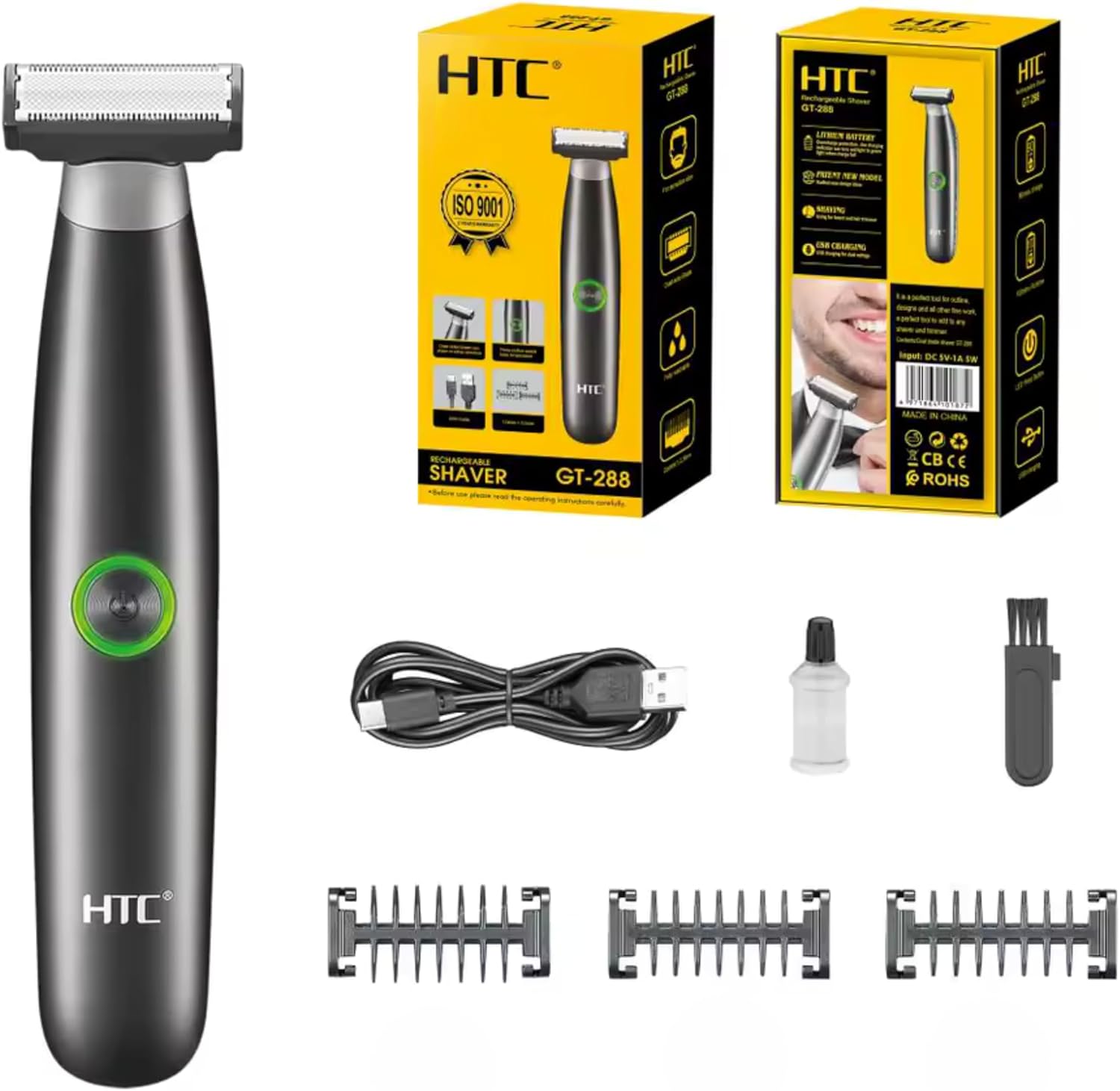
Image 3.1: Contents of the HTC GT-288 Electric Shaver package, including the shaver, USB cable, three precision combs, cleaning brush, and lubricating oil.
4. Produktüberschreitungview
The HTC GT-288 Electric Shaver features a sleek design with a dual-sided blade for efficient trimming and shaving. It includes an easy-to-operate press-button switch and is fully washable for convenient cleaning.
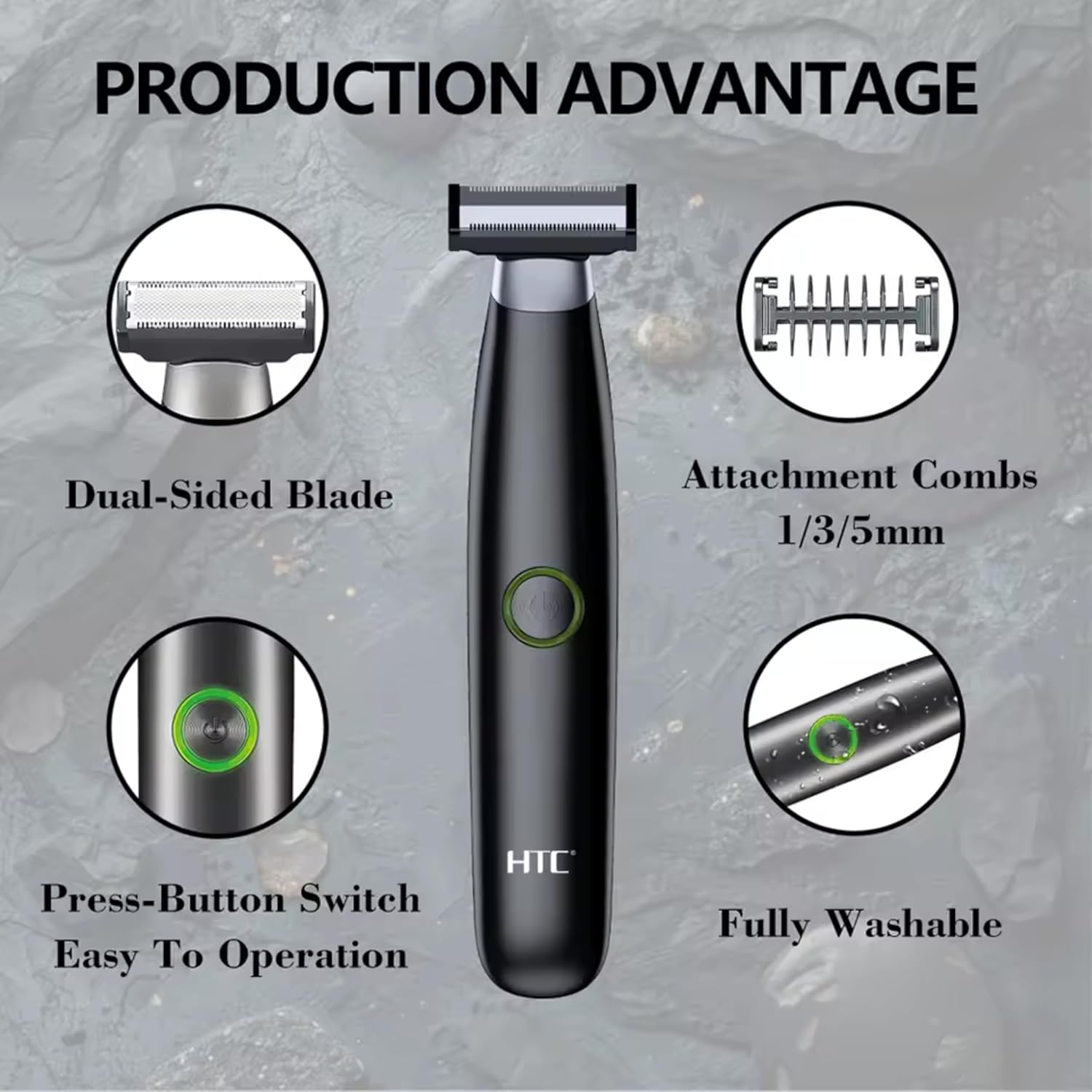
Bild 4.1: Überview of the HTC GT-288 Electric Shaver's key features, highlighting the dual-sided blade, attachment combs (1/3/5mm), press-button switch, and fully washable design.

Image 4.2: Detail of the LED press button, which serves as the on/off switch for easy operation.
5. Einrichtung
- Auspacken: Entnehmen Sie vorsichtig alle Komponenten aus der Verpackung.
- Grundgebühr: Before first use, fully charge the shaver. Refer to Section 6 for charging instructions.
- Kamm anbringen (optional): If desired, select one of the three precision combs (1mm, 3mm, or 5mm) and slide it onto the shaver head until it clicks into place. Ensure it is securely attached.
6. Aufladen
The HTC GT-288 Electric Shaver is equipped with a rechargeable battery for cordless operation.
- Stellen Sie sicher, dass der Rasierer ausgeschaltet ist.
- Verbinden Sie das schmale Ende des USB-Ladekabels mit dem Ladeanschluss des Rasierers.
- Connect the larger end of the USB cable to a compatible USB power source (e.g., computer, USB wall adapter).
- The LED indicator on the shaver will illuminate to show that it is charging.
- Allow the shaver to charge completely before its first use. A full charge typically takes several hours.
- Sobald der Akku vollständig geladen ist, trennen Sie das USB-Kabel.
7. Bedienungsanleitung
The HTC GT-288 shaver can be used for both wet and dry shaving.
- Einschalten: Press the LED button to turn on the shaver.
- Trockenrasur: For dry shaving, ensure your skin is clean and dry. Gently press the shaver against your skin and move it in slow, even strokes against the direction of hair growth.
- Nassrasur: For wet shaving, apply shaving foam or gel to your skin. The shaver is waterproof, allowing for use in the shower or with water. Move the shaver in gentle, even strokes.
- Using Precision Combs: Attach the desired 1mm, 3mm, or 5mm comb for trimming beards, sideburns, or other facial hair to a specific length. Move the shaver with the comb attached against the direction of hair growth for an even trim.
- Ausschalten: Press the LED button again to turn off the shaver after use.
8. Wartung und Reinigung
Regelmäßige Reinigung gewährleistet optimale Leistung und verlängert die Lebensdauer Ihres Rasierers.
- Ausschalten: Schalten Sie den Rasierer vor der Reinigung immer aus.
- Spülkopf: The shaver is fully washable (IPX6 rated). You can rinse the shaver head directly under running water to remove hair clippings.
- Reinigungsbürste verwenden: For more thorough cleaning, use the provided cleaning brush to remove stubborn hair particles from the blade and comb attachments.
- Klingen schmieren: After cleaning and drying, apply a small drop of the provided lubricating oil to the blades. Turn on the shaver for a few seconds to distribute the oil evenly. This helps maintain blade performance.
- Trocken: Lassen Sie den Rasierer vor dem Verstauen oder Aufladen vollständig an der Luft trocknen.

Image 8.1: The HTC GT-288 Electric Shaver being rinsed under a faucet, illustrating its IPX6 fully washable design for easy cleaning.
9. Fehlerbehebung
| Problem | Mögliche Ursache | Lösung |
|---|---|---|
| Der Rasierer lässt sich nicht einschalten. | Batterie ist leer. | Laden Sie den Rasierer vollständig auf. |
| Shaver does not cut effectively. | Die Klingen sind mit Haaren verstopft oder stumpf. | Clean the shaver head thoroughly. Apply lubricating oil. If problem persists, blades may need replacement. |
| Der Rasierer reißt Haare aus. | Battery is low or blades are clogged. | Charge the shaver. Clean the shaver head. |
| Der Rasierer schaltet sich während des Gebrauchs ab. | Batterie ist leer. | Laden Sie den Rasierer auf. |
10. Spezifikationen
- Marke: HTC
- Modellname: GT-288
- Energiequelle: Wiederaufladbar über USB
- Besondere Merkmale: USB Cable, Adjustable Combs, Rechargeable, Water Resistant, Wet & Dry Use
- Empfohlene Verwendung: Facial Shaving, Beard Trimming, Daily Use, Travel
- Enthaltene Komponenten: Electric Shaver, USB Cable, 3 Precision Combs, Cleaning Brush, Lubricating Oil
- Produktgewicht: 250 Gramm
- Farbe: Schwarz
- Klingenmaterial: Edelstahl
- Kopftyp: Präzisionstrimmer
11. Garantie und Support
This product is manufactured by HTC. For any questions, technical support, or warranty claims, please contact the seller or manufacturer directly through your purchase platform. Please retain your proof of purchase for warranty purposes.