
1. Einleitung
This manual provides essential information for setting up, operating, maintaining, and troubleshooting your realme Note 70T smartphone. Please read this guide thoroughly to ensure optimal performance and longevity of your device.
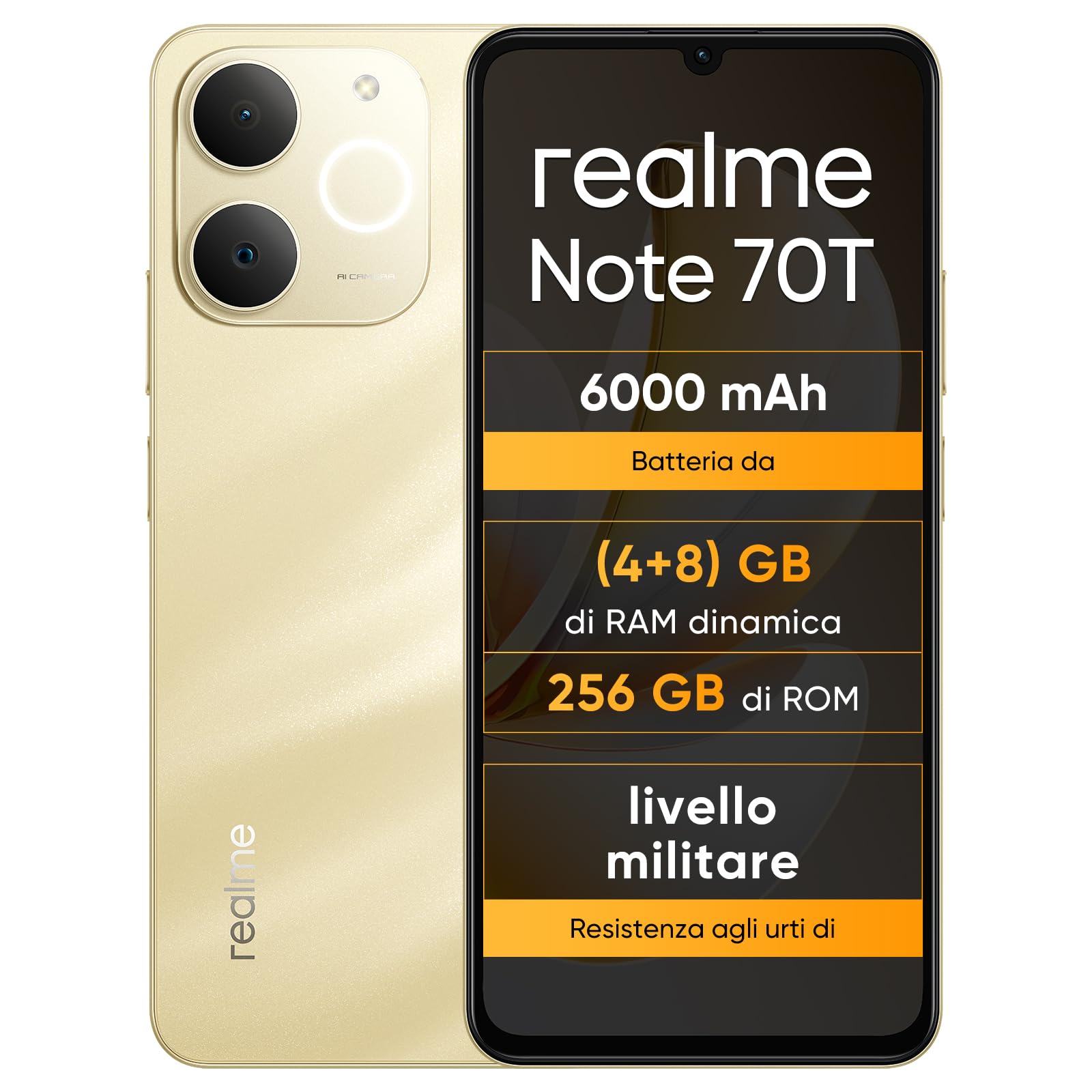
Abbildung: Vorder- und Rückseite view of the realme Note 70T smartphone.
2. Installationsanleitung
2.1 Packungsinhalt
Überprüfen Sie, ob Ihr Paket die folgenden Artikel enthält:
- realme Note 70T Smartphone
- USB-Kabel
- Handyhülle
- Schutzfolie
2.2 Einlegen der SIM-Karte und Einschalten
- Suchen Sie den SIM-Karten-Einschub an der Seite des Geräts. Verwenden Sie das mitgelieferte SIM-Karten-Auswurfwerkzeug, um den Einschub zu öffnen.
- Carefully place your Nano-SIM card(s) and/or microSD card into the tray, ensuring correct orientation. The realme Note 70T supports Dual SIM.
- Schieben Sie die Ablage vorsichtig zurück in den Schlitz, bis sie bündig mit dem Gehäuse des Telefons abschließt.
- Press and hold the Power button (located on the right side) until the realme logo appears on the screen.

Abbildung: Seite view of the realme Note 70T, illustrating the location of the SIM card tray.
2.3 Erstaufladung
Before first use, it is recommended to fully charge your device. Connect the USB cable to the phone's USB-C port and the other end to a compatible power adapter (not included) or a computer's USB port.

Abbildung: Unten view of the realme Note 70T, highlighting the USB-C charging port.
3. Bedienungsanleitung
3.1 Grundfunktionen
- Ein-/Ausschalten: Halten Sie die Ein-/Aus-Taste gedrückt. Wählen Sie „Ausschalten“ oder „Neustart“.
- Lautstärkeregelung: Verwenden Sie die Lautstärketasten „Lauter“ und „Leiser“ an der Seite des Geräts.
- Bildschirm sperren/entsperren: Drücken Sie kurz die Ein-/Aus-Taste, um den Bildschirm zu sperren oder zu entsperren.
- Gesichtserkennung: Configure facial recognition in Settings for quick and secure unlocking.

Abbildung: Seite view of the realme Note 70T, showing the power and volume buttons.
3.2 Anzeigefunktionen
The realme Note 70T features a 6.75-inch Eye Comfort Display with a 90Hz refresh rate. This provides smooth visuals and reduces eye strain. The display offers vivid clarity and comfortable viewing.

Image: The realme Note 70T display showcasing its 90Hz refresh rate and eye comfort features with a vibrant beach scene.
3.3 Kamerafunktionen
Capture every moment with the 13MP rear camera and 5MP front camera. The device includes advanced AI features to enhance your photography:
- AI Clear Face: Improves blurry portraits for sharper results.
- KI-Radierer: Removes unwanted elements from photos.
- AI Image Matting: Allows you to easily remove subjects from backgrounds.

Image: Demonstration of the AI Clear Face feature, showing a blurry portrait before and after AI enhancement.

Image: Demonstration of the AI Eraser feature, showing an object removed from a photo.

Image: Demonstration of the AI Image Matting feature, showing a person isolated from the background.
3.4 Batteriemanagement
The 6000mAh battery provides up to two days of usage on a single charge. It supports extended standby and includes 38 levels of charging protection for long-term battery health.

Image: Illustration of the realme Note 70T's 6000mAh battery capacity and estimated usage times for various activities.
3.5 Performance and Audio
Powered by an octa-core chipset with speeds up to 1.8 GHz, the realme Note 70T ensures smooth performance for gaming and applications. It supports fast app launch times and keeps up to 16 apps active in the background.
Experience enhanced audio with 300% ultra volume and AI Call 2.0, which provides intelligent noise reduction for clear calls.

Image: Visual representation of the realme Note 70T's octa-core processor.

Image: Illustration of the AI Call 2.0 feature, demonstrating noise reduction during calls.
4. Wartung
4.1 Wasser- und Staubbeständigkeit (IP54)
The realme Note 70T is rated IP54 for water and dust resistance, protecting against splashes and dust ingress. The speaker vibrates at a specific frequency to expel accumulated water. This feature ensures the device remains functional in various daily situations.

Image: The realme Note 70T being splashed with water, demonstrating its IP54 water resistance.
4.2 ArmorShell Protection
The device features ArmorShell protection, having passed the MIL-STD 810H military-grade shock resistance test. This includes multi-angle drop tests and high-intensity impact tests, ensuring durability against accidental drops from up to 1.8 meters.

Image: The realme Note 70T being dropped onto a rocky surface, illustrating its military-grade resistance.
4.3 Allgemeine Pflege
- Reinigen Sie das Gerät mit einem weichen, trockenen Tuch. Vermeiden Sie scheuernde Materialien.
- Vermeiden Sie es, das Telefon über längere Zeit extremen Temperaturen oder direkter Sonneneinstrahlung auszusetzen.
- Versuchen Sie nicht, das Gerät selbst zu zerlegen oder zu reparieren, da dies zum Verlust der Garantie und zu Schäden führen kann.
5. Fehlerbehebung
5.1 Häufige Probleme und Lösungen
- Gerät lässt sich nicht einschalten: Stellen Sie sicher, dass der Akku geladen ist. Schließen Sie ihn an ein Ladegerät an und versuchen Sie es erneut.
- Bildschirm reagiert nicht: Starten Sie das Gerät neu, indem Sie den Netzschalter längere Zeit (normalerweise 10-15 Sekunden) gedrückt halten.
- Apps stürzen ab oder laufen langsam: Close background applications. Utilize the AI Optimization feature to improve app smoothness.

Image: Screenshot of the AI Optimization feature on the realme Note 70T, showing options to improve app smoothness.
5.2 Werksreset
Sollten die Probleme weiterhin bestehen, können Sie einen Werksreset in Betracht ziehen. Warnung: This will erase all data on your device. Back up important information before proceeding. Navigate to Einstellungen > System > Reset-Optionen > Alle Daten löschen (Werksreset).
6. Spezifikationen
| Besonderheit | Spezifikation |
|---|---|
| Marke | realme |
| Modellname | realme Note 70T |
| Betriebssystem | Android 15 |
| RAM-Größe | 4 GB |
| Speicherkapazität | 256 GB |
| Bildschirmgröße | 6.75 Zoll |
| Auflösung | 720 x 1600 |
| Bildwiederholrate | 90 Hz |
| Zellulartechnologie | 4G |
| Konnektivitätstechnologie | Bluetooth |
| Farbe | Sandiges Gold |
| Number of SIM Card Slots | Dual-SIM |
| Ladeanschlusstyp | USB-C |
| Biometric Identification Features | Gesichtserkennung |
| Wasserbeständigkeit | Wasserbeständig (IP54) |
| Kopfhöreranschluss | No 3.5 mm Jack |
| Maximum Supported Flash Memory Size | 256 GB |
| Front Camera Sensor Resolution | 5 Megapixel |
| Rear Camera Sensor Resolution | 13 Megapixel |
| Number of Rear Cameras | 1 |
| Number of Front Cameras | 1 |
| Maximale Batterieleistung | 6000 Milliamper-Stunde (mAh) |
| Artikelabmessungen | 15.7 x 7.4 x 0.9 cm |
| Durchschnittliche Akkulaufzeit | 2 Tage |
| Auflösung der Videoaufnahme | 1080p |
| Bildfrequenz | 30 fps |
| GPS and Georeferencing Features | WAHR |
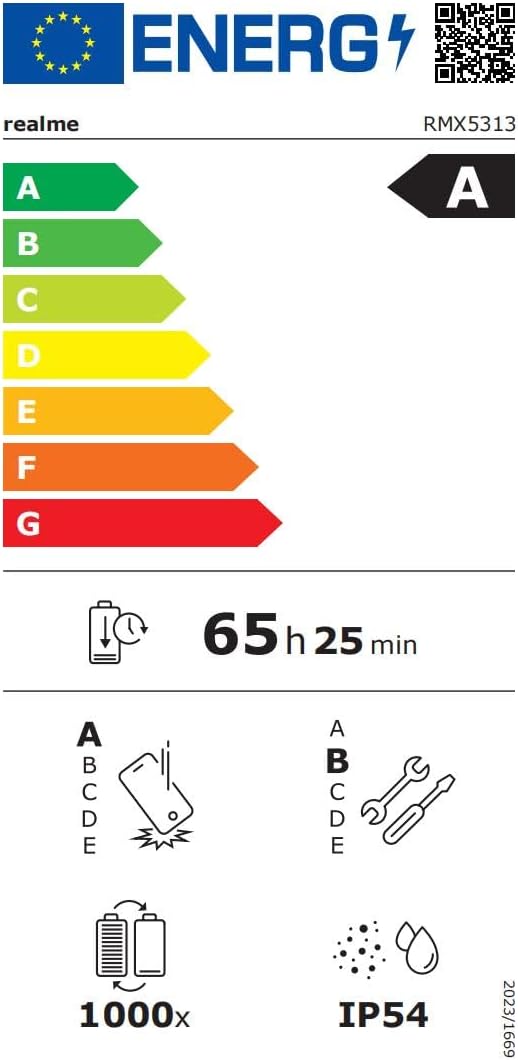
Image: EU Energy Label for realme Note 70T, showing energy efficiency, battery life, and IP54 rating. For more details, visit eprel.ec.europa.eu/qr/2361473.
7. Garantieinformationen
Your realme Note 70T smartphone comes with a limited manufacturer's warranty. Please refer to the warranty card included in your package or visit the official realme webAuf der Website finden Sie detaillierte Informationen zu Garantieumfang, -dauer und Serviceverfahren.
8. Kundendienst
Für weitere Unterstützung, technischen Support oder Serviceanfragen wenden Sie sich bitte über die offizielle Website an den realme-Kundendienst. website or the contact information provided in your product documentation. You can also find FAQs and troubleshooting tips on the realme support portal.
Additional resources, including a Data Transparency Declaration, can be found Hier.


