
Einführung
This manual provides detailed instructions for the installation, operation, and maintenance of your UNITOPSCI Single Din Car Stereo, Model 6886C. This unit features a 6.86-inch HD touchscreen, Apple CarPlay, Android Auto, Bluetooth 5.0, FM radio, USB connectivity, and support for a backup camera. Please read this manual thoroughly before use to ensure proper functionality and safety.
Packungsinhalt
Bitte überprüfen Sie, ob alle unten aufgeführten Artikel in Ihrem Paket enthalten sind:
- 1 x Autoradio
- 1 x Rückfahrkamera
- 1 x Stromkabel
- 1 x Lautsprecherkabel
- 1 x Remote Control (Battery Not included)
- 1 x Benutzerhandbuch
- 1 x Mikrofon

Image: All components included in the UNITOPSCI car stereo package.
Produkt überview
The UNITOPSCI 6886C is a single DIN car stereo featuring a 6.86-inch HD touchscreen. Its compact design allows for installation in standard single DIN openings.
Abmessungen und Anschlüsse
The unit measures approximately 187mm (7.3 inches) in length and 52mm (2.0 inches) in height. The screen itself is 6.86 inches. The rear panel includes various ports for power, speakers, microphone, video output, camera input, and GPS antenna.

Abbildung: Vorder- und Rückseite view with dimensions and connection ports labeled.
Setup und Installation
Eine Installation durch einen Fachmann wird empfohlen. Stellen Sie sicher, dass die Stromversorgung des Fahrzeugs vor Beginn der Installation unterbrochen ist.
Installationsschritte:
- Prepare Dash Opening: Confirm your vehicle's dash opening is suitable for a single DIN unit (187mm x 52mm). A suitable dash kit may be required if the opening is not standard.
- Kabelverbindungen: Connect the power cable and speaker cable to the corresponding ports on the car stereo and your vehicle's wiring harness. Refer to the wiring diagram in the included user manual for specific connections.
- Rückfahrkamera: Connect the backup camera cable to the 'CAMIN' port on the rear of the stereo. Ensure the camera's power is correctly wired to the vehicle's reverse light circuit for automatic activation.
- Mikrofon: Connect the external microphone to the 'MIC' port for improved hands-free calling audio quality.
- GPS-Antenne: If applicable, connect the GPS antenna to the 'GPS' port.
- Sichere Einheit: Mount the car stereo securely into the dash opening.
- Stromversorgung wiederherstellen: Schließen Sie die Fahrzeugbatterie wieder an und testen Sie alle Funktionen.
Bedienungsanleitung
This section details the primary functions and features of your car stereo.
1. Apple CarPlay & Android Auto (Wired Connection)
Connect your iPhone or Android smartphone via a USB cable to access Apple CarPlay or Android Auto. This allows you to use navigation, make calls, send messages, and listen to music directly from your phone's interface displayed on the stereo screen. Voice control (Siri for CarPlay, Google Assistant for Android Auto) is supported for hands-free operation.

Image: Apple CarPlay, Android Auto, and Mirror Link functionality via wired USB connection.
2. Bluetooth 5.0
Pair your mobile device with the stereo via Bluetooth 5.0 for hands-free calling and wireless audio streaming. Access your phonebook and dial directly from the stereo's touchscreen. The Bluetooth name for pairing is 'CAR BT'.
3. UKW-Radio
Tune into FM radio stations (frequency range 87.5-108MHz). The unit supports 18 preset stations, allowing quick access to your favorite channels for news, music, and traffic updates.
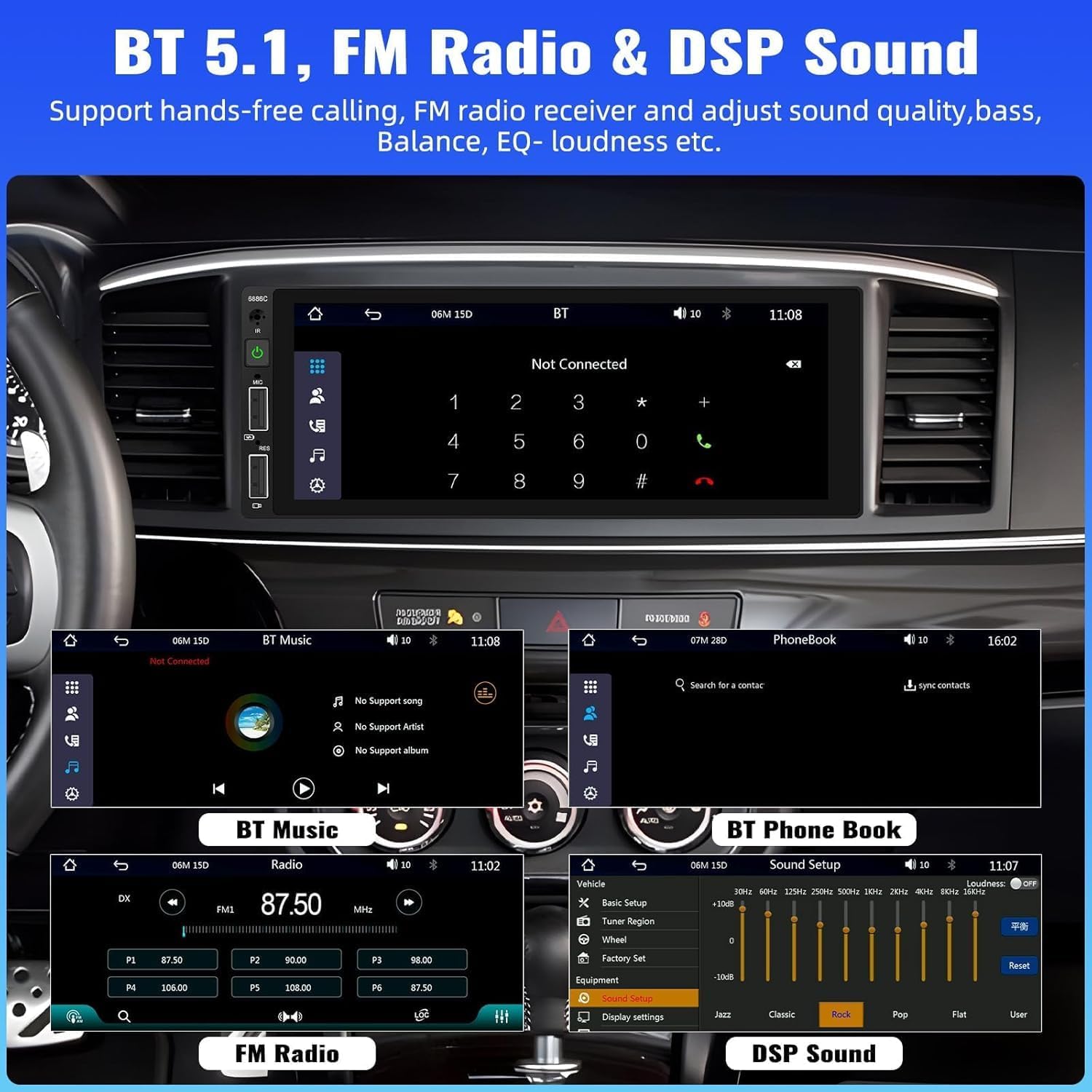
Image: Bluetooth, FM Radio, and Digital Sound Processing (DSP) settings interface.
4. Spiegel-Link
Utilize the Mirror Link function to display your smartphone's screen directly on the car stereo. Connect your device using its original USB cable. This feature is useful for viewing maps or playing videos from your phone.
5. USB-Wiedergabe und -Ladefunktion
The stereo features dual USB slots. Use these ports for media playback from USB drives or for fast charging your mobile devices. The unit also supports DVR connection via USB (DVR not included).

Image: Multiple playback options including USB charging and DVR support.
6. EQ Sound Feature
Adjust the audio output to your preference using the built-in EQ sound feature. Customize settings for bass, balance, and loudness to optimize your listening experience.
7. Lenkradsteuerung (SWC)
If your vehicle supports it, connect the steering wheel control wires to easily manage radio functions, adjust volume, and handle calls without taking your hands off the wheel. This enhances driving safety.
8. Eingang für Rückfahrkamera
When the vehicle is shifted into reverse gear, the stereo automatically displays the video feed from the connected backup camera. The included camera features 4 LED lights for clear night vision and parking lines to assist with safer parking maneuvers.

Image: Backup camera input and steering wheel control interface.
9. Siebenfarbige Hintergrundbeleuchtung
Customize the button backlight color to match your vehicle's interior or your personal preference. Choose from seven available colors.
10. Speicher ausschalten
The unit retains the last playing state (e.g., radio station, music track) when powered off and resumes from that point upon restart.
Wartung
Um die Langlebigkeit und optimale Leistung Ihres Autoradios zu gewährleisten, beachten Sie bitte folgende Wartungshinweise:
- Reinigung: Reinigen Sie den Bildschirm und das Gehäuse mit einem weichen, trockenen Tuch. Vermeiden Sie Scheuermittel oder Lösungsmittel.
- Temperatur: Vermeiden Sie es, das Gerät extremen Temperaturen auszusetzen.
- Feuchtigkeit: Das Gerät sollte trocken und vor Feuchtigkeit geschützt gehalten werden.
- Firmware-Updates: Überprüfen Sie die Angaben des Herstellers webBesuchen Sie die Website regelmäßig, um zu prüfen, ob Firmware-Updates verfügbar sind, um die Leistung zu verbessern und neue Funktionen hinzuzufügen.
Fehlerbehebung
Sollten Sie Probleme mit Ihrem Autoradio haben, beachten Sie bitte die folgenden häufigen Probleme und Lösungen:
| Problem | Mögliche Ursache | Lösung |
|---|---|---|
| Kein Strom | Falsche Verkabelung; durchgebrannte Sicherung; schwache Fahrzeugbatterie. | Stromanschlüsse prüfen; Sicherung ersetzen; Fahrzeugbatterie prüfen. |
| Kein Ton | Lautsprecherkabel nicht angeschlossen; Lautstärke zu niedrig; Stummschaltung aktiviert. | Überprüfen Sie die Lautsprecheranschlüsse; Erhöhen Sie die Lautstärke; Deaktivieren Sie die Stummschaltung. |
| Bluetooth stellt keine Verbindung her | Bluetooth not enabled on device; Incorrect pairing process. | Ensure Bluetooth is on; Re-attempt pairing (Bluetooth name: CAR BT). |
| CarPlay/Android Auto funktioniert nicht | Defektes USB-Kabel; Telefon nicht kompatibel; Softwareproblem. | Use original USB cable; Check phone compatibility; Restart phone and stereo. |
| Rückfahrkamera ohne Anzeige | Camera not powered; Video cable disconnected; Incorrect trigger wire. | Check camera power supply; Verify video cable connection; Ensure reverse trigger wire is connected. |
Technische Daten
Detailed technical specifications for the UNITOPSCI 6886C car stereo:
- Modell: 6886C
- Bandtage: Gleichstrom 12 V
- System: ZUSAMMENZUCKEN
- CPU-Chip: F133
- Bildschirmgröße: 6.86 Zoll
- Bildschirmauflösung: 1280*480
- Spiegel Link: Unterstützt
- Radioband: FM
- Funkchip: QN8035
- Leistungsabgabe: 45W*4 (180 Watts total)
- Arbeitstemperatur: -10~60℃
- Bluetooth-Version: 5.0
- Bluetooth-Name: AUTO BT
- Bunte Hintergrundbeleuchtung: Unterstützt
- Umkehrung des Eingangs: FBAS
- Leistung AmpLifier-Chip: TDA7388
- Radiofrequenz: 87.5 bis 108 MHz
- Audio Format Unterstützung: MP3 / WMA / WAV / APE / FLAC
- Video Format Unterstützung: RM/RMVB/AVI/MP4/MKV/3GP
- Unterstützte Bildformate: JPG-BMP-PNG
- Unterstützte Sprachen: Englisch, Chinesisch, Spanisch, Portugiesisch, Russisch, Italienisch, Deutsch, Französisch, Türkisch, Tschechisch, Arabisch, Polnisch, Hebräisch
Garantie und Support
Your UNITOPSCI car stereo comes with a 2 Jahr Garantie from the date of purchase, covering manufacturing defects. For technical assistance, troubleshooting, or warranty claims, please contact our support team.
Online-Hilfe: UNITOPSCI@126.com