1. Einleitung
Welcome to the user manual for your new OKP LiDAR Robot Vacuum and Mop Combo. This advanced robotic cleaner is designed to provide efficient and thorough cleaning for your home, combining powerful vacuuming with effective mopping capabilities. Featuring dToF LiDAR navigation, multi-floor mapping, and smart obstacle avoidance, the L6 Aqua ensures comprehensive coverage and a hassle-free cleaning experience. Please read this manual carefully before using the product to ensure proper operation and maintenance.

Image: The OKP L6 Aqua Robot Vacuum and Mop Combo, shown with its charging dock, a mop pad, and side brushes, highlighting its compact design and included accessories.
2. Produktkomponenten
Before starting, please ensure all components are present in the packaging:
- OKP L6 Aqua Robot Vacuum and Mop Combo
- Ladestation
- Netzteil
- Seitenbürsten (2 Paar)
- Washable Mop Pad (1 or more)
- Reinigungswerkzeug
- Benutzerhandbuch (dieses Dokument)
Image: A visual representation of the OKP L6 Aqua robot vacuum, its charging station, and various cleaning accessories like side brushes and a mop pad, as they appear when unboxed.
3. Einrichtung
3.1 Platzierung der Ladestation
Place the charging dock against a wall in an open, uncluttered area. Ensure there is at least 0.5 meters (1.6 feet) of clear space on both sides of the dock and 1.5 meters (4.9 feet) in front of it. Connect the power adapter to the dock and plug it into a wall outlet.
3.2 Erstaufladung
Before first use, fully charge the robot vacuum. Place the robot onto the charging dock, ensuring the charging contacts align. The indicator light on the robot will show charging status. A full charge typically takes 4-5 hours.
3.3 App-Verbindung und WLAN-Einrichtung
Download the "OKP" app from your mobile device's app store. Follow the in-app instructions to connect your robot vacuum to your home's 2.4GHz Wi-Fi network. This enables remote control, scheduling, and access to advanced features like mapping and no-go zones.

Image: A smartphone screen displaying the OKP app interface, showing options for automatic, zone, spot, and scheduled cleaning, along with map editing capabilities.

Image: A person using a smartphone to control the OKP robot vacuum, illustrating the convenience of app and voice control via Wi-Fi, Amazon Alexa, and Google Home.
4. Bedienungsanleitung
4.1 Reinigungsmodi
The L6 Aqua offers various cleaning modes to suit your needs, accessible via the OKP app or the robot's physical button:
- Automatische Reinigung: Der Roboter reinigt den gesamten Bereich intelligent.
- Zonenreinigung: Clean specific areas defined on the map in the app.
- Fleckenreinigung: Konzentriert sich auf einen kleinen, überschaubaren Bereich zur intensiven Reinigung.
- Kantenreinigung: Reinigt entlang von Wänden und Möbelkanten.
- Geplante Reinigung: Legen Sie bestimmte Zeiten fest, zu denen der Roboter automatisch reinigen soll.

Image: An illustration of the OKP L6 Aqua's advanced 3-in-1 functionality, combining sweeping, vacuuming, and mopping, with adjustable power modes: Silence, Standard, and Super.
4.2 Kartierung und Navigation
Equipped with advanced dToF LiDAR navigation, the L6 Aqua accurately maps your home, allowing for efficient cleaning paths and multi-floor mapping capabilities. You can define "no-go zones" and "no-mop zones" within the app to restrict the robot from certain areas.

Image: A visual demonstrating the OKP L6 Aqua's 360° dToF LiDAR Navigation with a 15m range, highlighting its fast and accurate mapping, 15m scanning radius, and ability to map up to 700 square meters.

Image: An illustration showing the customizable maps and no-go zones feature of the OKP L6 Aqua, where users can define areas the robot should avoid, such as children's play areas.
4.3 Staubsaugen und Wischen
The L6 Aqua seamlessly transitions between vacuuming and mopping. Fill the 200ml water tank and attach the washable mop pad for mopping. The robot features carpet detection, automatically boosting suction on carpets for deep cleaning and avoiding carpets in mopping mode to prevent water stains.
4.4 Hindernisvermeidung
Equipped with 190° PSD (Position Sensitive Device) obstacle detection and smart sensors, the robot intelligently navigates around furniture, cords, and small obstacles, even in low-light conditions, ensuring a smooth and collision-free cleaning path.

Image: A diagram illustrating the OKP L6 Aqua's precision sensing capabilities with 9 sensors and 190° wide-angle detection, allowing it to effectively dodge obstacles like toys and slippers.
4.5 Automatisches Aufladen und Fortsetzen
When the battery level is low, the L6 Aqua will automatically return to its charging dock. Once sufficiently recharged (to 80%), it will resume cleaning from where it left off, ensuring complete coverage without manual intervention.
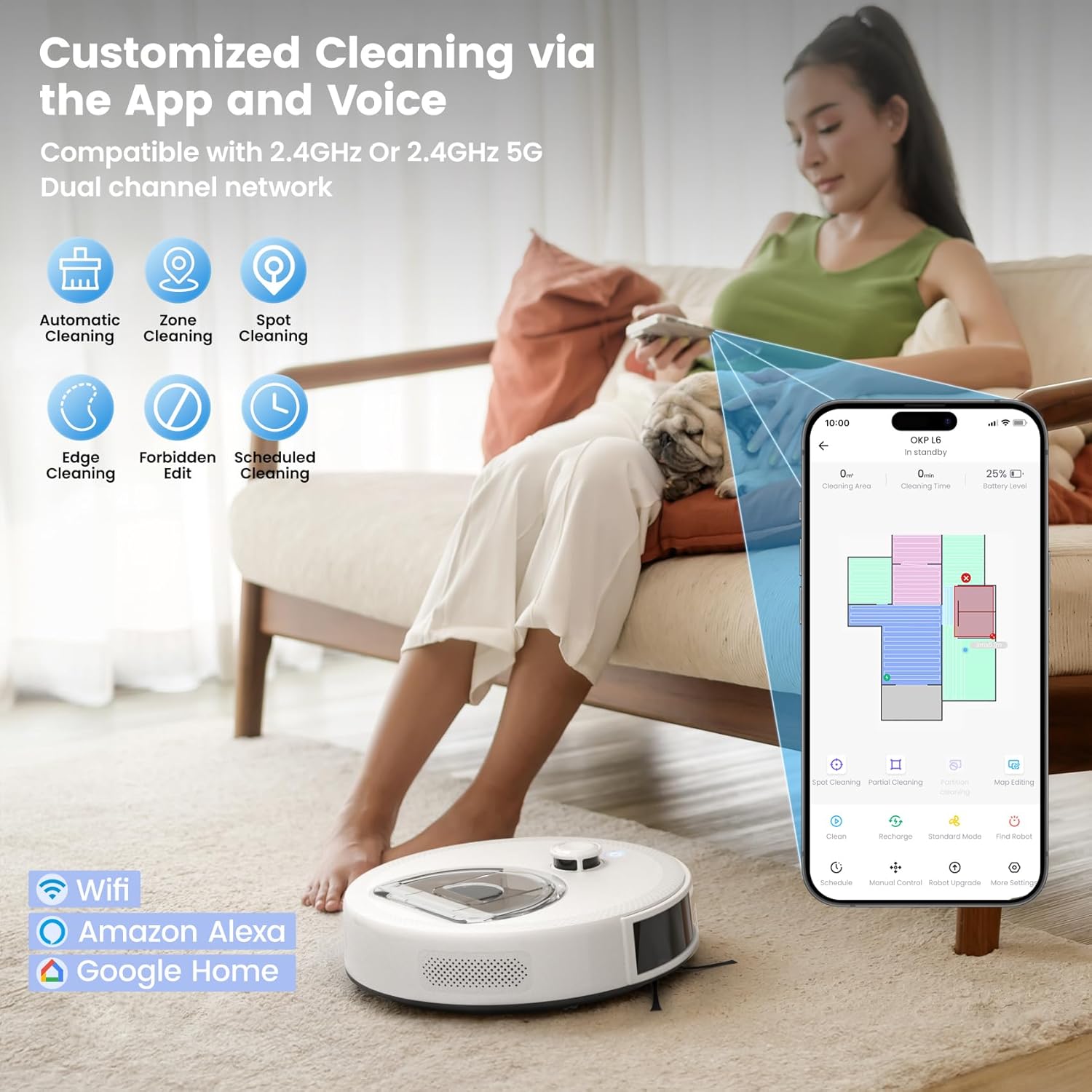
Image: A visual representation of the OKP L6 Aqua's breakpoint technology, showing the robot returning to its dock to recharge when the battery is low (15%) and then resuming cleaning from the exact spot once recharged (80%).
5. Wartung
Regular maintenance ensures optimal performance and extends the lifespan of your OKP L6 Aqua.
5.1 Mülleimer leeren
The 450ml visible dustbin allows you to easily see when it needs emptying. Press the dustbin release button, remove the dustbin, and empty its contents into a trash bin. Clean the filter regularly.
5.2 Reinigung des Mopppads
After each mopping session, detach the washable mop pad and rinse it thoroughly with water. Allow it to air dry completely before reattaching.
5.3 Reinigung von Bürste und Sensor
Periodically check and clean the side brushes for tangled hair or debris. Use the provided cleaning tool to remove any hair wrapped around the brushes. Wipe the charging contacts and all sensors (cliff sensors, wall sensors) with a clean, dry cloth to ensure proper function.
5.4 Anti-Tangle System
The L6 Aqua features an upgraded Zero-Tangle System with a sealed LiDAR turret, brushless suction port, dual high-speed side brushes, straight-through airflow, and a seamless body. This design minimizes hair wrap and prevents dirt traps, making maintenance easier, especially for pet owners.

Image: A comparison illustrating the OKP L6 Aqua's upgraded Zero-Tangle System, showing its clean internal design compared to other robot vacuums that often accumulate hair and debris.
6. Fehlerbehebung
If your OKP L6 Aqua encounters an issue, refer to the table below for common problems and their solutions.
| Problem | Mögliche Ursache | Lösung |
|---|---|---|
| Roboter lässt sich nicht einschalten | Niedriger Batteriestand; Ein-/Ausschalter nicht gedrückt | Auf die Ladestation stellen; Den Ein-/Ausschalter 3 Sekunden lang gedrückt halten. |
| Roboter findet Ladestation nicht | Dock obstructed; Robot too far from dock | Sorgen Sie für ausreichend Freiraum um die Dockingstation herum; positionieren Sie den Roboter manuell näher an der Dockingstation. |
| Schlechte Reinigungsleistung | Voller Staubbehälter; Verstopfter Filter; Abgenutzte Bürsten | Mülleimer leeren; Filter reinigen/austauschen; Bürsten reinigen/austauschen. |
| Roboter bleibt häufig hängen | Obstacles on floor; Dirty sensors | Clear floor of cables/small items; Clean cliff and wall sensors. |
| Verbindung zu WLAN/App nicht möglich | Incorrect Wi-Fi password; Router too far; 5GHz network selected | Passwort überprüfen; Roboter näher an den Router heranführen; Sicherstellen, dass das 2.4-GHz-Netzwerk verwendet wird. |
7. Produktspezifikationen
| Besonderheit | Spezifikation |
|---|---|
| Marke | OKP |
| Modellname | L6 Aqua Robot Vacuum and Mop Combo |
| Navigationstyp | LiDAR Navigation (dToF) |
| Fassungsvermögen des Staubbehälters | 450 ml (sichtbar) |
| Fassungsvermögen des Wassertanks | 200 ml |
| Max Laufzeit | Bis zu 150 Minuten |
| Abdeckungsbereich | Bis zu 1600 qm |
| Konnektivität | 2.4GHz Wi-Fi, Alexa, Google Assistant |
| Technische Daten | 12 Zoll L x 12 Zoll B x 3.5 Zoll H |
| Farbe | Frostweiß |
8. Garantie und Kundendienst
OKP provides a one-year warranty for the L6 Aqua Robot Vacuum and Mop Combo. For any questions, issues, or technical support, please contact OKP professional customer service.
Kundendienst: Available Monday to Friday via the Amazon message center.
Bitte bewahren Sie Ihren Kaufbeleg für Garantieansprüche auf.