
Einführung
This manual provides detailed instructions for the installation, operation, and maintenance of your Ctronics 4K Hybrid Zoom 10x Outdoor WiFi Surveillance Camera, Model 930-4KD. This camera is designed for outdoor security, featuring dual lenses, 10x hybrid zoom, auto-tracking, human detection, color night vision, two-way audio, and an IP66 weatherproof rating.
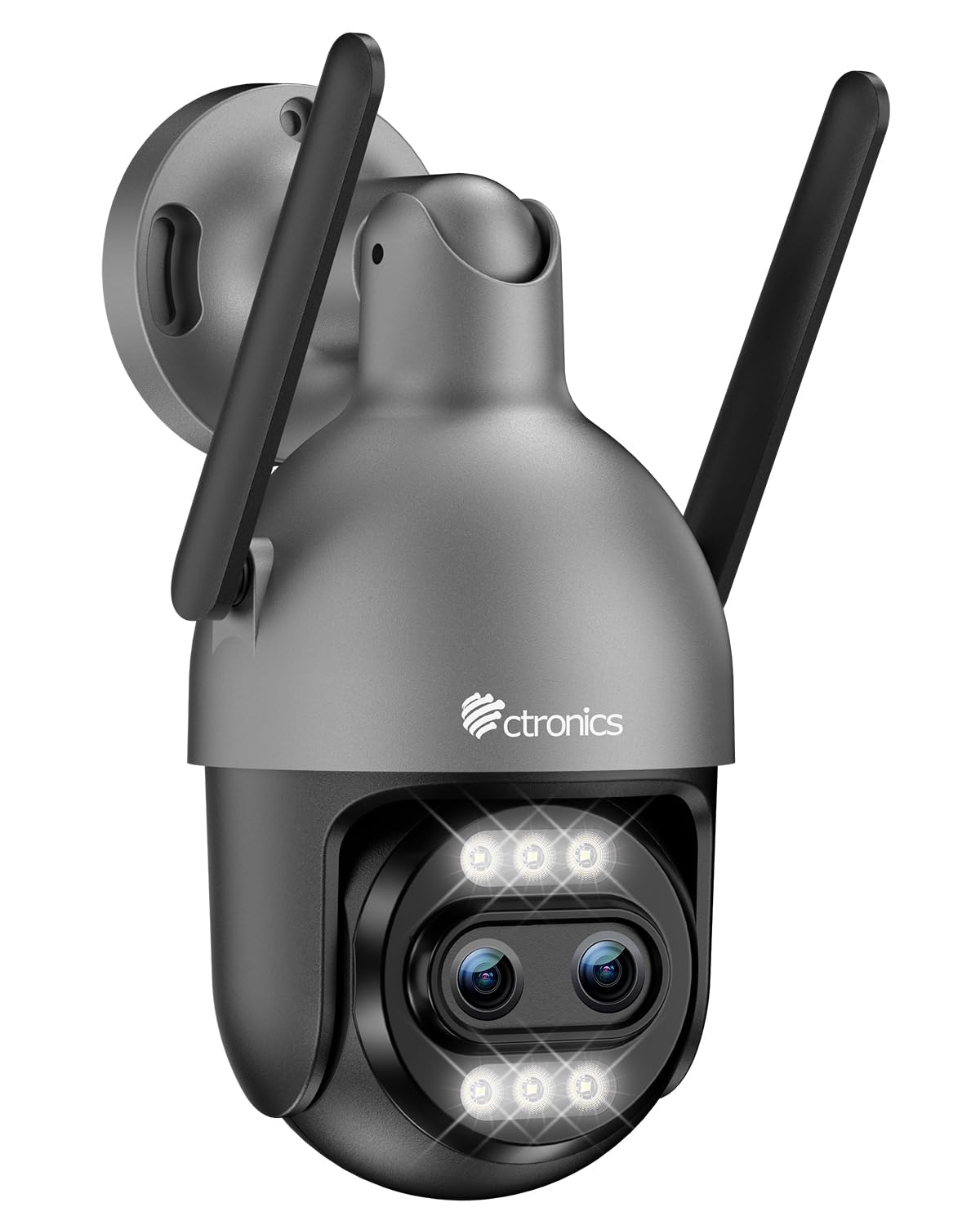
Image: Ctronics 4K Hybrid Zoom 10x Outdoor WiFi Surveillance Camera, Model 930-4KD.
1. Einrichtung und Installation
1.1 Packungsinhalt
Überprüfen Sie, ob alle Komponenten im Paket vorhanden sind:
- Ctronics 4K Hybrid Zoom 10x Outdoor WiFi Surveillance Camera (Model 930-4KD)
- Netzteil
- Befestigungsschrauben und Anker
- Wasserdichtes Set für Netzwerkkabel
- Benutzerhandbuch (dieses Dokument)
1.2 Physische Installation
The camera is designed for outdoor use and ceiling mounting. Choose a location that provides optimal surveillance coverage and has a stable surface for mounting. Ensure the camera is within range of your Wi-Fi network or close to an Ethernet connection point.
- Mark the drilling positions on the wall or ceiling using the mounting template (if provided, otherwise use the camera base).
- Bohren Sie Löcher und setzen Sie die Wandanker ein.
- Befestigen Sie die Kamerabasis mit den mitgelieferten Schrauben an der Oberfläche.
- Adjust the camera angle as needed before final tightening.

Bild: Example of a Ctronics dual-lens PTZ camera, similar to Model 930-4KD, mounted for outdoor surveillance.
1.3 Strom- und Netzwerkanschluss
Connect the camera to power using the provided power adapter. For network connectivity, you have two options:
- Wi-Fi-Verbindung: Ensure your Wi-Fi network is 2.4GHz or 5GHz compatible. Follow the in-app instructions for Wi-Fi setup.
- Kabelverbindung: Connect an Ethernet cable from your router to the camera's network port. Use the waterproof kit to protect the connection if installed outdoors.
1.4 App-Installation und -Konfiguration
Download the official Ctronics Pro app from your smartphone's app store (iOS or Android). Alternatively, use the HiP2P Client software for Windows or Mac OS.
- Install the Ctronics Pro app on your smartphone or HiP2P Client on your computer.
- Registrieren Sie ein Konto und melden Sie sich an.
- Follow the on-screen prompts to add your camera. This typically involves scanning a QR code on the camera or manually entering its ID.
- Konfigurieren Sie die Grundeinstellungen wie Zeitzone, Aufnahmeeinstellungen und Benachrichtigungseinstellungen.

Image: The Ctronics multi-platform software interface, showing compatibility with desktop, laptop, tablet, and smartphone devices.
2. Bedienungsanleitung
2.1 Live View und Aufzeichnung
Once connected, access the live feed through the Ctronics Pro app or HiP2P Client. You can view real-time video, initiate manual recordings, and capture screenshots.
2.2 Erweiterte Funktionen
- 10-facher Hybrid-Zoom: Utilize the digital controls in the app to zoom in and out, combining optical and digital zoom for detailed views.
- Auto Zoom Tracking: Enable this feature to allow the camera to automatically track detected human movement and zoom in for clearer identification.
- Menschliche Erkennung: Configure motion detection zones and sensitivity. The camera will send alerts upon detecting human shapes, reducing false alarms.
- Farbnachtsicht: The camera employs Starlight vision technology and LED lights to provide full-color video even in low-light conditions, up to 30 meters.
- Zweiwege-Audio: Use the built-in microphone and speaker to communicate with visitors or deter intruders remotely.
- PTZ-Steuerung: Pan, Tilt, and Zoom the camera remotely via the app to adjust the viewing angle and cover a 360-degree area.

Image: The Ctronics 10x Hybrid Zoom camera, highlighting its advanced optical capabilities.
2.3 Speichermöglichkeiten
The camera supports local recording to a Micro SD card (up to 256GB). Ensure the card is inserted correctly and formatted through the app. Cloud storage options may also be available through the Ctronics service.
3. Wartung
- Reinigung: Reinigen Sie das Kameraobjektiv und das Gehäuse regelmäßig mit einem weichen, fusselfreien Tuch.amp Für eine klare Bildqualität ein Tuch verwenden. Keine scharfen Chemikalien verwenden.
- Firmware-Updates: Check the Ctronics Pro app periodically for firmware updates. Keeping your camera's firmware updated ensures optimal performance and security.
- Stromversorgung: Vergewissern Sie sich, dass Netzteil und Kabel unbeschädigt sind.
4. Fehlerbehebung
| Problem | Lösung |
|---|---|
| Kamera stellt keine Verbindung zum WLAN her | Ensure the camera is within Wi-Fi range. Check Wi-Fi password. Try resetting the camera and re-adding it to the app. Verify your router supports 2.4GHz/5GHz. |
| Kein Bild oder schwarzer Bildschirm | Check power connection. Ensure network connection is stable. Restart the camera and the app. |
| Bewegungserkennungsalarme sind zu häufig/zu selten | Adjust motion detection sensitivity and detection zones in the app settings. |
| Zwei-Wege-Audio funktioniert nicht | Check microphone and speaker permissions in the app. Ensure volume levels are adequate. |
| SD-Karte zeichnet nicht auf | Ensure the SD card is inserted correctly and formatted within the app. Check if the card is full or corrupted. Replace if necessary. |
5. Spezifikationen
| Besonderheit | Detail |
|---|---|
| Modellname | 930-4KD |
| Marke | Ctronics |
| Konnektivitätstechnologie | Wired, WiFi |
| Besondere Merkmale | Two-Way Audio, Local Recording, UHD Resolution, PTZ Technology, Night Vision |
| Verwendung | Im Freien |
| Kompatible Geräte | Computer, Laptop, Smartphone, Tablet |
| Stromquelle | Elektrokabel (12 Volt) |
| Montagetyp | Deckenmontage |
| Farbe | Silver (argenté) |
| Formfaktor | Kuppel |
| Material | Metall |
| Alarmtyp | Audio und Bewegung |
| Lichtquellentyp | LED |
| Effective Capture Resolution | 8 Megapixel |
| Internationale Schutzbewertung | IP66 |
| Kontrollmethode | Anwendung |
| Wireless-Technologie | Bluetooth (for initial setup/pairing, likely) |
| Screen Capture Resolution | 4K |
| Effektive Videoauflösung | 3840.0 (likely 3840x2160 for 4K) |
| Nachtsichtbereich | 30 Meter |
| Nachtsichttyp | Sternenlicht |
| Abmessungen (L x B x H) | 15 x 15 x 15 cm |
| Videoaufnahmeformat | MP4 |
| Optischer Zoom | 6x |
| Fokustyp | Autofokus |
| Zoomtyp | 6x Optical Zoom + 4x Digital Zoom (10x Hybrid) |
| Optische Sensorik | CMOS |
| Flash-Speichertyp | Micro SD |
| Maximal unterstützter Flash-Speicher | 256 GB |
6. Garantie und Support
For warranty information, technical support, or further assistance, please refer to the official Ctronics website or contact their customer service directly. Details are typically provided on the product packaging or the official Ctronics support page.
You can also find additional resources and FAQs on the Ctronics official webWebsite: www.ctronics.com