1. Einleitung
Thank you for choosing the Dreo 110-Pint Smart Dehumidifier. This appliance is designed to efficiently remove excess moisture from large spaces up to 4500 square feet, such as basements, bedrooms, living rooms, bathrooms, and laundry rooms. Featuring smart controls, multiple operating modes, and dual drainage options, it provides a comfortable and healthy environment by maintaining optimal humidity levels. Please read this manual thoroughly before operation to ensure proper use and maintenance.
2. Wichtige Sicherheitshinweise
Um das Risiko von Bränden, Stromschlägen oder Verletzungen zu verringern, beachten Sie beim Betrieb dieses Geräts stets die grundlegenden Sicherheitsvorkehrungen.
- Lesen Sie vor der Verwendung des Luftentfeuchters alle Anweisungen.
- Dieses Gerät ist nur für den Gebrauch in Innenräumen bestimmt.
- Stellen Sie sicher, dass das Netzteil mit der Lautstärke übereinstimmttage ist auf dem Typenschild angegeben.
- Betreiben Sie den Luftentfeuchter nicht mit einem beschädigten Kabel oder Stecker.
- Vor der Reinigung, Wartung oder dem Umstellen des Geräts immer den Netzstecker ziehen.
- Blockieren Sie keine Luftein- und -auslässe.
- Keep the unit upright for at least 24 hours before plugging it in after transport.
- The Dreo Dehumidifier is ETL-certified to meet stringent electrical safety standards, featuring a 90° tilt waterproof design that automatically powers off when tilted, along with comprehensive thermal protection (23°F to 248°F) to prevent overheating and 15A overcurrent protection against power surges.
3. Produktüberschreitungview
3.1. Komponenten
The Dreo 110-Pint Smart Dehumidifier is designed for efficient and user-friendly operation. Below are the main components:
- Bedienfeld: Located on the top, with touch buttons and a digital display.
- Luftauslass: Top-mounted for efficient moisture expulsion.
- Lufteinlass: Rear-mounted for air intake.
- Wassertank: Front-loading, 2-gallon (8L) capacity with a visible water level indicator.
- Drain Hose Outlet: Located at the rear for continuous drainage.
- Lenkrollen: 360° smooth-rolling wheels for easy mobility.
- Tragegriffe: Integrated on the sides for convenient lifting.
- Waschbarer Filter: Easily accessible for cleaning to maintain air quality.
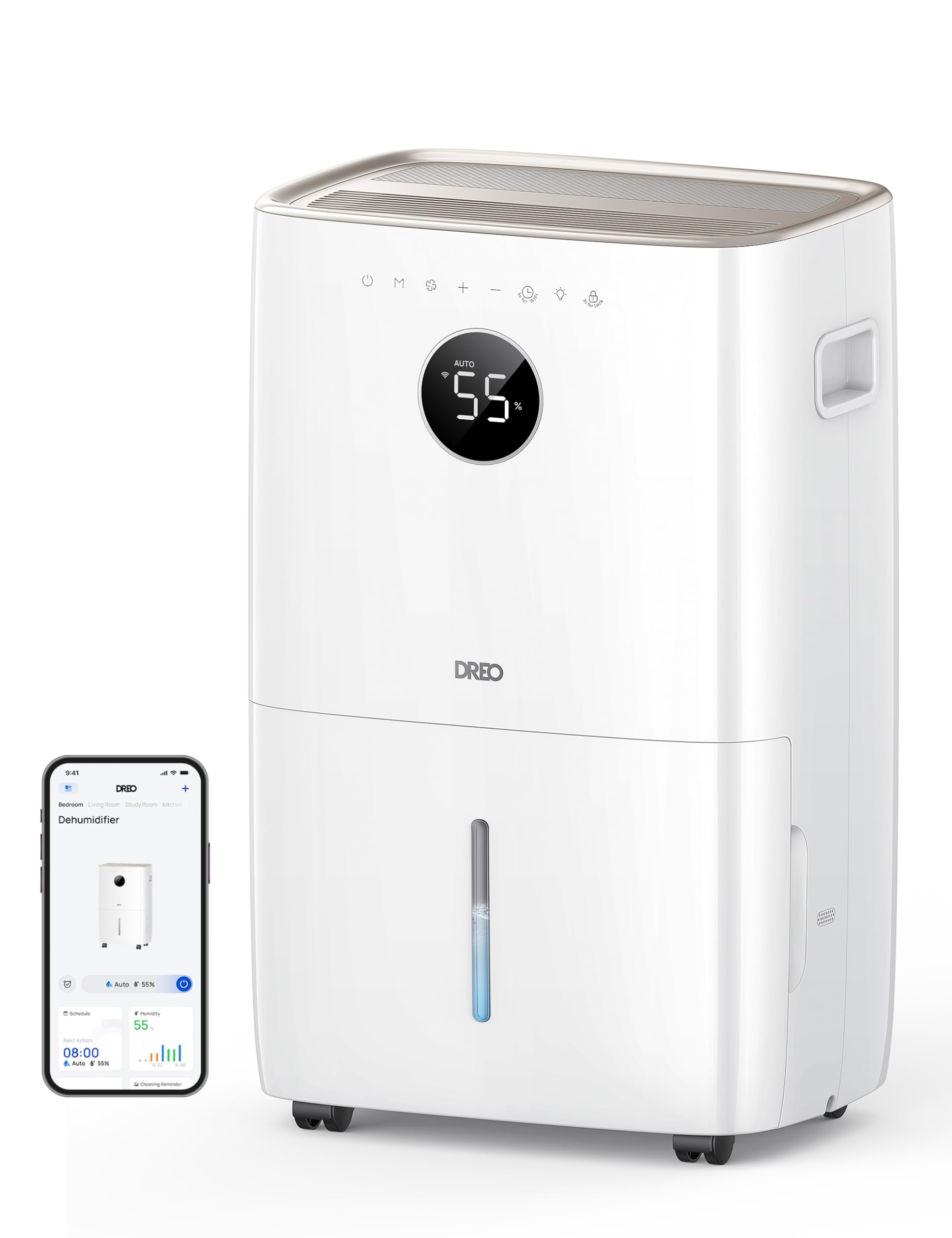
Bild: Vorderseite view of the Dreo 110-Pint Smart Dehumidifier, highlighting its compact design and dimensions (11.3"D x 15.4"W x 24.4"H).
3.2. Systemsteuerung
The intuitive control panel allows for easy operation and monitoring of your dehumidifier.
- Netzschalter: Schaltet das Gerät ein oder aus.
- Modus-Taste: Cycles through Auto, Comfort, and Continuous modes.
- Lüftergeschwindigkeitstaste: Regelt die Lüftergeschwindigkeit (Niedrig, Mittel, Hoch).
- Feuchtigkeitsregulierungsknöpfe (+/-): Sets desired humidity level in Auto Mode.
- Timer-Taste: Sets a 24-hour timer for automatic on/off.
- WLAN-Anzeige: Zeigt den WLAN-Verbindungsstatus an.
- Kindersicherungstaste: Sperrt das Bedienfeld, um versehentliche Änderungen zu verhindern.
- Filter-Reset-Anzeige: Leuchtet auf, wenn der Filter gereinigt werden muss.
- Water Full Alert: Illuminates when the water tank is full, and the unit stops operation.
- Abtauanzeige: Activates automatically at 41°F (5°C) for optimal performance in cold environments.

Image: Close-up of the dehumidifier's control panel, showing the digital display set to 55% humidity in Auto Mode, with various function icons.
4. Einrichtung
4.1. Auspacken und Aufstellen
- Nehmen Sie den Luftentfeuchter vorsichtig aus der Verpackung.
- Place the unit upright on a flat, stable surface. Ensure there is at least 8 inches (20 cm) of space around the air inlets and outlets for proper airflow.
- Lassen Sie das Gerät mindestens 24 Stunden aufrecht stehen, bevor Sie es anschließen, damit sich das Kältemittel setzen kann.
4.2. Stromanschluss
Plug the power cord into a grounded electrical outlet. Ensure the outlet meets the electrical requirements of the dehumidifier.
4.3. Entwässerungsoptionen
The Dreo dehumidifier offers two drainage methods: manual emptying of the water tank or continuous drainage via a hose.

Image: The dehumidifier illustrating both the manual water tank removal and the continuous drainage hose connection.
4.3.1. Manuelle Entwässerung
- When the water tank is full, the unit will automatically stop and display a "Water Full" alert.
- Carefully pull out the water tank from the front of the unit using the integrated handle.
- Entleeren Sie das gesammelte Wasser in ein Waschbecken oder einen Abfluss.
- Schieben Sie den leeren Wassertank wieder in das Gerät, bis er einrastet. Der Luftentfeuchter nimmt den Betrieb wieder auf.
4.3.2. Kontinuierliche Entwässerung
- Locate the drain hose outlet at the rear of the dehumidifier.
- Entfernen Sie den Gummistopfen aus dem Auslass.
- Connect the provided drain hose (or a standard garden hose) to the outlet. Ensure the connection is secure to prevent leaks.
- Route the hose to a suitable drain point (e.g., floor drain, sink, or sump pump). Ensure the hose is sloped downwards to allow gravity to drain the water and is free of kinks.
- The dehumidifier will now continuously drain water without needing to empty the tank manually.
5. Bedienungsanleitung
Drücken Sie die Netzschalter to turn the dehumidifier on. The unit will start operating in its last used mode and settings.
5.1. Betriebsarten
Drücken Sie die Modustaste um durch die verfügbaren Betriebsmodi zu schalten:
- Automatikmodus: The dehumidifier intelligently adjusts fan speed to maintain your target humidity level within a 5% tolerance. Use the +/- Tasten to set your desired humidity (e.g., 45-55% is generally recommended).
- Komfortmodus: The unit operates to maintain a comfortable humidity level based on ambient temperature.
- Kontinuierlicher Modus: The dehumidifier runs continuously at the selected fan speed, regardless of the ambient humidity. This is ideal for very damp conditions or for continuous drainage.
5.2. Lüftergeschwindigkeitseinstellung
In Auto or Continuous mode, press the Taste für die Lüftergeschwindigkeit to select between Low, Medium, or High fan speeds.
5.3. Timer-Funktion
Drücken Sie die Timer-Taste to set a desired operating duration (from 1 to 24 hours). The unit will automatically turn on or off after the set time has elapsed.
5.4. Smart Control (DREO App)
The Dreo 110-Pint Smart Dehumidifier can be controlled remotely via the DREO app on your smartphone or through voice assistants like Alexa and Google Home.

Image: A smartphone displaying the DREO app interface, showing remote control capabilities for the dehumidifier.
5.4.1. Connecting to the DREO App
- Download the DREO app from your smartphone's app store (available on iOS and Android).
- Erstellen Sie ein Konto oder melden Sie sich an.
- Follow the in-app instructions to add your Dreo 110-Pint Smart Dehumidifier (Model DH711S). Ensure your phone is connected to a 2.4GHz Wi-Fi network.
Video: This video demonstrates the process of downloading the DREO app and creating a new user account to manage your smart dehumidifier.
Video: This video provides a step-by-step guide on how to connect your Smart Dehumidifier DH711S to the DREO app for remote control and smart features.
5.4.2. App-Funktionen
Through the DREO app, you can:
- Überwachen Sie die Luftfeuchtigkeitswerte in Echtzeit.
- Legen Sie Zeitpläne und Timer fest.
- Adjust operating modes and fan speeds.
- Receive notifications (e.g., water tank full, filter cleaning reminder).
- Control the unit using voice commands with Alexa or Google Home.
6. Wartung
Regelmäßige Wartung gewährleistet optimale Leistung und Langlebigkeit Ihres Luftentfeuchters.
6.1. Reinigen des Luftfilters
The filter reset indicator will light up after approximately 250 hours of operation, signaling that the filter needs cleaning.
- Ziehen Sie den Stecker des Luftentfeuchters aus der Steckdose.
- Entfernen Sie den Luftfilter von der Rückseite des Geräts.
- Wash the filter with clean water (no hotter than 104°F / 40°C) and a mild detergent.
- Gründlich abspülen und vollständig an der Luft trocknen lassen, bevor es wieder eingebaut wird.
- Once the filter is reinstalled, plug in the unit and press the Filter-Reset-Taste for 3 seconds to clear the indicator.

Image: A hand removing the washable air filter from the back of the dehumidifier for cleaning.
6.2. Reinigen des Wassertanks
Reinigen Sie den Wassertank regelmäßig, um Schimmelbildung vorzubeugen.
- Remove the water tank as described in the Manual Drainage section.
- Reinigen Sie den Tank mit warmem Wasser und einem milden Reinigungsmittel.
- Rinse thoroughly and dry completely before placing it back into the unit.
6.3. Allgemeine Reinigung
Wischen Sie die Außenseite des Luftentfeuchters mit einem weichen,amp Tuch. Verwenden Sie keine scharfen Chemikalien oder Scheuermittel.
7. Fehlerbehebung
Sollten Sie Probleme mit Ihrem Luftentfeuchter haben, beachten Sie bitte die folgenden häufig auftretenden Probleme und Lösungen:
| Problem | Mögliche Ursache | Lösung |
|---|---|---|
| Der Luftentfeuchter schaltet sich nicht ein. | No power, power cord loose, water tank full. | Check power connection, ensure plug is secure, empty water tank. |
| Das Gerät sammelt kein Wasser. | Humidity level too low, room temperature too low, air filter clogged. | Increase target humidity, ensure room temp is above 41°F (5°C), clean air filter. |
| Das Gerät ist laut. | Gerät steht nicht auf ebener Fläche, Luftfilter verstopft. | Place on a flat surface, clean air filter. |
| Wasser tritt aus dem Gerät aus. | Water tank not properly installed, continuous drain hose is loose or kinked. | Reinstall water tank correctly, check drain hose connection and ensure no kinks. |
| Display shows fluctuating numbers. | Normal adjustment to current humidity. | This is normal operation as the sensor adjusts to ambient conditions. |
| Unit isn't defrosting automatically. | Issue with the condenser. | Wenden Sie sich für Hilfe an den Kundendienst. |
8. Spezifikationen
| Besonderheit | Detail |
|---|---|
| Marke | Dreo |
| Modellname | DR-HDH001S |
| Kapazität | 110 Pints (at 86°F, RH 90%) / 50 Pints per Day (DOE Standard) |
| Abdeckungsbereich | Bis zu 4500 Quadratmeter |
| Wassertankvolumen | 2 Gallonen (8 l) |
| Betriebsarten | Auto, Comfort, Continuous |
| Lüftergeschwindigkeiten | 3 (Niedrig, Mittel, Hoch) |
| Luftstromkapazität | 210 Kubikfuß pro Minute (CFM) |
| Feuchtigkeitskontrolle | Adjustable, with ±5% precision sensor |
| Besondere Merkmale | Smart Control (DREO App, Alexa, Google Home), Auto-Defrost, 90° Tilt Waterproof Design, Thermal Protection, 15A Overcurrent Protection, Washable Filter, 360° Caster Wheels |
| Technische Daten | 11.3"T x 15.4"B x 24.4"H |
| Artikelgewicht | 43.7 Pfund |
| Material | Metall, Kunststoff |
| Zertifizierungen | ETL-zertifiziert |
9. Garantie und Support
Dreo products come with a standard warranty. For specific warranty details, please refer to the warranty card included in your product packaging or visit the official Dreo webWebsite.
9.1. Kundendienst
If you have any questions, concerns, or require assistance with your Dreo 110-Pint Smart Dehumidifier, please contact Dreo Customer Support:
- E-Mail: support@dreo.com
- WebWebsite: www.dreo.com
Please have your model number (DR-HDH001S) and purchase information ready when contacting support.