
1. Einleitung
Vielen Dank für Ihren Einkauf.asing the Elett Handy Polisher with Extension Handle. This versatile cleaning tool is designed to simplify your cleaning tasks with its interchangeable brush heads and convenient extension handle. Please read this manual thoroughly before first use to ensure proper operation, maintenance, and safety.
2. Sicherheitshinweise
Beachten Sie beim Gebrauch elektrischer Geräte stets die grundlegenden Sicherheitsvorkehrungen, um das Risiko von Bränden, Stromschlägen und Verletzungen zu verringern.
- Bewahren Sie das Gerät außerhalb der Reichweite von Kindern und Haustieren auf.
- Do not immerse the main unit in water or other liquids. The device is not waterproof.
- Achten Sie darauf, dass die Batterien mit der richtigen Polarität eingelegt sind. Entfernen Sie die Batterien, wenn das Gerät längere Zeit nicht benutzt wird.
- Mischen Sie keine alten und neuen Batterien oder verschiedene Batterietypen.
- Use only the specified type and number of batteries (4 x AA dry cell batteries, sold separately).
- Do not use the polisher on delicate surfaces that may be scratched or damaged by abrasive cleaning. Test on an inconspicuous area first.
- Schalten Sie das Gerät aus, bevor Sie die Bürstenköpfe wechseln oder Wartungsarbeiten durchführen.
- Versuchen Sie nicht, das Gerät selbst zu reparieren oder zu modifizieren. Wenden Sie sich an den Kundendienst, um Unterstützung zu erhalten.
3. Packungsinhalt
Bitte überprüfen Sie, ob alle unten aufgeführten Artikel in Ihrem Paket enthalten sind:
- Elett Handy Polisher Main Unit
- Verlängerungsgriff
- Brush Head (Standard)
- Sponge Brush Head
- Bürstenabdeckung
- Benutzerhandbuch (dieses Dokument)
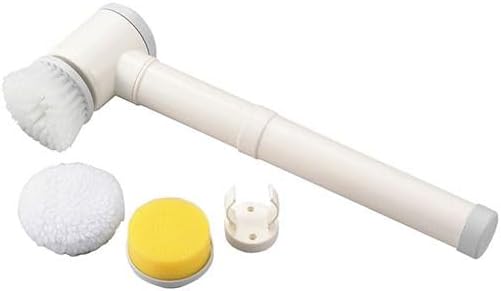
Image 1: Elett Handy Polisher and its included accessories. The main unit is white with grey accents, featuring a handle and a rotating head. Below it are a white fluffy brush, a yellow sponge brush, and a white plastic brush cover.
4. Einrichtung
4.1 Einlegen der Batterie
- Suchen Sie das Batteriefach am Hauptgerät.
- Öffnen Sie die Abdeckung des Batteriefachs.
- Insert 4 AA dry cell batteries (sold separately) according to the polarity indicators (+/-) inside the compartment.
- Schließen Sie den Batteriefachdeckel fest.
4.2 Anbringen der Bürstenköpfe
- Select the desired brush head (standard brush or sponge brush) for your cleaning task.
- Align the brush head with the rotating spindle on the main unit.
- Drücken und drehen Sie den Bürstenkopf vorsichtig, bis er sicher einrastet.
- Zum Entfernen den Bürstenkopf gegen den Uhrzeigersinn drehen und abziehen.
4.3 Anbringen des Verlängerungsgriffs
For extended reach, attach the extension handle:
- Align the end of the main unit with the opening of the extension handle.
- Push the main unit firmly into the extension handle until it locks into place.
- To detach, press the release button (if present) or twist and pull the main unit from the extension handle.
5. Bedienungsanleitung
5.1 Ein-/Ausschalten
Press the power button located on the handle of the main unit to turn the polisher ON. Press it again to turn the polisher OFF.
5.2 Reinigungsverfahren
- Ensure the correct brush head is securely attached for the surface you intend to clean.
- Apply a small amount of appropriate cleaning solution directly to the surface or to the brush head.
- Turn on the Elett Handy Polisher.
- Gently place the rotating brush head onto the surface to be cleaned. Apply light pressure and move the polisher slowly over the area.
- For stubborn stains, allow the brush to work for a few seconds before moving on.
- After cleaning, turn off the polisher and wipe the cleaned surface with a clean cloth if necessary.

Image 2: The Elett Handy Polisher in operation, demonstrating its use on a textured surface. The brush head is actively rotating, creating foam as it cleans.
5.3 Brush Head Selection Guide
| Bürstentyp | Empfohlene Verwendung |
|---|---|
| Standardbürste | General cleaning of hard surfaces like tiles, grout, sinks, and bathtubs. Effective for scrubbing away dirt and grime. |
| Schwammbürste | Gentle cleaning and polishing of delicate surfaces, or for applying cleaning solutions evenly. Suitable for glass, mirrors, and polished surfaces. |
6. Wartung und Pflege
6.1 Reinigung des Geräts
- After each use, turn off the polisher and remove the brush head.
- Wischen Sie das Hauptgerät mit adamp Tuch. Das Hauptgerät nicht unter Wasser abspülen.
- Stellen Sie sicher, dass das Gerät vor der Einlagerung vollständig trocken ist.
6.2 Reinigung der Bürstenköpfe
- Rinse the brush heads under running water to remove any cleaning solution or debris.
- For thorough cleaning, use mild soap and water.
- Allow brush heads to air dry completely before reattaching or storing.
6.3 Speicherung
Store the Elett Handy Polisher and its accessories in a cool, dry place, away from direct sunlight and moisture. If storing for an extended period, remove the batteries from the main unit.
7. Fehlerbehebung
| Problem | Mögliche Ursache | Lösung |
|---|---|---|
| Gerät lässt sich nicht einschalten. | Die Batterien sind leer oder falsch eingelegt. | Ersetzen Sie die Batterien durch neue und achten Sie dabei auf die richtige Polarität. |
| Brush head does not rotate or rotates slowly. | Low battery power; brush head not properly attached; excessive pressure applied. | Replace batteries; reattach brush head securely; reduce pressure during use. |
| Mangelhafte Reinigungsleistung. | Incorrect brush head for the task; insufficient cleaning solution; brush head is worn. | Select appropriate brush head; apply more cleaning solution; replace worn brush heads. |
8. Spezifikationen
| Besonderheit | Detail |
|---|---|
| Modellnummer | ET-07H, C6132515 |
| Abmessungen (ca.) | 6.5 × 12 × 41 cm (2.56 × 4.72 × 16.14 Zoll) |
| Material | ABS-Harz |
| Stromquelle | 4 x AA Dry Cell Batteries (nicht enthalten) |
| Ursprungsland | China |
9. Garantie und Support
This product is designed for durability and performance. For any questions regarding product operation, maintenance, or troubleshooting not covered in this manual, please contact your retailer or the point of purchase for support. Please retain your proof of purchase for warranty claims, if applicable.
Für weitere Unterstützung besuchen Sie bitte unsere website or contact our customer service department. Contact details may be found on the product packaging or the retailer's webWebsite.