
1. Einleitung
This manual provides detailed instructions for the installation, setup, and operation of your Ctronics 4K Outdoor Security Camera, model CTIPC-950 (950C-4KB). Please read this manual thoroughly before using the product to ensure proper functionality and safety. Keep this manual for future reference.
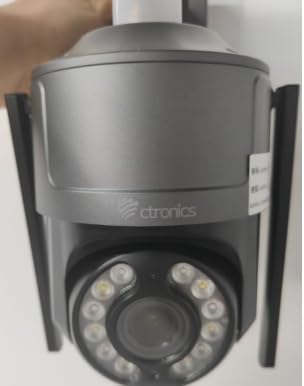
Figure 1: Ctronics 4K Outdoor Security Camera (Model CTIPC-950)
2. Produktmerkmale
- True 4K Ultra HD with Starlight Lens: Experience superior image clarity day and night. Features vivid color night vision up to 30 meters.
- Advanced AI Detection & Auto Tracking: Accurately detects humans, vehicles, and pets. Automatically tracks moving targets to minimize false alarms.
- Powerful Red & Blue Strobe Light with Siren Alarm: Deters intruders effectively with visual and audible alerts.
- 8 Preset Positions & 4 Custom Detection Zones: Configure specific camera positions for quick patrols and define areas for focused surveillance.
- Privacy Masking Feature: Protect sensitive areas by masking them from surveillance.
- Flexible Installation & Multi-Device Remote Access: Supports wall or ceiling mounting. Manage up to 36 cameras via the Ctronics app on mobile or PC, with split-screen viewing, group management, and multi-user sharing.
- Dualband-WLAN: Supports both 2.4GHz and 5GHz Wi-Fi for reliable and stable connection.
- IP66 Wetterfest: Durable metal construction ensures reliable operation in various outdoor conditions.
3. Packungsinhalt
Überprüfen Sie, ob alle Artikel im Paket vorhanden sind:
- Ctronics 4K Security Camera (CTIPC-950 / 950C-4KB)
- Bedienungsanleitung (dieses Dokument)
- Befestigungsschrauben und Dübel
- Netzteil
4. Einrichtung
4.1 Erste Inbetriebnahme und Netzwerkkonfiguration
- Strom anschließen: Plug the power adapter into the camera's power jack and then into a power outlet. The camera will power on and perform a self-test.
- Laden Sie die Ctronics-App herunter: Suchen nach "Ctronics" in your mobile device's app store (iOS or Android) and download the official application.
- Registrieren/Anmelden: Öffne die App und erstelle ein neues Konto oder melde dich mit einem bestehenden Konto an.
- Kamera hinzufügen: Tap the "+" icon in the app to add a new device. Select "Wireless Installation" or scan the QR code located on the camera body.
- Mit WLAN verbinden: Follow the on-screen prompts to connect the camera to your home's dual-band (2.4GHz or 5GHz) Wi-Fi network. Ensure your phone's volume is turned up to maximum during sound-based configuration.
Video 1: Wi-Fi Setting via Sound (S20-G model, similar process for CTIPC-950)
This video demonstrates the Wi-Fi setup process using sound configuration, which is applicable to various Ctronics camera models including the CTIPC-950. It shows how to power on the camera, open the rubber cover, and use the mobile app to connect to your home Wi-Fi network by entering the password and allowing the phone to transmit sound signals to the camera for configuration.
5. Installation
5.1 Montageort
Choose a suitable outdoor location for mounting. The camera supports both wall and ceiling installation. Ensure the chosen spot provides a clear view des Bereichs, den Sie überwachen möchten und der Zugang zu einer Stromquelle hat.
5.2 Montageschritte
- Bohrlöcher markieren: Use the provided mounting template or the camera's base to mark the positions for drilling on the wall or ceiling.
- Bohrlöcher: Drill pilot holes at the marked positions. Insert wall plugs if mounting on masonry or concrete.
- Sichern Sie die Basis: Befestigen Sie die Montagebasis der Kamera mit den mitgelieferten Schrauben an der Wand oder Decke.
- Befestigen Sie die Kamera: Befestigen Sie die Kameraeinheit sicher an der Montagebasis.
6. Bedienungsanleitung
6.1 Live View und Schwenk-/Neigesteuerung
Access the live feed through the Ctronics app. Use the on-screen controls to pan the camera horizontally up to 355° and tilt vertically up to 90° to adjust the viewing-Winkel.
Video 2: Ctronics 4K Security Camera Overview (Model 930C, similar features for CTIPC-950)
Dieses Video bietet ein Overview of a Ctronics 4K security camera, highlighting its 355° pan and 90° tilt capabilities, 4K UHD resolution, starlight lens for night vision, AI detection for humans, pets, and vehicles, and the red and blue alarm light with siren. It also shows the metal body, IP67 weatherproof rating, 24/7 recording, dual-band Wi-Fi, and cloud/SD card storage options.
6.2 KI-Erkennung und automatische Verfolgung
The camera's advanced AI can differentiate between humans, vehicles, and pets. When motion is detected, the camera can automatically track the moving object and send real-time notifications to your linked devices.
6.3 Nachtsichtmodi
Die Kamera bietet mehrere Nachtsichtoptionen:
- Farbnachtsicht: Utilizes the starlight lens to provide full-color images in low-light conditions up to 30 meters.
- Infrarot-Nachtsicht (IR): Liefert klare Schwarzweißbilder in völliger Dunkelheit.
6.4 Alarmfunktionen
Upon detection of an intruder, the camera can activate its red and blue strobe lights and a loud siren to deter unwanted visitors. You will also receive instant alerts on your mobile device.
6.5 Preset Positions and Detection Zones
Configure up to 8 preset camera positions for quick navigation to frequently monitored areas. Define up to 4 customizable motion detection zones to focus surveillance on critical areas and reduce irrelevant alerts.
6.6 Zwei-Wege-Audio
Nutzen Sie das eingebaute Mikrofon und den Lautsprecher, um direkt über die App mit Besuchern zu kommunizieren oder Eindringlinge abzuschrecken.
7. Spezifikationen
| Besonderheit | Beschreibung |
|---|---|
| Modellname | CTIPC-950 (950C-4KB) |
| Verwendung im Innen- und Außenbereich | Im Freien |
| Auflösung der Videoaufnahme | 3840 (4K UHD) |
| Effektive Standbildauflösung | 8 Megapixel |
| Nachtsichtbereich | 50 Meters (Color Night Vision up to 30m) |
| Konnektivitätstechnologie | Wireless (Dual-Band Wi-Fi: 2.4GHz, 5GHz), Ethernet, ONVIF, RTSP |
| Stromquelle | Kabelgebundenes Elektrogerät (12 Volt, 12 Watt) |
| Controllertyp | Elektronik-App |
| Montagetyp | Wandmontage, Deckenmontage |
| Internationale Schutzbewertung | IP66 (wetterfest) |
| Material | Metall |
| Artikelabmessungen (L x B x H) | 5.91 x 5.91 x 5.91 Zoll |
| Artikelgewicht | 2.2 Pfund |
| Speicheroptionen | Micro SD (up to 256GB), FTP, NAS, Cloud Storage |
8. Wartung
- Regelmäßige Reinigung: Reinigen Sie das Kameraobjektiv und das Gehäuse regelmäßig mit einem weichen Tuch.amp Für eine klare Bildqualität ein Tuch verwenden. Keine scharfen Chemikalien verwenden.
- Firmware-Updates: Check the Ctronics app regularly for firmware updates to ensure optimal performance and security.
- Überprüfung der Stromversorgung: Vergewissern Sie sich, dass Netzteil und Kabel unbeschädigt und ordnungsgemäß angeschlossen sind.
- Netzwerkstabilität: Verify your Wi-Fi network is stable to maintain continuous camera operation.
9. Fehlerbehebung
- Kamera stellt keine Verbindung zum WLAN her:
- Stellen Sie sicher, dass sich die Kamera in Reichweite Ihres WLAN-Routers befindet.
- Überprüfen Sie, ob das WLAN-Passwort korrekt ist.
- Versuchen Sie, die Kamera und Ihren Router neu zu starten.
- Ensure your router supports 2.4GHz or 5GHz bands and that the camera is attempting to connect to the correct band.
- Schlechte Bildqualität:
- Reinigen Sie das Kameraobjektiv.
- Überprüfen Sie Ihre Netzwerkverbindungsgeschwindigkeit. Eine langsame Verbindung kann die Streaming-Qualität beeinträchtigen.
- Stellen Sie sicher, dass keine Hindernisse die Sicht der Kamera blockieren. view.
- Falscher Alarm:
- Passen Sie die Empfindlichkeitseinstellungen für die Bewegungserkennung in der App an.
- Configure detection zones to exclude areas with frequent irrelevant motion (e.g., moving trees).
- Ensure AI detection for humans/vehicles/pets is enabled to filter out other movements.
- Kein Strom:
- Check if the power adapter is securely plugged into both the camera and the power outlet.
- Testen Sie die Steckdose mit einem anderen Gerät, um sicherzustellen, dass sie funktionsfähig ist.
10. Garantie und Support
Your Ctronics 4K Outdoor Security Camera is covered by a manufacturer's warranty. For specific warranty terms and conditions, please refer to the documentation included with your purchase or visit the official Ctronics website. For technical support, troubleshooting assistance, or any product-related inquiries, please contact Ctronics customer service through the contact information provided on their webauf der Website oder innerhalb der Ctronics-App.