
JIGOO C200
JIGOO C200 Akku-Staubsauger – Benutzerhandbuch
Modell: C200
Marke: JIGOO
1. Einleitung
This manual provides essential information for the safe and efficient operation, maintenance, and troubleshooting of your JIGOO C200 Cordless Vacuum Cleaner. Please read this manual thoroughly before first use and retain it for future reference.
The JIGOO C200 is a versatile, lightweight, and powerful cordless vacuum designed for multi-surface cleaning. It features strong suction, an anti-tangle brush, and a multi-stage filtration system to effectively clean various floor types and capture fine particles.

Image: The JIGOO C200 Cordless Vacuum Cleaner, shown fully assembled in its upright stick configuration.
2. Wichtige Sicherheitshinweise
Beim Gebrauch von Elektrogeräten sollten immer grundlegende Vorsichtsmaßnahmen beachtet werden, darunter die folgenden:
- Lesen Sie vor der Verwendung des Geräts alle Anweisungen.
- Nicht im Freien oder auf nassen Oberflächen verwenden.
- Nicht als Spielzeug verwenden. Bei Verwendung durch oder in der Nähe von Kindern ist besondere Vorsicht geboten.
- Verwenden Sie das Produkt nur wie in dieser Anleitung beschrieben. Verwenden Sie ausschließlich die vom Hersteller empfohlenen Anbauteile.
- Nicht mit beschädigtem Kabel oder Stecker verwenden. Wenn das Gerät nicht ordnungsgemäß funktioniert, heruntergefallen ist, beschädigt wurde, im Freien liegen gelassen wurde oder ins Wasser gefallen ist, bringen Sie es zu einem Servicecenter.
- Ziehen oder tragen Sie das Gerät nicht am Kabel, verwenden Sie das Kabel nicht als Griff, schließen Sie keine Türen am Kabel und ziehen Sie das Kabel nicht um scharfe Kanten oder Ecken. Fahren Sie nicht mit dem Gerät über das Kabel. Halten Sie das Kabel von heißen Oberflächen fern.
- Ziehen Sie den Stecker nicht am Kabel, sondern fassen Sie ihn am Stecker und nicht am Kabel an.
- Fassen Sie Stecker oder Gerät nicht mit nassen Händen an.
- Stecken Sie keine Gegenstände in die Öffnungen. Verwenden Sie das Gerät nicht, wenn die Öffnungen blockiert sind. Halten Sie das Gerät frei von Staub, Flusen, Haaren und allem, was den Luftstrom beeinträchtigen könnte.
- Halten Sie Haare, lose Kleidung, Finger und alle Körperteile von Öffnungen und beweglichen Teilen fern.
- Heben Sie keine brennenden oder rauchenden Gegenstände auf, z. B. Zigaretten, Streichhölzer oder heiße Asche.
- Nicht zum Aufsaugen von entzündlichen oder brennbaren Flüssigkeiten (z. B. Benzin) verwenden oder in Bereichen verwenden, wo diese vorhanden sein können.
- Giftige Stoffe wie Chlorbleiche, Ammoniak oder Abflussreiniger dürfen nicht aufgesammelt werden.
- Nicht ohne Staubbeutel und/oder Filter verwenden.
- Schalten Sie alle Bedienelemente aus, bevor Sie den Stecker ziehen.
- Seien Sie beim Reinigen von Treppen besonders vorsichtig.
- Nicht zum Aufheben harter oder scharfer Gegenstände wie Glas, Nägel, Schrauben, Münzen usw. verwenden.
- Unbeabsichtigtes Anlaufen verhindern. Stellen Sie sicher, dass sich der Schalter in der Aus-Position befindet, bevor Sie das Gerät hochheben oder tragen.
- Laden Sie nur mit dem vom Hersteller angegebenen Ladegerät auf.
- Bei unsachgemäßer Handhabung kann Flüssigkeit aus der Batterie austreten. Vermeiden Sie den Kontakt. Bei versehentlichem Kontakt mit Wasser spülen. Wenn Flüssigkeit in die Augen gelangt, suchen Sie zusätzlich ärztliche Hilfe auf.
3. Packungsinhalt
Bitte überprüfen Sie den Inhalt Ihres Pakets, um sicherzustellen, dass alle Artikel vorhanden und unbeschädigt sind:
- Main Vacuum Body (with dustbin and motor)
- Herausnehmbarer Akku
- PostureProtect Telescopic Tube (Extension Wand)
- Zero-Tangle PowerFin Brush Head
- Ladeadapter
- Motorized Mattress Brush
- 360° Crevice Tool
- Soft Dusting Head
- Wandhalterung mit Schrauben
- Benutzerhandbuch (dieses Dokument)
4. Montage und Einrichtung
4.1 Zusammenbau des Staubsaugers
- Bringen Sie den Verlängerungsstab an: Insert the top end of the PostureProtect Telescopic Tube into the main vacuum body until it clicks securely into place.
- Anbringen des Bürstenkopfes: Insert the bottom end of the extension wand into the Zero-Tangle PowerFin Brush Head until it clicks securely.
- Installieren Sie die Batterie: Slide the removable battery pack into the slot on the main vacuum body until it locks. Ensure it is fully seated.
4.2 Laden des Akkus
Before first use, fully charge the battery. A full charge typically takes approximately 4-5 hours.
- Connect the charger adapter to the charging port on the battery pack or directly to the main vacuum body if the battery is installed.
- Plug the charger into a wall outlet. The LCD display will indicate charging status.
- Sobald der Akku vollständig geladen ist, ziehen Sie den Stecker des Ladegeräts.
4.3 Wandmontage (optional)
The JIGOO C200 features a self-standing design, but a wall mount is included for convenient storage.
- Choose a suitable location near a power outlet, ensuring it is clear of obstructions.
- Mark the drilling points for the wall mount bracket using a pencil.
- Drill holes and insert wall anchors if necessary (for drywall).
- Befestigen Sie die Wandhalterung mit den mitgelieferten Schrauben an der Wand.
- Hang the vacuum on the mounted bracket for storage and charging.
5. Bedienungsanleitung
5.1 Ein-/Ausschalten und Saugmodi
- Einschalten: Press the power button on the main vacuum body to start the vacuum.
- Saugleistung einstellen: Use the mode selection button (one-touch pedal control) to switch between hard floor mode (standard suction) and carpet boost mode (max suction). The LCD display will show the current mode and remaining runtime.
- Ausschalten: Drücken Sie den Netzschalter erneut, um den Staubsauger auszuschalten.
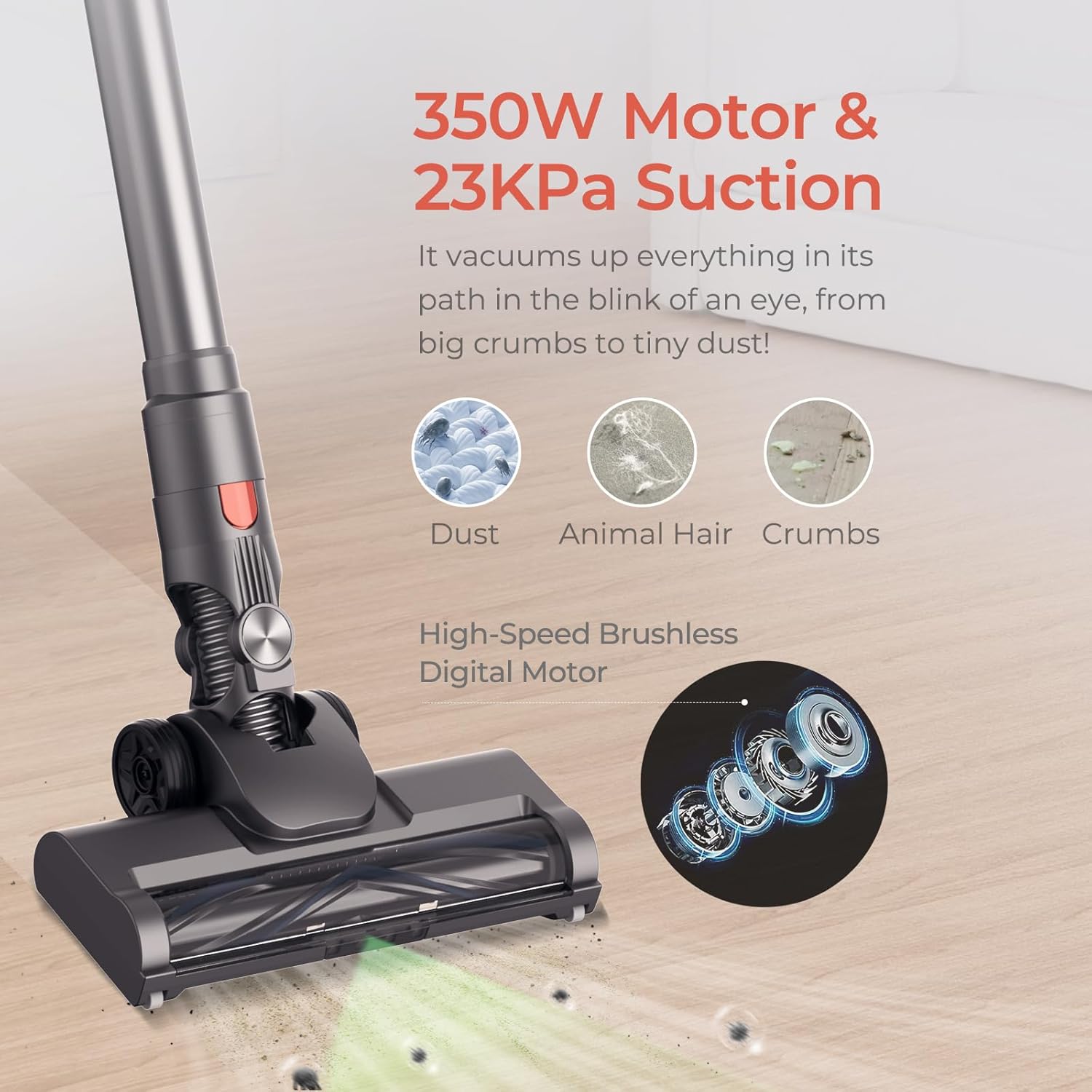
Image: Illustration of the JIGOO C200's powerful 350W motor and 23KPa suction, effectively cleaning dust, animal hair, and crumbs from a floor surface.
5.2 Anhänge verwenden
The JIGOO C200 comes with various attachments for specialized cleaning tasks:
- Zero-Tangle PowerFin Brush Head: Ideal for both hard floors and carpets. Its flexible silicone fins and guide teeth prevent hair tangling.
- Motorized Mattress Brush: For deep cleaning upholstery, mattresses, and pet beds.
- 360° Crevice Tool: Excellent for reaching tight spaces, corners, and edges.
- Soft Dusting Head: Gentle cleaning for delicate surfaces, shelves, and electronics.

Image: The JIGOO C200's Motorized Turbo Brush Head shown effectively cleaning both hard flooring and carpet, highlighting its versatility.
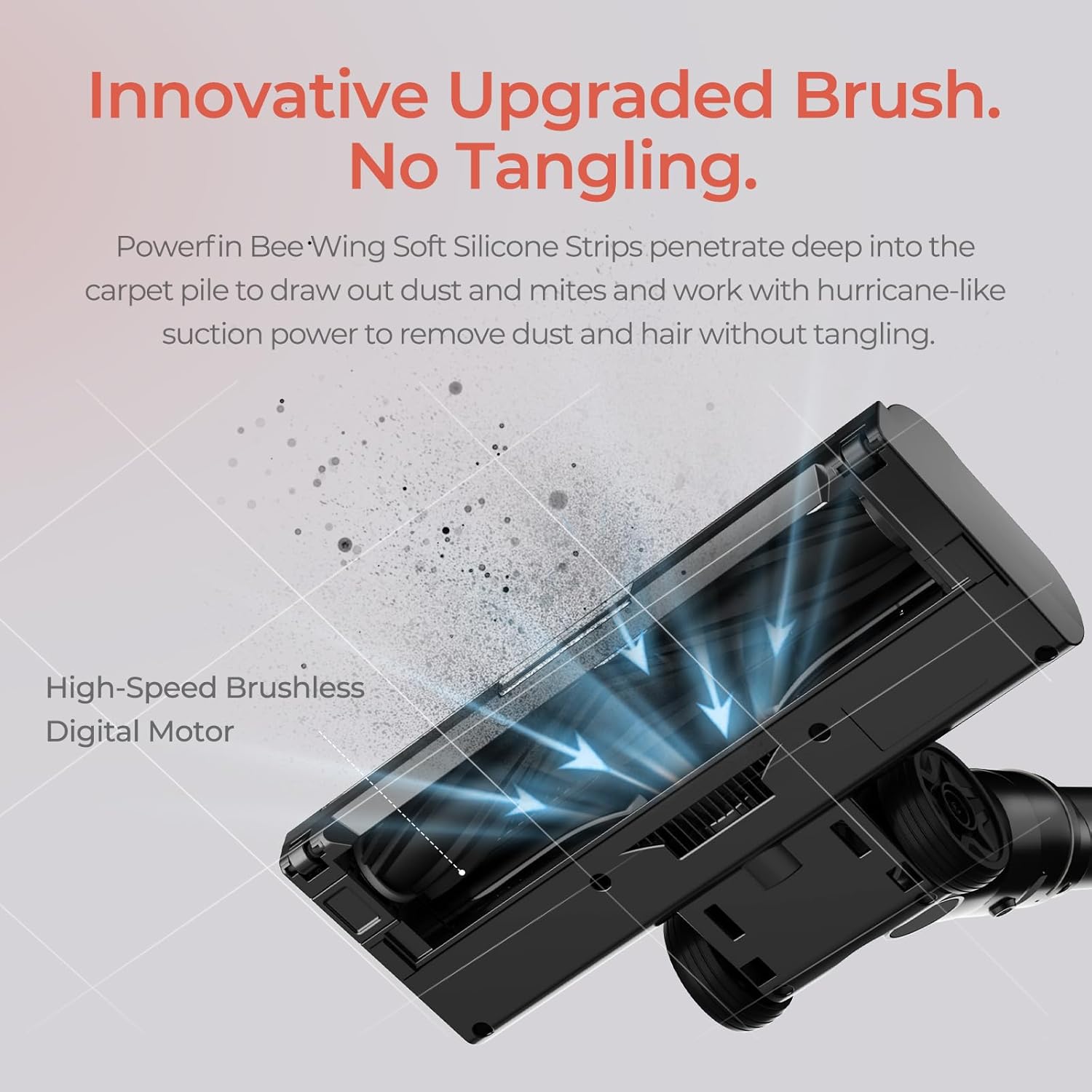
Bild: Eine detaillierte view of the JIGOO C200's innovative brush, featuring Powerfin Bee-Wing Soft Silicone Strips designed to prevent hair tangling during operation.
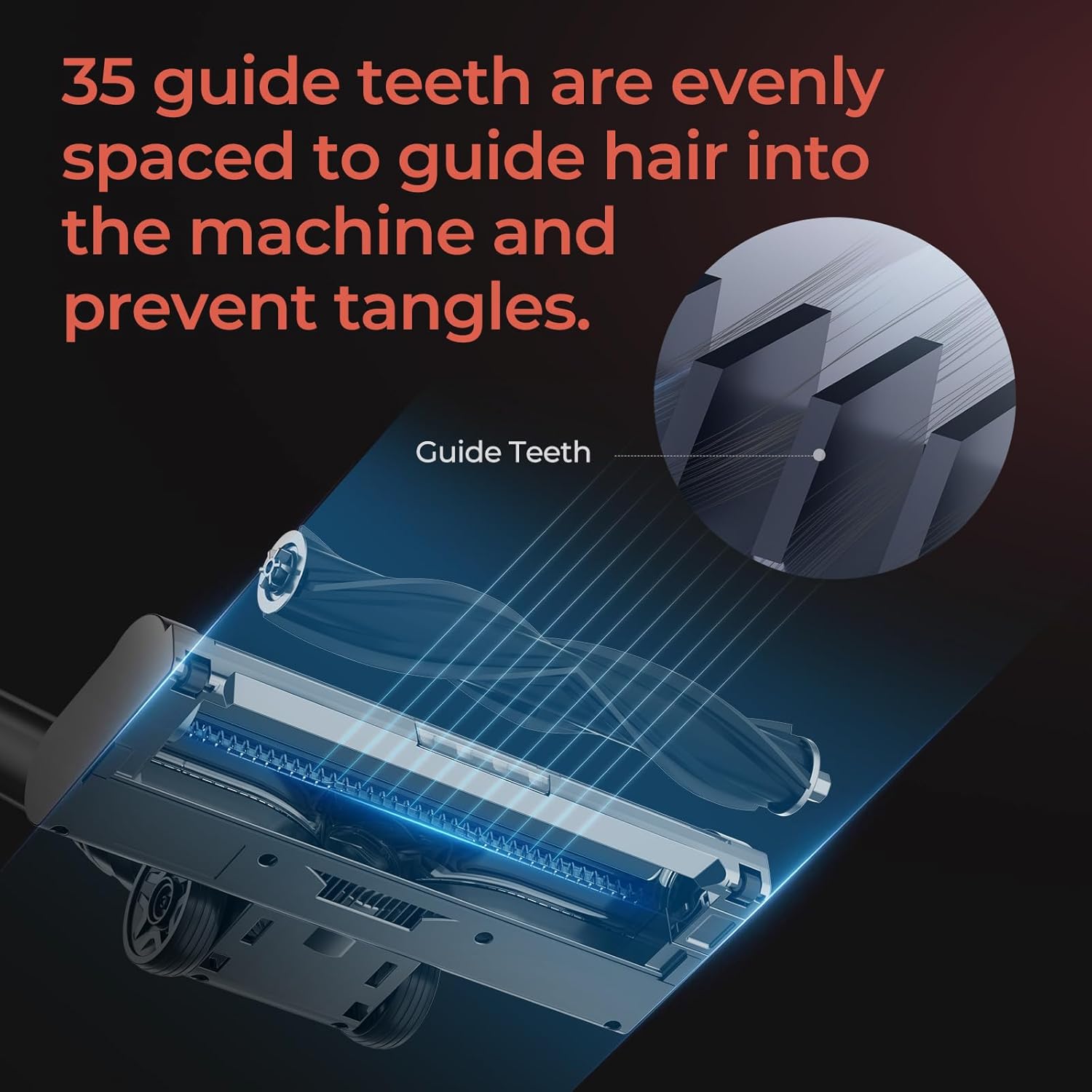
Image: A diagram illustrating the 35 evenly spaced guide teeth on the JIGOO C200's brush head, engineered to direct hair into the machine and prevent tangles.
To attach an accessory, simply remove the main brush head or extension wand and insert the desired tool until it clicks into place. To remove, press the release button and pull the tool off.
5.3 Den Mülleimer leeren
Empty the dustbin regularly to maintain optimal suction performance. The anti-clog Multi-Cone Cyclonic Tech helps maintain airflow even when the dustbin is full.
- Stellen Sie sicher, dass der Staubsauger ausgeschaltet ist.
- Suchen Sie den Entriegelungsknopf für den Staubbehälter am Hauptteil des Staubsaugers.
- Drücken Sie den Knopf, um den Abfallbehälter abzunehmen.
- Position the dustbin over a trash can and open the bottom flap to release debris.
- Close the flap and reattach the dustbin to the main vacuum body until it clicks.
6. Wartung
Regular maintenance ensures the longevity and optimal performance of your JIGOO C200 vacuum.
6.1 Filterreinigung und -austausch
The JIGOO C200 features a 5-stage sealed HEPA filtration system. Clean filters regularly to prevent suction loss.

Image: An exploded diagram illustrating the JIGOO C200's 5-stage filtration system, detailing its components including the Sponge Filter, HEPA Filter, Stainless Steel Honeycomb Filter, Dust Separation Technology, and Cyclone Centrifugation Technology.
- Zugriffsfilter: Detach the dustbin. The filters are located inside the dustbin assembly.
- Filter reinigen: Remove the sponge filter, HEPA filter, and stainless steel honeycomb filter. Tap them gently over a trash can to remove loose dust. For thorough cleaning, rinse them under cold running water.
- Trockenfilter: Lassen Sie alle Filterkomponenten vor dem Zusammenbau mindestens 24 Stunden lang vollständig an der Luft trocknen. Verwenden Sie keinen Trockner oder direkte Hitze.
- Zusammenbauen: Once completely dry, reassemble the filters in the correct order and reattach the dustbin.
- Ersatz: Filters should be replaced every 3-6 months depending on usage, or if they show signs of wear or damage.
6.2 Reinigung der Bürstenwalze
Although designed to be tangle-free, occasional cleaning of the brush roll may be necessary.
- Ensure the vacuum is turned off and detached from the extension wand.
- Locate the brush roll release mechanism on the side of the brush head.
- Entfernen Sie die Bürstenrolle.
- Use scissors or a cleaning tool to remove any tangled hair or debris from the brush roll and its housing.
- Setzen Sie die Bürstenwalze wieder ein und befestigen Sie sie.
6.3 Batteriepflege
- Store the vacuum and battery in a cool, dry place.
- Setzen Sie den Akku keinen extremen Temperaturen aus.
- Bei längerer Lagerung sollte der Akku vor der Einlagerung auf etwa 50 % aufgeladen werden.
7. Fehlerbehebung
If you encounter issues with your JIGOO C200, please refer to the following common problems and solutions:
| Problem | Mögliche Ursache | Lösung |
|---|---|---|
| Der Staubsauger lässt sich nicht einschalten. | Die Batterie ist nicht geladen oder nicht richtig eingesetzt. | Stellen Sie sicher, dass der Akku vollständig geladen und sicher eingerastet ist. |
| Geringe Saugleistung. | Dustbin is full; Filters are clogged; Blockage in nozzle, wand, or hose. | Empty dustbin. Clean or replace filters. Check for and remove any blockages. |
| Die Bürstenwalze dreht sich nicht. | Brush roll is tangled with hair or debris; Brush head is not properly attached. | Clean the brush roll. Ensure the brush head is securely attached to the wand. |
| Der Staubsauger schaltet sich während des Gebrauchs plötzlich ab. | Batterie leer; Überhitzungsschutz aufgrund einer Blockierung aktiviert. | Recharge the battery. Check for and clear any blockages, then allow the unit to cool down. |
If the problem persists after attempting these solutions, please contact JIGOO customer support.
8. Spezifikationen
- Marke: JIGOO
- Modellname: C200
- Besonderheit: HEPA-Filterung
- Filtertyp: HEPA-Filter
- Kabellos: Ja
- Farbe: Grau
- Produktabmessungen: 17.5 Zoll L x 7.5 Zoll B x 10 Zoll H
- Artikelgewicht: 23.5 Pfund
- Laufzeit: Up to 40 minutes (with 2000mAh HyperCore cell)
- Saugleistung: 220AW (HyperSuction)
- Motor: Bürstenlos
9. Garantie und Support
9.1 Garantieinformationen
The JIGOO C200 Cordless Vacuum is backed by a 2 Jahre Sorglos-Garantie. This warranty covers motor and battery issues. Please retain your proof of purchase for warranty claims.
9.2 Kundendienst
Bei Fragen, technischem Support oder Garantieansprüchen nutzen Sie bitte die folgenden Ressourcen:
- Online-Hilfezentrum: Access our 24/7 online help center which includes video guides for common issues.
- E-Mail-Support: Contact our specialists for email responses, typically within 12 hours.
- Refer to the JIGOO official webFür konkrete Kontaktdaten besuchen Sie bitte die Website oder Ihre Einkaufsplattform.
Ask a question about this manual
Ask about setup, troubleshooting, compatibility, parts, safety, or missing instructions. Manuals+ will review the question and use this page’s manual context to help answer it.