
Einführung
Thank you for choosing the MYSTILUCK Wireless Controller. This controller is designed to provide a versatile and enhanced gaming experience across multiple platforms, including PlayStation 5, PC (Windows 10 and above), Mac, iOS, Android, and Steam Deck. This manual provides detailed instructions for setup, operation, maintenance, and troubleshooting to ensure optimal performance.

Image: The MYSTILUCK Wireless Controller, featuring a black finish with colorful LED accents around the joysticks, touchpad, and button outlines.
Aufstellen
Packungsinhalt
- MYSTILUCK Wireless-Controller
- USB-Ladekabel
- USB Wireless Adapter (for certain connections)
- Bedienungsanleitung
Aufladen des Controllers
The controller comes with a built-in 1500mAh rechargeable battery. Before first use, fully charge the controller. Connect the supplied USB charging cable to the controller's USB-C port and the other end to a compatible USB power source (e.g., console, PC, USB wall adapter). The LED indicator will show charging status and turn off or change color when fully charged.
Mit Geräten verbinden
The MYSTILUCK Wireless Controller supports multiple connection methods depending on the device.

Image: A graphic illustrating the MYSTILUCK Wireless Controller's compatibility with PS5, PC, Mac, Steam Deck, Android, and iOS devices.
- PlayStation 5: Turn on your PS5 console. Connect the controller to the PS5 using the USB charging cable. Press the PS button on the controller. Once paired, you can disconnect the cable for wireless play.
- PC (Windows 10 und höher):
- Drahtlos (Bluetooth): Ensure your PC has Bluetooth enabled. On the controller, press and hold the Share button and PS button simultaneously until the light bar flashes. On your PC, go to Bluetooth settings, search for new devices, and select the controller.
- Wireless (USB Adapter): Plug the USB wireless adapter into an available USB port on your PC. The controller should automatically connect.
- Verdrahtet: Connect the controller directly to your PC using the USB charging cable. The PC should recognize it automatically.
- Mac: On the controller, press and hold the Share button and PS button simultaneously until the light bar flashes. On your Mac, go to System Preferences > Bluetooth, search for new devices, and select the controller.
- iOS/Android: On the controller, press and hold the Share button and PS button simultaneously until the light bar flashes. On your mobile device, enable Bluetooth, search for new devices, and select the controller.
- Dampfdeck: On the controller, press and hold the Share button and PS button simultaneously until the light bar flashes. On your Steam Deck, go to Bluetooth settings, search for new devices, and select the controller.
Bedienung des Controllers
Button Layout and Basic Functions
The MYSTILUCK Wireless Controller features a standard layout with several enhanced functionalities:
- D-Pad: Richtungseingang.
- Aktionsschaltflächen (Dreieck, Kreis, Kreuz, Quadrat): Primary game input.
- Linker/Rechter Analog-Joystick: Präzise Bewegungs- und Kamerasteuerung.
- L1/R1 (Stoßstangen): Secondary action buttons.
- L2/R2 (Trigger): Analoger Eingang für Beschleunigung, Bremsung oder Schussabgabe.
- PS-Taste (Home): Access system menus, power on/off.
- Teilen Knopf: Teile Gameplay-Inhalte.
- Optionsschaltfläche: Zugriff auf die Spielmenüs.
- Touchpad: Multi-touch input for navigation and specific game functions.
- 3.5mm Kopfhörerbuchse: Für Audioausgabe und Mikrofoneingang.
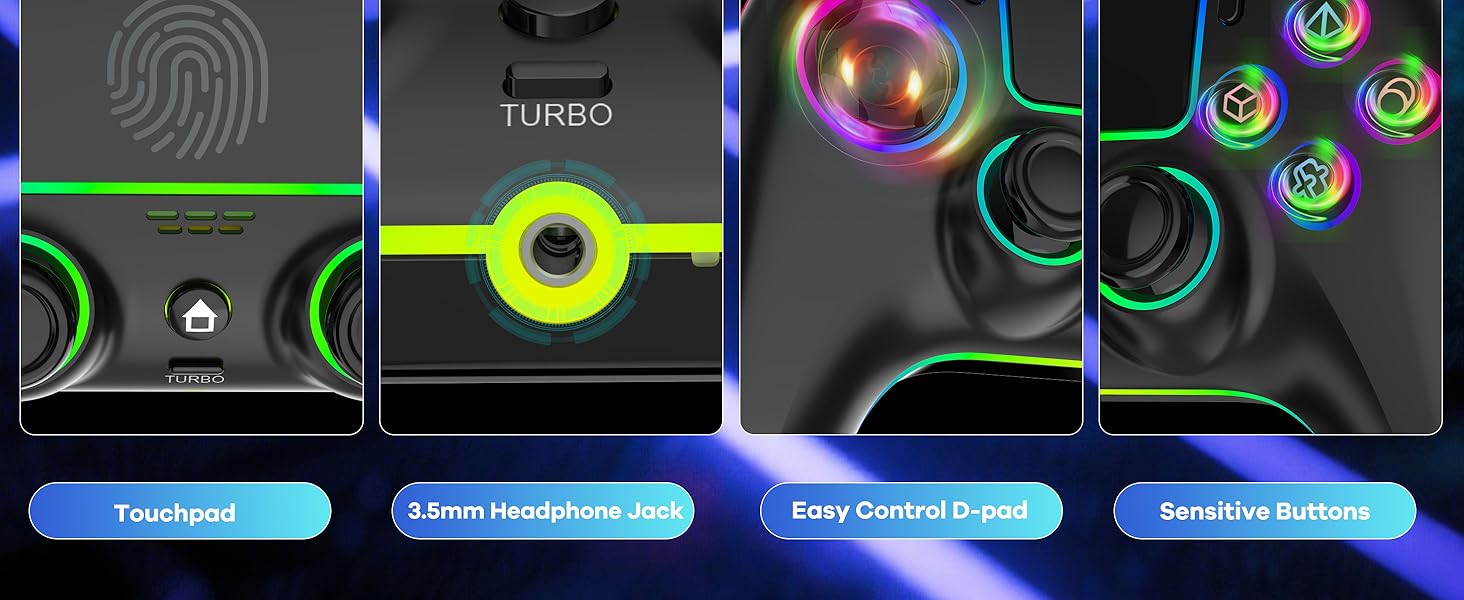
Bild: Eine detaillierte view highlighting the touchpad, 3.5mm headphone jack, D-pad, and responsive action buttons of the controller.
Erweiterte Funktionen
- Hall-Effekt-Joysticks: These joysticks utilize magnetic sensors instead of physical contacts, significantly reducing wear and tear, eliminating stick drift, and providing enhanced precision and durability.
- Auslöser des Hall-Effekts: Similar to the joysticks, the triggers use Hall Effect technology for precise and consistent input, offering a response time of less than 0.1ms.
- Doppelte Vibration: Experience immersive haptic feedback with dual vibration motors that respond to in-game actions.
- 6-Achsen-Gyroskop: Built-in motion sensors provide precise control for games that support tilt and motion input.
- Programmable Keys (M1/M2): The controller features two programmable back buttons (M1 and M2) for custom key mapping. Refer to the quick start guide for specific programming instructions.
- Turbofunktion: Activate rapid-fire for specific buttons. To activate, press and hold the desired button, then press the 'Turbo' button. Repeat the process to deactivate.
- LED-Beleuchtungsmodi: The controller features 7 colors of lighting and 4 LED modes. Consult the quick start guide for instructions on how to cycle through colors and modes.

Image: An X-ray style diagram illustrating the internal mechanism of the Hall Effect Joysticks, emphasizing the magnetic sensing technology.

Abbildung: Eine Schnittzeichnung view of the controller's trigger mechanism, highlighting the Hall Effect sensor for improved responsiveness.

Image: A visual representation of the controller's dual vibration feature and its 1500mAh battery capacity.

Image: A graphic highlighting the 6-axis gyroscope and the location of the two programmable back keys (M1, M2) on the controller.

Image: Four MYSTILUCK Wireless Controllers, each illuminated with different LED colors, demonstrating the customizable lighting options.
Wartung
- Reinigung: Reinigen Sie den Controller mit einem weichen, trockenen Tuch. Bei hartnäckigem Schmutz leicht andrücken.ampBefeuchten Sie das Tuch mit Wasser oder einer milden Reinigungslösung. Vermeiden Sie scharfe Chemikalien oder scheuernde Materialien.
- Lagerung: Bewahren Sie den Controller an einem kühlen, trockenen Ort fern von direkter Sonneneinstrahlung und extremen Temperaturen auf.
- Batteriepflege: Um die Batterielebensdauer zu verlängern, sollte der Controller nicht häufig vollständig entladen werden. Bei längerer Lagerung sollte der Akku alle paar Monate auf etwa 50 % aufgeladen werden.
Fehlerbehebung
- Controller Not Connecting/Disconnecting Frequently:
- Stellen Sie sicher, dass der Controller vollständig aufgeladen ist.
- Re-pair the controller with your device (refer to the 'Connecting to Devices' section).
- Stellen Sie sicher, dass keine anderen drahtlosen Geräte Störungen verursachen.
- Try connecting the controller via a wired connection to rule out wireless issues.
- Ladeprobleme:
- Verify the USB charging cable is securely connected to both the controller and the power source.
- Versuchen Sie es mit einem anderen USB-Anschluss oder Netzteil.
- Stellen Sie sicher, dass das Ladekabel nicht beschädigt ist.
- Buttons Unresponsive or Turbo Function Stuck:
- Perform a controller reset. Locate the small reset button on the back of the controller (often in a small pinhole). Use a thin object (like a paperclip) to press and hold the button for 3-5 seconds.
- Stellen Sie sicher, dass die Firmware des Controllers auf dem neuesten Stand ist (siehe Herstellerangaben). webWebsite für Aktualisierungen).
- Stick Drift: The MYSTILUCK controller features Hall Effect Joysticks designed to prevent stick drift. If you experience any issues, perform a controller reset. If the problem persists, contact customer support.
Technische Daten
| Modellnummer | B0F1MKBDPT |
| Hersteller | MYSTILUCK |
| Konnektivität | Wireless (Bluetooth/USB Adapter), Wired (USB-C) |
| Kompatibilität | PS5, PC (Windows 10+), Mac, iOS, Android, Steam Deck |
| Batterie | 1500 mAh (im Lieferumfang enthalten) |
| Artikelgewicht | 10.9 Unzen (ca. 309 Gramm) |
| Verpackungsabmessungen | 6.42 x 4.37 x 2.95 Zoll (ca. 16.3 x 11.1 x 7.5 cm) |
| Besondere Merkmale | Hall Effect Joysticks & Triggers, Dual Vibration, 6-Axis Gyroscope, Programmable Back Buttons, Customizable LED Lighting, Touchpad, 3.5mm Headphone Jack |
Garantie und Support
Garantieinformationen
MYSTILUCK products are manufactured to high-quality standards. For specific warranty details, including coverage period and terms, please refer to the warranty card included with your product or visit the official MYSTILUCK webBewahren Sie Ihren Kaufbeleg für Garantieansprüche auf.
Kundenservice
If you encounter any issues or have questions not covered in this manual, please contact MYSTILUCK customer support. Contact information can typically be found on the product packaging, the official MYSTILUCK webWebsite oder über die Supportkanäle Ihres Händlers.