
1. Einleitung
Thank you for choosing the Sunffice Wireless Bluetooth 5.3 Earbuds. This manual provides essential information for setting up, operating, and maintaining your new earbuds and charging case. Please read it carefully to ensure optimal performance and longevity of your device.
2. Packungsinhalt
Bitte überprüfen Sie, ob alle unten aufgeführten Artikel in Ihrem Paket enthalten sind:
- Sunffice Wireless Bluetooth Earbuds (Left and Right)
- LED Touch Screen Charging Case
- USB-Ladekabel (Typ-C)
- Bedienungsanleitung

Image: Contents of the Sunffice Earbuds package, including the earbuds, charging case, USB cable, and user manual.
3. Produktüberschreitungview
Familiarize yourself with the components of your Sunffice Wireless Earbuds and Charging Case.

Image: The Sunffice Wireless Earbuds placed in their charging case, showcasing the LED touch screen.
Image: Detailed diagram illustrating the various components of the earbuds and charging case, including the flashlight, USB interface, Type-C port, earplug, charging port, left/right charging compartments, magnetic edge, charging compartment cover, screen off button, multi-functional screen, time display, and battery levels for both earbuds and the charging case.
- Ohrhörer: In-ear design with touch control.
- Ladekoffer: Features a full-color LED touch screen, USB-A output for phone charging, and a Type-C input for charging the case.
- LED-Touchscreen: Displays date, time, battery levels, Bluetooth connection status, and provides access to various functions like music control, equalizer, illumination, camera trigger, alarm, volume adjustment, and games.
4. Einrichtung
4.1 Charging the Charging Case and Earbuds
Vor dem ersten Gebrauch Ladecase und Ohrhörer vollständig aufladen.
- Connect the provided Type-C USB cable to the charging port on the case and a power source.
- The LED screen will indicate the charging status.
- Place the earbuds into their respective slots in the charging case. They will automatically begin charging.
The 5000mAh charging case can charge the earbuds approximately 4-5 times, providing extended listening time. The case can also be used as a power bank to charge your phone.

Image: The Sunffice charging case connected to a laptop, illustrating the charging process for the case itself.
4.2 Bluetooth-Kopplung
Die Ohrhörer nutzen Bluetooth 5.3 für eine schnelle und stabile Verbindung.
- Öffnen Sie das Ladeetui. Die Ohrhörer wechseln automatisch in den Kopplungsmodus.
- Aktivieren Sie auf Ihrem Gerät (Smartphone, Tablet, Laptop) Bluetooth und suchen Sie nach verfügbaren Geräten.
- Select "Bluetooth Earbuds" (or similar name) from the list to connect.
- Nach der ersten Kopplung verbinden sich die Ohrhörer zukünftig automatisch mit Ihrem Gerät, sobald Sie sie aus dem Ladecase nehmen.

Image: A smartphone displaying its Bluetooth settings, showing a successful connection to the earbuds, labeled as 'A98 TWS'.
5. Bedienungsanleitung
5.1 LED Touch Screen Functions
The charging case features an intelligent LED touch screen for various controls and information.

Image: The LED touch screen of the charging case displaying various functions, including music control, system settings, calculator, stopwatch, equalizer, and lock screen wallpaper options.
- Uhrzeit und Datum: Check current date and time.
- Batteriestand: View battery status of both earbuds and the charging case.
- Musiksteuerung: Wiedergabe, Pause, Titel überspringen und Lautstärke direkt über den Bildschirm anpassen.
- Equalizer: Select different audio profiles (e.g., Pop, Rock, Class, Jazz, Rural, Normal).
- Beleuchtung: Control lighting features (if applicable).
- Kameraauslöser: Als Fernauslöser für die Kamera Ihres Telefons verwenden.
- Alarm: Stellen Sie Wecker ein.
- Spiele: Access built-in games.
- Taschenlampe: Aktivieren Sie die eingebaute Taschenlampe.
5.2-Ohrhörer-Touch-Steuerung
The earbuds feature touch-sensitive areas for controlling playback and calls. Specific functions can often be customized via a mobile application (if available).
- Einmaliges Tippen: Musik abspielen/pausieren, Anruf annehmen/beenden.
- Doppeltippen: Nächster Titel (rechter Ohrhörer), Vorheriger Titel (linker Ohrhörer).
- Dreifacher Tipp: Sprachassistent aktivieren.
- Lange drücken: Reject call, Switch between Noise Cancellation/Transparency modes (if applicable).
5.3 Charging Your Phone with the Case
The charging case can act as a portable power bank for your mobile phone.
- Connect your phone's charging cable to the USB-A output port on the charging case.
- The charging case will begin to charge your phone.
Video: This video demonstrates the various features of the Sunffice Wireless Earbuds and Charging Case, including unboxing, navigating the touch screen for games and calculators, and using the charging case to charge a smartphone. It also shows the flashlight function.
6. Wartung
Um die Langlebigkeit und optimale Leistung Ihrer Ohrhörer zu gewährleisten, beachten Sie bitte folgende Pflegehinweise:
- Reinigung: Reinigen Sie die Ohrhörer und das Ladecase regelmäßig mit einem weichen, trockenen und fusselfreien Tuch. Vermeiden Sie die Verwendung von scharfen Chemikalien oder scheuernden Materialien.
- Wasserbeständigkeit: The earbuds feature IPX waterproof coating technology, protecting them from sweat and rain. However, they are not designed for submersion in water. Do not use them while swimming or showering.
- Lagerung: Bewahren Sie die Ohrhörer bei Nichtgebrauch im Ladecase auf, um sie zu schützen und geladen zu halten. Lagern Sie sie an einem kühlen, trockenen Ort und schützen Sie sie vor extremen Temperaturen.
- Laden: Verwenden Sie ausschließlich das mitgelieferte Ladekabel oder ein zertifiziertes gleichwertiges Kabel. Vermeiden Sie Überladung.

Image: Sunffice earbuds with water droplets, illustrating their water-resistant design suitable for sports activities.
7. Fehlerbehebung
Sollten Sie Probleme mit Ihren Ohrhörern haben, beachten Sie bitte die folgenden gängigen Lösungsansätze:
- Kein Ton: Stellen Sie sicher, dass die Ohrhörer aufgeladen und ordnungsgemäß gekoppelt sind und die Lautstärke sowohl an den Ohrhörern als auch an Ihrem verbundenen Gerät aufgedreht ist.
- Kopplung fehlgeschlagen: Make sure Bluetooth is enabled on your device and the earbuds are in pairing mode. Try turning Bluetooth off and on again on your device, or resetting the earbuds (refer to manufacturer's web(falls erforderlich, finden Sie auf der Website spezifische Anweisungen zum Zurücksetzen).
- Intermittierende Verbindung: Ensure you are within the Bluetooth range (up to 10 meters) and there are no significant obstructions between the earbuds and your device.
- Ladeprobleme: Check that the charging cable is securely connected and the power source is active. Clean the charging contacts on both the earbuds and the case.
- Touchscreen reagiert nicht: Ensure the screen is clean and dry. Try restarting the charging case by holding the screen off button (if available) or allowing the battery to drain and recharge.
8. Spezifikationen
| Besonderheit | Spezifikation |
|---|---|
| Modellname | Wireless Bluetooth Earbuds with charging case |
| Bluetooth-Version | 5.3 |
| Bluetooth-Reichweite | 10 Meter |
| Akkulaufzeit der Ohrhörer | Ca. 5 Stunden |
| Kapazität des Ladegehäuses | 5000mAh (approx. 4-5 earbud charges) |
| Wasserbeständigkeit | Water Resistant (IPX) |
| Steuerungstyp | Touch-Steuerung |
| Kompatible Geräte | Cellphones, Laptops, Music Production Equipment, Smart Speaker, Tablets |
| Artikelgewicht | 100 Gramm (3.53 Unzen) |
| Material | Plastik |
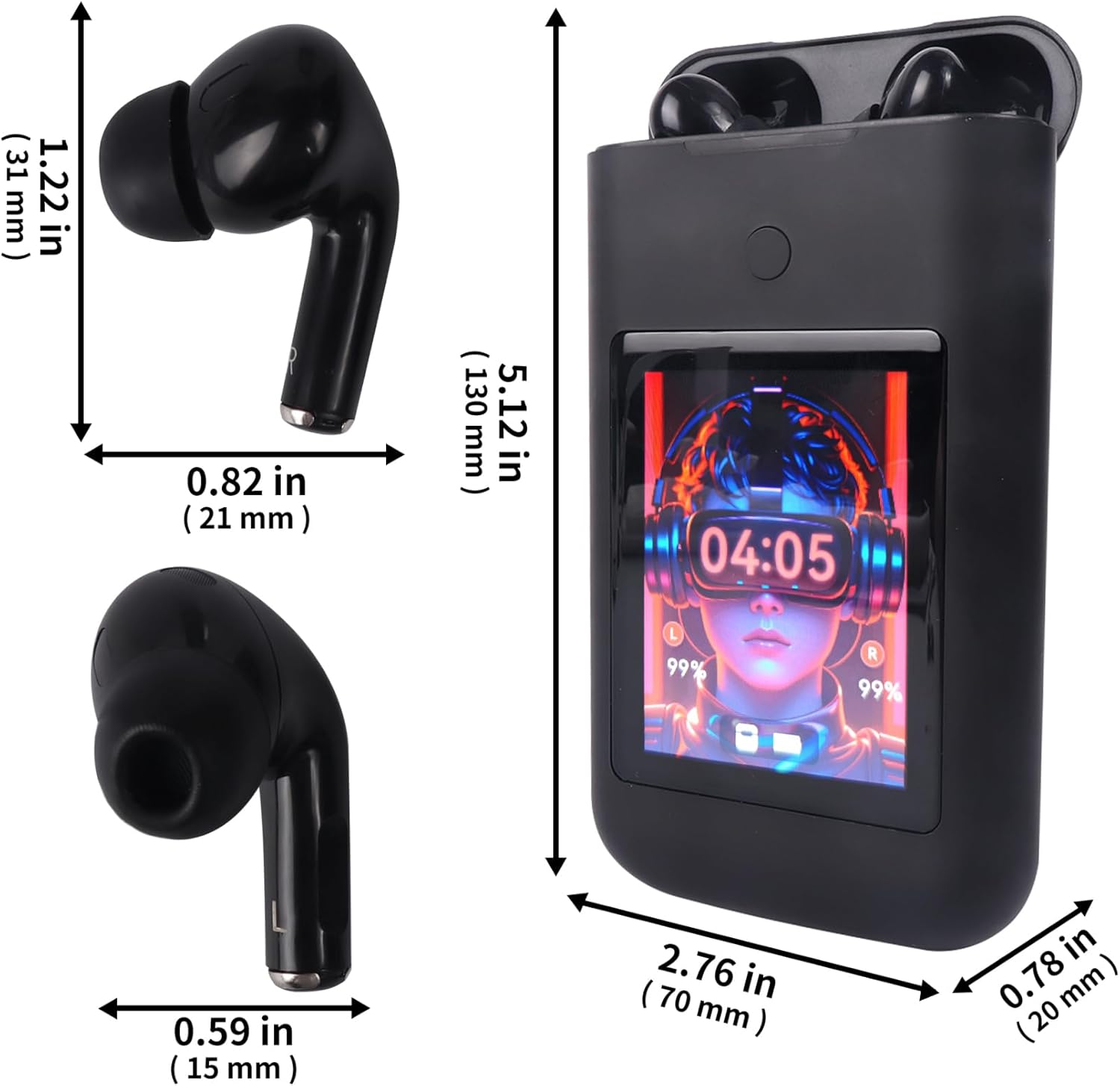
Image: Diagram showing the dimensions of the Sunffice Wireless Earbuds and their charging case in inches and millimeters.
9. Sicherheitshinweise
- Zerlegen, reparieren oder modifizieren Sie das Produkt nicht.
- Das Produkt darf nicht extremen Temperaturen, direkter Sonneneinstrahlung oder offenen Flammen ausgesetzt werden.
- Avoid exposing the product to excessive moisture or liquids beyond its water resistance rating.
- Um Gehörschäden zu vermeiden, sollten die Ohrhörer nicht über längere Zeiträume mit hoher Lautstärke verwendet werden.
- Außerhalb der Reichweite von Kindern und Haustieren aufbewahren.
10. Garantie und Support
Informationen zur Garantie und zum Kundendienst finden Sie in der mit Ihrem Kauf gelieferten Dokumentation oder kontaktieren Sie den Verkäufer direkt. Bewahren Sie Ihren Kaufbeleg für eventuelle Garantieansprüche auf.