
1. Produktüberschreitungview
The WE-VIBE Chorus is a couples vibrator designed for shared pleasure. It features an adjustable design for comfortable, hands-free use during intimate moments. The device is made from body-safe silicone and is 100% waterproof, allowing for easy cleaning and versatile use.
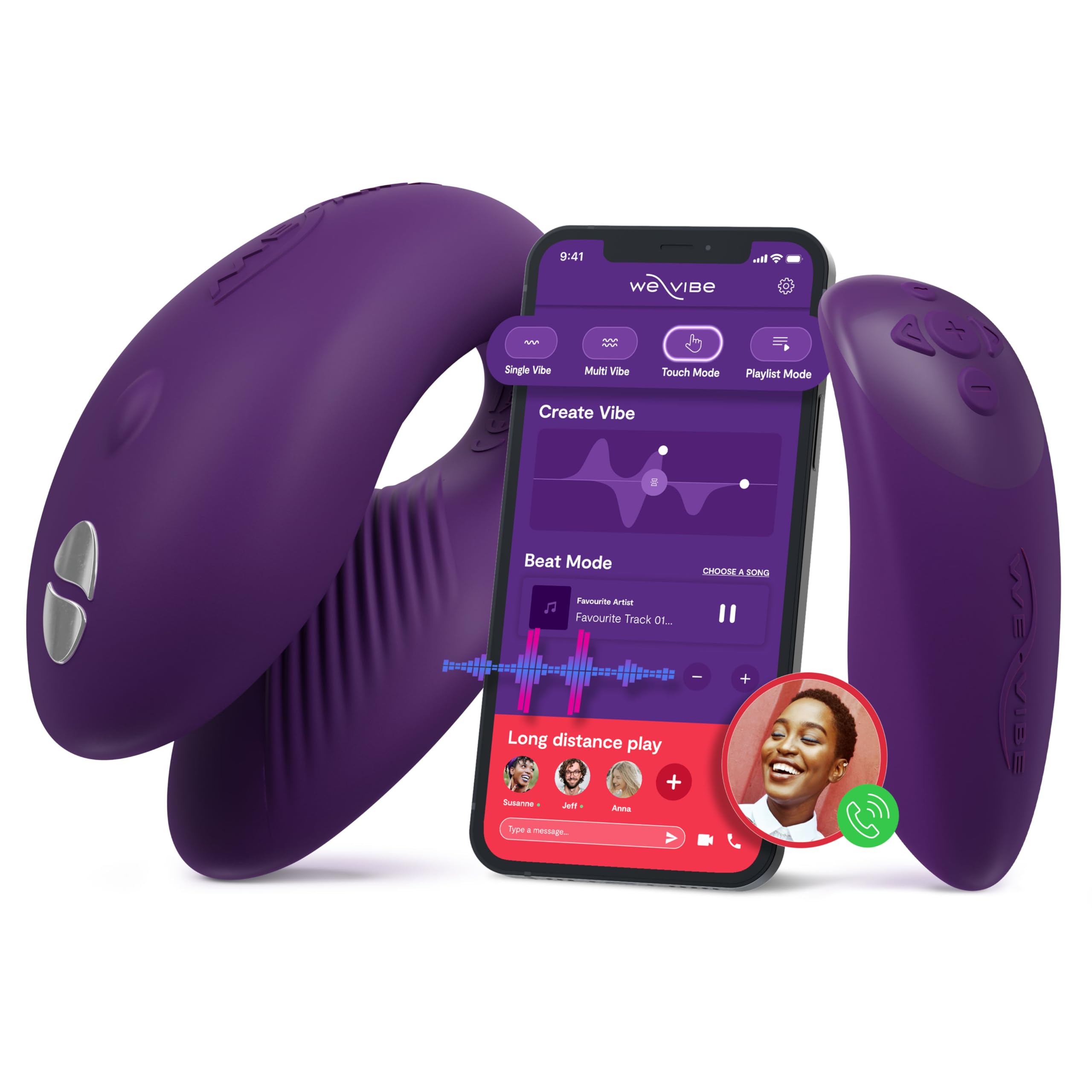
Figure 1: WE-VIBE Chorus Couples Vibrator and its control options.
Hauptmerkmale:
- Triple Stimulation: Designed to stimulate the clitoris, G-spot, and penis simultaneously during penetrative sex.
- Einstellbares Design: Flexible and soft material ensures a comfortable and adaptable fit for hands-free use.
- Squeeze Remote: Offers intuitive control; squeezing increases vibration intensity.
- Touch Sense Modes: Unique touch-sensitive receptors allow movements to control vibrations.
- App-Steuerung: Connects via Bluetooth to the free We-Connect phone app for remote control, custom vibration patterns, and long-distance play.
- Wasserdicht (IPX7): Fully submersible for easy cleaning and use in various environments.
2. Einrichtung
2.1 Aufladen des Geräts
Before first use, fully charge your WE-VIBE Chorus. The device comes with a charging case that also serves as a discreet storage solution.
- Place the Chorus vibrator and its remote into the designated slots in the charging case.
- Connect the charging cable to the port on the charging case and to a USB power source.
- An indicator light on the charging case will show the charging status. It will typically change color or turn off when fully charged.

Figure 2: WE-VIBE Chorus vibrator and remote in its charging case.
2.2 App-Installation und Verbindung
For enhanced control and features, download the We-Connect app.
- Download the free We-Connect app from your device's app store (available on Google Play and the App Store).
- Stellen Sie sicher, dass Bluetooth auf Ihrem Telefon aktiviert ist.
- Turn on your WE-VIBE Chorus device by pressing the power button.
- Open the We-Connect app and follow the on-screen instructions to pair your device.

Figure 3: The We-Connect app interface for intuitive control.
3. Bedienungsanleitung
3.1 Basic Use (Device Only)
- Apply a water-based lubricant to the internal arm of the toy for comfortable insertion.
- Insert the device as desired.
- Press the power button on the device to turn it on and cycle through vibration modes.
- Hold the power button to turn the device off.
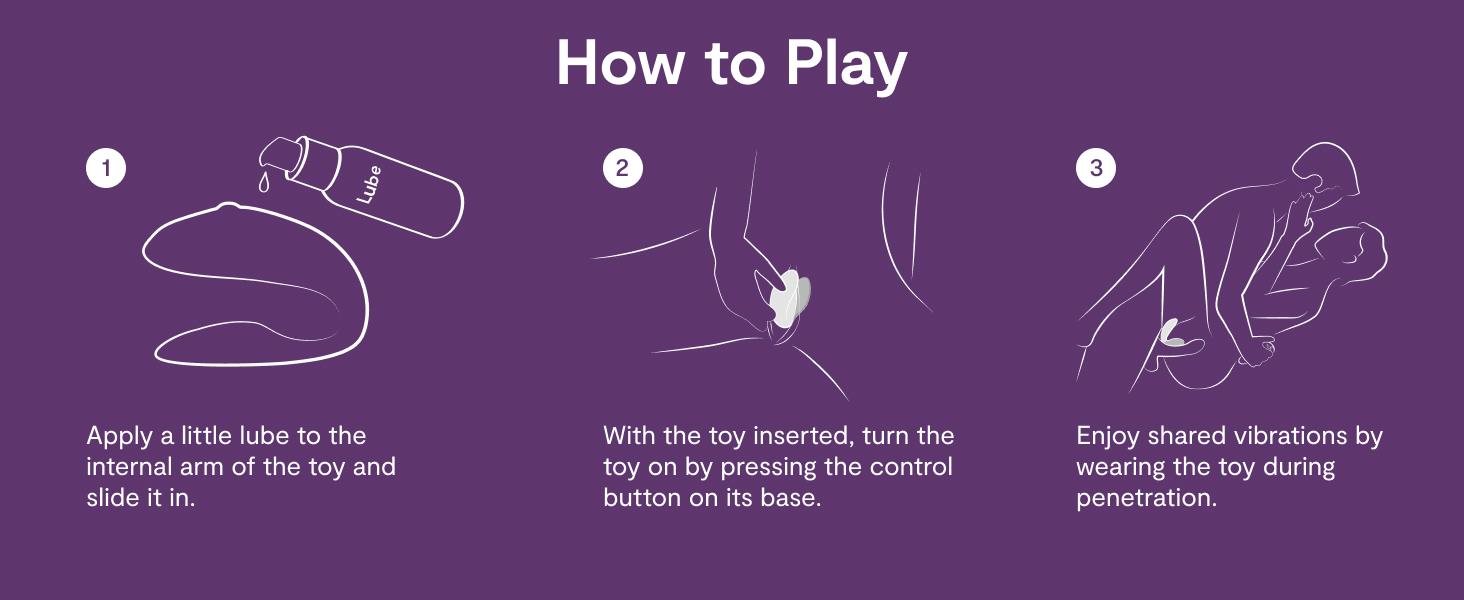
Figure 4: How to use the WE-VIBE Chorus for shared pleasure.
3.2 Verwenden der Fernbedienung
The included remote control provides convenient access to the device's functions.
- Netzschalter: Schaltet das Gerät ein/aus und wechselt zwischen den Modi.
- Intensitätstasten: Use the '+' and '-' buttons to adjust vibration intensity.
- Squeeze Mode: The remote features a squeeze function; applying pressure increases intensity.

Figure 5: The WE-VIBE Chorus vibrator and its dedicated remote control.
3.3 Using the We-Connect App
The We-Connect app offers advanced control and customization.
- Custom Vibes: Create and save personalized vibration patterns.
- Spiel über große Entfernungen: Share control of your device with a partner from anywhere in the world.
- Musiksynchronisierung: Some app modes allow vibrations to sync with music.
- Touch-Modus: Control vibrations directly through touch on your phone screen.

Figure 6: Long-distance control and app features for the WE-VIBE Chorus.
4. Wartung
4.1 Reinigungshinweise
Eine ordnungsgemäße Reinigung gewährleistet Hygiene und verlängert die Lebensdauer Ihres Geräts.
- After each use, wash the device thoroughly with warm water and a mild, toy-safe soap or specialized toy cleaner.
- Gründlich abspülen, um alle Seifenreste zu entfernen.
- Vor dem Verstauen mit einem fusselfreien Tuch trocken tupfen oder vollständig an der Luft trocknen lassen.
- Do not use harsh chemicals, alcohol-based cleaners, or petroleum-based lubricants, as these can damage the silicone material.
4.2 Speicherung
Store the WE-VIBE Chorus in its charging case or a clean, dry place away from direct sunlight and extreme temperatures. Avoid storing it with other toys made of different materials to prevent material degradation.
5. Fehlerbehebung
5.1 Device Not Turning On or Responding
- Batterie prüfen: Ensure the device is fully charged. Place it in the charging case and verify the indicator light.
- Netzschalter: Halten Sie den Netzschalter einige Sekunden lang gedrückt, um sicherzustellen, dass er registriert wird.
5.2 App/Remote Connectivity Issues
- Bluetooth: Ensure Bluetooth is enabled on your phone and the device is within range.
- Reparatur: If connection is lost, try unpairing and re-pairing the device within the We-Connect app.
- Hindernisse: Physical obstructions or body positioning can sometimes interfere with signal strength, especially with the remote. Try adjusting positions.
- App-Update: Ensure your We-Connect app is updated to the latest version.
- Neustart: Try restarting both your phone and the WE-VIBE Chorus device.
5.3 Unbequeme Passform
- Position anpassen: The Chorus is designed to be adjustable. Experiment with different placements and angles to find the most comfortable fit.
- Schmierung: Ensure adequate water-based lubricant is used to minimize friction and improve comfort.
6. Spezifikationen
| Besonderheit | Detail |
|---|---|
| Modellname | Chor |
| Marke | WIR-VIBE |
| Material | Silikon |
| Farbe | Dunkelviolett |
| Technische Daten | 4.33 x 3.84 x 4.33 Zoll |
| Gewicht | 1.1 Pfund |
| Batterien | 1 CR2032 batteries required (for remote) |
| Wasserdichtigkeit | IPX7 |
| Konnektivität | Bluetooth (We-Connect App) |
7. Garantie und Support
For detailed warranty information and customer support, please refer to the official WE-VIBE webBesuchen Sie die Website oder kontaktieren Sie direkt den Kundenservice. Bewahren Sie Ihren Kaufbeleg für eventuelle Garantieansprüche auf.
Hersteller: WOW Tech
WebWebsite: www.we-vibe.com (Example, please verify official site)