
Einführung
This manual provides detailed instructions for the installation, operation, and maintenance of your MIUCDA Smart Wi-Fi Thermostat. This device is designed to control heating and cooling systems, offering smart features for enhanced comfort and energy efficiency.
Bitte lesen Sie diese Bedienungsanleitung vor der Installation und Inbetriebnahme sorgfältig durch, um eine einwandfreie Funktion und Sicherheit zu gewährleisten.
Sicherheitshinweise
- Vor der Installation oder Wartung des Thermostats muss immer die Stromzufuhr zum Heiz-/Kühlsystem unterbrochen werden.
- Die Installation sollte von einem qualifizierten Elektriker durchgeführt werden, wenn Sie sich bezüglich der Verdrahtungsvorgänge unsicher sind.
- Ensure the thermostat is compatible with your specific heating/cooling system (dry contact gas boilers only).
- Setzen Sie das Gerät nicht übermäßiger Feuchtigkeit oder extremen Temperaturen aus.
- Use only specified power sources (AAA batteries or Type-C wired connection).
Packungsinhalt
Überprüfen Sie, ob alle Artikel in Ihrem Paket vorhanden sind:
- MIUCDA Smart Wi-Fi Thermostat
- Montagehalterung
- Schrauben und Wandanker
- Benutzerhandbuch (dieses Dokument)
- (AAA batteries and Type-C cable are not included)
Setup und Installation
1. Den Thermostat mit Strom versorgen
The thermostat can be powered by three AAA batteries (not included) or via a Type-C wired connection. Choose the method that best suits your installation.

Image: The thermostat's rear view, illustrating the AAA battery compartment and the Type-C power input for flexible power options.
- Einlegen der Batterie: Open the battery compartment on the back of the thermostat and insert three AAA batteries, ensuring correct polarity.
- Kabelgebundene Stromversorgung: Connect a Type-C cable (not included) to the Type-C port on the thermostat.
2. Montage des Thermostats
The thermostat is designed for surface mounting, eliminating the need to embed it into the wall.

Image: A diagram showing the thermostat's backplate being mounted to a wall, with wiring connections visible.
- Befestigen Sie die Montagehalterung mit den mitgelieferten Schrauben und Dübeln an der Wand.
- Connect the thermostat's wiring to your heating/cooling system's dry contact gas boiler. Refer to your boiler's manual for specific wiring diagrams.
- Befestigen Sie die Thermostateinheit an der montierten Halterung.

Image: An illustration indicating compatibility with dry contact gas boilers and incompatibility with electric heating systems or actuators/valves.
Hinweis zur Kompatibilität: This thermostat is compatible only with dry contact gas boilers. It is not compatible with electric heating systems or actuators/valves.
3. WiFi Verbindung
The thermostat requires a 2.4 GHz Wi-Fi network for smart control features.
- Laden Sie die Tuya Smart or Intelligentes Leben App aus dem App Store Ihres Smartphones.
- Registrieren Sie sich oder melden Sie sich in Ihrem Konto an.
- Follow the in-app instructions to add your MIUCDA Smart Wi-Fi Thermostat. This typically involves putting the thermostat into pairing mode (refer to the thermostat's display for pairing indicators) and connecting it to your 2.4 GHz Wi-Fi network.
Bedienungsanleitung
1. Manual Temperature Control
Adjust the temperature directly on the thermostat using the rotary knob. The current temperature and set temperature will be displayed on the screen.

Image: The thermostat's digital display, highlighting temperature hysteresis, minimum adjustment, and upper/lower temperature limits.
- Temperaturbereich: Einstellbar von 5°C bis 35°C.
- Temperaturpräzision: ±1°C.
- Hysterese: Configurable from 0.5°C to 10°C.
- Kalibrierungsbereich: -9.9°C bis 9.9°C.
2. App-Steuerung (Tuya Smart / Smart Life)
Control your thermostat remotely using the Tuya Smart or Smart Life application on your smartphone.
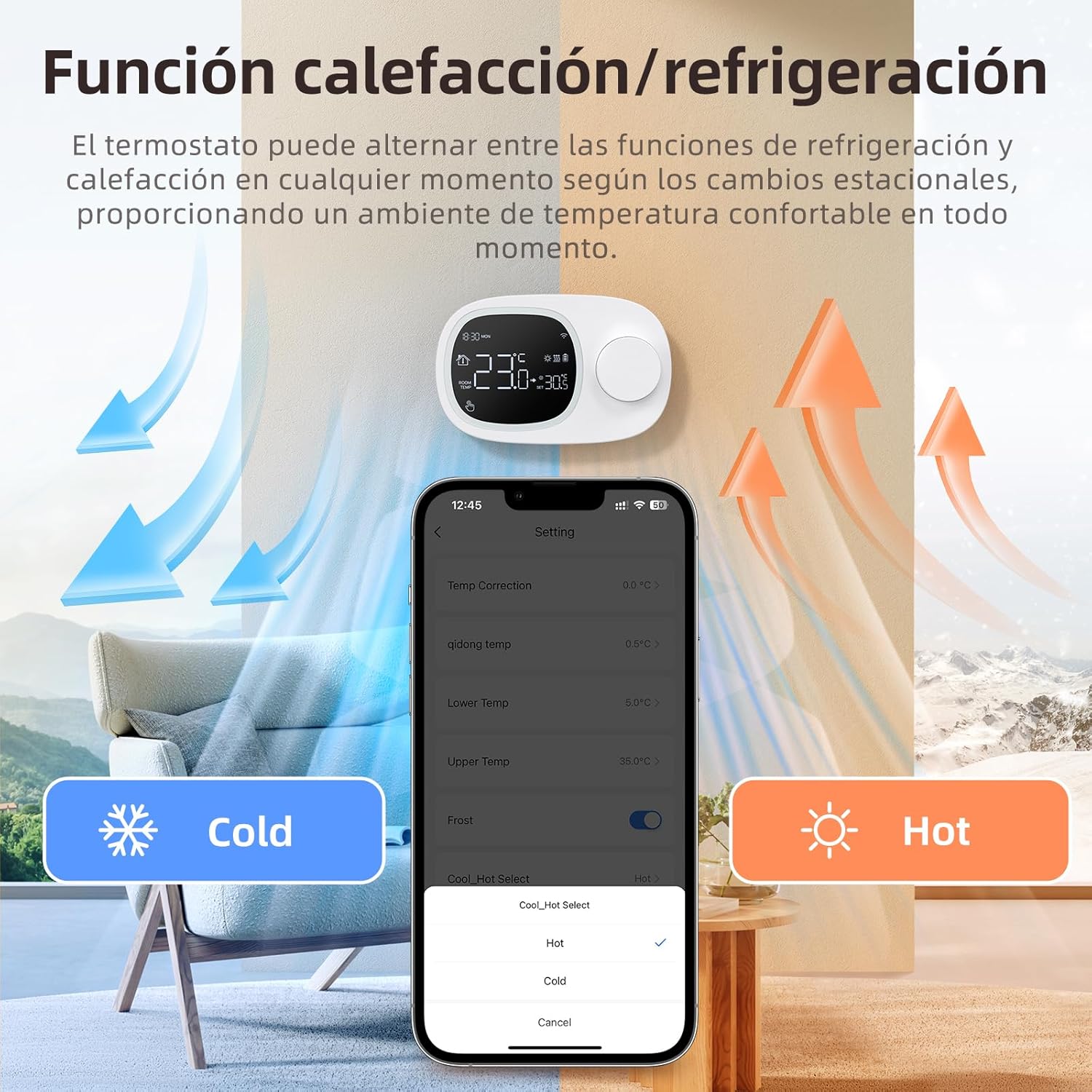
Image: A smartphone screen displaying the Tuya/Smart Life app interface for thermostat control, alongside icons for Alexa and Google Home integration.
- Adjust temperature, change modes, and set schedules from anywhere.
- Überwachen Sie die aktuelle Raumtemperatur.
3. Sprachsteuerung (Alexa / Google Home)
Integrieren Sie Ihr Thermostat mit Amazon Alexa oder Google Home für bequeme Sprachbefehle.
- Enable the Tuya Smart or Smart Life skill/action in your Alexa or Google Home app.
- Link your account.
- Use commands such as "Alexa, set thermostat to 22 degrees" or "Hey Google, what's the temperature in the living room?"
4. Wöchentliches Programm
Set up a weekly schedule with up to 6 different time windows per day to optimize comfort and energy savings.

Image: A smartphone screen displaying the weekly programming feature within the app, showing different temperature settings for various times of the day across the week.
- Access the programming feature within the Tuya Smart or Smart Life app.
- Define desired temperatures for specific times on each day of the week.
5. Heating and Cooling Modes
The thermostat supports both heating and cooling modes, allowing adaptation to seasonal needs.
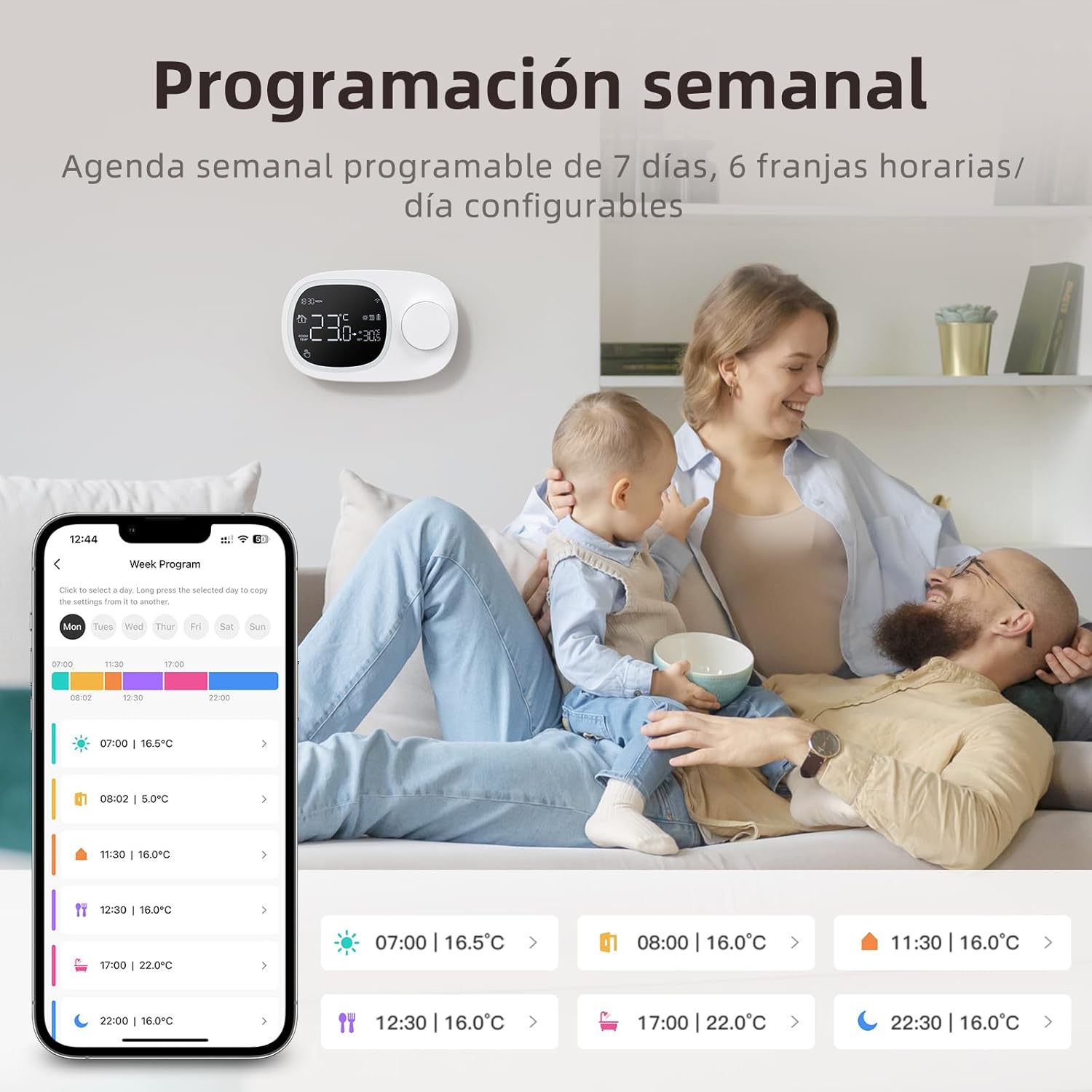
Image: An illustration showing the thermostat's ability to switch between heating (hot) and cooling (cold) modes, adapting to seasonal temperature changes.
- Switch between heating and cooling modes via the app or the thermostat's interface.
- Ensure your connected system supports both modes for full functionality.
Wartung
- Reinigung: Wischen Sie die Oberfläche des Thermostats mit einem weichen, trockenen Tuch ab. Verwenden Sie keine Scheuermittel oder Lösungsmittel.
- Batteriewechsel: If using battery power, replace AAA batteries when the low battery indicator appears on the display.
- Firmware-Updates: Periodically check the Tuya Smart or Smart Life app for available firmware updates to ensure optimal performance and new features.
Fehlerbehebung
| Problem | Mögliche Ursache | Lösung |
|---|---|---|
| Thermostat schaltet sich nicht ein. | Dead batteries or no wired power. | Replace AAA batteries or ensure Type-C power cable is connected and receiving power. |
| Es kann keine Verbindung zum WLAN hergestellt werden. | Incorrect Wi-Fi password, 5GHz network, or thermostat not in pairing mode. | Ensure correct 2.4 GHz Wi-Fi network and password. Put thermostat into pairing mode (refer to app instructions). Move closer to router. |
| Thermostat regelt Heizung/Kühlung nicht. | Incorrect wiring, incompatible system, or system power off. | Check wiring connections. Confirm compatibility with dry contact gas boiler. Ensure heating/cooling system has power. |
| Ungenaue Temperaturanzeige. | Thermostat location, calibration needed. | Ensure thermostat is not near heat sources or drafts. Use the app to calibrate the temperature if necessary. |
Technische Daten
- Marke: MIUCDA
- Modellnummer: 52171983031
- Farbe: Weiß
- Gewicht: 160 Gramm
- Dimensions (Thermostat Unit): 13.3 cm x 8.6 cm x 2.5 cm (L x W x D)
- Temperaturpräzision: ±1 °C
- Einstellbarer Temperaturbereich: 5°C bis 35°C
- Temperaturhysterese: 0.5°C bis 10°C
- Temperaturkalibrierungsbereich: -9.9°C bis 9.9°C
- Konnektivität: Wi-Fi (2.4 GHz only), Wired
- Energiequelle: 3x AAA Batteries (not included) or Type-C Cable (not included)
- Controller-Typ: Mechanical knob, Intelligent Wi-Fi
- Besonderheit: Smart Control and Wi-Fi
- Kompatible Systeme: Dry contact gas boilers
- Kontrollmethode: Manual, App (Tuya Smart/Smart Life), Voice (Alexa/Google Home)

Image: A diagram illustrating the physical dimensions of the MIUCDA Smart Wi-Fi Thermostat.
Garantieinformationen
The MIUCDA Smart Wi-Fi Thermostat comes with a Zwei Jahre Garantie ab Kaufdatum. Diese Garantie deckt Material- und Verarbeitungsfehler bei normalem Gebrauch ab.
The warranty does not cover damage caused by misuse, unauthorized modifications, accidents, or improper installation.
Bitte bewahren Sie Ihren Kaufbeleg für Garantieansprüche auf.
Kundenservice
For technical assistance, troubleshooting, or warranty inquiries, please contact MIUCDA customer support. We offer 24 Stunden technischer Support.
Kontaktinformationen:
- Refer to the contact details provided on the product packaging or the official MIUCDA webWebsite.
- If purchased through Amazon, you may contact the seller "MiucDa" directly through your order history for assistance.