
Einführung
This manual provides instructions for the setup, operation, and maintenance of your Phomemo M834 Bluetooth Thermal Printer. Please read this manual thoroughly before using the device to ensure proper function and longevity.
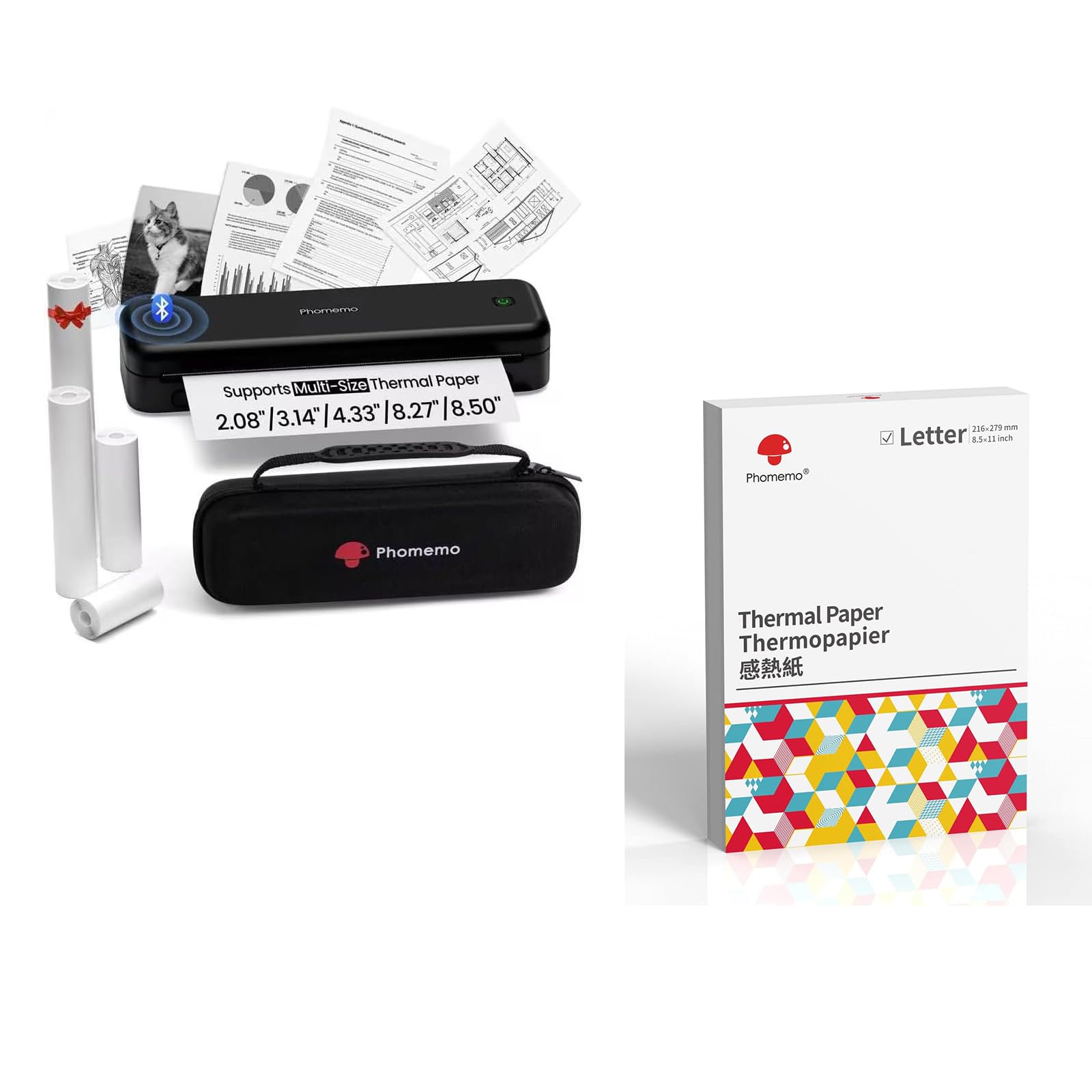
Image: The Phomemo M834 thermal printer, demonstrating its compatibility with multiple paper sizes and including its dedicated carry case.
Packungsinhalt
Überprüfen Sie, ob alle Artikel im Paket vorhanden sind:
- 1 x Phomemo M834 Portable Printer
- 1 x Tragetasche
- 1 x Roll of 8.5" Thermal Paper
- 1 x Roll of 4.33" Thermal Paper
- 1 x Roll of 3.14" Thermal Paper
- 1 x Roll of 2.08" Thermal Paper
Installationshandbuch
1. Aufladen des Druckers
The M834 printer is equipped with a 2600mAh rechargeable battery. Before initial use, fully charge the printer using the provided charging cable. A full charge allows for over 160 pages of continuous printing.
2. Einlegen von Thermopapier
The Phomemo M834 supports various thermal paper sizes, including US Letter, A4, 4.33'', 3.14'', and 2.08''. It is compatible with roll, fold, and ordinary thermal paper types. Important: This printer is designed exclusively for thermal paper and is not compatible with standard laser or inkjet printer paper.
- Öffnen Sie die Abdeckung des Papierfachs.
- Insert the thermal paper roll or stack, ensuring the printable side faces the print head.
- Schließen Sie den Deckel des Papierfachs fest.

Image: A box of Phomemo Letter size thermal paper, indicating its 8.5 x 11 inch dimensions.
3. Anschließen des Druckers
Der Drucker M834 bietet sowohl Bluetooth- als auch USB-Anschlussmöglichkeiten.
Bluetooth Verbindung:
- Stellen Sie sicher, dass der Drucker eingeschaltet ist.
- Enable Bluetooth on your mobile device (iOS, Android, Tablets) or computer.
- Open the Phomemo app or your device's Bluetooth settings and select "M834" to pair.
USB-Verbindung:
- Connect the printer to your computer (Windows, macOS, Chrome OS, Linux) using a USB cable.
- Installieren Sie die erforderlichen Treiber, wenn Ihr Betriebssystem Sie dazu auffordert.

Image: The Phomemo M834 printer connected to various devices, illustrating its compatibility with iOS, Android, Tablets via Bluetooth, and Windows, macOS, Chrome OS, Linux via USB.
Bedienungsanleitung
Drucken von Dokumenten
Once connected, you can print documents from your device. The M834 printer offers a print resolution of 300 dpi, providing clear and sharp prints for various uses.
- Öffnen Sie das Dokument oder Bild, das Sie drucken möchten, auf Ihrem angeschlossenen Gerät.
- Wählen Sie in Ihrer Anwendung die Druckoption aus.
- Choose "Phomemo M834" as your printer.
- Passen Sie die Druckeinstellungen nach Bedarf an (z. B. Papierformat, Ausrichtung).
- Starten Sie den Druckauftrag.

Image: A visual comparison highlighting the enhanced print clarity of 300 DPI output from the Phomemo M834 compared to a 203 DPI printer.
Unterstützte Papiersorten und -formate
The M834 is versatile in its paper support:
- Größen: US Letter (8.5" x 11"), A4, 4.33'', 3.14'', 2.08''
- Typen: Roll thermal paper, Fold thermal paper, Ordinary thermal paper
Ensure you use only Phomemo thermal paper for optimal results. Thermal prints are quick-drying, allowing for immediate handling and writing.

Image: A hand writing on a document printed with the Phomemo M834, demonstrating the quick-dry nature of thermal prints.
Wartung
Reinigen des Druckkopfs
Um die Druckqualität zu erhalten, reinigen Sie den Druckkopf regelmäßig. Verwenden Sie dazu ein weiches, fusselfreies Tuch und wischen Sie ihn vorsichtig ab.ampened with isopropyl alcohol. Gently wipe the print head surface. Ensure the printer is off and disconnected from power before cleaning.
Batteriepflege
To prolong battery life, avoid fully discharging the printer frequently. If storing the printer for an extended period, charge it to approximately 50% and store it in a cool, dry place.
Fehlerbehebung
If you encounter issues with your Phomemo M834 printer, refer to the following common solutions:
- Drucker lässt sich nicht einschalten: Ensure the battery is charged. Connect the printer to a power source and allow it to charge for at least 30 minutes before attempting to power it on again.
- Schlechte Druckqualität: Check if the thermal paper is loaded correctly with the printable side facing the print head. Clean the print head as described in the Maintenance section. Ensure you are using genuine Phomemo thermal paper.
- Verbindung via Bluetooth nicht möglich: Make sure Bluetooth is enabled on both the printer and your device. Ensure the printer is within range. Try restarting both the printer and your device.
- Papierstau: Turn off the printer and carefully open the paper compartment. Remove any jammed paper. Ensure paper is loaded correctly and not creased or bent.
- Printer not recognized by computer (USB): Verify the USB cable is securely connected. Try a different USB port or cable. Ensure necessary drivers are installed for your operating system.
Technische Daten
| Modellname | M834 |
| Drucktechnologie | Thermal |
| Konnektivitätstechnologie | Bluetooth, USB |
| Maximale Druckauflösung | 300 dpi (Schwarzweiß) |
| Druckerausgabe | Einfarbig |
| Maximale Mediengröße | US Letter (8.5" x 11") |
| Unterstützte Papierformate | US Letter, A4, 4.33'', 3.14'', 2.08'' |
| Max. Blatteingabekapazität | 100 sheets (for folded thermal paper) |
| Batteriekapazität | 2600 mAh |
| Funktionen | Nur Drucken |
| Farbe | Schwarz |
Garantie und Support
The Phomemo M834 printer comes with a limited warranty. For specific warranty terms and conditions, please refer to the warranty card included in your package or visit the official Phomemo webWebsite.
For technical support or customer service inquiries, please contact Phomemo customer support through their official channels.