
1. Einleitung
The Micufuns M338-A is a high-performance vocal dynamic microphone designed for superior audio capture in various applications, including podcasting, streaming, gaming, voice-overs, and music recording. Its dual USB and XLR connectivity offers flexibility for both plug-and-play convenience and professional studio integration. Featuring advanced noise reduction and intuitive controls, the M338-A ensures clear, distortion-free sound.
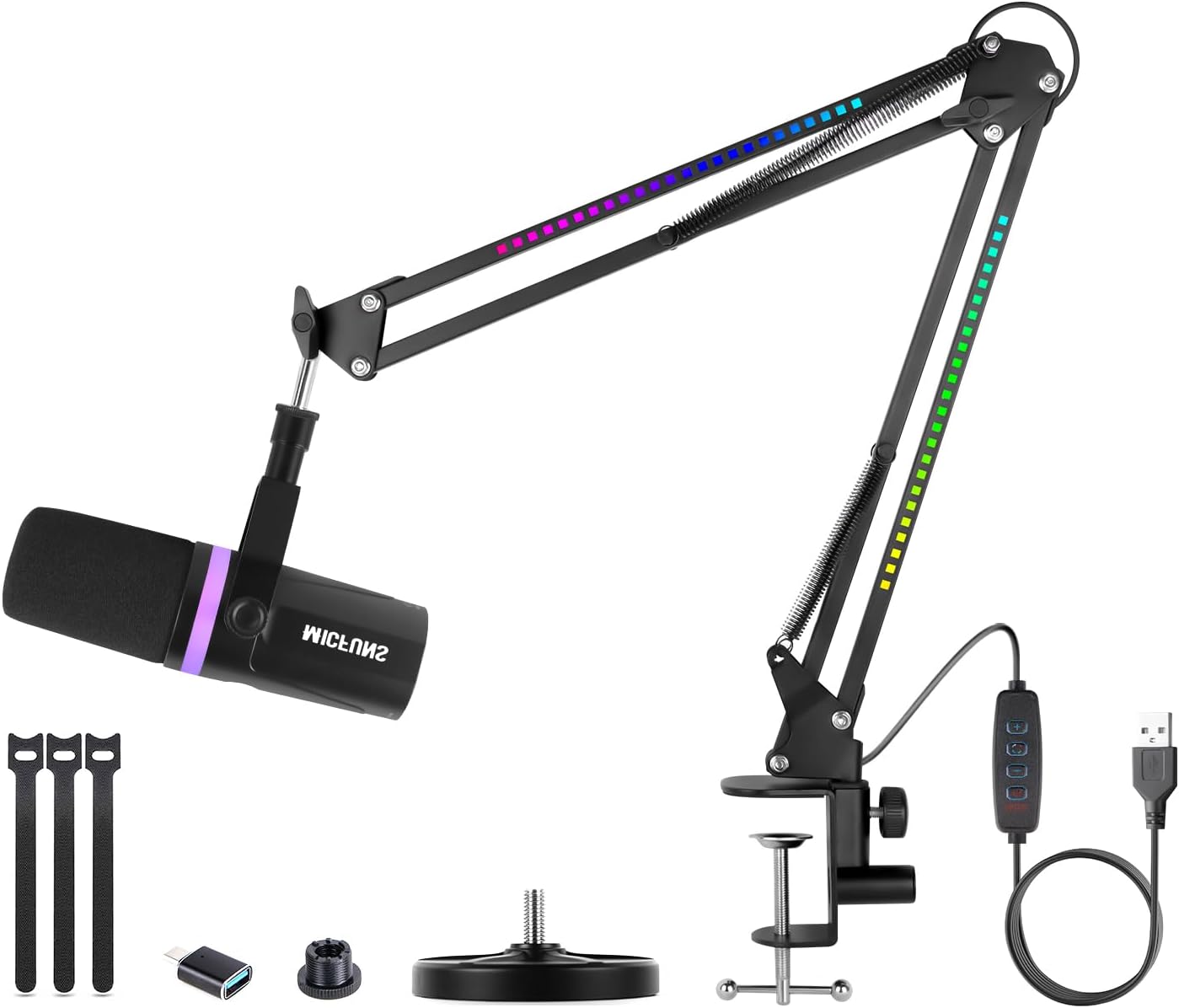
Überview of the Micufuns M338-A microphone system, including the microphone, boom arm, and various connection cables.
2. Packungsinhalt
Bitte überprüfen Sie, ob alle unten aufgeführten Artikel in Ihrem Paket enthalten sind:
- Micufuns Vocal Dynamic Microphone (M338-A)
- Stoßdämpferhalterung
- RGB Arm Stand (Boom Arm)
- Desk Microphone Stand
- 8.2ft (2.5m) USB-C to USB Cable
- 5/8'' to 3/8'' Adapter
- Kabelbinder (zur Kabelorganisation)
- Benutzerhandbuch (dieses Dokument)
3. Produktmerkmale
- Nieren-Polarmuster: The directional cardioid pickup pattern effectively minimizes background noise from sources like computer fans or hard drives, ensuring your voice is captured with clarity and detail.
- Breiter Frequenzgang: With a frequency response of 192Hz-24KHz, the microphone delivers crystal-clear audio, capturing every nuance for an immersive gaming, streaming, or recording experience.
- High Sound Pressure Level (SPL): Capable of handling sound pressure levels exceeding 130dB, it provides powerful, distortion-free sound even in high-energy audio environments.
- Dual Connectivity (USB & XLR):
- USB-Modus: Easily compatible with Windows, Mac OS, and Android operating systems for plug-and-play convenience.
- XLR Mode: Connects to professional interfaces, mixers, or portable PA systems for enhanced audio production. Note: All function keys on the microphone are only available when using the USB connection.
- Integrierte Kontrollen:
- 2-in-1 Smart Knob: Effortlessly adjust microphone gain and headphone monitoring volume.
- Stummschaltung mit einer Taste: A convenient mute button with an LED indicator allows for quick and silent transitions during recordings or live sessions.
- Verbesserte Rauschunterdrückung: Includes a windscreen to dampen plosives and an external shock mount to reduce unwanted low-frequency vibrations and mechanical noise from your desk.
- RGB Atmosphere Light: The boom arm features colorful RGB lighting modes to enhance your setup's aesthetic.

The M338-A features HIFI-grade audio and intelligent noise reduction for clear sound pickup.

High-performance DSP chip for intelligent noise reduction, ensuring clear voice pickup.
4. Installationsanleitung
4.1 Microphone Assembly
- Attach the microphone to the included shock mount. Ensure it is securely fastened.
- Mount the shock mount (with microphone) onto either the RGB Arm Stand or the Desk Microphone Stand using the 5/8'' to 3/8'' adapter if necessary. Tighten all screws to ensure stability.
- Position the microphone appropriately for your recording or streaming setup.
4.2 Anschließen des Mikrofons

Diagram illustrating the XLR and USB connectivity options of the M338-A microphone.
USB Connection (Plug & Play)
For direct connection to your computer (Windows, Mac OS) or Android device:
- Connect the USB-C end of the provided 8.2ft (2.5m) USB-C to USB cable to the USB-C port on the microphone.
- Verbinden Sie das USB-A-Ende des Kabels mit einem freien USB-Anschluss an Ihrem Computer oder Gerät.
- The microphone should be automatically recognized by your operating system. Select "Micufuns M338-A" as your input device in your system's sound settings or recording software.
XLR-Anschluss (Professionelles Setup)
For connecting to audio interfaces, mixers, or other professional audio equipment:
- Schließen Sie ein Standard-XLR-Kabel (nicht im Lieferumfang enthalten) an den XLR-Anschluss des Mikrofons an.
- Connect the other end of the XLR cable to the XLR input on your audio interface or mixer.
- Configure your audio interface/mixer settings to recognize the microphone input.
- Wichtiger Hinweis: When using the XLR connection, the integrated function keys (mute, volume knob) on the microphone itself will not be active. All controls must be managed through your connected audio interface or mixer.
Video demonstrating the setup and connectivity options for the Micfuns M338-A microphone.
5. Bedienungsanleitung
5.1 Mute-Funktion
The microphone features a convenient one-button mute function. Press the mute button located on the microphone body to instantly mute or unmute your audio. The LED indicator will change color to show the mute status (e.g., red for muted, green/blue for active).

The one-button mute feature allows for quick audio control, preventing unwanted sounds during breaks or conversations.
5.2 Gain and Headphone Volume Control
The 2-in-1 smart knob on the microphone allows you to adjust both the microphone gain (input sensitivity) and the headphone monitoring volume. Rotate the knob to increase or decrease the levels as needed. This feature is active only when connected via USB.

The 2-in-1 smart knob provides quick adjustment for mic gain and headphone volume, alongside the USB and XLR ports.
5.3 Echtzeitüberwachung
Plug your headphones into the 3.5mm headphone jack on the microphone to monitor your audio in real-time with zero latency. This allows you to hear exactly what the microphone is picking up, ensuring optimal sound quality during recording or streaming. This feature is active only when connected via USB.
5.4 RGB-Beleuchtungssteuerung
The RGB Arm Stand features integrated lighting. Control the brightness and lighting modes using the dedicated buttons on the inline controller attached to the USB cable. This allows you to customize the aesthetic of your setup.

Detaillierte view of the RGB lighting on the boom arm and the inline lighting control unit.
6. Wartung
- Reinigung: Use a soft, dry cloth to clean the microphone body and stand. Avoid using harsh chemicals or abrasive materials.
- Windschutzscheibe: The foam windscreen can be gently removed and cleaned with mild soap and water if necessary. Ensure it is completely dry before reattaching.
- Lagerung: Bewahren Sie das Mikrofon bei Nichtgebrauch in einer sauberen, trockenen Umgebung fern von extremen Temperaturen und hoher Luftfeuchtigkeit auf.
- Kabelpflege: Avoid sharp bends or kinks in the USB cable to prevent damage. Use the included cable ties for neat cable management.
7. Fehlerbehebung
| Problem | Mögliche Ursache | Lösung |
|---|---|---|
| Kein Tonausgang (USB) |
|
|
| No sound output (XLR) |
|
|
| Verzerrter oder undeutlicher Ton |
|
|
| RGB-Lichter funktionieren nicht |
|
|
8. Spezifikationen

Key dimensions of the Micufuns M338-A microphone and stand components.
| Attribut | Wert |
|---|---|
| Modellname | M338-A |
| Marke | micfuns |
| Richtcharakteristik | Unidirektional (Niere) |
| Konnektivitätstechnologie | USB, XLR |
| Frequenzbereich | 192 Hz bis 24 kHz |
| Maximale Frequenz | 192 KHz |
| Mindestfrequenz | 50 Hz |
| Impedanz | 16 Ohm |
| Signal-Rausch-Verhältnis | 95 dB |
| Geräuschpegel | 95 dB |
| Hardware-Plattform | PC, Laptop, Desktop, Mixer, Audio Interface, Sound Card |
| Kompatible Geräte | Laptop, Desktop, Mixer, Audio Interface, Sound Card, Personal Computer |
| Material | Metall |
| Farbe | Schwarz |
| Artikelgewicht | 2.2 Pfund (ca. 1 Kilogramm) |
| Produktabmessungen (L x B x H) | 18.11 x 16.93 x 3.15 Zoll |
| Stromquelle | Kabelgebundene Elektrik |
| Empfohlene Verwendung | Streaming, Studio Recording/Podcast/Vocal/Video Creation/Broadcast |
9. Garantie und Support
Micfuns products are designed and manufactured to the highest quality standards. For warranty information, technical support, or any inquiries regarding your Micufuns M338-A microphone, please refer to the contact information provided on the product packaging or visit the official Micfuns webBitte bewahren Sie Ihren Kaufbeleg für Garantieansprüche auf.