
1. Installationsanleitung
1.1 Packungsinhalt
Bevor Sie beginnen, vergewissern Sie sich, dass alle Artikel in Ihrem Paket vorhanden sind:
- Basiseinheit
- 3 schnurlose Mobilteile
- 3 AC-Adapter
- Telefonkabel
- 3 NiMH-Akkus
- Wandhalterung
- Abridged User’s Manual
- Kurzanleitung

Image: The VTech CS5329-3 cordless phone system, showing the main base unit and three cordless handsets with their charging cradles.
1.2 Einlegen der Batterie
Each cordless handset requires a NiMH battery for operation. To install:
- Öffnen Sie die Abdeckung des Batteriefachs auf der Rückseite des Mobilteils.
- Stecken Sie den Stecker des Akkus fest in die Buchse im Inneren des Fachs.
- Legen Sie den Akku in das Fach ein.
- Schließen Sie den Batteriefachdeckel.
1.3 Anschließen der Basiseinheit
Connect the base unit to your telephone line and a power outlet:
- Stecken Sie ein Ende des Telefonkabels in die TEL LINE-Buchse auf der Rückseite des Basisgeräts.
- Stecken Sie das andere Ende des Telefonkabels in eine Telefonwandbuchse.
- Stecken Sie das kleine Ende des Netzteils in die POWER-Buchse auf der Rückseite des Basisgeräts.
- Stecken Sie das große Ende des Netzteils in eine Wandsteckdose, die nicht über einen Wandschalter gesteuert wird.
1.4 Aufladen des Mobilteils
Place each handset in its respective charging cradle or the main base unit. The handsets will begin charging automatically. Allow at least 10-12 hours for the initial charge before first use to ensure optimal battery performance.
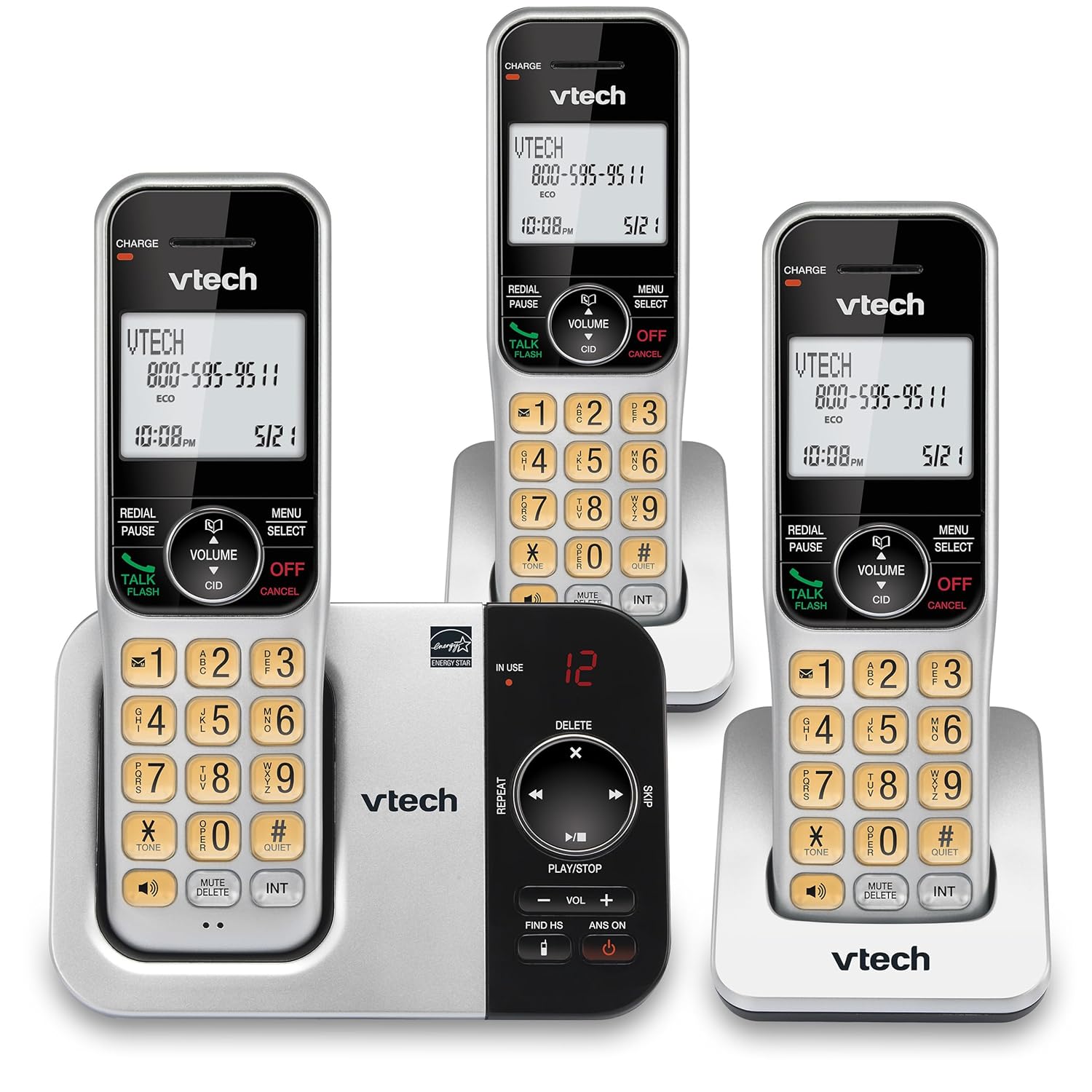
Abbildung: Eine Alternative view of the VTech CS5329-3 phone system, highlighting the compact design of the handsets and charging cradles.
2. Bedienungsanleitung
2.1 Anrufe tätigen und entgegennehmen
Um einen Anruf zu tätigen, drücken Sie die SPRECHEN/BLITZ button, then dial the number. To receive a call, simply lift the handset from the cradle or press any key (except AUS/ABBRECHEN).
2.2 Digitales Anrufbeantwortersystem
The integrated digital answering system offers up to 23 minutes of recording time for incoming messages, announcements, and memos. You can play back messages directly from the base unit or any handset. The lighted display on the handset indicates the number of new messages waiting.
2.3 Full Duplex Speakerphone
Enjoy clear, natural conversations with the full-duplex handset speakerphone. This feature allows both parties to speak and be heard simultaneously, enhancing call quality and participation.
2.4 Anrufer-ID
Caller ID entries are displayed on the large, backlit LCD screen of the handset, making it easy to identify callers even in low-light conditions. The screen provides high-contrast text for readability.
2.5 Anrufblockierung
Effectively manage unwanted calls by utilizing the Call Block feature. You can input and/or save up to 150 names and numbers in the call block directory to prevent them from ringing through.
2.6 Erweiterbarkeit
The VTech CS5329-3 system is expandable up to 5 handsets using only one phone jack. Additional CS5309 accessory handsets (sold separately) can be placed anywhere in your home or office near an outlet, providing flexible and convenient communication throughout your space.

Image: Another perspective of the VTech CS5329-3 phone system, showcasing the sleek design and keypad layout of the handsets.
3. Wartung
3.1 Reinigung Ihres Telefons
Wischen Sie Telefon und Basisstation mit einem weichen, leicht feuchten Tuch ab.amp Mit einem Tuch abwischen. Verwenden Sie keine Reinigungssprays oder aggressive Chemikalien, da diese die Oberfläche oder elektrische Bauteile beschädigen können.
3.2 Batteriepflege
To maintain optimal battery life, ensure handsets are placed on their charging cradles when not in use. Avoid exposing batteries to extreme temperatures.
4. Fehlerbehebung
If you experience issues with your VTech CS5329-3 phone system, try the following common troubleshooting steps:
- Kein Wählton: Ensure the telephone line cord is securely connected to both the base unit and the wall jack. Check if other phones in your home have a dial tone.
- Kein Strom: Verify that the AC adapter is properly plugged into the base unit and a working electrical outlet.
- Schlechte Tonqualität: Gehen Sie näher an die Basisstation heran. Stellen Sie sicher, dass keine großen Metallgegenstände oder andere elektronische Geräte das Signal stören.
- Handy lädt nicht: Make sure the handset is properly seated in the charging cradle and the charging contacts are clean.
- Anrufbeantworter zeichnet nicht auf: Check the recording time available. Ensure the answering system is turned ON.
For more detailed troubleshooting, refer to the Abridged User’s Manual included in your package.
5. Spezifikationen
| Besonderheit | Detail |
|---|---|
| Technische Daten | 5.54 x 7.31 x 2.99 Zoll; 2.36 Pfund |
| Artikelmodellnummer | CS5329-3 |
| Batterien | 3 AAA-Batterien erforderlich. (im Lieferumfang enthalten) |
| Hersteller | VTech |
| Farbe | Silber schwarz |
| Telefontyp | Kabellos |
| Material | Plastik |
| Stromquelle | Kabelgebundene Elektrik |
| Typ des Anrufbeantworters | Digitales |
| Artikelgewicht | 1.07 Kilogramm |
| Kompatible Geräte | PSTN Landline Connections |
6. Garantie und Support
Your VTech CS5329-3 Cordless Phone System is covered by a manufacturer's warranty. Please refer to the warranty information provided in your Abridged User’s Manual for specific terms and conditions.
For technical support, product registration, or to purchase additional accessories, please visit the official VTech website or contact their customer service. Contact details can typically be found in your product documentation or on the VTech brand store page.
Weitere Informationen finden Sie unter VTech Store auf Amazon.