
1. Einleitung
Thank you for choosing the HWB Farmhouse 3-in-1 Vanity Desk. This versatile furniture piece is designed to function as a makeup vanity, an office desk, or a storage cabinet, adapting to your needs. It features a flip-top mirror with adjustable 3-color LED lighting, a convenient charging station, multiple drawers, and adjustable shelves for organized storage. This manual provides essential information for safe assembly, operation, and maintenance of your new vanity desk.

Abbildung 1: Ein Überview of the HWB Farmhouse 3-in-1 Vanity Desk, showcasing its primary configuration as a makeup vanity with the mirror flipped up and the accompanying stool.

Figure 2: This image illustrates the versatility of the HWB vanity, showcasing its use as a makeup vanity, a storage cabinet, and an office desk, suitable for various rooms like bedrooms, cloakrooms, living rooms, and study rooms.
2. Sicherheitshinweise
Bitte lesen und verstehen Sie alle Sicherheitshinweise vor der Montage und Verwendung. Die Nichtbeachtung dieser Hinweise kann zu Verletzungen oder Schäden am Produkt führen.
- Bewahren Sie alle Kleinteile und Verpackungsmaterialien außerhalb der Reichweite von Kindern und Haustieren auf, um Erstickungsgefahren zu vermeiden.
- Montieren Sie das Gerät auf einer weichen, sauberen Oberfläche, um Kratzer zu vermeiden.
- Vor Gebrauch sicherstellen, dass alle Schrauben und Befestigungselemente fest angezogen sind. Regelmäßig überprüfen und gegebenenfalls nachziehen.
- Do not overload drawers or shelves. Refer to specifications for weight capacity.
- For electrical components (lights, charging station), ensure the power source matches the product's requirements. Do not use damaged cords or plugs.
- Um Schäden zu vermeiden, stellen Sie keine heißen Gegenstände direkt auf die Oberfläche.
- Do not stand or sit on the desk surface, except for the designated stool.
3. Packungsinhalt
Before beginning assembly, verify that all components listed in your product's assembly guide are present and undamaged. If any parts are missing or damaged, please contact customer support.
- Main Desk Components (panels, top, base)
- Schubladenkomponenten
- Stool Components
- Flip-Top Mirror with LED Lights
- Ladestationseinheit
- Hardware Pack (screws, dowels, cam locks, handles, etc.)
- Montageanleitung

Figure 3: This image highlights key features of the vanity desk, including the lighted flip-top mirror, 6-compartment storage, lighting control and charging panel, 5 sliding drawers, 2 adjustable storage shelves, and the stool with hidden storage.
4. Aufbau und Montage
Follow the step-by-step instructions provided in the separate assembly guide included with your product. The general assembly process involves:
- Auspacken: Carefully remove all components from the packaging. Lay them out on a clean, soft surface to prevent damage.
- Teile identifizieren: Match each part to the diagrams in the assembly guide.
- Haupttischgestell zusammenbauen: Verbinden Sie die Seitenwände, die Rückwand und den Sockel mit dem mitgelieferten Befestigungsmaterial.
- Schubladen einbauen: Assemble the drawer boxes and install the drawer slides. Insert the drawers into their designated slots.
- Regale anbringen: Insert adjustable shelves into the side cabinets as desired.
- Install Flip-Top Mirror: Secure the mirror assembly to the desk top according to the instructions.
- Ladestation anschließen: Integrate the charging station unit into its designated slot on the desk top and connect its power cable.
- Hocker zusammenbauen: Follow the separate instructions for assembling the padded stool, including its hidden storage compartment.
- Letzte Kontrollen: Ensure all connections are tight and the desk is stable before use.

Figure 4: A close-up of the internal storage solutions, highlighting the 9-compartment organizer within the flip-top section, the adjustable shelves in the side cabinets, and the hidden storage space with drawers within the accompanying stool.
5. Bedienungsanleitung
5.1 Flip-Top Mirror Operation
- To use as a makeup vanity, gently lift the top panel to reveal the mirror and internal storage compartments.
- To use as a regular desk or storage cabinet, gently lower the top panel until it is flush with the desk surface.
5.2 LED-Beleuchtungssteuerung
The mirror features integrated LED lights with adjustable color modes and brightness.

Figure 5: This image provides a closer look at the HD flip-top mirror mechanism and the integrated charging station, detailing the light and brightness buttons, USB, Type-C ports, and AC outlets.
- Ein-/Ausschalten: Press the 'Light Button' (often depicted as a light bulb icon) once to turn the lights on. Press again to cycle through color modes or turn off.
- Beleuchtungsmodus anpassen: With the lights on, repeatedly press the 'Light Button' to switch between Warm Light, Cool Light, and Blue Light modes.
- Helligkeit anpassen: Use the 'Brightness Button' (often depicted as a sun icon) to increase or decrease the light intensity. Hold the button down to smoothly adjust brightness, or press repeatedly for stepped adjustments.
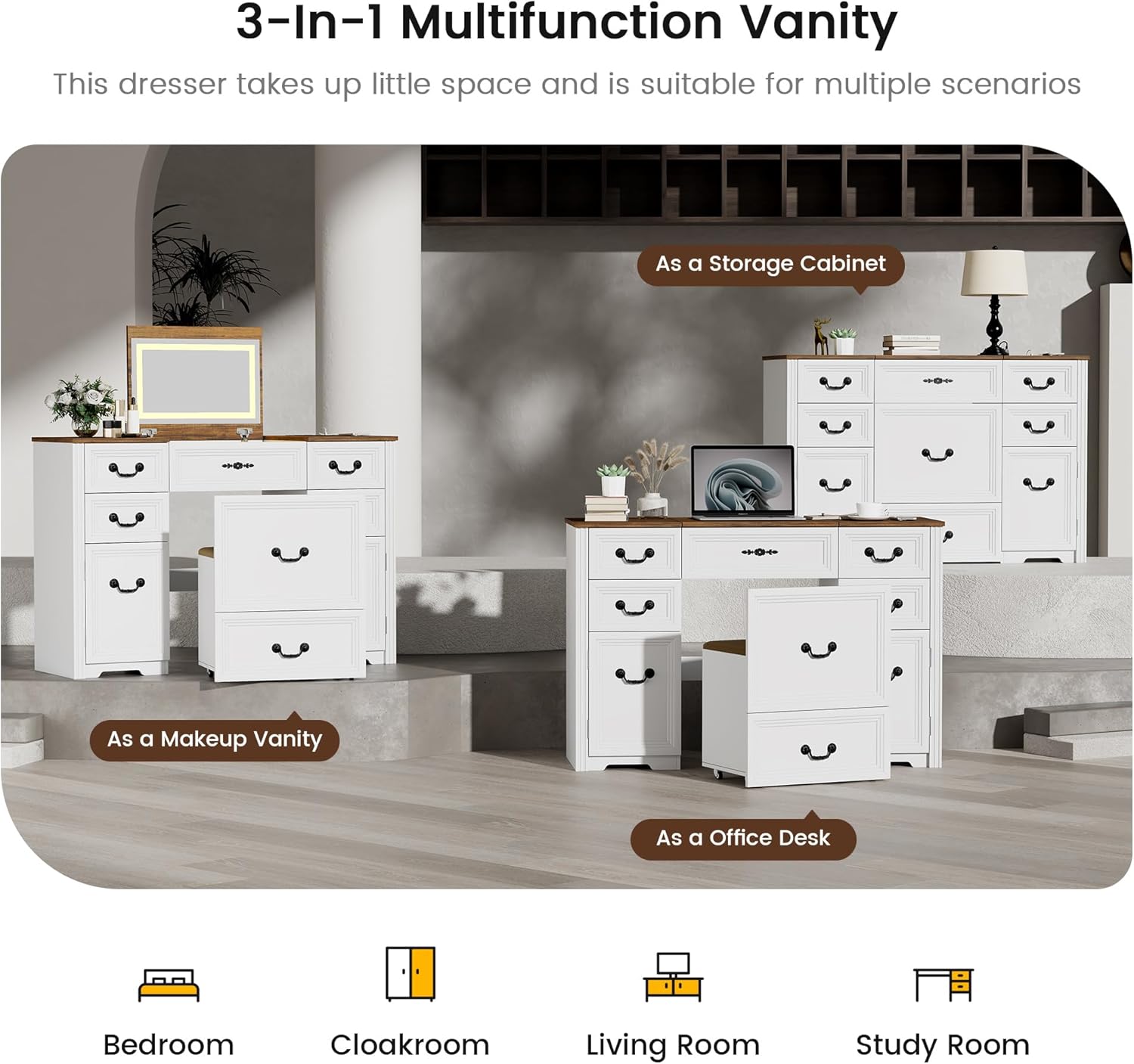
Figure 6: An illustration demonstrating the three distinct lighting modes (Warm, Cool, Blue) and the adjustable brightness feature of the vanity mirror lights, controlled by dedicated buttons.
5.3 Nutzung der Ladestation
Die integrierte Ladestation bietet bequemen Stromzugang für Ihre Geräte.

Abbildung 7: Eine detaillierte view of the desk's thick table top, emphasizing the integrated charging station with a phone connected, and the overall sturdy construction.
- Stecken Sie das Netzkabel der Ladestation in eine normale Wandsteckdose.
- Use the USB and Type-C ports to charge compatible electronic devices.
- The two AC outlets can be used for small appliances or chargers. Ensure the total wattage does not exceed the charging station's maximum capacity.
6. Wartung
Proper care and maintenance will extend the life of your vanity desk.
- Reinigung: Wischen Sie Oberflächen mit einem weichen, damp Mit einem Tuch abwischen. Vermeiden Sie scheuernde Reinigungsmittel, aggressive Chemikalien oder übermäßige Feuchtigkeit, da diese die Oberfläche beschädigen können.
- Spiegelpflege: Reinigen Sie den Spiegel mit einem Glasreiniger und einem fusselfreien Tuch.
- Elektrische Komponenten: Keep the charging station and LED lights dry. Do not attempt to repair electrical components yourself; contact qualified personnel if issues arise.
- Hardware: Überprüfen Sie regelmäßig alle Schrauben und Befestigungselemente, um sicherzustellen, dass sie fest sitzen. Ziehen Sie sie bei Bedarf nach, um die Stabilität zu gewährleisten.
- Vermeiden Sie direktes Sonnenlicht: Längere Einwirkung direkter Sonneneinstrahlung kann zum Ausbleichen oder zur Beschädigung der Oberfläche führen.
7. Fehlerbehebung
If you encounter any issues with your HWB Vanity Desk, refer to the following common problems and solutions:
- Problem: Die LED-Leuchten schalten sich nicht ein.
Lösung: Ensure the charging station's power cord is securely plugged into a working wall outlet. Check if the light button has been pressed. - Problem: Charging station ports are not working.
Lösung: Verify the charging station is powered on and connected to a live outlet. Test with a different device or cable to rule out device-specific issues. - Problem: Die Schubladen klemmen oder lassen sich nur schwer öffnen/schließen.
Lösung: Check if the drawers are properly aligned on their slides. Ensure no items are obstructing the drawer's movement. Lightly lubricate drawer slides if necessary. - Problem: Desk feels unstable or wobbly.
Lösung: Re-check all assembly hardware and tighten any loose screws or fasteners. Ensure the desk is placed on a level surface.
8. Spezifikationen
| Marke | HWB |
| Modellnummer | CY-85096 |
| Technische Daten | 15.7"T x 31.5"B x 19.7"H (15.7 x 31.5 x 19.7 Zoll) |
| Artikelgewicht | 116.8 Pfund |
| Material | Holzwerkstoff |
| Farbe | Weiß |
| Möbelfinish | Holz |
9. Garantie und Support
For warranty information, technical support, or to order replacement parts, please refer to the contact information provided with your purchase or visit the official HWB website. Please have your model number (CY-85096) and purchase date available when contacting support.