
1. Einleitung
The UGREEN 100W GaN Desktop Charger (Model X765) is a high-performance charging solution designed for efficiency and convenience. It features four USB-C ports and two USB-A ports, allowing you to charge up to six devices simultaneously with a total power output of 100W. Utilizing advanced GaN technology, this charger offers a compact design without compromising on power. It supports various fast charging protocols, ensuring optimal charging for a wide range of electronic devices.
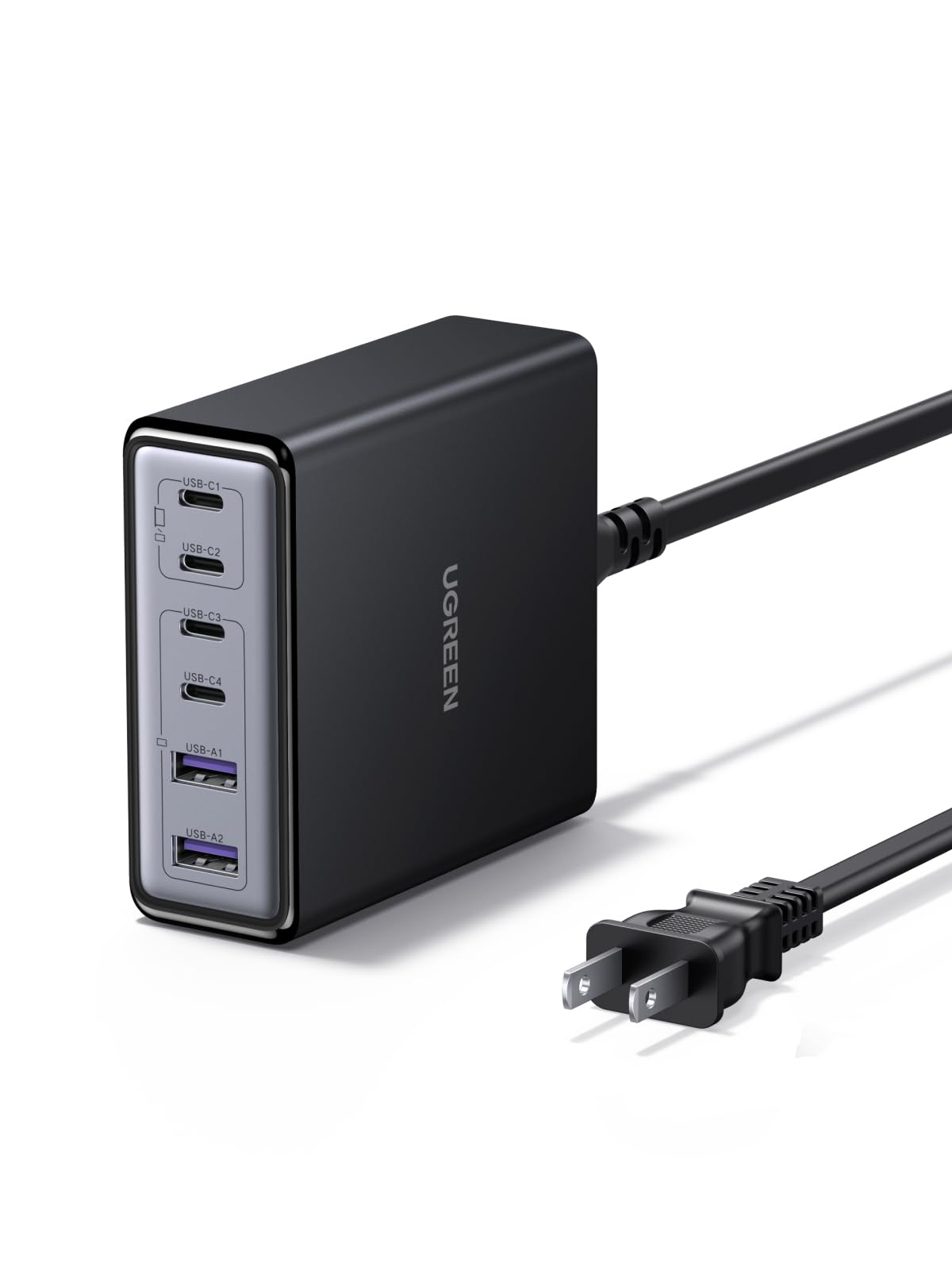
Image 1.1: UGREEN 100W GaN Desktop Charger, showcasing dank seines kompakten Designs und der zahlreichen Ladeanschlüsse.
2. Produktmerkmale
- 6-Port-Ladefunktion: Equipped with 4 USB-C ports and 2 USB-A ports to charge multiple devices simultaneously.
- 100 W Gesamtleistung: Delivers a combined maximum output of 100W across all ports, intelligently distributing power.
- 65W Single Port Output: USB-C ports can deliver up to 65W individually, suitable for fast-charging laptops.
- GaN-Technologie: Utilizes Gallium Nitride (GaN) technology for a compact and efficient design.
- Kompaktes Design: Measures approximately 8.0 x 8.6 x 3.0 cm, saving desk space.
- Mehrere Sicherheitsmaßnahmen: Beinhaltet Überstrom, Überspannungtage, short-circuit, overheating, overpower, dry-heat prevention, and undervoltage Schutz.
- Thermal Guard (TG) Technology: Features real-time temperature monitoring for enhanced safety and longevity.
- Breite Kompatibilität: Supports various fast charging protocols like PD3.0, QC4.0, PPS, AFC, SCP, UFCS, and FCP.
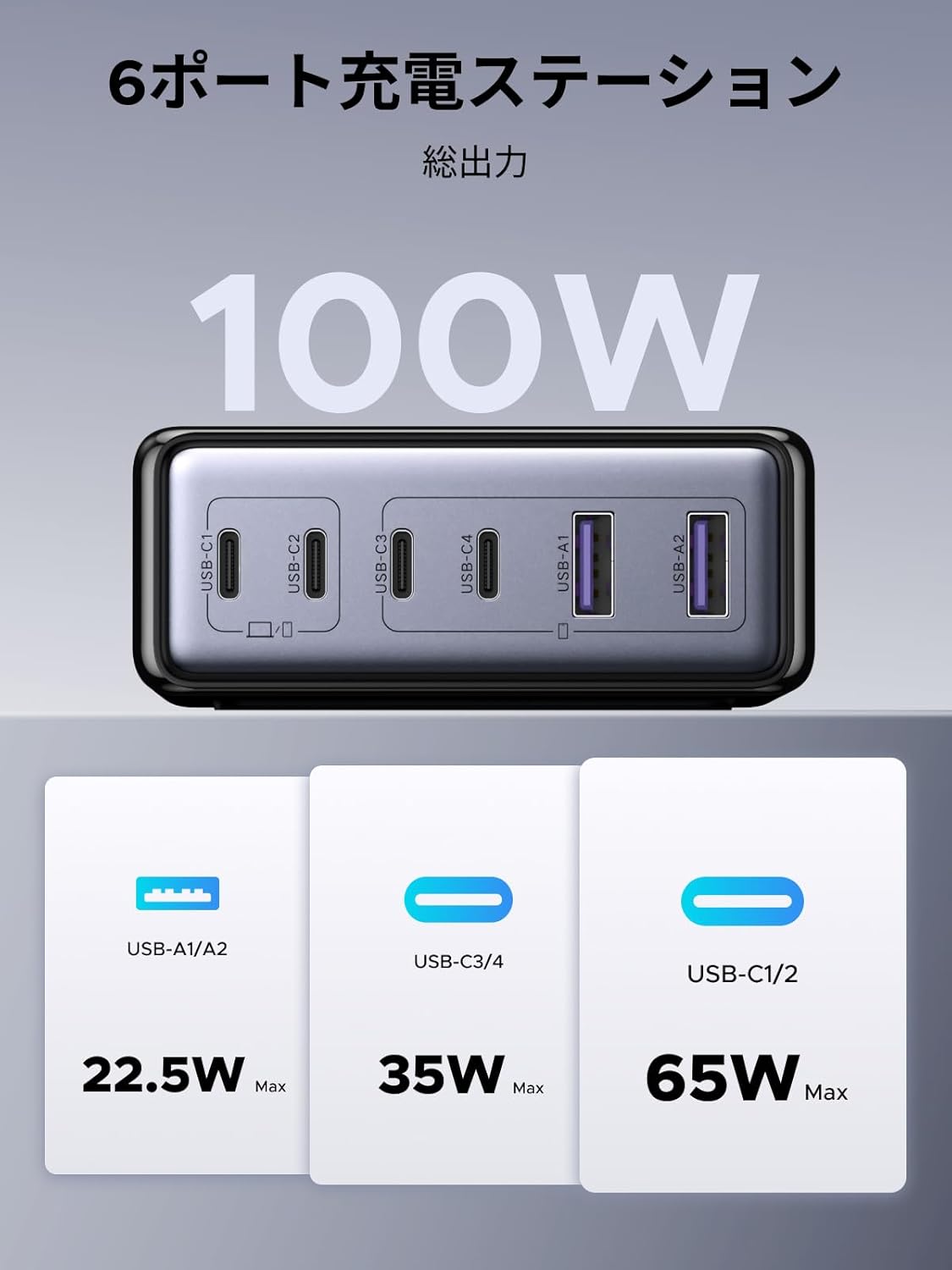
Bild 2.1: Überview of the 6-port charging station, illustrating the 100W total output and maximum power delivery for each port type (USB-A/A2: 22.5W Max, USB-C3/C4: 35W Max, USB-C1/C2: 65W Max).

Image 2.2: Depiction of the internal GaN chip and Thermal Guard technology, highlighting safety features such as overvoltage, overheating, overcurrent, and overcharge protection.
3. Einrichtungsanweisungen
- An die Stromversorgung anschließen: Plug the included AC power cable into the charger's power input port, then connect the other end to a wall outlet.
- Geräte verbinden: Verwenden Sie geeignete Ladekabel, um Ihre Geräte an die verfügbaren USB-C- oder USB-A-Anschlüsse des Ladegeräts anzuschließen.
- Ladevorgang prüfen: Ensure your devices display a charging indicator to confirm proper connection.

Image 3.1: The charger in use, demonstrating its ability to charge various devices simultaneously, such as a laptop, smartphone, smartwatch, and Nintendo Switch.
4. Bedienungsanleitung
The UGREEN 100W GaN Desktop Charger intelligently distributes power based on the connected devices' requirements. For optimal performance, consider the following:
- Laden eines einzelnen Geräts: When charging a single device, a USB-C port can deliver up to 65W, providing rapid charging for compatible laptops and other high-power devices.
- Aufladen mehrerer Geräte: When multiple devices are connected, the charger's intelligent power management system dynamically allocates the total 100W output to each port. This ensures efficient charging for all connected devices.
- Hafenpriorisierung: While the charger manages power automatically, connecting high-power devices (e.g., laptops) to USB-C1 or USB-C2 ports first may optimize their charging speed.
Power Distribution Examples:

Abbildung 4.1: Beispielamples of power distribution when one, two, or three ports are in use. For instance, with two USB-C ports, power might be split as 45W/20W or 20W/45W, or one port might receive 65W while another receives 35W.

Abbildung 4.2: Weitere Beispieleamples of power distribution when four, five, or all six ports are utilized. For example, with six ports, power might be distributed as 45W/20W, 20W/45W, 10W, 10W, 5W, 5W across the various USB-C and USB-A ports.
5. Wartung
- Reinigung: Trennen Sie das Ladegerät vor der Reinigung von der Steckdose und allen angeschlossenen Geräten. Wischen Sie die Oberfläche mit einem weichen, trockenen Tuch ab. Verwenden Sie keine flüssigen Reiniger oder Sprays.
- Lagerung: Bewahren Sie das Ladegerät an einem kühlen, trockenen Ort ohne direkte Sonneneinstrahlung und extreme Temperaturen auf.
- Handhabung: Vermeiden Sie es, das Ladegerät fallen zu lassen oder starken Stößen auszusetzen. Versuchen Sie nicht, das Ladegerät zu zerlegen oder zu verändern.
6. Fehlerbehebung
- Gerät lädt nicht:
- Ensure the charger is properly plugged into a working wall outlet.
- Überprüfen Sie, ob das Ladekabel sowohl am Ladegerät als auch am Gerät fest angeschlossen ist.
- Try a different charging cable or port to rule out cable/port issues.
- Vergewissern Sie sich, dass Ihr Gerät mit den Ausgangsspezifikationen des Ladegeräts kompatibel ist.
- Langsames Laden:
- Verwenden Sie unbedingt ein hochwertiges Kabel, das Schnellladen unterstützt.
- Check the power requirements of your device; some devices require higher wattage for optimal speed.
- If multiple devices are connected, the total 100W output is shared. Disconnecting some devices may increase charging speed for others.
- Das Ladegerät fühlt sich warm an:
- Es ist normal, dass sich das Ladegerät während des Betriebs erwärmt, insbesondere beim Laden mehrerer Geräte oder von Geräten mit hohem Stromverbrauch.
- Stellen Sie sicher, dass das Ladegerät an einem gut belüfteten Ort aufgestellt und nicht abgedeckt wird.
- If the charger becomes excessively hot or emits smoke/unusual odors, immediately unplug it and contact support.
7. Spezifikationen
| Marke | UGREEN |
| Modellnummer | X765 |
| Steckertyp | USB Typ C, USB Typ A |
| Kompatible Geräte | Laptops, iPhone 17-8 series, Galaxy S25-S10 series, Xperia, Pixel Pro, MacBook, iPad, Smartwatches, Gaming Consoles |
| Eingangslautstärketage | 100 V (Wechselstrom) |
| Ausgangsstrom | 5 Amps (max.) |
| Ausgangsvolumentage | 20.0 Volt (maximal) |
| Gesamtausgangsleistung | 100 W |
| Anzahl der Ports | 6 (4x USB-C, 2x USB-A) |
| Im Lieferumfang enthaltene Komponenten | Bedienungsanleitung |
| Herkunft | China |

Image 7.1: The charger's wide compatibility with devices such as MacBook Pro/Air, iPad Air/Mini/Pro, Dell, Galaxybook, Microsoft Surface, Google Pixel series, iPhone series, Galaxy series, AirPods/Pro, cameras, and gaming consoles.
8. Garantie und Support
Dieses UGREEN-Produkt wird mit folgendem Inhalt geliefert: 24 Monate Herstellergarantie ab Kaufdatum. Diese Garantie deckt Material- und Verarbeitungsfehler bei normalem Gebrauch ab.
Garantieausschlüsse: The warranty does not cover damages caused by intentional misuse, unauthorized modifications, accidents, or improper handling by the customer or third parties.
For warranty claims, technical support, or any inquiries regarding your UGREEN 100W GaN Desktop Charger, please contact the seller or UGREEN customer service through their official website or the platform where the product was purchased. Please retain your proof of purchase for warranty validation.