
1. Einleitung
Vielen Dank für Ihren Einkauf.asing the MLWSHR Digital LED Alarm Clock Model 8808. This device combines a digital alarm clock with a thermo-hygrometer, offering dual alarms, snooze function, date and year display, 12/24 hour switch, weekday settings, Daylight Saving Time (DST) functionality, auto-dimmable display with three brightness levels, and a convenient 5V1A USB output for charging other devices. Please read this manual carefully to ensure proper use and maintenance of your new alarm clock.
2. Sicherheitshinweise
- Halten Sie das Gerät von Wasser und Umgebungen mit hoher Luftfeuchtigkeit fern.
- Setzen Sie das Gerät keinen extremen Temperaturen oder direkter Sonneneinstrahlung über längere Zeiträume aus.
- Use only the provided USB Type-C cable for power.
- Versuchen Sie nicht, das Gerät selbst zu zerlegen oder zu reparieren. Wenden Sie sich bei Problemen an den Kundendienst.
- Ensure proper ventilation when using the USB output to charge other devices.
3. Packungsinhalt
- MLWSHR Digital LED Alarm Clock Model 8808
- USB-Typ-C-Stromkabel
- Bedienungsanleitung
4. Produktüberschreitungview
Machen Sie sich mit den wichtigsten Komponenten und Bedienelementen Ihres Weckers vertraut.
This image displays the front of the MLWSHR Digital LED Alarm Clock, highlighting the time display, weekday indicators, temperature in Celsius, humidity percentage, and dual alarm icons. It also points to the Daylight Saving Time (DST) indicator.

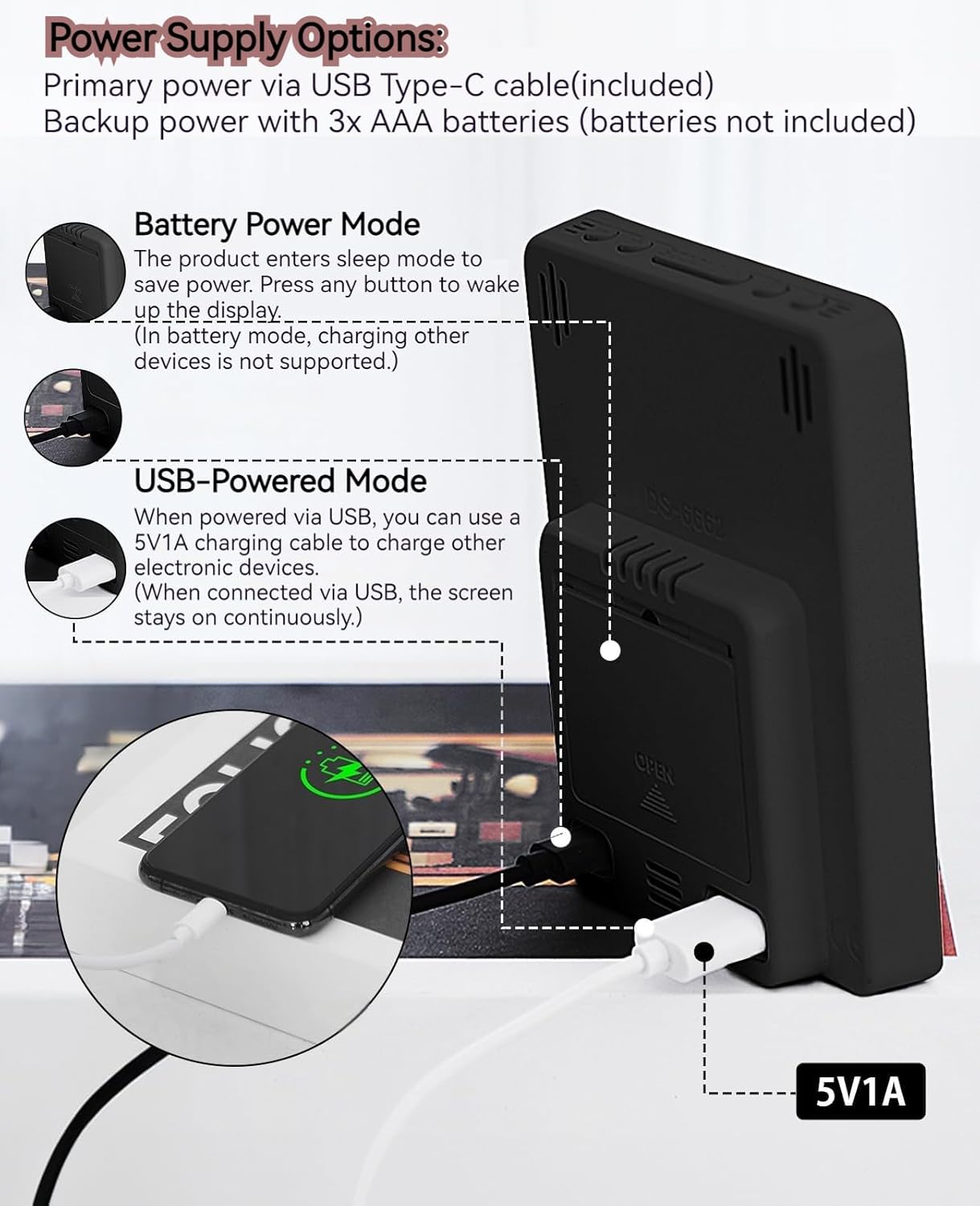
This image illustrates the side and back of the alarm clock, detailing the USB Type-C input for primary power, the battery compartment for 3x AAA backup batteries (not included), and the USB-A output (5V1A) for charging other devices. It also shows the control buttons located on the top edge.
Steuerung:
- Set-Taste: Wechselt in den Einstellmodus für Uhrzeit, Datum und Alarme.
- UP (+) Button: Increases values during setting, adjusts brightness.
- DOWN (-) Button: Decreases values during setting, adjusts brightness.
- Schlummer-/Lichttaste: Aktiviert die Schlummerfunktion, passt die Displayhelligkeit an.
- ALARM 1 Taste: Activates/deactivates Alarm 1, enters Alarm 1 setting.
- ALARM 2 Taste: Activates/deactivates Alarm 2, enters Alarm 2 setting.
- 12/24-Stunden-Taste: Wechselt zwischen 12-Stunden- und 24-Stunden-Zeitformat.
- °C/°F-Taste: Switches between Celsius and Fahrenheit temperature display.
5. Einrichtung
5.1 Netzteil
The MLWSHR Digital LED Alarm Clock can be powered in two ways:
- Primary Power (USB Type-C): Connect the provided USB Type-C cable to the clock's input port and plug the other end into a 5V1A USB power adapter (not included). When powered via USB, the display will remain continuously on.
- Backup Power (3x AAA Batteries): Insert 3 AAA batteries (not included) into the battery compartment on the back of the clock. In battery-only mode, the display will enter sleep mode to conserve power. Press any button to temporarily activate the display. Note that the USB output for charging other devices is not supported when operating on battery power alone.
5.2 Erste Zeit- und Datumseinstellung
After connecting power, the clock will typically display a default time. To set the correct time and date:
- Halten Sie die SATZ Die Taste 3 Sekunden lang gedrückt halten, um in den Zeiteinstellungsmodus zu gelangen. Die Stundenziffern blinken.
- Verwenden Sie die AUF (+) or NIEDER (-) Tasten zum Einstellen der Stunde.
- Drücken SATZ Um die Stunde erneut zu bestätigen, wechseln Sie zur Minuteneinstellung. Die Minutenziffern blinken.
- Verwenden Sie die AUF (+) or NIEDER (-) Tasten zum Einstellen der Minuten.
- Drücken Sie weiter SATZ to cycle through and set the Year, Month, and Day using the AUF (+) or NIEDER (-) buttons for adjustment.
- Nachdem Sie den Tag eingestellt haben, drücken Sie SATZ Ein letztes Mal, um den Einstellungsmodus zu verlassen.
6. Bedienungsanleitung
6.1 Umschaltung zwischen 12- und 24-Stunden-Format
Drücken Sie die 12 / 24HR Taste zum Umschalten zwischen 12-Stunden- (mit AM/PM-Anzeige) und 24-Stunden-Zeitformat.
This video demonstrates various features of the MLWSHR Digital LED Alarm Clock, including the time, temperature, humidity, weekday display, auto/manual brightness adjustment, 12/24 hour switch, and the easy-to-use buttons and USB-C input/USB-A output.
6.2 Alarme einstellen (Alarm 1 & Alarm 2)
The clock features two independent alarms. Each alarm can be set for specific days of the week (Monday-Friday, Monday-Saturday, or Monday-Sunday).

This image illustrates the dual alarm functionality, showing how each alarm can be customized to ring on specific days of the week: Monday to Friday, Monday to Saturday, or every day. It highlights the alarm icons and weekday indicators on the display.
- Drücken Sie die ALARM 1 or ALARM 2 button to select the desired alarm. The alarm icon will appear on the display.
- Die ausgewählte Taste gedrückt halten ALARM Durch Drücken der Taste für 3 Sekunden gelangen Sie in den Alarm-Einstellmodus. Die Stundenanzeige blinkt.
- Verwenden Sie die AUF (+) or NIEDER (-) Tasten, um die Weckstunde einzustellen.
- Drücken Sie die ALARM Drücken Sie erneut die Taste, um die Stunde zu bestätigen und zur Minuteneinstellung zu wechseln.
- Verwenden Sie die AUF (+) or NIEDER (-) Tasten zum Einstellen der Alarmminuten.
- Drücken Sie die ALARM button again to set the alarm frequency (e.g., Mon-Fri, Mon-Sat, Mon-Sun). Use AUF (+) or NIEDER (-) zu wählen.
- Drücken Sie die ALARM button one last time to exit alarm setting mode.
- To turn an alarm ON or OFF, simply press the corresponding ALARM 1 or ALARM 2 button briefly. The alarm icon will appear (ON) or disappear (OFF) from the display.
6.3 Schlummerfunktion
When an alarm sounds, you can activate the snooze function for a temporary delay.

This image shows the clock's snooze button and how it functions. When the alarm rings, a brief press of the snooze button will delay the alarm for 5 minutes. Holding the button for more than two seconds will turn off the alarm for that day.
- Wenn der Wecker klingelt, drücken Sie die SNOOZE / LICHT button briefly. The alarm will pause and ring again after 5 minutes.
- To turn off the alarm for the current day, press and hold the SNOOZE / LICHT button for more than 2 seconds, or press any other button (except SNOOZE / LICHT).
6.4 Helligkeitseinstellung
The clock features an auto-dimmable display and three manual brightness levels.
- Automatisch dimmbar: The built-in light sensor automatically adjusts the display brightness based on ambient light conditions. This is the default setting.
- Manuelle Helligkeit: Drücken Sie kurz die SNOOZE / LICHT button to cycle through 3 manual brightness levels (L-01, L-02, L-03).
- To return to auto-dimmable mode, continue pressing the SNOOZE / LICHT button until 'L-AU' appears on the display.
6.5 Thermometer & Hygrometer
The clock displays indoor temperature and humidity levels.

This image highlights the temperature and humidity readings on the clock's display. It also provides guidance on ideal humidity levels and suggests actions (humidifier/dehumidifier) if levels are too low or too high. The temperature detection range is 23°F to 122°F (-5°C to 50°C) with an error margin of ±2°F.
- Schalter Temperatureinheit: Drücken Sie die ° C / ° F button to switch between Celsius and Fahrenheit temperature display.
- The temperature range is 23°F to 122°F (-5°C to 50°C) with an error margin of ±2°F.
- The humidity measurement error is within ±5%.
6.6 USB Power Output (5V1A)
The clock features a USB-A output port (5V1A) that can be used to charge other electronic devices.

This image demonstrates the use of the clock's USB-A output port to charge a smartphone. The clock provides a 5V1A output, making it a convenient charging station. This feature is only available when the clock is powered via its USB Type-C input.
- Connect your device's charging cable to the USB-A output port on the back of the alarm clock.
- Ensure the alarm clock is powered via its USB Type-C input for this feature to function. The USB output is not active when the clock is running on battery power alone.
6.7 Sommerzeit (DST)
The clock supports Daylight Saving Time adjustment.
- Zum Aktivieren oder Deaktivieren der Sommerzeit die Taste gedrückt halten Sommerzeit button (if available, or refer to the SET button sequence for DST in specific models). The DST indicator will appear or disappear.
7. Wartung
- Reinigen Sie die Uhr mit einem weichen, trockenen Tuch. Verwenden Sie keine Scheuermittel oder Lösungsmittel.
- If the clock will not be used for an extended period, remove the AAA batteries to prevent leakage.
- Halten Sie die USB-Anschlüsse frei von Staub und Schmutz.
8. Fehlerbehebung
| Problem | Mögliche Ursache | Lösung |
|---|---|---|
| Display is off or intermittent. | Running on battery power in sleep mode, or no power. | Press any button to activate display in battery mode. Connect USB Type-C cable for continuous display. Check USB power source. |
| USB-Ausgang lädt keine Geräte. | Clock is running on battery power, or USB cable is faulty. | Ensure the clock is connected to primary USB Type-C power. Try a different USB cable. |
| Der Alarm ertönt nicht. | Der Alarm ist nicht aktiviert oder falsch eingestellt. | Check if the alarm icon is displayed. Re-set the alarm time and frequency. |
| Die Temperaturanzeige ist ungenau. | Environmental factors or sensor error. | Allow time for the sensor to stabilize. Ensure the clock is not near heat sources or vents. Note the ±2°F error margin. |
| Datum/Uhrzeit können nicht eingestellt werden. | Not in setting mode, or buttons are unresponsive. | Press and hold the SET button for 3 seconds. Ensure the clock has stable power. |
9. Spezifikationen
- Marke: MLWSHR
- Modellnummer: 8808
- Anzeigetyp: LED
- Energiequelle: USB Type-C (5V1A) / 3x AAA Batteries (backup)
- Produktabmessungen: 3.54 Zoll B x 4.72 Zoll H
- Merkmale: Dual Alarms, Snooze, Thermo-Hygrometer, Date & Year Display, 12/24 Hour Switch, Weekdays, DST, Auto Dimmable (3 levels), USB Output (5V1A)
- Material: Eco-friendly Plastic
- Verwendung im Innen- und Außenbereich: Innenbereich
10. Garantie und Support
The MLWSHR Digital LED Alarm Clock Model 8808 comes with a 2 Jahr Garantie Diese Garantie gilt ab Kaufdatum und deckt Herstellungsfehler sowie Funktionsstörungen bei normalem Gebrauch ab.
For technical support, warranty claims, or any questions regarding your product, please contact MLWSHR customer service through the retailer's platform or visit our official website for contact information. Please have your purchase receipt and model number ready when contacting support.