1. Einleitung
The Artograph Smart HD Digital Art Projector Flare 100 is a versatile tool designed for artists, muralists, and creatives. It allows for tracing, enlarging, and projecting images onto various surfaces like walls or canvases. Featuring sharp HD resolution, built-in art grids, and flexible setup options, this portable projector enhances precision and efficiency in artistic endeavors. This manual provides detailed instructions for setting up, operating, maintaining, and troubleshooting your Flare 100 projector.
2. Lieferumfang
Upon opening your Artograph Smart HD Digital Art Projector Flare 100 package, please verify that all the following components are included:
- Artograph Flare 100 Digital Art Projector
- Netzkabel
- Fernbedienung
- Benutzerhandbuch (dieses Dokument)
- Monopod Arm Clamp Stand
- HDMI-Kabel
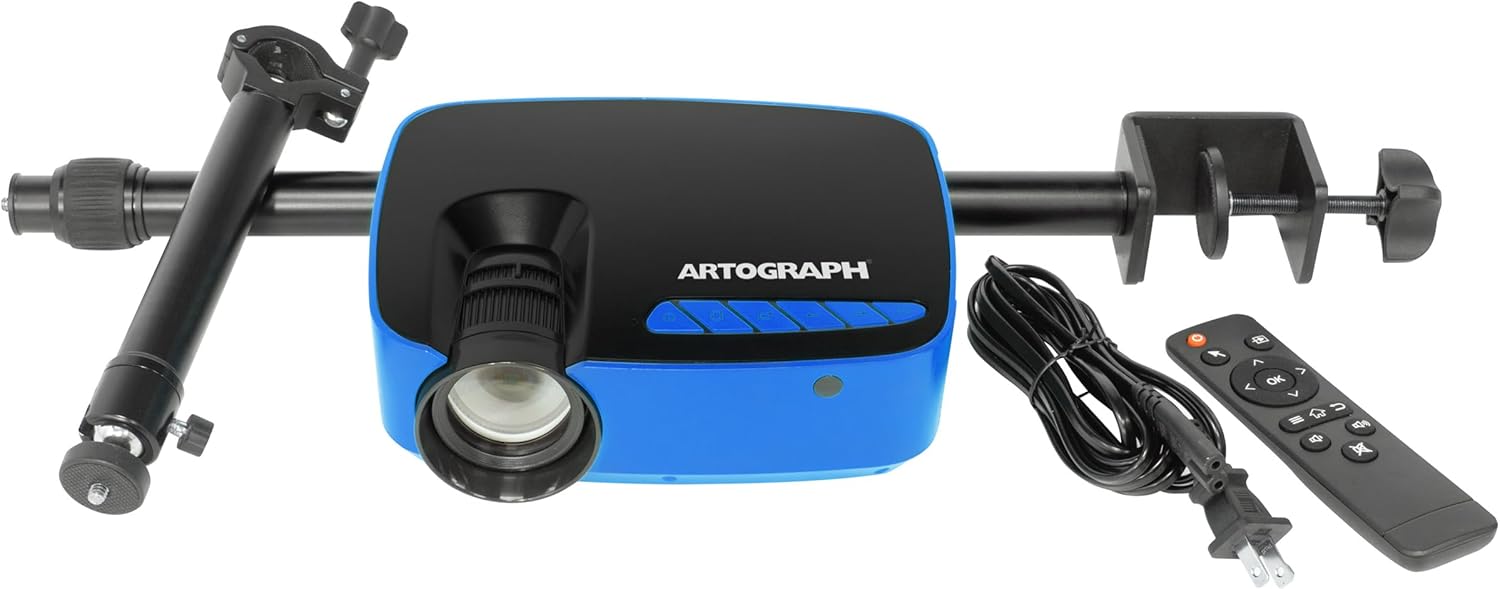
Image: The Artograph Flare 100 Digital Art Projector shown with its included accessories: the projector unit, power cord, remote control, and the monopod arm clamp Stand.
3. Einrichtung
Follow these steps to set up your Artograph Flare 100 projector for optimal performance.
3.1 Physische Einrichtung
- Positionierung des Projektors: Place the projector on a stable, flat surface or attach it to the included Monopod Arm Clamp Stand. The stand allows for flexible positioning, including projecting onto vertical surfaces or down onto a desktop.
- Attaching the Monopod Arm Clamp Stand: Securely attach the monopod arm to a table or desk using the clamp. Then, screw the projector onto the monopod's swivel ball head. This allows for 360° projection and adjustment to various angles.

Image: The Artograph Flare 100 projector securely mounted on its adjustable monopod arm clamp stand, ready for use.

Image: Demonstrates the versatility of the Flare 100, showing how it can project images straight, down onto a surface, or up onto a ceiling, thanks to its monopod stand with swivel ball.
3.2 Stromanschluss
- Strom anschließen: Plug the provided power cord into the projector's power input port and then into a standard electrical outlet.
3.3 Konnektivität
The Flare 100 supports various input sources:
- HDMI: Connect your computer, tablet, or other HDMI-enabled device using the HDMI cable.
- USB-A 2.0: Insert a USB flash drive containing images or media files.
- TF-Karte: Insert a TF (microSD) card with your media.
- AV-Anschluss: Use the AV port for composite video and audio input.
- W-lan: Connect to a Wi-Fi network for wireless screen sharing from compatible devices. Refer to the on-screen menu for Wi-Fi setup instructions.
3.4 Fokus- und Trapezkorrektur
Adjust the image clarity and shape using the manual controls:
- Fokus: Drehen Sie den Fokusring am Projektorobjektiv, bis das projizierte Bild scharf und klar ist.
- Trapezkorrektur: Use the keystone adjustment dial to correct trapezoidal distortion, ensuring the projected image is rectangular, especially when projecting at an angle.
4. Bedienung
This section details the basic operation of your Artograph Flare 100 projector.
4.1 Ein-/Ausschalten
- Einschalten: Drücken Sie die Ein/Aus-Taste am Projektor oder auf der Fernbedienung.
- Ausschalten: Drücken Sie den Netzschalter erneut, um den Projektor auszuschalten.
4.2 Navigation im Menü
Use the control buttons on the projector or the remote control to navigate the on-screen menu. The buttons typically include OK, Left, Right, Return, and Page for selection and navigation.

Image: A detailed diagram illustrating the control buttons (OK, Left, Right, Return, Page, On/Off, Focus, Keystone) on the top of the projector and all available input/output ports (Audio Out, AV, HDMI, USB, TF) on the rear and side.
4.3 Medienwiedergabe
The Flare 100 features a built-in media player. Select the desired input source (HDMI, USB, TF Card, Wi-Fi) from the main menu.
- Unterstützte Fotoformate: BMP, JPG, PNG, TXT
- Unterstützte Audioformate: AAC, APE, FLAC, MP3, OGG, WAV, WMA
- Unterstützte Videoformate: 3GP, AVI, FLV, MKV, MOV, MP4, MPG, RMVB, VOB
4.4 Using Built-In Art Grids
The projector includes five built-in art grids to assist with proportion and composition when transposing images to a wall or canvas.
- Drittelregel
- Horizontale Linien
- Concentric Circles
- Kreuzschraffur
- Perspektive
To activate and select a grid, navigate through the projector's menu options. The grid will overlay your projected image.

Image: The Artograph Flare 100 projecting an image with various grid overlays, demonstrating the built-in tools for artistic proportion and composition.
5. Wartung
Durch die richtige Wartung wird die Langlebigkeit und optimale Leistung Ihres Projektors gewährleistet.
5.1 Reinigung
- Linse: Verwenden Sie ein weiches, fusselfreies Tuch, das speziell für optische Linsen entwickelt wurde. Wischen Sie die Linse vorsichtig ab, um Staub oder Fingerabdrücke zu entfernen. Vermeiden Sie scheuernde Materialien oder aggressive Chemikalien.
- Casing: Wischen Sie die Außenseite des Projektors mit einem weichen, trockenen Tuch ab. Bei hartnäckigen Flecken kann ein leicht klopfender Reflektor helfen.amp Ein Tuch kann verwendet werden, achten Sie aber darauf, dass keine Feuchtigkeit in das Gerät eindringt.
- Vents: Periodically check the ventilation openings for dust accumulation. Use a soft brush or compressed air to clear any blockages, ensuring proper airflow and preventing overheating.
5.2 Speicherung
When not in use, store the projector in a cool, dry place away from direct sunlight and extreme temperatures. If storing for an extended period, consider using the original packaging or a protective case to prevent dust buildup and accidental damage.
6. Fehlerbehebung
This section addresses common issues you might encounter with your Artograph Flare 100 projector.
| Problem | Mögliche Ursache | Lösung |
|---|---|---|
| Kein Bild projiziert | Power not connected; Input source not selected; Device not connected properly. | Ensure power cord is securely plugged in. Select the correct input source (HDMI, USB, TF, Wi-Fi). Verify cables are firmly connected to both projector and source device. |
| Das Bild ist unscharf oder unscharf. | Focus ring not adjusted; Projector too close/far from surface; Minimum projection distance not met. | Rotate the focus ring on the lens until the image is clear. Adjust the distance between the projector and the projection surface. Note that the minimum focus distance may result in a projected image size of over 16 inches. |
| Das Bild ist verzerrt (trapezförmig). | Die Trapezkorrektur wurde nicht angepasst. | Use the keystone adjustment dial to correct the image shape until it is rectangular. |
| Kein Ton vom Projektor | Volume too low; Audio format not supported; External audio device connected. | Increase the volume using the remote or projector controls. Ensure the audio file format is supported. If using external speakers via the 3.5mm jack, ensure they are connected and powered on. |
| Difficulty connecting to Wi-Fi | Incorrect password; Network issues; Device compatibility. | Double-check the Wi-Fi password. Restart your router and the projector. Ensure your device is compatible with the projector's screen sharing feature. |
| Projektor überhitzt | Blockierte Lüftungsöffnungen; Längerer Einsatz in heißer Umgebung. | Ensure ventilation openings are clear of obstructions. Operate the projector in a well-ventilated area. Allow the projector to cool down if it has been in continuous use for an extended period. |
7. Spezifikationen
Detailed technical specifications for the Artograph Smart HD Digital Art Projector Flare 100.
| Besonderheit | Detail |
|---|---|
| Modellnummer | 25707 |
| Abmessungen (L x B x H) | 7.75 x 6.25 x 2.75 Zoll |
| Artikelgewicht | 1.68 Pfund |
| Farbe | Blau / Schwarz |
| Bildschirmauflösung (nativ) | 1280 x 720 (HD) |
| Unterstützte maximale Auflösungen | 1920 x 1080 (Full HD) up to 3840 x 2160 (4K) |
| Helligkeit | 300 Lumen |
| Projektionsgröße | 30" - 100" |
| Wastage | 55 Watt |
| Konnektivitätstechnologie | 3.5mm Jack, AV Port, TF Card, HDMI, USB-A 2.0, Wi-Fi |
| Besondere Merkmale | Built-In Media Player, Five Built-In Art Grids, Includes Monopod Arm, Manual Keystone and Focus Correction |
8. Garantie und Support
8.1 Produktgarantie
Artograph products are manufactured with quality and durability in mind. For specific warranty terms and conditions applicable to your Flare 100 projector, please refer to the warranty card included in your product packaging or visit the official Artograph webDie Garantie deckt in der Regel Herstellungsfehler bei normalem Gebrauch ab.
8.2 Kundendienst
If you encounter any issues not covered in the troubleshooting section or require further assistance, please contact Artograph customer support. You can find contact information, FAQs, and additional resources on the official Artograph webWebsite:
Visit Artograph Official WebWebsite
Bitte halten Sie Ihre Produktmodellnummer (25707) und die Kaufinformationen bereit, wenn Sie sich an den Support wenden.