
1. Introduction
This manual provides detailed instructions for the Elitech RC-5+ and LogEt5T Digital USB Temperature Data Loggers. These devices are designed for reliable temperature monitoring in various applications, including cold chain logistics, pharmaceuticals, and food storage. Please read this manual thoroughly before operating the device to ensure proper usage and optimal performance.
2. Product Overview
The Elitech RC-5+ and LogEt5T are advanced digital temperature data loggers that offer precise temperature measurement and convenient data reporting. Both models feature a built-in USB port for direct connection to a computer, enabling automatic PDF and Excel report generation without the need for specialized software.
2.1 Elitech RC-5+
The RC-5+ is a versatile PDF USB temperature data logger suitable for general temperature monitoring. It features a clear LCD display and simple button controls for starting and stopping data logging.
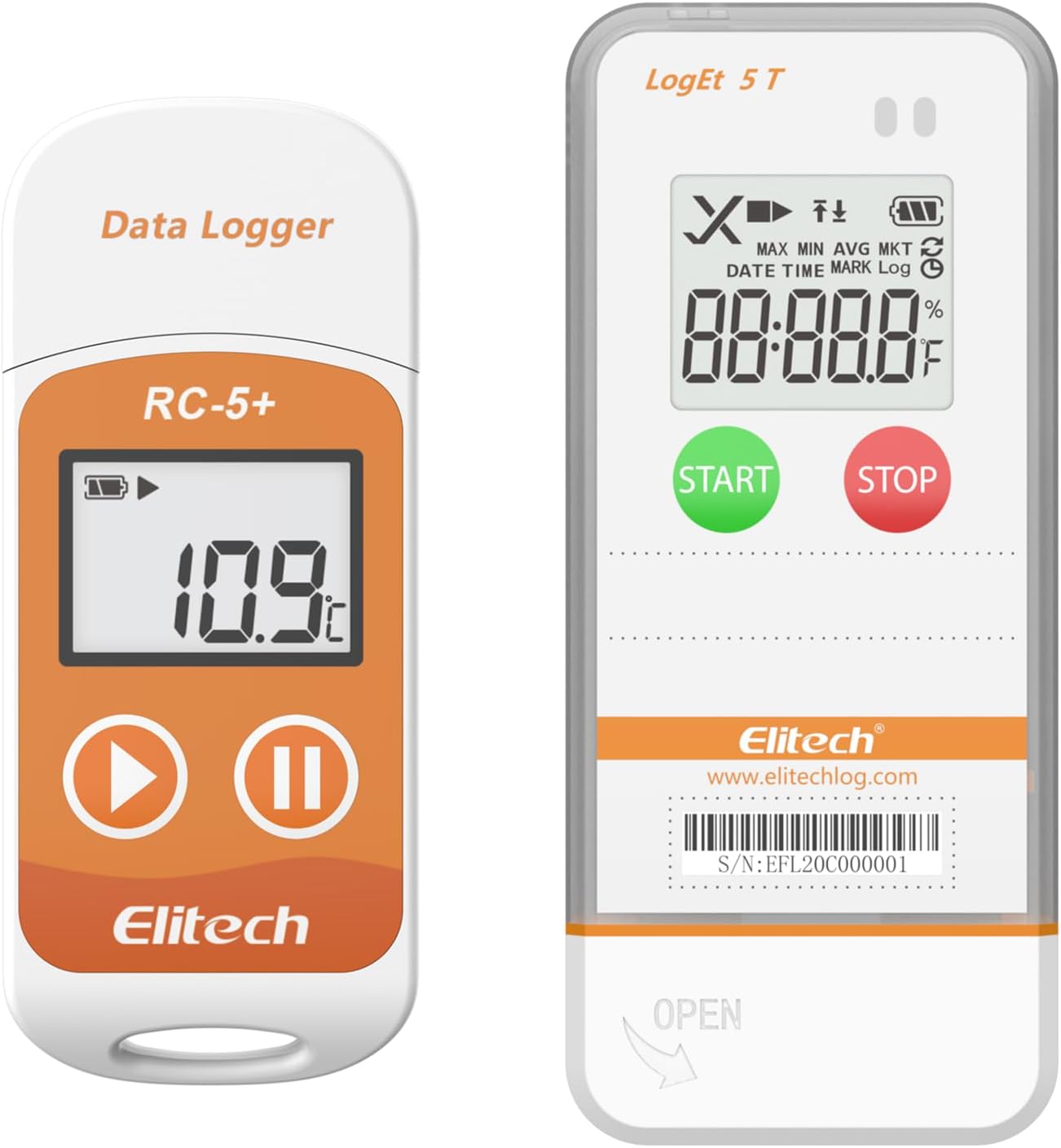
Image: Elitech RC-5+ (left) and LogEt5T (right) Digital USB Temperature Data Loggers.
2.2 Elitech LogEt5T
The LogEt5T is a digital USB temperature data logger designed for applications requiring higher accuracy and compliance with standards like FDA 21 CFR Part 11. It offers a detailed LCD screen displaying various data points and intuitive start/stop buttons.

Image: Elitech LogEt5T Data Logger with its internal sensor, LCD screen, buttons, and USB port labeled.
- ① Internal Sensor: Measures ambient temperature.
- ② LCD Screen: Displays current readings and status.
- ③ Button: Used for operation (Start/Stop/Mark).
- ④ USB Port: For data export and configuration.
- ⑤ External Sensor (Optional): For remote temperature measurement (not shown in this specific image, but part of the LogEt5T component diagram).
3. Key Features
- Wide Temperature Measuring Range: Both models operate within -30°C to +70°C (-22°F to 158°F).
- High Accuracy: LogEt5T offers ±0.1°C/±0.1°F, while RC-5+ offers ±0.9°F.
- Data Visualization: LCD screens display current, maximum, minimum, average, MKT values, date, time, and logging status.
- Parameter Settable: Customize temperature unit, alarm range, and logging interval.
- Automatic PDF/Excel Report: Generate reports directly upon USB connection to PC or Android phone, no software required for basic reports.
- USB Plug and Play: Easy data export and device configuration.
- Large Capacity Data Storage: Up to 32,000 data points. Data can be cleared and reused.
- Durability: RC-5+ is IP67 rated, LogEt5T is IP65 rated, providing protection against dust and water ingress.

Image: Illustration of the 32,000 data point storage capacity of the LogEt5T data logger.
4. Setup
4.1 Initial Inspection
Upon receiving your data logger, inspect the packaging and device for any signs of damage. Ensure all included components, such as the data logger, calibration certificate, and user manual, are present.
4.2 Software Installation (Optional for Advanced Features)
While basic PDF/Excel reports do not require software, for advanced functions such as detailed parameter settings, data query, chart comparison, and email backup, download the Elitechlog software from the official Elitech website (www.elitechlog.com).
5. Operation
5.1 Starting a Log
To begin recording temperature data, press and hold the START button (LogEt5T) or the Play/Start button (RC-5+) until the logging indicator appears on the LCD screen. The device will then start recording data at the preset interval.
5.2 Stopping a Log
To stop recording, press and hold the STOP button (LogEt5T) or the Pause/Stop button (RC-5+) until the logging indicator disappears. The device will save the recorded data.
5.3 Viewing Data on LCD Screen
The LCD screen provides real-time information and recorded data summaries. Press the START button (LogEt5T) or the Play/Start button (RC-5+) briefly to cycle through displayed values such as current temperature, maximum, minimum, average, MKT, date, and time.

Image: Elitech LogEt5T LCD screen showing functions like MAX/MIN/AVG/MKT, DATE/TIME/MARK/Log, Over limit Alarm, Device Status, Battery Level, and Displayed Value.
5.4 Switching Temperature Units
To switch between Celsius (°C) and Fahrenheit (°F), connect the data logger to a computer and use the Elitechlog software, or refer to the device-specific instructions for direct unit switching if available.
6. Data Management
6.1 Connecting to a Computer
Remove the protective cap from the USB port and plug the data logger directly into a USB port on your PC or Android phone. The device will be recognized as a removable storage device.

Image: Elitech LogEt5T data logger connected to a laptop via its USB port, illustrating the plug-and-play functionality for data export.
6.2 Automatic Report Generation
Upon successful connection, the data logger will automatically generate a PDF report and an Excel (CSV) file containing the recorded temperature data. These files can be accessed and saved directly from the device's storage.

Image: Elitech LogEt5T demonstrating "Shadow Data" feature, passively recording data to ensure integrity, alongside a sample data report showing device and shipment information, configuration, and logging summary.
6.3 Using Elitechlog Software
The Elitechlog software provides enhanced data management capabilities:
- Data Query & Storage: View and store historical data.
- Chart Comparison: Compare data from multiple devices.
- Parameter Settings: Configure logging intervals, alarm thresholds, and other device parameters.
- Email Backup: Send data reports via email.
- FDA 21 CFR Part 11 Compliance: For LogEt5T, the software supports compliance requirements.
- Data Export: Export data in various formats (PDF, Excel).

Image: Diagram illustrating the features of Elitechlog software, including data query & storage, chart comparison, settable alarm range, FDA 21 CFR Part 11 compliance, data graph visibility, email backup, and temperature unit switch.
7. Maintenance
7.1 Cleaning
Wipe the device with a soft, damp cloth. Do not use abrasive cleaners or immerse the device in water, despite its IP rating, to prevent potential damage to the USB port or internal components.
7.2 Operating Environment
Operate the data logger within its specified temperature range of -22°F to 158°F (-30°C to 70°C) to ensure accurate readings and prevent damage to the device. Avoid extreme temperatures, direct sunlight, and high humidity.
8. Troubleshooting
- Device Not Starting: Ensure the battery is charged or the device is connected to a power source (USB). Press and hold the start button for the required duration.
- No Data Report Generated: Verify the device is properly connected to the USB port. Try a different USB port or computer. Ensure the logging process was started and stopped correctly.
- Inaccurate Readings: Check if the device is operating within its specified temperature range. Ensure the sensor is not obstructed. Recalibration may be required if persistent issues occur.
- Software Not Recognizing Device: Ensure Elitechlog software is installed correctly. Try restarting the software and reconnecting the device. Check for driver updates if necessary.
9. Specifications
9.1 Elitech RC-5+

Image: Elitech RC-5+ data logger with its detailed specifications.
| Feature | Specification |
|---|---|
| Temperature Measurement Range | -30°C ~ +70°C (-22°F ~ 158°F) |
| Temperature Accuracy | ±0.5°C / ±0.9°F (-20°C ~ +40°C); ±1°C / ±1.8°F (others) |
| Resolution | 0.1°C / °F |
| Data Capacity | 32,000 points (Max) |
| Protection Class | IP67 |
| Connectivity | USB |
| Report Format | PDF, Excel (CSV) |
9.2 Elitech LogEt5T

Image: Elitech LogEt5T data logger with its detailed specifications.
| Feature | Specification |
|---|---|
| Temperature Measurement Range | -30°C ~ +70°C (-22°F ~ 158°F) |
| Temperature Accuracy | ±0.5°C (-20~40°C); ±0.1°C (-100~150°C); ±2°C (others) |
| Resolution | 0.1°C / °F |
| Data Capacity | 32,000 points (Max) |
| Protection Class | IP65 |
| Size | 97mm x 43mm x 12.5mm |
| Connectivity | USB |
| Report Format | PDF, Excel (CSV) |
| Compliance | FDA 21 CFR Part 11 |
10. Warranty and Support
Your Elitech data logger comes with a calibration certificate and a user manual. For warranty information, technical support, or service inquiries, please visit the official Elitech website or contact Elitech customer service directly. Retain your purchase receipt for warranty validation.
Official Website: www.elitechlog.com


