
1. Einleitung
The Radtel RT16 FRS Two Way Radio is designed for reliable, license-free communication across 16 channels. Featuring a durable build, USB-C charging, and VOX functionality, it is suitable for various environments from outdoor activities to commercial settings.
Packungsinhalt
Your Radtel RT16 package includes:
- 2x Radtel RT16 Two Way Radios
- 2x Rechargeable Lithium-Ion Batteries (2000mAh)
- 2x Gürtelclips
- 2x USB-C Charger Cables
- 2x Ohrhörer
- 1x Benutzerhandbuch
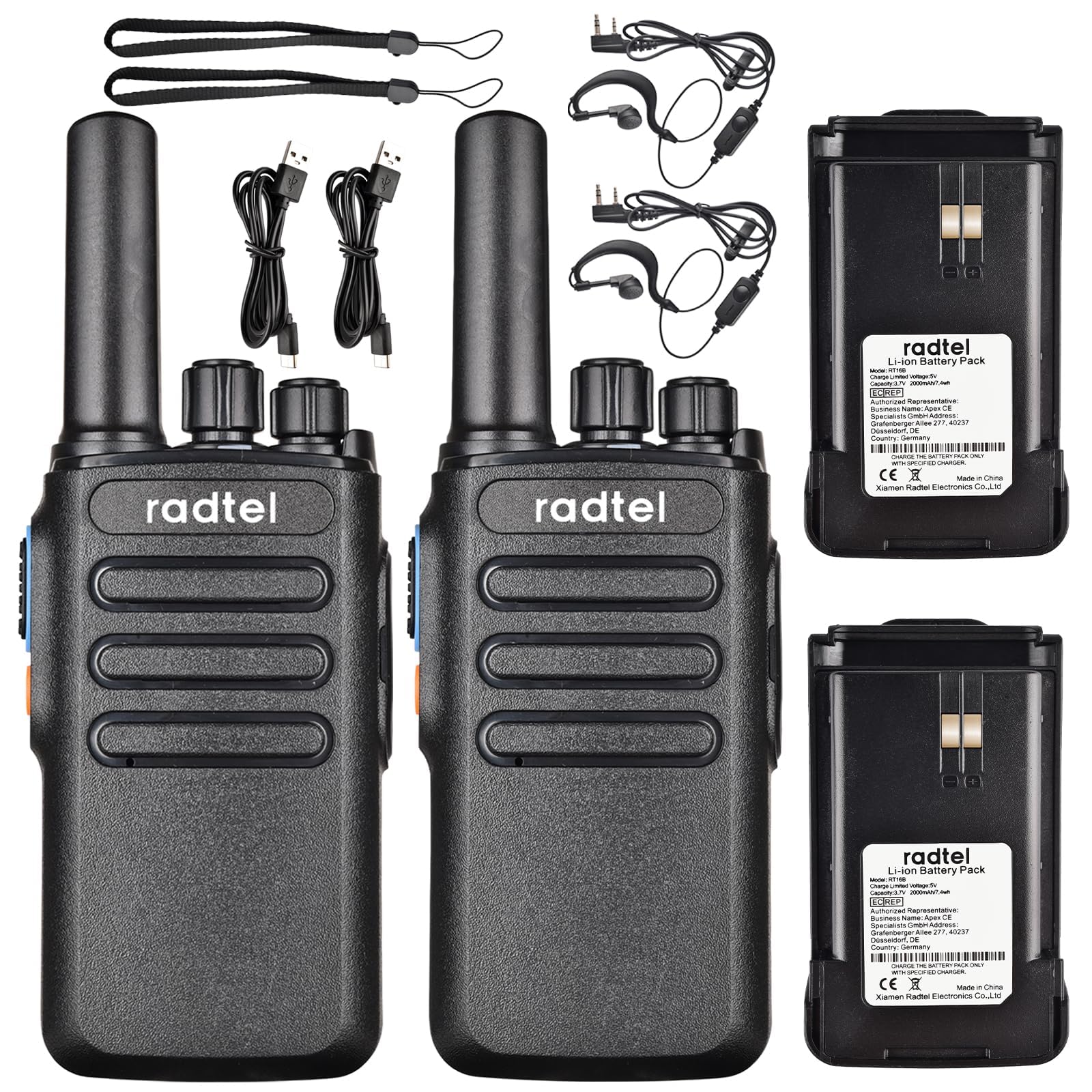
Image 1.1: Radtel RT16 Two Way Radios and included accessories.
2. Einrichtung
2.1 Einlegen der Batterie
- Stellen Sie sicher, dass das Radio ausgeschaltet ist.
- Suchen Sie das Batteriefach auf der Rückseite des Radios.
- Schieben Sie die Batterie in das Batteriefach, bis sie hörbar einrastet.

Image 2.1: Battery compartment and belt clip attachment.
2.2 Gürtelclip-Befestigung
- Richten Sie den Gürtelclip an den dafür vorgesehenen Schlitzen auf der Rückseite des Funkgeräts aus.
- Push the clip firmly until it locks into position.
2.3 Laden des Akkus
The RT16 radios feature convenient USB-C charging. Use the provided USB-C cable to charge the radio. The charging port is located at the bottom of the radio.
- Schließen Sie das USB-C-Kabel an den Ladeanschluss des Radios an.
- Connect the other end of the cable to a compatible USB power source (e.g., phone charger, power bank, car adapter).
- The indicator light on the radio will show charging status (refer to the LED indicator section for details).

Image 2.2: USB-C charging options for the RT16.
3. Bedienungsanleitung
3.1 Ein-/Ausschalter und Lautstärkeregelung
To power on the radio, rotate the top-left knob clockwise until you hear a click and a voice prompt indicating the current channel. Continue rotating to adjust the volume. To power off, rotate the knob counter-clockwise until it clicks off.
3.2 Kanalauswahl
The RT16 has 16 available channels. To select a channel, rotate the top-right knob. The radio will announce the selected channel number.

Abbildung 3.1: Oben view of the RT16 showing power/volume and channel knobs.
3.3 Push-to-Talk (PTT)-Taste
To transmit your voice, press and hold the large button on the side of the radio. Release the button to listen.
3.4 Headset-Anschluss
The radio supports a 2-pin K-connector headset for hands-free operation. Open the rubber cover on the side of the radio and plug in the headset connectors.

Image 3.2: Headset connection port on the RT16.
3.5 Voice Operated Exchange (VOX) Function
The VOX function allows for hands-free transmission without pressing the PTT button. The radio will automatically transmit when it detects your voice. This feature requires software activation for first use and offers 9 adjustable levels.

Image 3.3: Illustration of VOX function for hands-free use.
Activating VOX Mode
To activate VOX mode, hold down the small side button while powering on the radio. Continue holding until you hear a beep indicating activation.
Video 3.1: Demonstrates how to activate the voice control (VOX) mode on the Radtel RT16 radio.
Deactivating VOX Mode
To deactivate VOX mode, hold down the small side button while powering on the radio. Continue holding until you hear two beeps, confirming deactivation.
Video 3.2: Demonstrates how to deactivate the voice control (VOX) mode on the Radtel RT16 radio.
3.6 Language Switch Operation
The radio supports both Chinese and English voice prompts. To switch the language, turn the channel knob to channel 16. Then, power off the radio. While powering on, hold down the small side button until you hear a beep. This will switch the language mode.
Video 3.3: Instructions for switching between Chinese and English voice prompts on the Radtel RT16 radio.
4. Wartung
- Halten Sie das Radio sauber, indem Sie es mit einem weichen, fusselfreien Tuch abwischen.amp Tuch. Vermeiden Sie die Verwendung aggressiver Chemikalien oder Lösungsmittel.
- Do not immerse the radio in water as it is not water resistant.
- Bewahren Sie das Radio an einem kühlen, trockenen Ort auf, wenn es nicht in Gebrauch ist.
- Stellen Sie sicher, dass die Abdeckung des USB-C-Anschlusses fest verschlossen ist, um das Eindringen von Staub und Feuchtigkeit zu verhindern.
5. Fehlerbehebung
| Problem | Mögliche Ursache | Lösung |
|---|---|---|
| Kein Strom | Batterie schwach oder nicht richtig eingesetzt. | Laden Sie den Akku auf oder setzen Sie ihn wieder sicher ein. |
| Kann nicht mit anderen Funkgeräten kommunizieren. | Die Funkgeräte sind auf unterschiedlichen Kanälen oder außerhalb der Reichweite. | Ensure both radios are on the same channel. Move closer to the other radio. Check for obstructions. |
| Schlechte Audioqualität | Schwaches Signal, Störungen oder geringe Lautstärke. | Adjust volume. Move to an area with fewer obstructions. Change channel if interference is present. |
| VOX funktioniert nicht | VOX nicht aktiviert oder Empfindlichkeit zu gering. | Activate VOX mode (see Section 3.5). Adjust VOX sensitivity level via programming software. |
6. Spezifikationen
| Besonderheit | Detail |
|---|---|
| Marke | Radtel |
| Modellnummer | RT16 |
| Anzahl der Kanäle | 16 |
| Frequenzbereich | 462/467 MHz (FRS Band) |
| Maximale Sprechreichweite | Up to 5 Kilometers (open outdoor areas) |
| Ausgangsleistung | 2W |
| Akku-Typ | Lithium-Ionen-Akku (2000 mAh) |
| Laden | USB-C |
| Besondere Merkmale | Long Range, Type-C rechargeable battery, VOX Function, Channel Scan |
| Wasserbeständigkeit | Nicht wasserfest |
| Technische Daten | 1.37"T x 2.16"B x 5.9"H |
| Artikelgewicht | 0.39 Pfund |
| Kompatible Geräte | Other FRS two-way radios, Standard earpieces |
7. Gewährleistung
The Radtel RT16 FRS Two Way Radio comes with a 1-Year Warranty from the manufacturer, Xiamen Radtel Electronics Co.,Ltd.
8. Unterstützung
For further assistance or to explore other Radtel products, please visit the official Radtel Store: