1. Einleitung
Welcome to the WONNIE DC105P Digital Camera user manual. This guide provides essential information for setting up, operating, and maintaining your new camera. Designed for ease of use, this camera captures vivid 56MP photos and Full HD 1080P videos, making it perfect for young photographers to explore their creativity.
2. Sicherheitshinweise
- Setzen Sie die Kamera weder Wasser noch extremen Temperaturen aus.
- Halten Sie die Kamera von starken Magnetfeldern fern.
- Verwenden Sie ausschließlich die angegebenen Batterien und das Ladekabel.
- Vermeiden Sie es, die Kamera fallen zu lassen oder starken Stößen auszusetzen.
- Reinigen Sie die Linse mit einem weichen, trockenen Tuch.
3. Lieferumfang
Upon unboxing your WONNIE DC105P Digital Camera, please ensure all the following items are present:
- WONNIE DC105P Digital Camera
- 32GB TF Karte
- Wiederaufladbare Batterien (x2)
- Typ-C USB-Kabel
- Schlüsselband
- Aufbewahrungstasche
- Benutzerhandbuch (dieses Dokument)
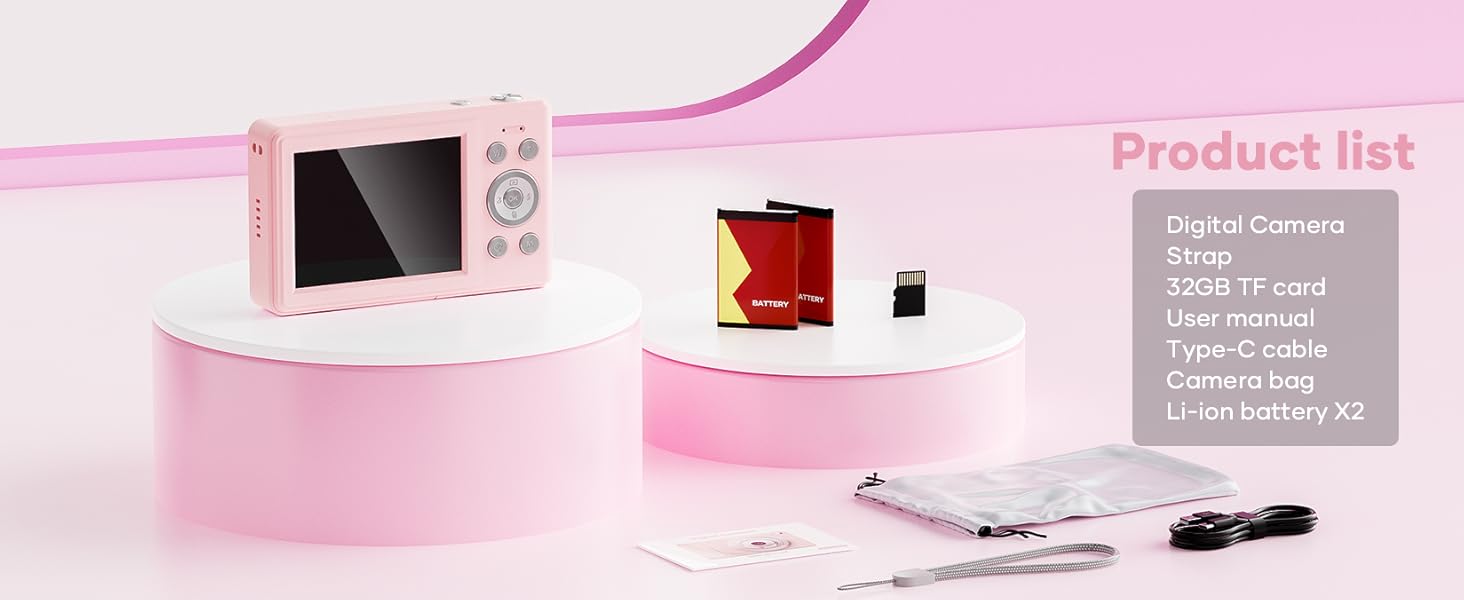
This image displays the WONNIE DC105P Digital Camera alongside its accessories: two rechargeable batteries, a 32GB TF card, a Type-C USB cable, a lanyard, and a soft storage bag, all neatly arranged.
4. Produktüberschreitungview
Machen Sie sich mit den Komponenten und Bedienelementen der Kamera vertraut.
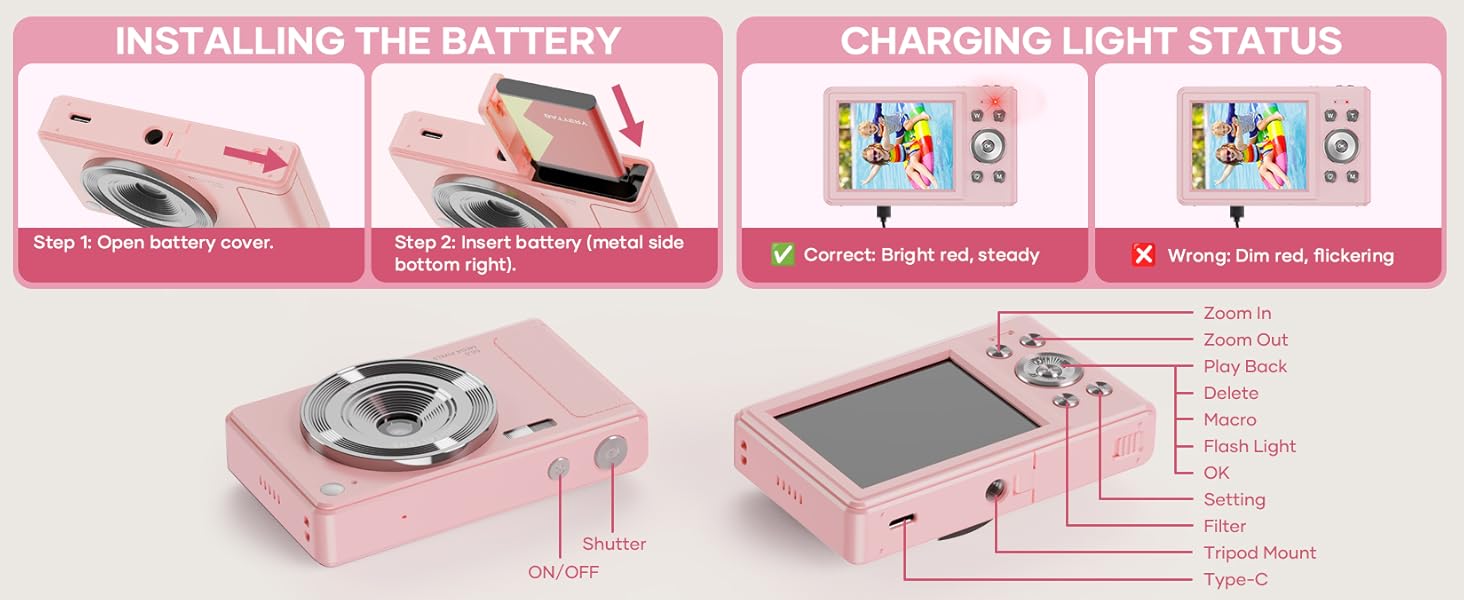
This diagram highlights the various buttons and ports on the WONNIE DC105P Digital Camera, including the power button, shutter button, zoom controls, playback button, menu button, OK button, flash light, tripod mount, and Type-C port.
Schlüsselkomponenten:
- Linse: Nimmt Bilder und Videos auf.
- Blitz: Sorgt für Beleuchtung bei schwachen Lichtverhältnissen.
- Auslöser: Drücken Sie diese Taste, um ein Foto aufzunehmen oder die Videoaufnahme zu starten/stoppen.
- Netzschalter: Schaltet die Kamera ein oder aus.
- LCD Bildschirm: Zeigt Live-Anzeigen view, Menüs und Wiedergabe.
- Navigationstasten (Hoch/Runter/Links/Rechts/OK): Wird zur Menünavigation und zur Auswahl von Optionen verwendet.
- Zoom-Tasten (W/T): Passt den digitalen Zoom an.
- Wiedergabetaste: Wechselt in den Wiedergabemodus view Aufgezeichnete Medien.
- Menü-Schaltfläche: Greift auf die Kameraeinstellungen zu.
- Typ C-Anschluss: Zum Aufladen und zur Datenübertragung.
- Stativhalterung: For attaching the camera to a tripod.
5. Einrichtung
5.1 Einlegen der Batterie
- Öffnen Sie die Batteriefachabdeckung an der Seite der Kamera.
- Insert the rechargeable battery with the metal contacts facing down and to the right, ensuring it clicks into place.
- Schließen Sie den Batteriefachdeckel fest.
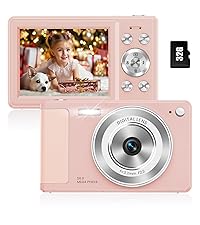
This image illustrates the two steps for battery installation: first, opening the battery cover, and second, inserting the battery with the metal side facing down and to the right.
5.2 Installation der SD-Karte
The camera supports a 32GB TF (Micro SD) card. Insert the TF card into the designated slot in the battery compartment until it clicks.
5.3 Laden des Akkus
- Schließen Sie die Kamera mithilfe des mitgelieferten USB-Typ-C-Kabels an eine Stromquelle an.
- The charging indicator light will show the charging status. A bright red, steady light indicates correct charging. A dim, flickering light indicates an issue.
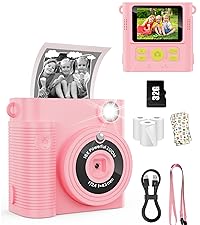
This image displays the camera's charging light status: a bright red, steady light for correct charging, and a dim, flickering light indicating an incorrect status.
5.4 Anbringen des Schlüsselbandes
Thread the lanyard through the designated loop on the camera body to prevent accidental drops.
6. Bedienung der Kamera
6.1 Ein-/Ausschalten
Press and hold the Power button (labeled ON/OFF) on the top of the camera to turn it on or off.
6.2 Fotos aufnehmen
In photo mode, frame your shot using the LCD screen and press the Shutter button to capture an image. The camera features 56MP resolution for clear photos.

This image shows a child holding the pink WONNIE DC105P Digital Camera, with the screen displaying a photo of children. Other children are in the foreground, emphasizing the camera's ease of use for capturing vibrant 56MP photos and smooth FHD 1080P videos.
Special Photo Features:
- 16x Digitalzoom: Use the 'W' and 'T' buttons to zoom in or out.
- 20 Fun Filters: Apply various creative filters to your photos via the menu.
- Selbstauslöser: Set a delay (2s, 5s, 10s) before taking a photo, ideal for group shots.
- Serienbildaufnahme (Burst-Modus): Capture a rapid sequence of 3 photos.
- Anti-Shake: Die digitale Bildstabilisierung hilft, Unschärfen durch Kamerabewegungen zu reduzieren.
- Fülllicht: Activate the built-in fill light for brighter photos in dim environments. (Note: Fill light won't activate in macro mode or when battery is too low.)
- Smile Recognition: Nimmt automatisch ein Foto auf, sobald ein Lächeln erkannt wird.

This image showcases three key features: Self Timer for perfect selfies, Continuous Shooting to capture every moment, and Anti Shake for steady shots.

This image illustrates the camera's 16x digital zoom capability with examples at 4x, 8x, and 16x, alongside a selection of 20 fun filters like Normal, Cold Filter, Warm Filter, and more, for endless creativity.
6.3 Videos aufnehmen
Switch to video mode (usually indicated by a camcorder icon in the menu) and press the Shutter button to start recording. Press again to stop. Videos are recorded in FHD 1080P with a built-in microphone.
6.4 Playback/ViewMedien
Press the Playback button to enter playback mode. Use the navigation buttons to scroll through your photos and videos. Press the OK button to play videos.
6.5 Übertragung Files
You have several options to transfer your media:
- USB-Anschluss an PC: Connect the camera to your computer using the Type-C cable. The camera will appear as a removable disk.
- OTG to Phone: Use a compatible OTG cable adapter (sold separately) to connect the camera to your smartphone (e.g., iPhone 15, Samsung).
- Kartenleser: Remove the TF card and insert it into a card reader to transfer files to a computer or phone.

This image illustrates three convenient ways to view and transfer media: directly connecting the camera via USB to a PC, using an OTG adapter to connect to a smartphone, or using a card reader with a smartphone.
6.6 WebCam-Funktionalität
Connect the camera to a computer via the Type-C USB cable. Select 'WebAktivieren Sie den „Cam“-Modus der Kamera (falls Sie dazu aufgefordert werden), um sie für Videoanrufe oder Live-Streaming zu nutzen.

This image demonstrates the WONNIE DC105P Digital Camera's capability to function as a webcam, showing it mounted on a laptop for a video call and for live streaming.
7. Videodemonstration
Dieses Video bietet einen allgemeinen Überblickview of the WONNIE Digital Camera, highlighting its features and suitability for kids and teens.
This video offers an introduction to the digital camera, demonstrating its basic functions and design.
8. Wartung
- Reinigung: Reinigen Sie das Kameragehäuse und den Bildschirm mit einem weichen, fusselfreien Tuch. Für das Objektiv verwenden Sie ein spezielles Objektivreinigungstuch und -mittel.
- Lagerung: Store the camera in its provided storage bag in a cool, dry place away from direct sunlight and humidity. Remove the battery if the camera will not be used for an extended period.
- Batteriepflege: Fully charge batteries before first use. Avoid completely draining the battery frequently to prolong its lifespan.
9. Fehlerbehebung
| Problem | Mögliche Lösung |
|---|---|
| Die Kamera lässt sich nicht einschalten. | Stellen Sie sicher, dass der Akku richtig eingelegt und vollständig aufgeladen ist. |
| Es ist nicht erlaubt, Fotos zu machen/Videos aufzunehmen. | Check if the SD card is inserted correctly and has sufficient free space. Ensure the battery is not critically low. |
| Bilder sind verschwommen. | Ensure the lens is clean. Use the anti-shake feature. Hold the camera steady while shooting. |
| Übertragung nicht möglich files to computer/phone. | Verify the USB cable connection. Ensure the camera is in the correct mode for data transfer (if prompted). Try a different USB port or cable. For phones, ensure OTG compatibility and adapter. |
| Charging indicator is flickering. | Refer to Figure 5.2 for correct charging status. Re-insert the cable or try a different power source. |
10. Spezifikationen
| Besonderheit | Detail |
|---|---|
| Auflösung des Fotosensors | 56 Megapixel |
| Videoauflösung | 1080p FHD |
| Optischer Zoom | 16-facher Digitalzoom |
| Bildschirmgröße | 2.8 Zoll LCD |
| Bildstabilisierung | Digitales |
| Speichermedien | 32GB TF Card (included), Max 32GB supported |
| Konnektivität | OTG, USB Type-C |
| Besondere Merkmale | Zeit Stamp, Anti-shake, Time-lapse, Continuous Shoot, Face Detection, Self-timer, Webcam, Filter Effect, Fill light, Selfie mirror, Auto Shut-off, Built-in Microphone |
| Artikelgewicht | 0.22 Kilogramm (ca. 0.48 Pfund) |
| Maße | Ca. 3.8 x 0.78 x 2.4 Zoll (basierend auf dem Bild) |
| Akku-Typ | Lithium Ion (1000mAh, 3.8V) |
11. Garantie und Support
Your WONNIE DC105P Digital Camera comes with a 1 Jahr Garantie. We are committed to providing excellent customer service and offer a hassle-free replacement policy. For any inquiries, missing accessories, or support needs, please contact our customer service team. We aim to respond within 24 hours.
For further assistance, please visit the official WONNIE Store on Amazon: WONNIE Store