
Lamzu Maya X
Lamzu Maya X Kabellose Gaming-Maus – Benutzerhandbuch
Model: Maya X
Einführung
Thank you for choosing the Lamzu Maya X Wireless Gaming Mouse. This manual provides detailed instructions for setting up, operating, maintaining, and troubleshooting your new gaming mouse. Please read this manual thoroughly to ensure optimal performance and longevity of your device.

Image: The Lamzu Maya X Wireless Gaming Mouse, split to show its internal structure and accompanied by its 8K wireless dongle.
Hauptmerkmale
- Ultraleicht: Weighing just 47g, the MAYA X mouse is designed to be lightweight yet sturdy, providing ultimate comfort during long gaming sessions.
- Symmetrical Shape Design: It is flexible and equally accommodating for palm, claw, or fingertip grip styles.
- Equipped with Optical Switches and Dust-Proof Encoder: Optical switches last three times longer than mechanical ones and can handle over 70 million cycles, respond quickly, give tactile feedback, and act fast. The Dust-Proof wheel encoder with 30-grid roller outputs 15 pulse signals, making games more precise and responsive.
- Pixart PAW 3950 Sensor: Powered by the latest flagship sensor. It supports up to 30,000 DPI and 750 IPS, with a maximum polling rate of 8,000 Hz when using the 8K dongle.
- Nordic 52840 MCU: Making battery more power efficient, providing fast response times, accurate motion tracking, and seamless performance without any lags during gameplay.
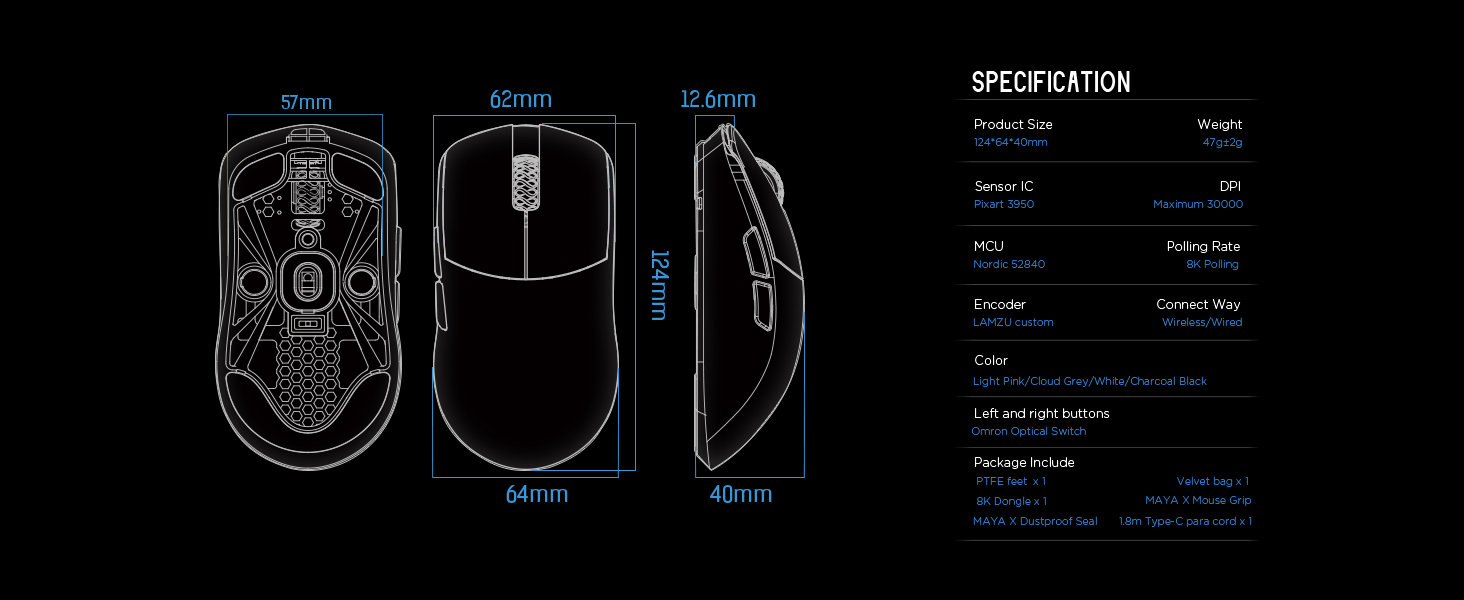
Image: Diagram illustrating the three common mouse grip types (palm, claw, fingertip) and how the symmetrical shape of the Maya X mouse accommodates them.

Bild: Nahaufnahme view of the Pixart PAW 3950 sensor integrated circuit, highlighting its advanced technology.

Bild: Detailliert view of the Nordic 52840 Microcontroller Unit (MCU), emphasizing its role in efficient performance and 8K Polling Rate compatibility.
Installationshandbuch
Packungsinhalt
- Lamzu Maya X Wireless Gaming Mouse
- PTFE Feet x 1 (extra set)
- 8K Dongle x 1
- Velvet Bag x 1
- MAYA X Mouse Grip
- MAYA X Dustproof Seal
- 1.8m Type-C Paracord x 1 (USB-C cable)
Erstverbindung
The Lamzu Maya X mouse supports both 2.4G wireless and wired connections.
2.4G Wireless-Verbindung
- Insert the included 8K dongle into an available USB port on your computer.
- Schalten Sie die Maus mit dem Ein-/Ausschalter an der Unterseite der Maus ein.
- The mouse should automatically connect to the dongle. If not, refer to the software section for pairing instructions.
For optimal wireless performance, ensure the dongle is placed close to the mouse and away from sources of interference.
Kabelverbindung
- Connect the provided 1.8m Type-C Paracord cable to the USB-C port on the front of the mouse.
- Verbinden Sie das andere Ende des Kabels mit einem freien USB-Anschluss Ihres Computers.
- The mouse will function immediately in wired mode with a 1KHz polling rate.

Image: The Lamzu Maya X mouse demonstrating its dual connectivity modes: 2.4G wireless via dongle and wired via USB-C cable.
Softwareinstallation (optional, aber empfohlen)
To unlock the full potential of your Lamzu Maya X mouse, including custom DPI settings, macro programming, and polling rate adjustments up to 8000Hz, download the official driver software from the Lamzu website. The software is web-based, eliminating the need for a local installation.
Besuchen: www.lamzu.com/support

Image: Screenshot of the Lamzu Aurora Web Driver interface, showing options for macro programming, button customization, DPI settings, polling rate, and LOD adjustment.
Bedienung der Maus
Tastenfunktionen
The Lamzu Maya X is a 6-button gaming mouse. Refer to the diagram below for button identification:

Image: Diagram illustrating the six programmable buttons on the Lamzu Maya X mouse: Left Click, Right Click, Scroll Wheel, DPI button, Forward side button, and Back side button. Also shows the On/Off switch on the underside.
- Links Klick: Primäre Aktionsschaltfläche.
- Rechtsklick: Sekundäre Aktionsschaltfläche.
- Scrollrad: Für Scroll- und Mittelklickfunktionen.
- DPI-Taste: Cycles through preset DPI levels. Customizable via software.
- Vorwärts-Seitentaste: Default for forward navigation. Customizable.
- Knopf auf der Rückseite: Default for backward navigation. Customizable.
- Ein-/Ausschalter: Located on the underside of the mouse to power on/off.
DPI-Anpassung
The mouse features a Pixart PAW 3950 sensor supporting up to 30,000 DPI. You can adjust DPI settings through the dedicated DPI button or more precisely using the Lamzu Aurora Web Driver software.

Image: A stylized view of the Lamzu Maya X mouse highlighting its capability for up to 30,000 DPI, indicating high precision.
Abfragerate
The Lamzu Maya X supports a maximum polling rate of 8,000 Hz when using the included 8K dongle. This high polling rate ensures smoother cursor movement and reduced input lag.

Image: The Lamzu Maya X mouse and its 8K dongle, promoting the 8K Polling Rate with Aurora Technology for enhanced performance.
Wartung
Reinigung
- Verwenden Sie ein weiches, trockenes Tuch, um die Oberfläche der Maus abzuwischen.
- Bei hartnäckigen Verschmutzungen leicht dampBefeuchten Sie das Tuch mit Wasser oder einer milden Reinigungslösung. Vermeiden Sie aggressive Chemikalien.
- Clean the optical sensor area on the underside regularly with a cotton swab to ensure accurate tracking.
Batteriepflege
- The mouse uses a Lithium Ion battery. Avoid fully discharging the battery frequently to prolong its lifespan.
- Laden Sie die Maus mit dem mitgelieferten USB-C-Kabel auf.
- Bewahren Sie die Maus an einem kühlen, trockenen Ort auf, wenn Sie sie längere Zeit nicht verwenden.
Replacing PTFE Feet
The package includes an extra set of PTFE feet. If the existing feet show significant wear, carefully peel them off and apply the new ones, ensuring the surface is clean and dry before application.

Abbildung: Unterseite view of the Lamzu Maya X mouse, showing the PTFE feet, optical sensor, and on/off switch.
Fehlerbehebung
Maus reagiert nicht
- Überprüfen Sie die Leistung: Ensure the mouse is turned on using the switch on the underside.
- Batteriestand: Laden Sie die Maus auf, wenn der Akku schwach ist.
- Drahtlose Verbindung: Ensure the 8K dongle is securely plugged into a USB port and within range. Try a different USB port.
- Kabelverbindung: Stellen Sie sicher, dass das USB-C-Kabel fest mit der Maus und dem Computer verbunden ist. Versuchen Sie es mit einem anderen USB-Anschluss.
- Reparatur: If using wireless, try re-pairing the mouse with the dongle via the software.
Inconsistent Tracking or Cursor Jitter
- Sensor reinigen: Reinigen Sie den optischen Sensor an der Unterseite der Maus.
- Oberfläche: Verwenden Sie die Maus auf einer sauberen, ebenen Oberfläche. Vermeiden Sie stark reflektierende oder transparente Oberflächen.
- DPI-Einstellung: Adjust DPI settings in the software to a suitable level.
- Abfragerate: Ensure the polling rate is stable and appropriate for your system.
Buttons Not Functioning Correctly
- Software-Check: Verify button assignments in the Lamzu Aurora Web Driver software.
- Physisches Hindernis: Check for any physical debris preventing button presses.
Technische Daten
| Besonderheit | Detail |
|---|---|
| Technische Daten | 4.88 x 2.52 x 0.04 Zoll |
| Artikelgewicht | 1.66 Unzen (47 g) |
| Modellnummer | Maya X |
| Batterien | 1 Lithium-Ionen-Akku (im Lieferumfang enthalten) |
| Datum der ersten Verfügbarkeit | 28. September 2024 |
| Hersteller | Lamzu |
| Ursprungsland | China |
| Farbe | Grau |
| Konnektivitätstechnologie | USB, 2.4G Wireless |
| Besonderheit | Leicht |
| Bewegungserkennungstechnologie | Optischer (Pixart PAW 3950) |
| Maximale DPI | 30,000 DPI |
| Abfragerate | Up to 8,000 Hz (with 8K dongle) |
| MCU | Nordic 52840 |
| Schalter | Optical Switches (Omron) |
| Encoder | Dust-Proof Encoder (30-grid) |
Garantie und Support
Garantieinformationen
Lamzu products typically come with a manufacturer's warranty. Please refer to the warranty card included in your product packaging or visit the official Lamzu webAuf der Website finden Sie detaillierte Garantiebedingungen speziell für Ihre Region.
Kundenservice
For technical assistance, troubleshooting, or any inquiries regarding your Lamzu Maya X mouse, please contact Lamzu customer support:
- WebWebsite: www.lamzu.com/support
- E-Mail: Wenden Sie sich an den Beamten webWebsite für Kontakt-E-Mail.
When contacting support, please have your product model (Maya X) and purchase information ready.
Ask a question about this manual
Ask about setup, troubleshooting, compatibility, parts, safety, or missing instructions. Manuals+ will review the question and use this page’s manual context to help answer it.