Produkt überview
This manual provides instructions for the assembly, operation, and maintenance of your VEVOR Medical Instrument Stand, Model 140301. This versatile stand is designed for use in various professional environments such as hospitals, laboratories, clinics, and salons, offering a stable and adjustable surface for instruments and supplies.
Hauptmerkmale
- Stable Load Capacity: Designed to securely hold laboratory equipment, this stand supports up to 16 lbs (7.2 kg), featuring a widened top tray for stable placement of portable tools. Anti-slip edges ensure further stability and safety.
- Easy Adjustability: The stand easily adjusts with a knob-lock design to accommodate various working positions, whether standing or seated, providing optimal ergonomic support.
- Langlebiges Material: Made from 201 stainless steel, this stand is resistant to impact and chemical corrosion, ensuring longevity and reducing maintenance costs.
- Comfortable Maneuvering: Ergonomic handles and silent, wear-resistant casters with locking rubber wheels ensure smooth and stable movement, whether traveling in straight lines or making agile turns.
- Versatile Adaptation: Suitable for busy hospitals, professional laboratories, and home care, offering convenient storage and transportation solutions. Widely used by medical professionals, nurses, beauticians, and others in their respective fields.
Sicherheitshinweise
Wichtige Sicherheitshinweise
- Vergewissern Sie sich vor der Verwendung, dass alle Komponenten sicher befestigt sind.
- Überschreiten Sie nicht die maximale Tragfähigkeit von 16 kg.
- Bitte auf einer ebenen, stabilen Oberfläche verwenden, um ein Umkippen zu verhindern.
- Regularly inspect wheels and adjustment mechanisms for wear or damage.
- Halten Sie Ihre Hände während der Höhenverstellung von beweglichen Teilen fern.
- Clean with appropriate disinfectants for stainless steel surfaces.
Montageanleitung
Schritt-für-Schritt-Montage
Follow these steps to assemble your VEVOR Medical Instrument Stand:
- Unpack all components from the packaging and verify against the parts list (refer to your product packaging for a complete list of parts).
- Attach the U-shaped base to the main vertical support poles. Ensure they are securely fitted.
- Secure the adjustable height mechanism to the main vertical support.
- Install the wheels onto the designated points on the base.
- Place the stainless steel tray onto the top support frame.
Assembly Visuals

Image: All components of the VEVOR Medical Instrument Stand unpacked and ready for assembly. This includes the main frame, U-shaped base, adjustable pole, and the stainless steel tray.

Bild: Eine Nahaufnahme view highlighting the sturdy construction and raised edges of the tray, designed to prevent items from falling.

Bild: Detailliert view of the premium TPR wheels, emphasizing their silent and flexible movement capabilities, along with the U-shaped support frame for stability.
Bedienungsanleitung
Höhe einstellen
To adjust the height of the instrument stand, locate the knob lock mechanism on the vertical support pole. Loosen the knob by turning it counter-clockwise. Carefully raise or lower the tray to the desired height. Once the desired height is reached, tighten the knob by turning it clockwise until secure. Ensure the tray is stable before placing items on it.
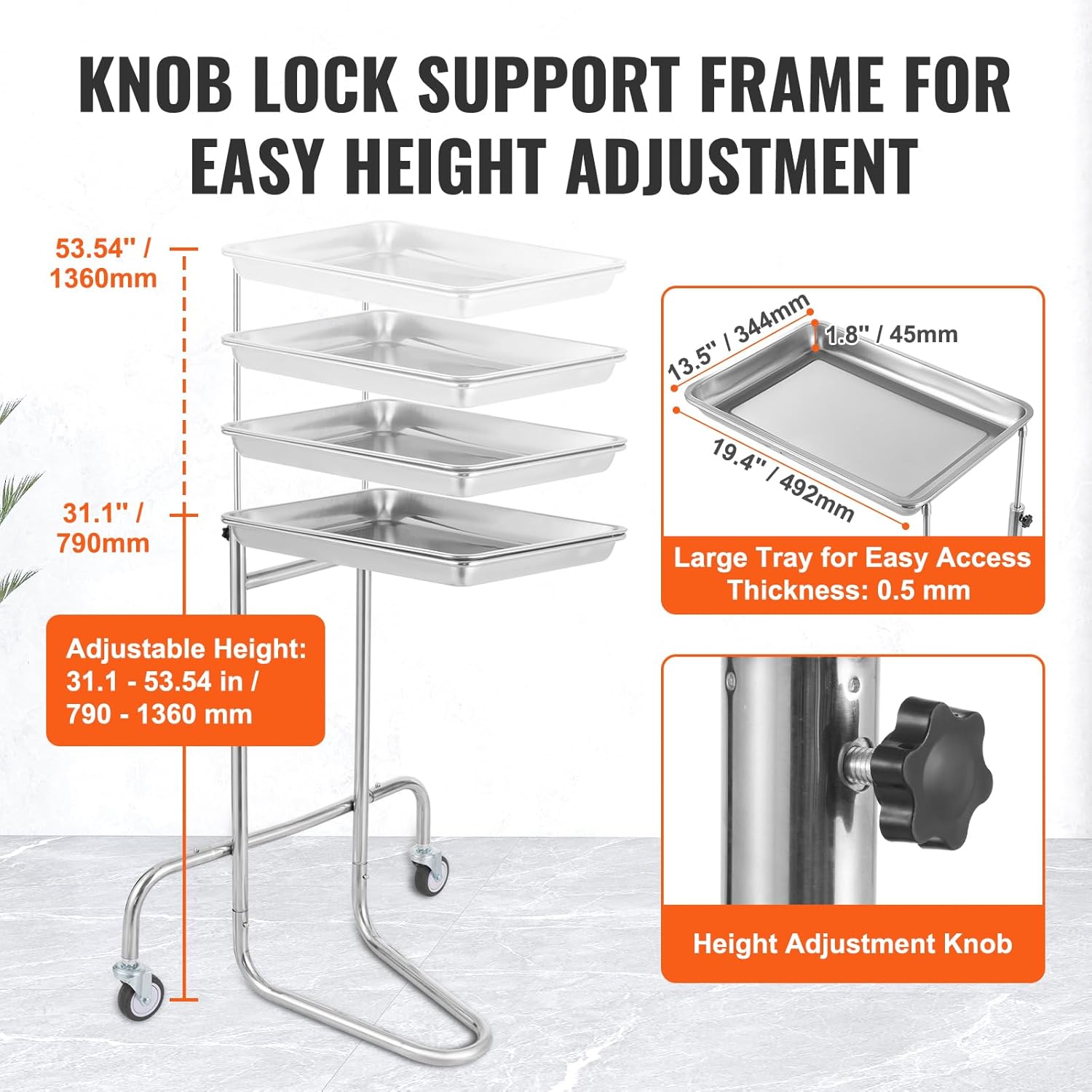
Image: An illustration demonstrating the adjustable height feature of the stand, ranging from 31.1 to 53.54 inches, controlled by a knob lock mechanism.
Verschieben des Ständers
The stand is equipped with silent, wear-resistant casters for easy mobility. To move the stand, gently push or pull it to the desired location. The U-shaped base provides stability during movement.
Verwenden des Tabletts
The stainless steel tray can be easily removed for cleaning or to transport items. Simply lift the tray from its support. To re-attach, align the tray with the support and lower it into place. The raised edges help prevent items from falling off.
Wartung
Reinigung
The VEVOR Medical Instrument Stand is constructed from 201 stainless steel, which is resistant to chemical corrosion. For general cleaning, wipe surfaces with a soft cloth dampened with mild soap and water. For disinfection, use appropriate medical-grade disinfectants suitable for stainless steel, following the disinfectant manufacturer's instructions. Ensure all surfaces are thoroughly dried after cleaning to prevent water spots.
Inspektion
- Regularly check all screws, bolts, and connections to ensure they are tight.
- Inspect the wheels for any signs of wear, damage, or debris that might hinder smooth movement.
- Examine the height adjustment mechanism for proper function and security.
- Check the stainless steel tray for any dents, scratches, or signs of corrosion.
Fehlerbehebung
Häufige Probleme
Der Ständer ist wackelig.
Ensure all assembly bolts and the height adjustment knob are securely tightened. Verify that the stand is on a flat, even surface.
Schwierigkeiten bei der Höhenverstellung
Loosen the height adjustment knob sufficiently. If the mechanism is stiff, apply a small amount of silicone-based lubricant to the sliding parts (avoiding the knob itself) and try again.
Räder rollen nicht reibungslos
Check for any hair, lint, or debris caught in the wheel casters. Clean them thoroughly. If wheels are damaged, they may need replacement.
Technische Daten
Produktspezifikationen
| Besonderheit | Detail |
|---|---|
| Technische Daten | 21.56 x 25.98 x 53.54 Zoll |
| Artikelgewicht | 10.8 Pfund (4.9 kg) |
| Hersteller | VEVOR |
| ASIN | B0DBTQJ6JB |
| Artikelmodellnummer | 140301 |
| Maximale Tragfähigkeit | 16 kg |
| Fachabmessungen | 19.4 x 13.5 x 1.8 Zoll (492 x 344 x 45 mm) |
| Einstellbare Höhe | 31.1 - 53.54 Zoll (790 - 1360 mm) |
| Radtyp | TPR, 2.95 inch (75 mm) diameter, 1 inch (25 mm) width |
| Material | 201 Edelstahl |
Maßdiagramm

Image: A detailed diagram illustrating the overall dimensions of the stand, including adjustable height range and tray measurements.
Garantie und Support
Garantieinformationen
For warranty details and terms, please refer to the official VEVOR website or the documentation included with your purchase. Keep your purchase receipt for any warranty claims.
Kundenservice
If you encounter any issues or have questions regarding your VEVOR Medical Instrument Stand, please visit the VEVOR support website or contact their customer service department for assistance. Contact information can typically be found on the VEVOR official weboder auf Ihrer Produktverpackung.