
1. Einleitung
This manual provides detailed instructions for the safe and effective use of your pxton 666S two-way radio. Please read this manual thoroughly before operating the device and retain it for future reference. The pxton 666S is a reliable communication device designed for various applications, featuring 16 memory channels, privacy codes, and multiple functions such as VOX, noise reduction, and a flashlight.
FCC ID: 2AX68GTR8. This device complies with Part 15 of the FCC Rules. Operation is subject to the condition that this device does not cause harmful interference.

Image 1.1: A set of ten pxton 666S two-way radios, each with its charging dock and an earphone, illustrating the complete package.
2. Packungsinhalt
Überprüfen Sie, ob alle Artikel in Ihrem Paket vorhanden sind:
- 10 x pxton 666S Two-Way Radios
- 10 x USB-Ladestationen
- 10 x 1500mAh Lithium-Batterien
- 10 x Gürtelclips
- 10 x Kopfhörer
- 5 x Benutzerhandbücher

Image 2.1: An illustration of the individual components included in the pxton 666S package: the radio unit, charging dock, battery, belt clip, earphone, and user manual.
3. Produktüberschreitungview
3.1 Hauptmerkmale
- 16 Speicherkanäle
- 165 Datenschutzcodes (50 CTCSS / 210 DCS)
- 5 Levels of VOX Sensitivity Adjustment
- Time-Out-Timer (TOT)
- Notfallalarm
- Rauschunterdrückung
- Automatische Rauschsperre
- Alarm bei niedrigem Batteriestand
- Energiesparmodus
- Scanfunktion
- Überwachungsfunktion
- LED-Taschenlampe
- Durable PC+ABS material construction
3.2 Funkkomponenten
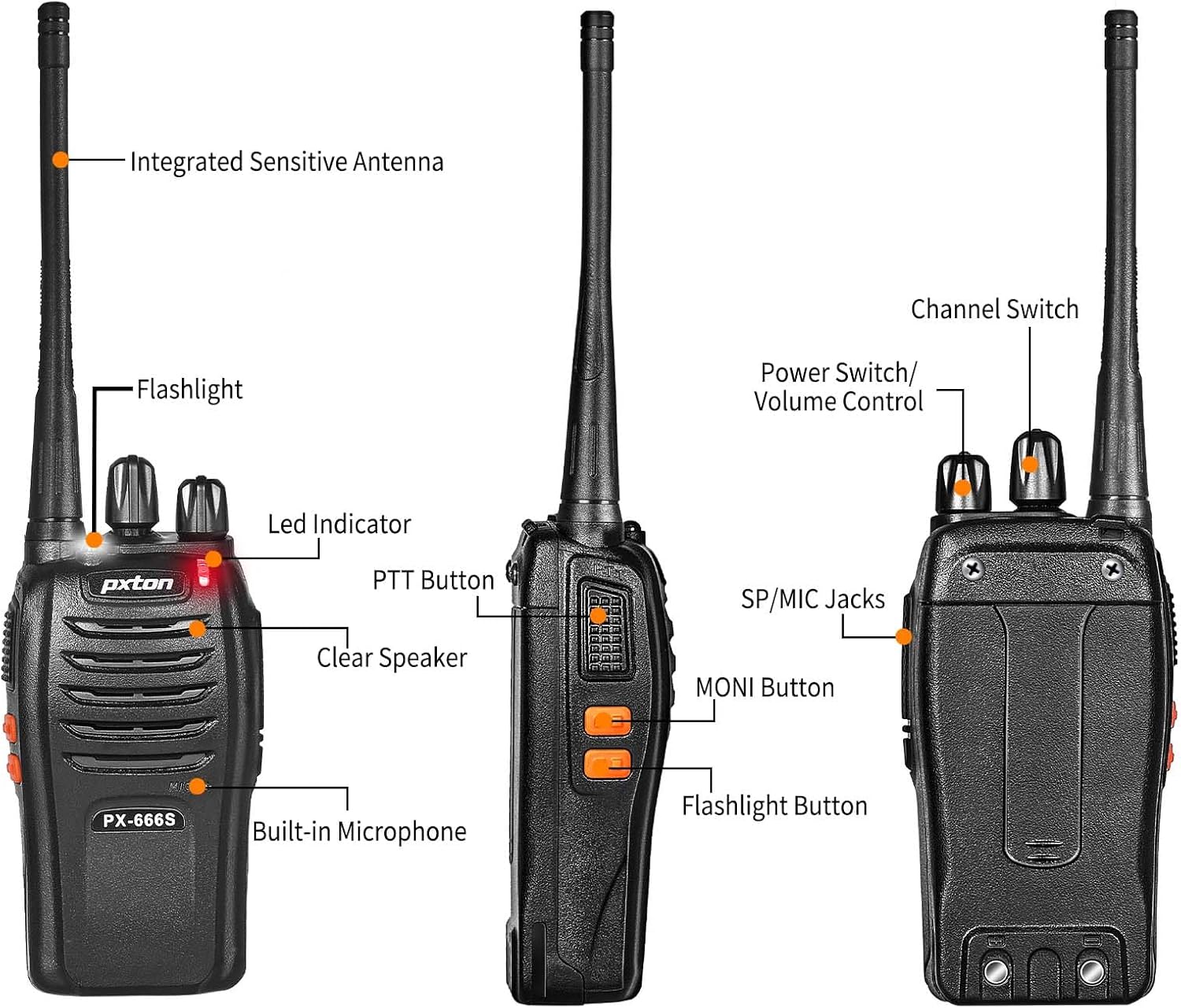
Image 3.1: Detailed diagram labeling the external components of the pxton 666S radio, including the integrated sensitive antenna, flashlight, LED indicator, PTT button, clear speaker, built-in microphone, SP/MIC jacks, MONI button, flashlight button, channel switch, and power switch/volume control.
- Integrierte hochempfindliche Antenne: Zum Senden und Empfangen von Signalen.
- Taschenlampe: Sorgt für Beleuchtung.
- LED-Anzeige: Displays status (e.g., transmitting, receiving, low battery).
- PTT-Taste (Push-to-Talk): Drücken zum Senden, loslassen zum Empfangen.
- Clear Speaker: Für Audioausgabe.
- Eingebautes Mikrofon: Für Audioeingang.
- SP/MIC-Buchsen: For connecting external earphones or microphones.
- MONI Button (Monitor): Temporarily disables squelch to hear weak signals.
- Taschenlampentaste: Aktiviert die LED-Taschenlampe.
- Kanalschalter: Rotates to select desired communication channel.
- Netzschalter/Lautstärkeregler: Durch Drehen des Drehmechanismus wird das Radio ein- und ausgeschaltet sowie die Lautstärke reguliert.

Image 3.2: The pxton 666S radio resting on rocks, emphasizing its rugged PC+ABS durable material, anti-fall, and anti-vibration design for extended service life.
4. Einrichtung
4.1 Einlegen der Batterie
- Richten Sie den Akku an den Rillen auf der Rückseite des Radios aus.
- Schieben Sie den Akku nach oben, bis er einrastet.
- Zum Entnehmen drücken Sie die Entriegelungstaste (falls vorhanden) und schieben die Batterie nach unten.
4.2 Laden des Akkus
The pxton 666S uses a 1500mAh Li-ion battery. A full charge takes approximately 3-4 hours.
- Connect the USB charging dock to a power source.
- Place the radio (with battery installed) into the charging dock.
- The LED indicator on the radio or charger will show charging status (e.g., red for charging, green for fully charged).

Image 4.1: Two pxton 666S radios placed in their respective charging docks, with earphones connected, demonstrating the charging setup.
4.3 Anbringen des Gürtelclips
Secure the belt clip to the back of the radio using the provided screws for convenient carrying.
4.4 Anschließen von Kopfhörern
Insert the earphone plug into the SP/MIC jacks on the side of the radio. Ensure it is fully inserted for proper audio transmission and reception.
5. Bedienungsanleitung
5.1 Ein-/Ausschalter und Lautstärkeregelung
- Um das Radio einzuschalten, drehen Sie den Netzschalter/Lautstärkeregler knob clockwise. You will hear a "click" and a tone.
- To turn off the radio, rotate the knob counter-clockwise until you hear a "click".
- To adjust the volume, rotate the Netzschalter/Lautstärkeregler Drehen Sie den Knopf im Uhrzeigersinn, um die Lautstärke zu erhöhen, und gegen den Uhrzeigersinn, um sie zu verringern.
5.2 Kanalauswahl
Drehen Sie den Kanalschalter knob to select one of the 16 available channels. Ensure all radios in your group are set to the same channel for communication.
5.3 Senden und Empfangen
- Zum Senden die Taste gedrückt halten PTT-Taste. Speak clearly into the microphone. The LED indicator will typically glow red.
- Um zu empfangen, geben Sie die PTT-Taste. The LED indicator will typically glow green when receiving a signal.
5.4 VOX-Funktion (sprachgesteuerte Übertragung)
The VOX function allows hands-free operation. When activated, the radio will automatically transmit when it detects your voice, without needing to press the PTT button. The pxton 666S offers 5 levels of VOX sensitivity adjustment.

Image 5.1: A security guard using the pxton 666S radio, illustrating the VOX/Handsfree function for clear and bright sound quality, allowing hands-free communication.
5.5 Taschenlampe
Drücken Sie die Taschenlampentaste to turn the LED flashlight on or off. This feature is useful in low-light conditions.

Image 5.2: The pxton 666S radio's flashlight feature in use, illuminating a campsite at night, demonstrating its utility in dark environments.
5.6 Überwachungsfunktion
Halten Sie die MONI Button to temporarily disable the squelch function. This allows you to hear very weak signals that might otherwise be blocked by the squelch, or to check if a channel is clear before transmitting.
5.7 Scanfunktion
The scanning function allows the radio to automatically scan through all programmed channels to detect activity. Refer to the full user manual (if provided separately) for specific instructions on activating and managing the scanning feature.
5.8 Sonstige Funktionen
- Rauschunterdrückung: Verbessert die Audioqualität durch Reduzierung von Hintergrundgeräuschen.
- Notfallalarm: Activates an audible alarm to signal for help.
- Time-Out-Timer (TOT): Prevents accidental prolonged transmissions by limiting the duration of each transmission.
- Energiesparmodus: Automatically reduces power consumption when no activity is detected, extending battery life.
- Warnung bei niedrigem Batteriestand: Provides an audible or visual warning when the battery level is low, indicating it's time to recharge.
6. Kommunikationsreichweite
The actual communication range of the pxton 666S can vary significantly based on environmental factors, terrain, and obstructions. General estimates are:
- Open Areas (flat terrain, mountain peaks): Bis zu 3 Meilen.
- Suburban/Countryside Areas: Approximately 1.2 miles.
- City Limits (with buildings and obstructions): Around 0.6 miles.

Image 6.1: Visual representation of the pxton 666S communication range, indicating up to 1-3 miles in open areas, 1.2 miles in rural settings, and 0.6 miles in urban environments.
7. Batterieinformationen
The pxton 666S is powered by a rechargeable 1500mAh Lithium-Ion battery (Model: BL-1, 5.55Wh, Voltage: 3.7 V).
- Typische Verwendung: Up to 12 hours of continuous talk time.
- Standby-Zeit: Up to 120 hours (5-7 days).
- Vollständige Ladezeit: Ungefähr 3–4 Stunden.
Wichtige Sicherheitshinweise für Batterien:
- Zerlegen Sie die Batterie nicht.
- Nicht im Feuer entsorgen.
- Verwenden Sie nur das angegebene Ladegerät.
- Schließen Sie die Anschlüsse nicht kurz.
- Kühl und trocken aufbewahren.

Image 7.1: The pxton 666S radio alongside its 1500mAh Li-ion battery, detailing battery model (BL-1), capacity (1500mAh), voltage (3.7V), and safety warnings.
8. Spezifikationen
| Besonderheit | Spezifikation |
|---|---|
| Modellnummer | PX-666S-0004 |
| Marke | Pixel |
| Anzahl der Kanäle | 16 |
| Frequenzbereich | UHF |
| Maximale Sprechreichweite | 3 Miles (line of sight) |
| Akku-Typ | 1500 mAh Lithium-Ionen-Akku (im Lieferumfang enthalten) |
| Bandtage | 3.7 Volt |
| Artikelgewicht | 7.05 Pfund (für die 10er-Packung) |
| Technische Daten | 9.9 x 11 x 6.9 Zoll (Verpackungsmaße) |
| Wasserbeständigkeit | Wasserfest |
| Besondere Merkmale | Automatic Squelch, Battery Saver Mode, Long Range, Rechargeable, Voice Operated Transmission (VOX) |

Image 8.1: A size comparison of the pxton 666S radio next to a smartphone (iPhone 14 Pro), illustrating its compact dimensions for portability.
9. Fehlerbehebung
If you encounter issues with your pxton 666S radio, please refer to the following common problems and solutions:
| Problem | Mögliche Ursache | Lösung |
|---|---|---|
| Kein Strom | Batterie nicht richtig eingesetzt oder entladen. | Stellen Sie sicher, dass der Akku richtig eingesetzt ist. Laden Sie den Akku vollständig auf. |
| Senden und Empfangen nicht möglich | Incorrect channel, out of range, low battery, squelch too high. | Verify all radios are on the same channel. Move closer to other radios. Recharge battery. Press MONI button to check for weak signals. |
| Schlechte Audioqualität / Rauschen | Weak signal, interference, radio too far apart. | Move to an area with fewer obstructions. Adjust volume. Ensure antenna is clear. |
| VOX funktioniert nicht | VOX sensitivity too low, feature disabled. | Adjust VOX sensitivity to a higher level. Ensure VOX is enabled (refer to full manual for programming). |
| Akkulaufzeit ist kurz | Frequent transmission, battery degradation, power-saving mode off. | Reduce transmission time. Ensure power-saving mode is active. Consider replacing old batteries. |
For further assistance, please contact pxton customer support.
10. Wartung
- Reinigung: Verwenden Sie ein weiches,amp Verwenden Sie ein Tuch, um das Äußere des Radios zu reinigen. Verwenden Sie keine scharfen Chemikalien oder Scheuermittel.
- Lagerung: Bei längerer Nichtbenutzung sollte die Batterie entfernt und das Radio an einem kühlen, trockenen Ort aufbewahrt werden.
- Batteriepflege: Fully charge batteries before long-term storage and recharge them every 3-6 months to maintain optimal performance.
- Antenne: Die Antenne darf nicht gebogen oder verändert werden, da dies die Leistung beeinträchtigen kann.
- Wasserbeständigkeit: While water-resistant, avoid submerging the radio in water. Ensure all covers (e.g., earphone jack cover) are securely closed.
11. Garantie und Support
pxton offers a 30-day no-questions-asked replacement and refund policy from the date of purchase. Additionally, the product comes with lebenslanger Kundendienst.
If you encounter any issues or require support, please contact pxton customer service. They are committed to assisting you with any concerns.
Hinweis zur Kompatibilität: The pxton 666S walkie talkie is compatible with PX-888S, PX-777S, and PX-888S Pro models. They can utilize the same programming tools and cables (programming cable sold separately).