
1. Einleitung
Thank you for choosing the FLEXISPOT QB2W-2080-IE Height Adjustable Standing Desk. This electric standing desk is designed to provide a versatile and ergonomic workspace, allowing you to easily switch between sitting and standing positions. Featuring a robust dual-motor lift system, intelligent control panel with memory functions, and an anti-collision system, this desk offers stability, efficiency, and safety for your daily work.
2. Sicherheitshinweise
Please read all safety instructions carefully before assembly and use to prevent injury or damage to the product. Keep this manual for future reference.
- Maximale Gewichtskapazität: Die maximale statische Tragfähigkeit darf nicht überschritten werden. 120 kg or dynamic load capacity of 100 kgÜberlastung kann zu Instabilität und Schäden führen.
- Höhenverstellbereich: Ensure the desk operates within its specified height range of 70 cm bis 119 cm (27.6 Zoll bis 46.9 Zoll) for optimal stability and safety.
- Kinder und Haustiere: Um Unfälle zu vermeiden, sollten Kinder und Haustiere während des Betriebs vom Schreibtisch ferngehalten werden.
- Stromversorgung: Connect the desk only to a properly grounded power outlet. Do not use damaged power cords or adapters.
- Spielraum: Ensure there are no obstructions above or below the desk during height adjustments to allow the anti-collision system to function effectively.
- Montage: Assembly requires two people. Ensure all components are securely fastened before use.
- Verschüttete Flüssigkeiten: Avoid spilling liquids on the control panel or electrical components. In case of a spill, immediately disconnect power and allow to dry completely before reconnecting.
3. Packungsinhalt
Prüfen Sie vor Beginn der Montage, ob alle Teile vorhanden und unbeschädigt sind. Sollten Teile fehlen oder beschädigt sein, wenden Sie sich bitte an unseren Kundendienst.
- Desktop (4 parts)
- Schreibtischbeine (2)
- Rahmenkomponenten
- Dual Motor Lift System
- Bedienfeld
- Netzteil und Kabel
- All necessary assembly tools and connection elements
- Bedienungsanleitung
4. Aufbau und Montage
Assembly of the FLEXISPOT QB2W-2080-IE desk requires approximately 2 people and includes all necessary tools. Follow these general steps:
- Komponenten auspacken: Nehmen Sie alle Teile vorsichtig aus der Verpackung und legen Sie sie auf eine saubere, weiche Unterlage, um Kratzer zu vermeiden.
- Montieren Sie den Rahmen: Attach the crossbars to the lifting columns (desk legs) using the provided hardware. Ensure all screws are tightened securely.
- Tischbeine anbringen: Befestigen Sie die Füße an der Unterseite der Hebesäulen.
- Desktop einbinden: Place the desktop sections onto the assembled frame. The desktop is made of 4 parts and includes connection elements for stability. Align the pre-drilled holes and secure the desktop to the frame using the provided screws.
- Bedienfeld und Stromversorgung anschließen: Connect the control panel cable to the motor control box. Then, connect the power adapter to the control box and plug it into a grounded power outlet.
- Kabelmanagement: Use the included cable ties or management accessories to organize cables neatly under the desk.
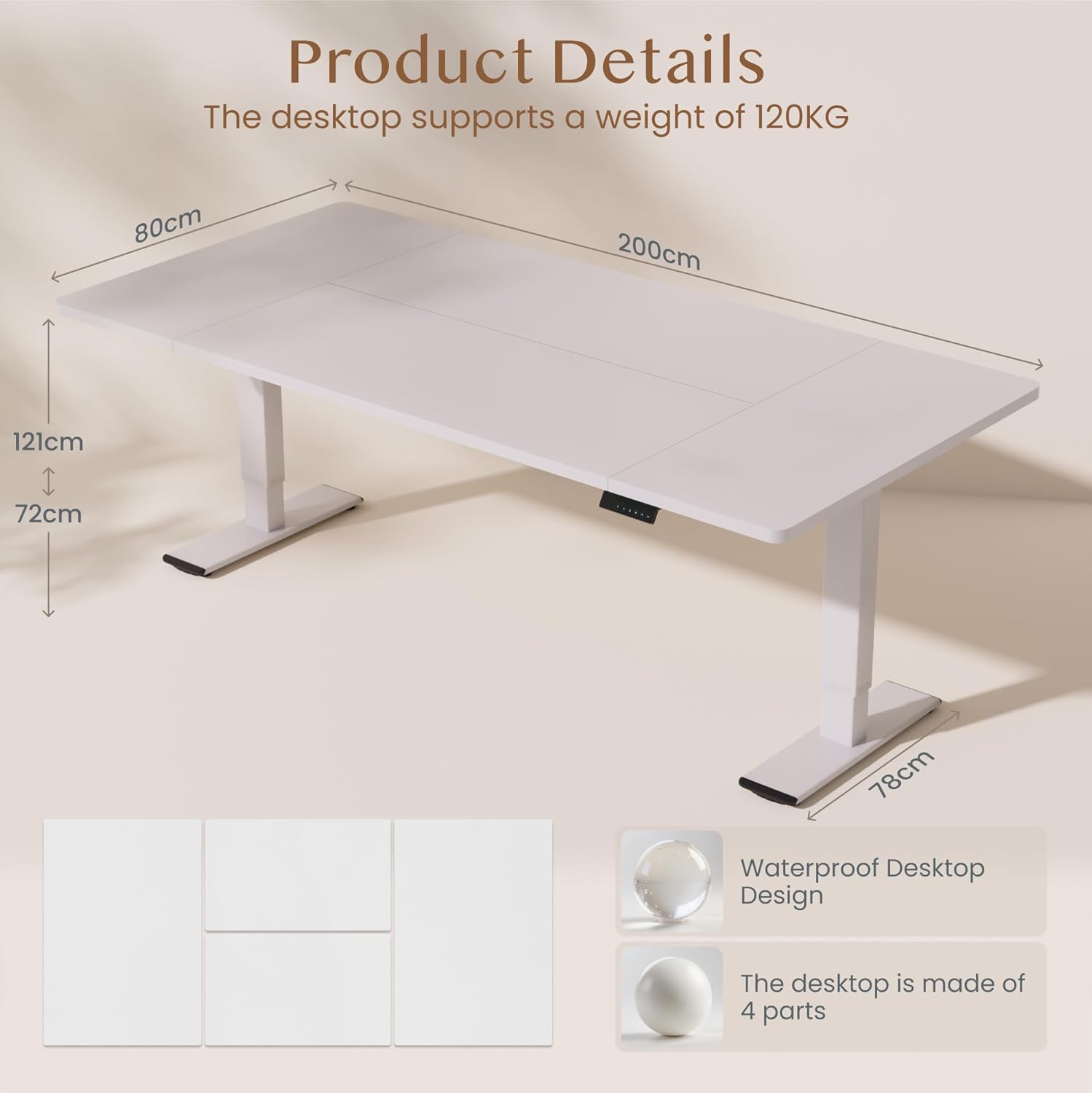
Bild: Product details of the FLEXISPOT standing desk, illustrating its dimensions (200cm length, 80cm width, 72-121cm height range) and the four-part, waterproof desktop design. The desktop supports a weight of 120KG.

Bild: The FLEXISPOT standing desk shown at its minimum (72cm) and maximum (121cm) height, demonstrating its height adjustability for both sitting and standing positions.
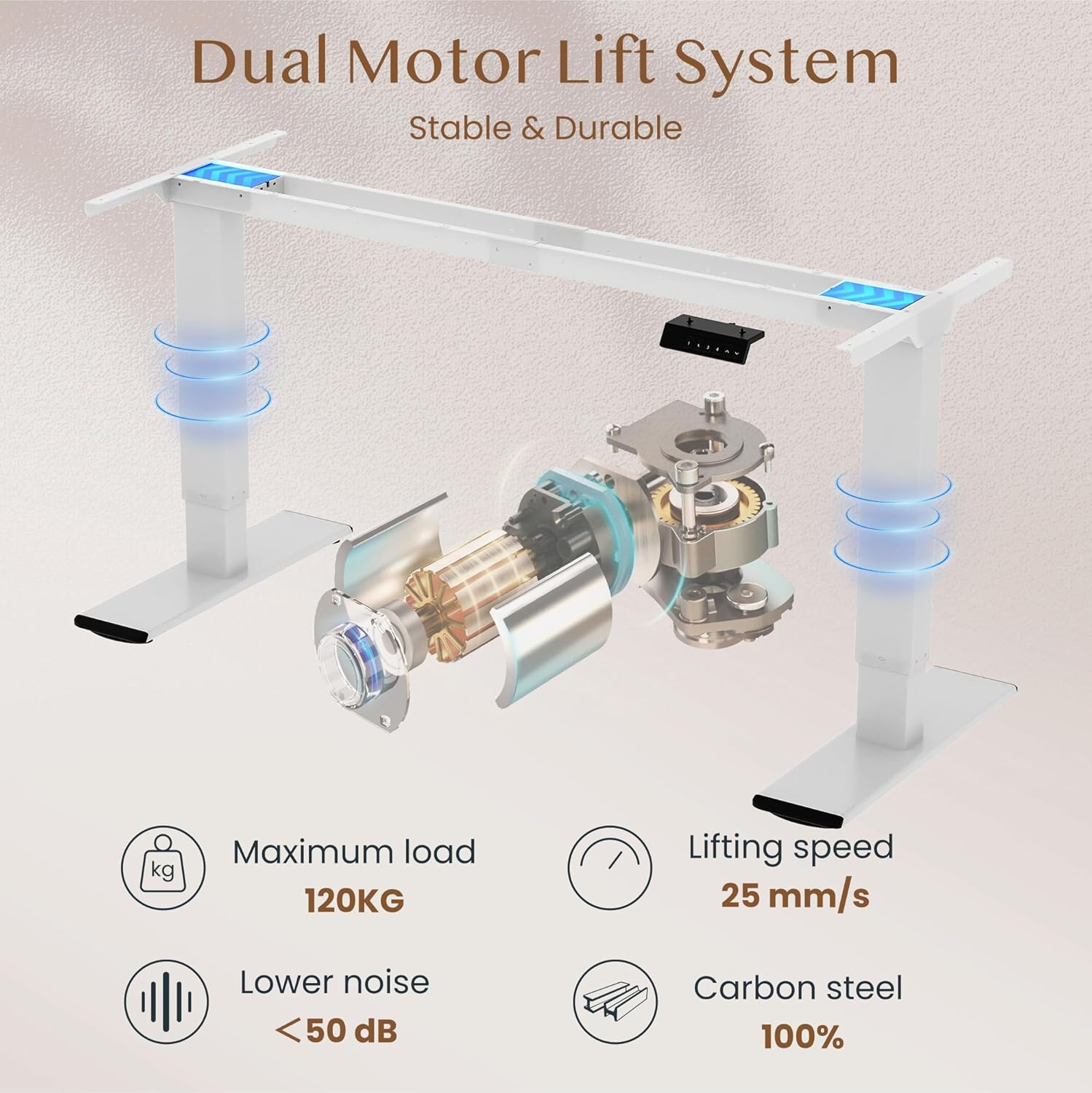
Bild: Diagram illustrating the FLEXISPOT dual motor lift system, highlighting its stable and durable design. Key specifications like maximum load (120KG), lifting speed (25 mm/s), lower noise (<50 dB), and 100% carbon steel construction are visible.
5. Bedienungsanleitung
The FLEXISPOT QB2W-2080-IE desk features an intuitive control panel for easy height adjustment and memory functions.
5.1. Grundlegende Höhenverstellung
- Drücken Sie die "^" (Up) Knopf zum Anheben des Schreibtisches.
- Drücken Sie die "v" (Down) Knopf zum Absenken des Schreibtisches.
- Release the button to stop the desk at the desired height.
5.2. Speichervoreinstellungen
Über das Bedienfeld können Sie bis zu vier bevorzugte Höheneinstellungen speichern.
- Stellen Sie den Schreibtisch mithilfe der Auf-/Ab-Tasten auf die gewünschte Höhe ein.
- Drücken Sie die "M" (Memory) button (often represented by a 'f' symbol). The LED display will show "S-".
- Drücken Sie sofort eine der Zifferntasten ("1", "2", "3", or "4") to save the current height to that preset. The display will show "S-1", "S-2", etc., to confirm.
- To recall a saved height, simply press the corresponding number button. The desk will automatically move to the saved position.
5.3. Antikollisionsfunktion
The desk is equipped with an anti-collision system that automatically stops and slightly reverses the desk's movement if it encounters an obstruction during height adjustment. This feature enhances safety and prevents damage to the desk or other objects.

Bild: Close-up of the FLEXISPOT intelligent control panel, showing buttons for Up & Down adjustment, 4 Memory Heights, an LED Screen, and the Anti-Collision Function indicator.

Bild: The FLEXISPOT standing desk in an office setting, illustrating its smooth and quiet operation with a lifting speed of 25mm/s and noise levels below 50 dB. The control panel is visible under the desk.

Bild: A visual comparison demonstrating the FLEXISPOT safety collision avoidance system. One side shows an object being avoided by the desk's upward movement (WITH Anti-Collision Function), while the other side implies a collision without the function.
6. Wartung
Regular maintenance ensures the longevity and optimal performance of your FLEXISPOT standing desk.
- Reinigung: Wischen Sie die Schreibtischoberfläche und die Beine mit einem Tuch ab.amp Mit einem Tuch abwischen. Vermeiden Sie die Verwendung von scharfen Chemikalien oder Scheuermitteln, die die Oberfläche beschädigen könnten.
- Verbindungen prüfen: Überprüfen Sie regelmäßig alle Schrauben und Bolzen auf festen Sitz. Ziehen Sie sie gegebenenfalls nach.
- Kabelmanagement: Ensure all cables are neatly organized and not pinched or tangled, which could affect desk operation or cause damage.
- Überladung vermeiden: Stellen Sie keine Gegenstände, die das maximale Gewicht überschreiten, auf den Schreibtisch.
7. Fehlerbehebung
Sollten Sie Probleme mit Ihrem Schreibtisch haben, beachten Sie bitte die folgenden gängigen Schritte zur Fehlerbehebung:
- Schreibtisch bewegt sich nicht:
- Prüfen Sie, ob das Netzkabel sowohl am Schreibtisch als auch an der Wandsteckdose fest eingesteckt ist.
- Stellen Sie sicher, dass keine Hindernisse die Bewegung behindern.
- Versuchen Sie, den Schreibtisch zurückzusetzen, indem Sie ihn für 10 Sekunden vom Stromnetz trennen und ihn dann wieder anschließen.
- Angezeigte Fehlercodes:
- If an error code appears, consult the specific error code section in the full manual (if available) or contact customer support. Often, a reset (unplugging and replugging) can clear minor errors.
- Uneven Movement/Instability:
- Stellen Sie sicher, dass der Schreibtisch auf einer ebenen Fläche steht.
- Prüfen Sie, ob alle Montageschrauben fest angezogen sind.
- Verify that the weight on the desk is evenly distributed and does not exceed the maximum capacity.
- Anti-Collision System Triggering Unnecessarily:
- Ensure there are no loose cables or objects near the desk's path that could be mistaken for an obstruction.
Sollten diese Schritte das Problem nicht beheben, wenden Sie sich bitte an den FLEXISPOT-Kundendienst, um weitere Unterstützung zu erhalten.
8. Spezifikationen
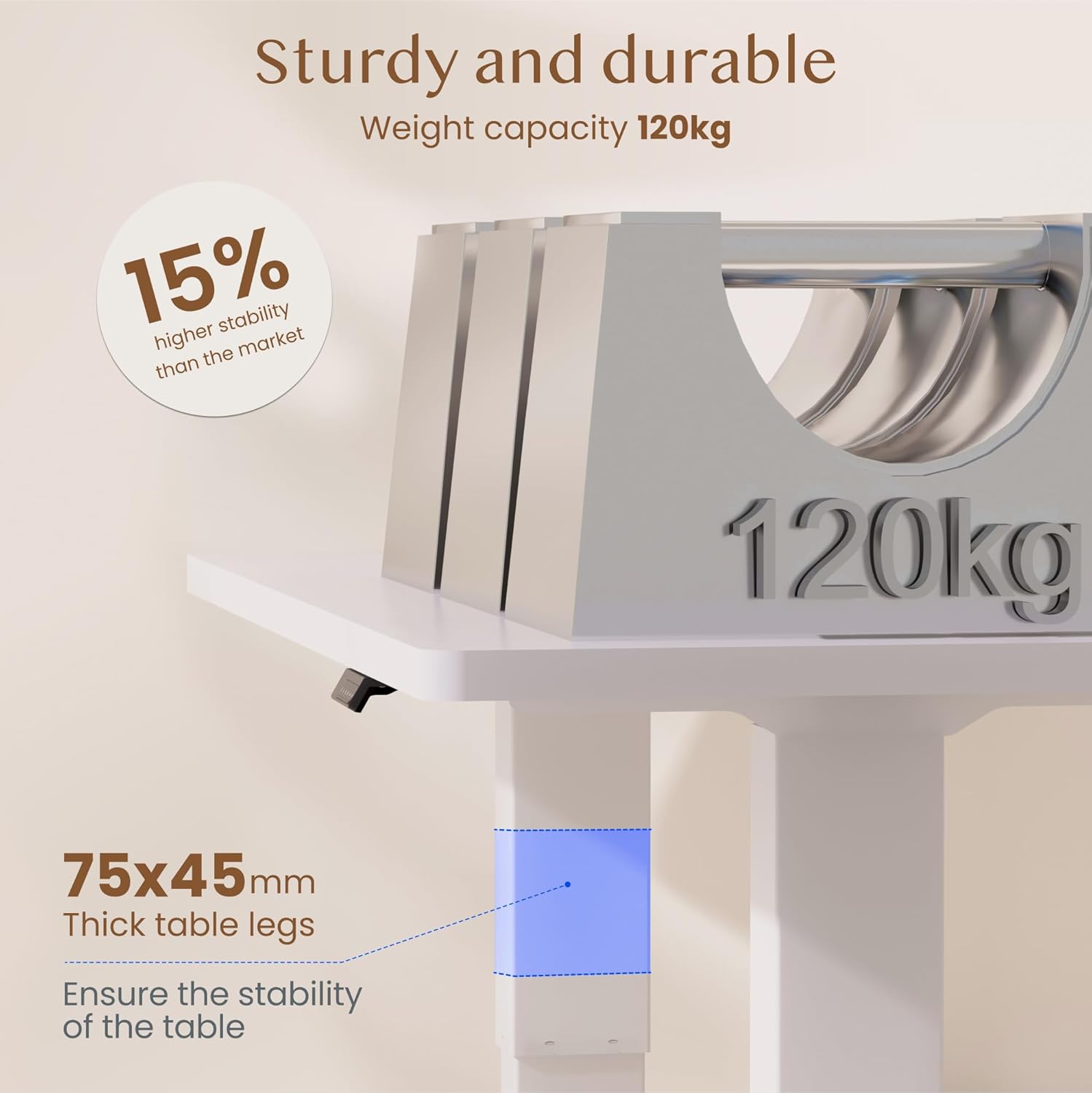
Bild: The FLEXISPOT standing desk highlighting its sturdy and durable construction, specifically the 75x45mm thick table legs designed to ensure stability and support a weight capacity of 120kg.

Bild: Eine Nahaufnahme view of the FLEXISPOT desk's thickened table legs, illustrating the adjustable height range from 70cm to 119cm, providing unmatched stability.
| Besonderheit | Spezifikation |
|---|---|
| Modellnummer | QB2W-2080-IE |
| Marke | FLEXISPOT |
| Abmessungen (L x B x H) | 200 x 80 x 72 cm (Mindesthöhe) |
| Höhenverstellbereich | 70 cm - 119 cm (27.6 Zoll - 46.9 Zoll) |
| Desktop-Dicke | 25 mm |
| Maximum Load Capacity (Static) | 120 kg |
| Maximum Load Capacity (Dynamic) | 100 kg |
| Hebesystem | Doppelmotor |
| Hubgeschwindigkeit | 25 mm/s |
| Geräuschpegel | < 50 dB |
| Material | Alloy Steel (Base and Top Material) |
| Farbe | Weiß |
| Montage erforderlich | Yes (2 people recommended, tools included) |
| Besondere Merkmale | Electric, 4 Memory Presets, Anti-Collision System |
| Produktgewicht | 40.9 kg |
| UPC | 810072889508 |
9. Garantie und Support
For warranty information, product support, or to report any issues, please contact FLEXISPOT customer service. Keep your purchase receipt and model number (QB2W-2080-IE) handy when contacting support.
The seller for this product is FLEXISPOT GmbH. Please refer to their official webDie genauen Garantiebedingungen und Kontaktdaten finden Sie auf der Website oder in Ihren Kaufunterlagen.