
micfuns M4pro
M4pro Audiomixer – Benutzerhandbuch
Model: M4pro | Brand: micfuns
Einführung
This manual provides detailed instructions for the setup, operation, and maintenance of your micfuns M4pro Audio Mixer. Please read this manual thoroughly before using the product to ensure proper functionality and longevity.
Im Leistungsumfang enthalten
Your micfuns M4pro Audio Mixer package includes the following components:
- Audio Mixer (1 unit)
- Drahtlose Mikrofone (2 Stück)
- 24V Power Cable (1 unit)
- One-to-two Charging Cable (1 unit)
- Type-C to USB Cable (1 unit)
- Anti-slip Rings (2 units)
- Microphone Covers (2 units)

Image: The M4pro Audio Mixer unit shown with its two accompanying wireless microphones.
Aufstellen
1. Stromanschluss
To power on the M4pro Audio Mixer, connect the provided 24V power cable to the DC IN port on the rear of the mixer. Ensure the power source is stable before turning on the unit.
Video: Demonstrates connecting the power cable to the M4pro Audio Mixer and powering on the unit.
2. Mikrofon-Setup
The M4pro mixer comes with two wireless microphones. Insert batteries into the microphones and power them on. The microphones will automatically pair with the mixer upon activation.

Image: Illustrates the automatic frequency pairing connection between the mixer and wireless microphones.
Video: Shows how to power on the wireless microphones and their automatic connection to the mixer.
3. Anschluss anderer Geräte
The M4pro mixer supports various input and output devices. Use the appropriate ports for your setup:
- Mikrofon-/Line-Eingänge: Use the XLR/TRS combo jacks for wired microphones or line-level instruments (e.g., guitar, electronic keyboard).
- REC-Ausgang: Connect to recording devices.
- Hauptausgang: An Lautsprecher anschließen bzw amplifizierer.
- Telefone: Schließen Sie zur Überwachung Kopfhörer an.
- USB-Audio: Connect to a computer for recording or playback.

Image: A visual guide demonstrating how to connect various audio devices such as microphones, guitars, keyboards, computers, and speakers to the mixer.
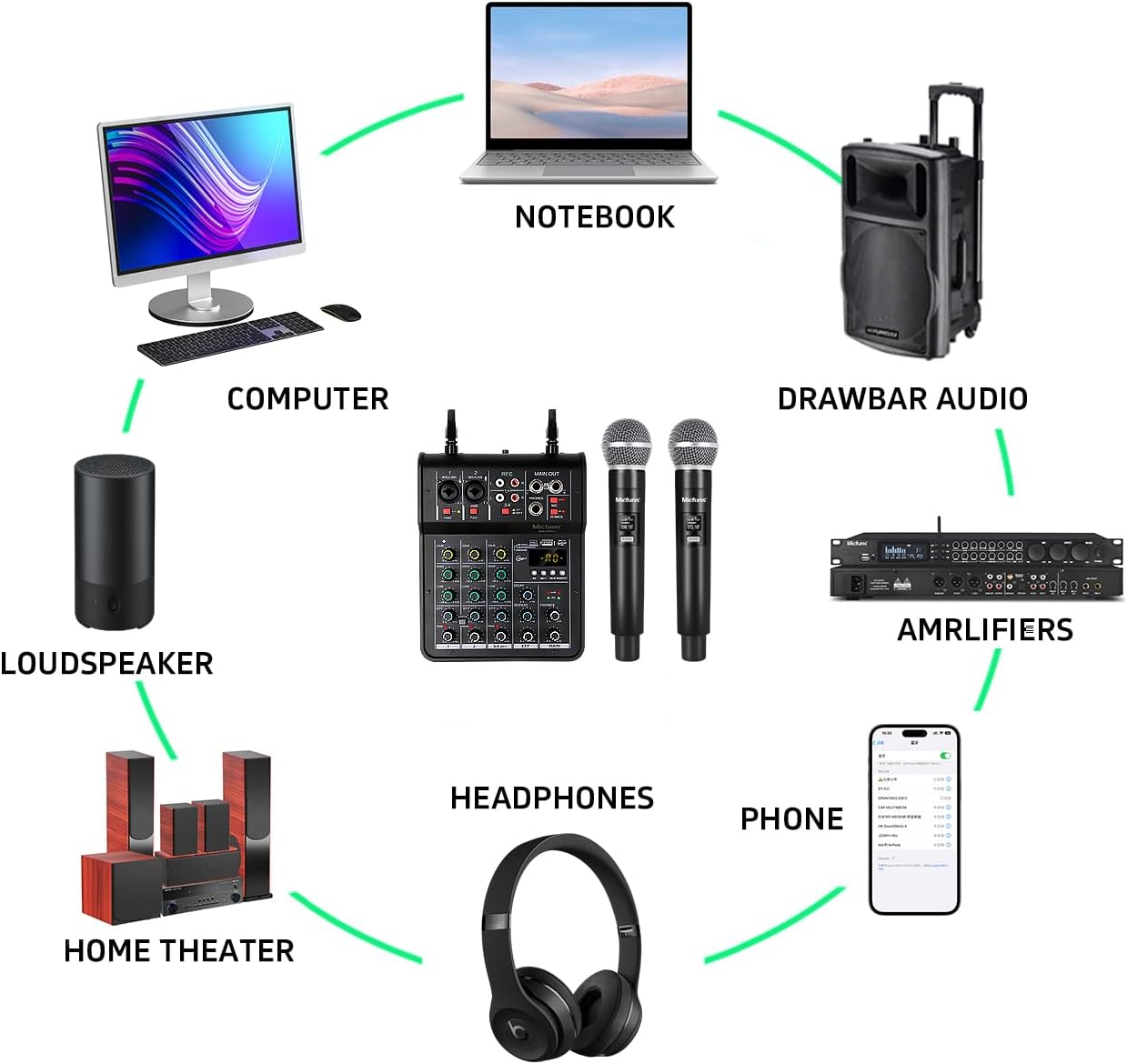
Bild: Ein überview of the M4pro Audio Mixer's connectivity within a typical audio setup, including computers, loudspeakers, amplifiers, headphones, and phones.
Bedienungsanleitung
1. Bluetooth-Verbindung
To connect a Bluetooth device (e.g., smartphone, tablet) to the mixer:
- Press the "MODE/BT" button on the mixer until "BLUE" appears on the display.
- On your device, enable Bluetooth and search for "BT-5.0".
- Select "BT-5.0" to pair. Once connected, you can play audio from your device through the mixer.

Image: Step-by-step visual guide for connecting a mobile device via Bluetooth to the mixer.
Video: Demonstrates the Bluetooth pairing process and audio playback from a smartphone.
2. USB-Wiedergabe und -Aufnahme
The mixer supports USB playback from a flash drive and USB audio connection to a computer for recording or playback.
- USB-Wiedergabe: Insert a USB flash drive into the USB port. The mixer will automatically detect and play compatible audio files. Use the control buttons (play/pause, next/previous) to manage playback.
- USB Audio (PC/Smartphone): Connect the mixer to your computer or smartphone using the Type-C to USB cable. The mixer will function as an external sound card, allowing for high-quality audio recording and playback.

Image: Shows the USB plug-and-play functionality for connecting to a PC or smartphone, highlighting intelligent noise reduction.
Video: Demonstrates USB flash drive playback on the mixer.
3. Phantomspeisung (+48V)
The M4pro mixer provides +48V phantom power for condenser microphones. To activate phantom power, press the "+48V" button located near the microphone input jacks. The indicator light will illuminate when active.

Image: Highlights the +48V phantom power switch and its suitability for various condenser microphones.
4. Bedienknöpfe und Tasten
Machen Sie sich mit den verschiedenen Bedienelementen des Mischpults vertraut:
- DAZUGEWINNEN: Passt die Eingangsempfindlichkeit für jeden Kanal an.
- HOCH NIEDRIG: Equalizer controls for high and low frequencies on each channel.
- EFF (Effect): Controls the level of the built-in effects (e.g., delay, repeat).
- VERZÖGERUNG/WIEDERHOLUNG: Adjusts parameters for the delay and repeat effects.
- GIPFEL: Indicates when the input signal is too high, potentially causing distortion. Adjust GAIN to prevent peaking.
- HAUPTSÄCHLICH: Master-Lautstärkeregler für den Hauptausgang.
- TELEFONE: Lautstärkeregler für Kopfhörer.

Abbildung: Eine detaillierte Frontansicht view of the mixer, showcasing all gain, EQ, effect, and volume controls.
Wartung
- Halten Sie den Mixer sauber, indem Sie ihn mit einem weichen, trockenen Tuch abwischen.
- Das Gerät darf keiner übermäßigen Feuchtigkeit, keinem Staub und keinen extremen Temperaturen ausgesetzt werden.
- Keine Scheuer- oder Lösungsmittel verwenden.
- Bewahren Sie den Mixer bei Nichtgebrauch an einem kühlen, trockenen Ort auf.
- Regularly check cables for damage and ensure secure connections.
Fehlerbehebung
- Kein Strom: Ensure the power cable is securely connected and the power button is pressed. Check the power source.
- Keine Tonausgabe: Verify all cables are correctly connected to the main output and speakers. Check volume levels on the mixer and connected devices.
- Mikrofon funktioniert nicht: Ensure microphones are powered on and paired. Check battery levels. If using a condenser mic, ensure +48V phantom power is enabled.
- Verzerrter Klang: Reduce the GAIN level for the input channel. Check for PEAK indicators. Ensure connected devices are not sending an overly strong signal.
- Probleme mit der Bluetooth-Verbindung: Ensure the mixer is in Bluetooth mode ("BLUE" displayed). Turn off and on Bluetooth on your device and the mixer, then try pairing again.
- USB-Wiedergabeprobleme: Stellen Sie sicher, dass der USB-Stick korrekt formatiert ist (FAT32) und kompatible Audiodateien enthält. files.
Technische Daten
| Besonderheit | Detail |
|---|---|
| Marke | micfuns |
| Modellnummer | M4pro |
| Anzahl der Kanäle | 4 |
| Konnektivitätstechnologie | USB, Bluetooth |
| Stromquelle | Kabelgebundene Elektrik |
| Bandtage | 5 Volt (Wechselstrom) |
| Artikelgewicht | 1.5 Kilogramm (3.3 Pfund) |
| Technische Daten | 13"T x 4"B x 14"H (13 x 4 x 14 Zoll) |
| Ursprungsland | China |
| Erstes verfügbares Datum | 30. April 2024 |
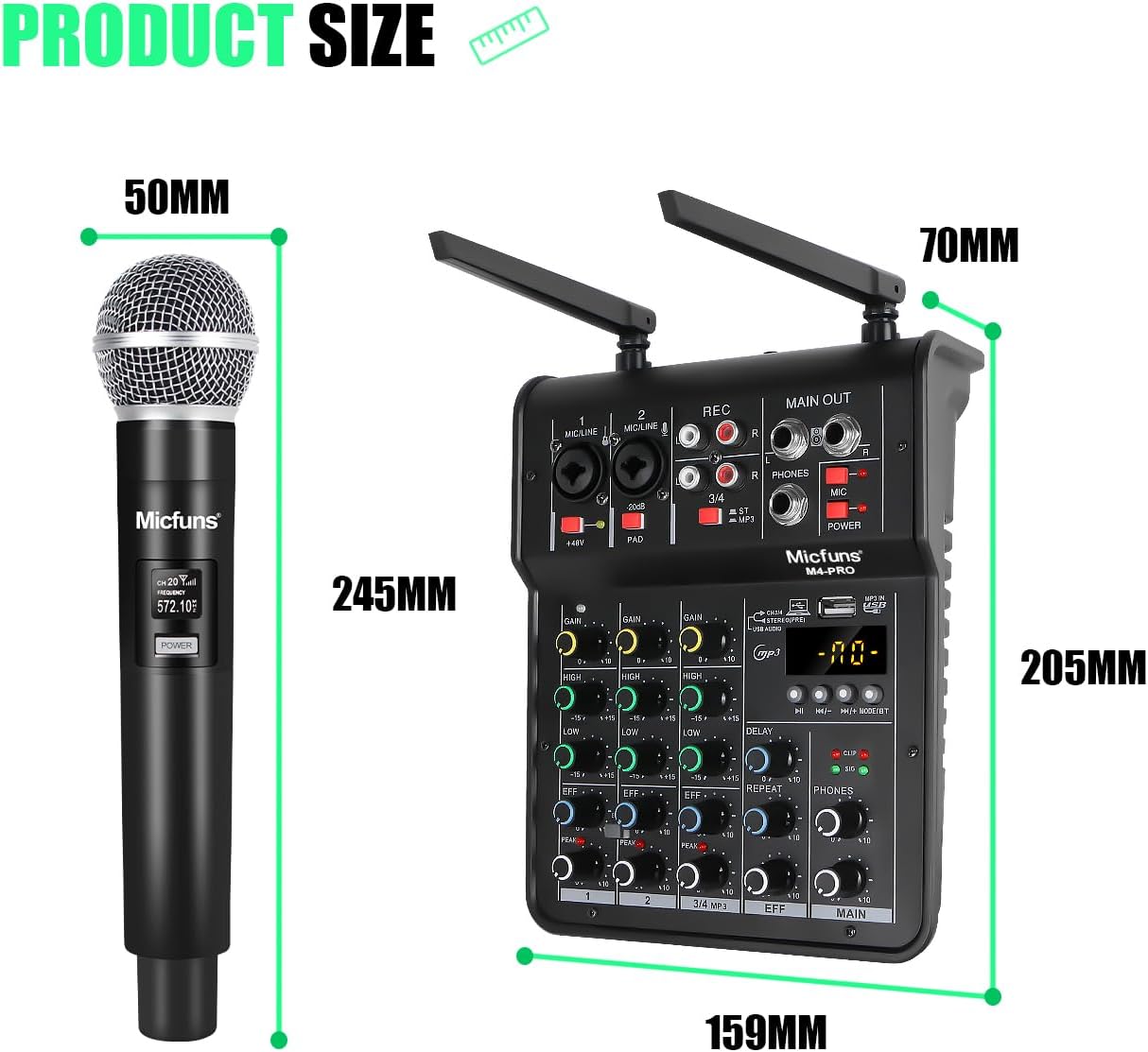
Image: Visual representation of the product dimensions for both the mixer and the wireless microphone.
Garantie und Support
Warranty information for the micfuns M4pro Audio Mixer is typically provided with your purchase documentation or can be found on the manufacturer's official webBitte konsultieren Sie diese Ressourcen für Einzelheiten zu Garantieumfang, Bedingungen und Konditionen.
For technical support, product inquiries, or service requests, please contact micfuns customer support through their official channels. Contact information is usually available on the product packaging or the manufacturer's webWebsite.
Ask a question about this manual
Ask about setup, troubleshooting, compatibility, parts, safety, or missing instructions. Manuals+ will review the question and use this page’s manual context to help answer it.