
1. Produktüberschreitungview
The MIUCDA Smart Wi-Fi Garage Door Opener is a control module designed to integrate your existing garage door motorization with smart home systems. It enables remote control via a mobile application and voice commands through compatible smart assistants.
Hauptmerkmale:
- Fernsteuerung per App: Manage your garage door from anywhere using the Tuya/Smart Life application.
- Sprachsteuerung: Kompatibel mit Amazon Alexa und Google Home für freihändige Bedienung.
- Statusüberwachung: Check the open/closed status of your garage door in real-time via the app.
- Terminplanung: Set custom schedules for opening and closing your garage door.
- Kein Hub erforderlich: Stellt eine direkte Verbindung zu Ihrem WLAN-Heimnetzwerk her.

Image 1.1: The MIUCDA Smart Garage Door Opener module, magnetic sensor, and a smartphone displaying the control app interface.

Image 1.2: Visual representation of the smart garage door opener's compatibility with various smart home platforms including Smart Life, Tuya, Amazon Alexa, and Google Home.
2. Sicherheitshinweise
Bitte lesen Sie vor der Installation und Inbetriebnahme alle Sicherheitshinweise sorgfältig durch. Die Nichtbeachtung dieser Hinweise kann zu Stromschlag, Brand oder anderen Verletzungen führen.
- Ensure power is disconnected before performing any wiring or installation.
- Die Installation sollte von einem qualifizierten Elektriker durchgeführt werden, wenn Sie sich bezüglich der elektrischen Verkabelung unsicher sind.
- Halten Sie das Gerät von Wasser und Umgebungen mit hoher Luftfeuchtigkeit fern.
- Versuchen Sie nicht, das Gerät selbst zu reparieren oder zu modifizieren. Wenden Sie sich an den Support, um Hilfe zu erhalten.
- This device is designed for use with garage door openers that have a low-voltage control input. Verify compatibility with your existing system.
3. Einrichtung und Installation
Follow these steps to install and configure your MIUCDA Smart Wi-Fi Garage Door Opener.
3.1 Packungsinhalt
- MIUCDA Smart Wi-Fi Garage Door Opener Module
- Magnetic Sensor (for door status detection)
- Anschlusskabel
- Benutzerhandbuch (dieses Dokument)
3.2 Schaltplan
The module can be mounted in a switch box or on a DIN rail. Ensure correct wiring as shown in the diagram below.

Image 3.1: Detailed wiring diagram illustrating how to connect the smart module to your garage door opener's drive head and wall button. It shows connections for signal cables (S1, S2), AC input (L, N), and sensor cables (S3, S4).
- Ausschalten: Disconnect power to your garage door opener at the circuit breaker.
- Montieren Sie das Modul: Choose a suitable location near your garage door opener. The module can be installed inside a switch box or mounted on a DIN rail.
- Strom anschließen: Connect the AC power supply (L and N terminals) to the module. Input Voltage: AC100-240V, 50/60Hz.
- Connect Signal Cables: Connect the signal cables (S1, S2) from the module to the low-voltage control terminals of your garage door opener. These are typically the same terminals used by your wall-mounted push button.
- Install Magnetic Sensor: Attach the magnetic sensor to your garage door. One part of the sensor should be mounted on the door frame, and the other part on the moving door itself, ensuring they align and are within 1-2 cm when the door is closed.
- Connect Sensor Cables: Connect the sensor cables (S3, S4) from the magnetic sensor to the corresponding terminals on the module.
- Strom wiederherstellen: Sobald alle Verbindungen hergestellt sind, schalten Sie Ihren Garagentoröffner wieder ein.
3.3 App-Pairing
- Lade App herunter: Laden Sie die App „Tuya Smart“ oder „Smart Life“ aus dem App Store Ihres Smartphones herunter.
- Registrieren/Anmelden: Erstellen Sie ein Konto oder melden Sie sich bei der App an.
- Gerät hinzufügen: In the app, tap '+' to add a new device. Select 'Garage Door Opener' or 'Electrician' -> 'Garage Door Switch'.
- Geben Sie die WLAN-Details ein: Follow the in-app instructions to connect the device to your 2.4GHz Wi-Fi network. Ensure your phone is connected to the same 2.4GHz network during pairing.
- Kopplung bestätigen: The app will confirm when the device is successfully added. You can then rename the device for easy identification.
4. Bedienungsanleitung
Control your garage door using the mobile app or voice commands.
4.1 Nutzung der mobilen App
Open the Tuya Smart or Smart Life app and select your garage door opener device.
- Öffnen schließen: Tap the main button on the device interface to open or close your garage door.
- Statusprüfung: The app displays the current status (Open/Closed) of your garage door based on the magnetic sensor.
- Geschichte: View a log of all open and close operations.
- Zeitplan: Set up automated schedules for your garage door.

Image 4.1: A user operating their garage door remotely via the Smart Life application on a smartphone, shown from inside a car.

Image 4.2: A smartphone screen showing the historical record of garage door open and close events within the control app.
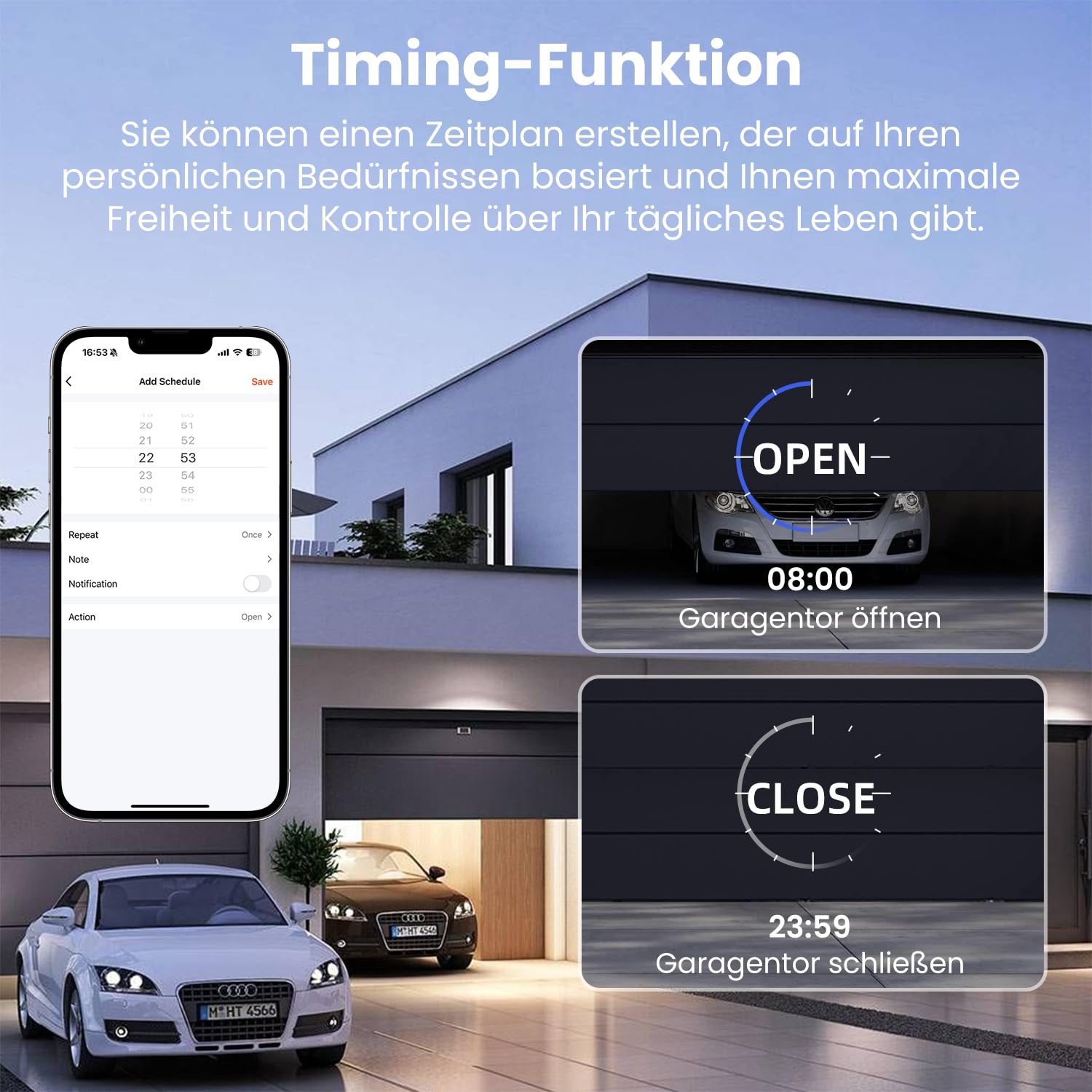
Image 4.3: The scheduling feature within the app, allowing users to set specific times for the garage door to open (e.g., 08:00) and close (e.g., 23:59).
4.2 Sprachsteuerung
Integrate your device with Amazon Alexa or Google Home for voice commands.
- Konto verknüpfen: In the Alexa or Google Home app, enable the "Tuya Smart" or "Smart Life" skill/service and link your account.
- Geräte entdecken: Bitten Sie Alexa oder Google, neue Geräte zu entdecken.
- Sprachbefehle: Verwenden Sie Befehle wie:
"Alexa, öffne das Garagentor."
"Hey Google, schließ die Garage."
"Alexa, ist das Garagentor offen?"

Image 4.4: A person interacting with an Amazon Alexa device to control their garage door using voice commands.
5. Wartung
Regular maintenance ensures optimal performance and longevity of your smart garage door opener.
- Sauberkeit: Keep the module and magnetic sensor clean and free from dust and debris. Use a soft, dry cloth for cleaning.
- Sensorausrichtung: Periodically check the alignment of the magnetic sensor. Ensure the two parts are still within the recommended distance (1-2 cm) when the door is closed.
- Firmware-Updates: Check the Tuya/Smart Life app for any available firmware updates for your device. Install updates to ensure the latest features and security patches.
- Wi-Fi-Verbindung: Ensure your Wi-Fi network is stable and the device has a strong signal. Poor Wi-Fi can affect performance.
6. Fehlerbehebung
If you encounter issues with your MIUCDA Smart Wi-Fi Garage Door Opener, refer to the following troubleshooting guide.
Häufige Probleme und Lösungen:
- Gerät in der App offline:
Lösung: Check your Wi-Fi router and internet connection. Ensure the device is within Wi-Fi range. Try restarting the module by temporarily disconnecting and reconnecting its power. Re-pair the device if necessary. - Garage Door Not Responding to Commands:
Lösung: Verify the module's power supply. Check the signal cable connections (S1, S2) to your garage door opener. Ensure your garage door opener is functioning correctly with its original wall button. - Incorrect Door Status in App:
Lösung: Check the magnetic sensor installation and alignment. Ensure the sensor cables (S3, S4) are securely connected to the module. The sensor parts must be close enough when the door is closed. - Sprachsteuerung funktioniert nicht:
Lösung: Ensure your Tuya/Smart Life account is correctly linked to Alexa/Google Home. Check if the device is discovered and named appropriately in the smart assistant app. Verify your smart assistant device has an active internet connection. - Schwierigkeitspaarung:
Lösung: Ensure your phone is connected to a 2.4GHz Wi-Fi network during pairing. Some routers combine 2.4GHz and 5GHz bands; try temporarily disabling the 5GHz band if you experience issues. Reset the module (refer to app instructions for specific reset procedure, usually involves holding a button).
7. Spezifikationen
| Besonderheit | Spezifikation |
|---|---|
| Marke | MIUCDA |
| Modellnummer | 6cd539ea-f8a9-4e5b-81a1-f917988390a5 |
| Eingangslautstärketage | AC100-240V, 50/60Hz |
| Aktuelle Bewertung | 10 A |
| Betriebsart | Automatisch |
| Kontakttyp | Normalerweise geschlossen |
| Steckertyp | Schraubklemme |
| Schaltertyp | Druckknopf |
| Schaltungsart | 1-Wege |
| Montagetyp | Unterputz |
| Antriebstyp | Scharnierhebel |
| Verpackungsabmessungen | 15 x 10.2 x 4.5 cm |
| Paketgewicht | 210 Gramm |
| Verfügbarkeit von Ersatzteilen | Informationen nicht verfügbar |
8. Garantieinformationen
Specific warranty details for the MIUCDA Smart Wi-Fi Garage Door Opener are not provided in the product information. Please refer to the retailer's return policy or contact MIUCDA customer support for warranty inquiries.
Generally, products purchased on Amazon.com.be come with a standard return policy. For this product, the return policy duration is 31 days for refund/replacement.
9. Unterstützung und Kontakt
For technical support, troubleshooting assistance, or further inquiries regarding your MIUCDA Smart Wi-Fi Garage Door Opener, please contact MIUCDA customer service.
Contact information was not explicitly provided in the product details. Please check the product packaging, the MIUCDA brand website, or your purchase confirmation for support contact details.
You may also refer to the help section within the Tuya Smart or Smart Life application for common questions and support resources related to smart home devices.


