
1. Einleitung
This manual provides detailed instructions for the operation and maintenance of your ORDRO B320 1080P Camcorder. Please read this manual thoroughly before using the device to ensure proper functionality and to maximize your user experience. This camcorder is designed for capturing Full HD 1080P video at 30 frames per second and 30MP still images, featuring IR night vision, an 18X digital zoom, and a 3.0-inch IPS screen.

Figure 1: ORDRO B320 1080P Camcorder.
2. Lieferumfang
Upon opening your ORDRO B320 Camcorder package, you should find the following items:
- ORDRO B320 Camcorder
- Objektivdeckel
- 2 x Lithium-Ionen-Akkus
- 16 GB SD-Karte
- USB-Kartenleser
- USB-Ladekabel
- Netzteil
- Fernbedienung
- Bedienungsanleitung
- Objektivabdeckung
- DV Bag
3. Produktüberschreitungview
Familiarize yourself with the main components and controls of your camcorder:

Figure 2: Key components of the ORDRO B320 Camcorder, including the lens, screen, and control buttons.
- Linse: Main optical component for capturing images and video.
- 3.0-Zoll-IPS-Bildschirm: Drehbarer Bildschirm für viewleben footage, Wiedergabe und Menünavigation.
- Power/IR Button: Toggles power and activates infrared night vision.
- Mode/OK Button: Switches between video, photo, and playback modes, and confirms selections.
- Menü-Schaltfläche: Accesses the camcorder's settings menu.
- Navigationstasten (Auf/Ab/Links/Rechts): Used for menu navigation and digital zoom control.
- Record/Stop Key: Startet und beendet die Videoaufnahme.
- Bildnachweis: Erstellt Standbilder.
- USB-Ausgang: Connects the camcorder to a computer for data transfer or webCam-Funktionalität.
- MIC-Eingang: For connecting an external microphone (not included) for enhanced audio.
- Hot Shoe Interface: For attaching external accessories like lights or microphones.
4. Einrichtung
4.1. Einbau und Aufladen der Batterie
- Öffnen Sie die Batteriefachabdeckung an der Unterseite des Camcorders.
- Legen Sie eine vollständig geladene Batterie in das Batteriefach ein und achten Sie dabei auf die richtige Polarität.
- Schließen Sie den Batteriefachdeckel fest.
- To charge the battery, insert the battery into the camcorder, then connect the camcorder to the power adapter using the provided USB cable. The camcorder can record while charging.
4.2. Installation der SD-Karte
- Suchen Sie den SD-Kartensteckplatz, der sich normalerweise in der Nähe des Batteriefachs oder an der Seite befindet.
- Schieben Sie die mitgelieferte 16-GB-SD-Karte in den Steckplatz, bis sie hörbar einrastet. Achten Sie darauf, dass die Karte richtig herum eingelegt ist.
- Zum Entfernen die Karte vorsichtig nach innen drücken, bis sie herausspringt.
4.3. Erstes Einschalten
To power on the camcorder, simply open the 3.0-inch IPS screen. The device will automatically power on. Close the screen to power off the device.
5. Bedienungsanleitung
5.1. Grundlegende Videoaufzeichnung
- Ensure the camcorder is powered on and in video recording mode (indicated by a video camera icon on the screen).
- Drücken Sie die Record/Stop Key to begin recording. A red indicator light will typically appear.
- Drücken Sie die Record/Stop Key erneut, um die Aufnahme zu stoppen.
5.2. Capturing Still Images
- Wechseln Sie mit dem/der/den Modus/OK-Taste (indicated by a camera icon).
- Nutzen Sie den Bildschirm, um den Bildausschnitt festzulegen.
- Drücken Sie die Fototaste to capture an image.
5.3. Digitalzoom
Use the navigation buttons (Up/Down) to control the 18X digital zoom. Press 'Up' to zoom in and 'Down' to zoom out.

Figure 3: Visual representation of key camcorder features such as digital zoom and webCam-Funktionalität.
5.4. Infrarot-Nachtsicht
To activate the infrared night vision function, press the Power/IR Button. This allows for clear recording in low-light conditions, though footage will appear in black and white.

Figure 4: Comparison of normal and infrared night vision recording capabilities.
5.5. WebNockenfunktion
Connect the camcorder to your computer via the USB cable. Select the webcam option on the camcorder's screen to use it for video calls or live streaming. This also allows for file auf Ihren Computer übertragen.
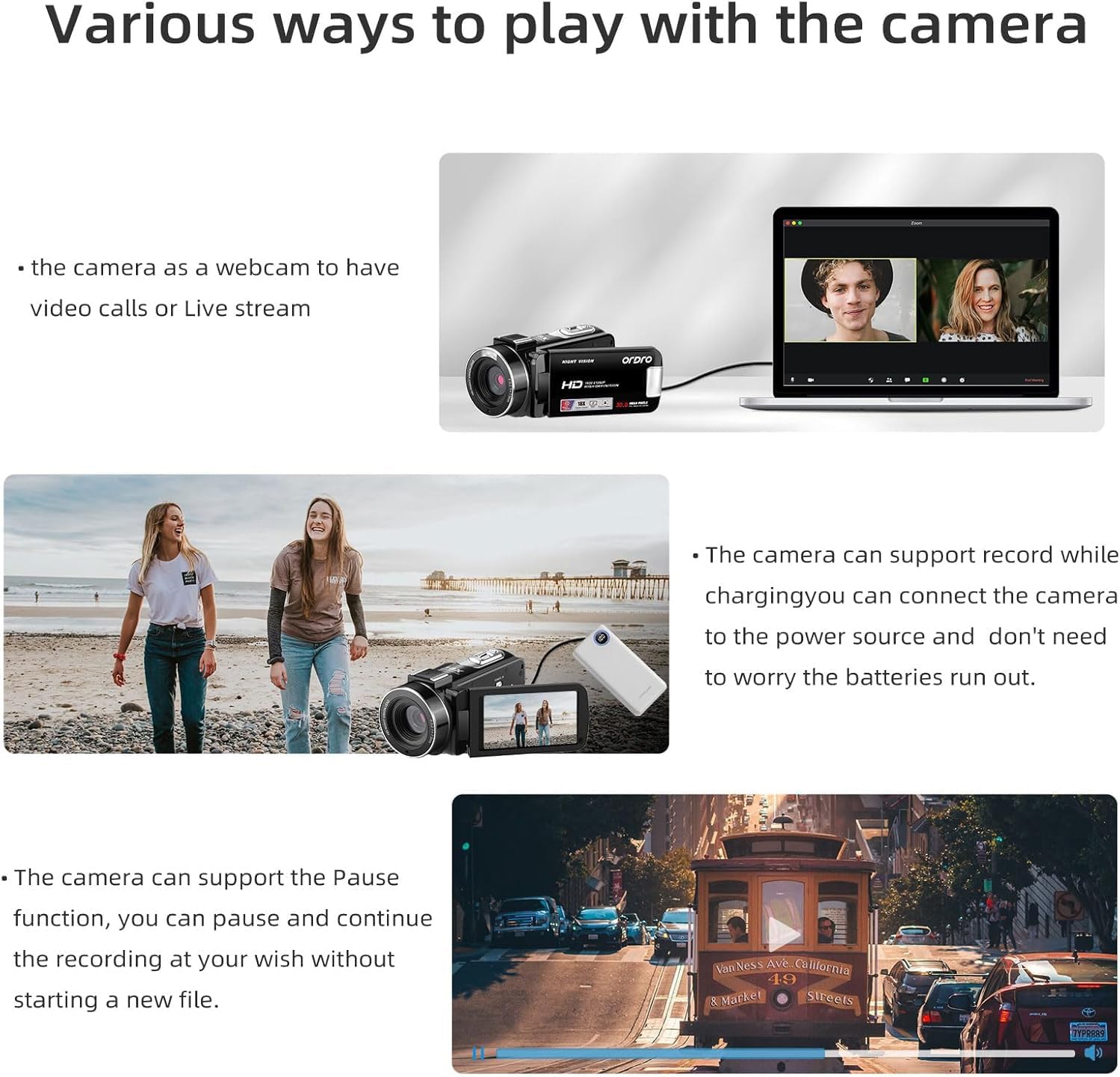
Figure 5: The camcorder connected to a laptop, demonstrating its webCam-Funktionalität.
5.6. Menüeinstellungen
Drücken Sie die Menüschaltfläche to access various settings. Use the navigation buttons to scroll and the Modus/OK-Taste to select. Available settings include:
- Mode Set: Auto, Night, Portrait, Landscape, Backlight, Sport, Party, Beach, High Sensitivity.
- Filmgröße: Adjust video resolution (e.g., FHD 1920x1080, HD 1280x720, VGA 640x480).
- Schönes Gesicht: Ein/Aus.
- Belichtung: Adjust EV values (+3 to -3).
- Weißabgleich: Auto, Daylight, Cloudy, Fluorescent, Tungsten.
- Schärfe: Sharp, Normal, Soft.
- Wirkung: Normal, B&W, Sepia, Red, Green, Blue, Sunset, Warm, Cool, Over Exposure, IR, Binary, Vivid, Undertone, Dog Eye, Aibao, Gothic, Japan Style, LOMO, Negative.
- ISO: Auto, 100, 200, 400.
- Datum Stamp: Off, Date, Date & Time.
- Aufstellen: Language, Set Date, Power Save, Beep, Frequency, Format, Default.
Video 1: Ein überview of the ORDRO B320 1080p Video Camera, demonstrating its features and various settings.
6. Wartung
To ensure the longevity and optimal performance of your ORDRO B320 Camcorder, follow these maintenance guidelines:
- Reinigen Sie die Linse mit einem weichen, fusselfreien Tuch. Vermeiden Sie scheuernde Materialien.
- Store the camcorder in its protective DV bag when not in use to prevent dust and scratches.
- Avoid exposing the camcorder to extreme temperatures, humidity, or direct sunlight for extended periods.
- Ensure batteries are fully charged before long periods of storage and recharge them periodically.
7. Fehlerbehebung
If you encounter issues with your ORDRO B320 Camcorder, refer to the following common problems and solutions:
- Die Kamera lässt sich nicht einschalten: Ensure the battery is correctly inserted and fully charged. The screen must be open for the camera to power on.
- Schlechte Bild-/Videoqualität: Check the lens for smudges or dirt. Ensure you are in appropriate lighting conditions for your selected mode. Adjust exposure, white balance, and sharpness settings in the menu.
- Verschwommenes Essentage, especially for small details: The camcorder may have limitations in focusing on very small or close-up details. While there are sharpness settings, they may not fully resolve issues with fine text or intricate objects at close range. Ensure sufficient lighting and try adjusting the distance to the subject.
- SD-Kartenfehler: Ensure the SD card is properly inserted. Try formatting the SD card via the camera's setup menu (this will erase all data). If the issue persists, try a different compatible SD card.
- Keine Audioaufnahme: Check if an external microphone is connected and functioning. Ensure the camcorder's internal microphone is not obstructed.
8. Spezifikationen
| Besonderheit | Spezifikation |
|---|---|
| Marke | ORDRO |
| Modellnummer | LM-ORDRO B320 |
| Auflösung der Videoaufnahme | 1080p |
| Effektive Standbildauflösung | 30 Megapixel |
| Digital Zoom | 18 x |
| Bildschirmgröße | 3 Zoll |
| Fotosensor-Technologie | CMOS |
| Konnektivitätstechnologie | W-lan |
| Durchschnittliche Batterielebensdauer | 120 Мinuten |
| Anzahl Batterien | 2 Lithium-Ionen (im Lieferumfang enthalten) |
| Verfügt über eine Bildstabilisierung | NEIN |
| Wasserbeständigkeit | Nicht wasserfest |
| Unterstütztes Audioformat | AAC, MP3 |
| Videoaufnahmeformat | MP4 |
| Unterstütztes Bildformat | JPEG |
9. Garantie und Support
The ORDRO B320 Camcorder comes with a one-year warranty from the manufacturer, ORDRO. For technical support, warranty claims, or further assistance, please refer to the contact information provided with your product packaging or visit the official ORDRO webWebsite.


