
1. Einleitung
Thank you for choosing the TOPADRE 140W USB C Charging Station. This powerful 5-port GaN charger block is designed to provide efficient and safe charging for a wide range of devices, including laptops, smartphones, and tablets. Featuring a high-definition digital display and advanced safety protocols, this charging station simplifies your charging experience by eliminating tangled cables and cluttered chargers.
2. Packungsinhalt
- 1 x TOPADRE 140W USB C Charging Station
- 1 x 5-ft Detachable AC Power Cord
- 1 x Tischständer
3. Produktmerkmale
- 5-in-1 Multi-Port Charging: Equipped with 3 USB-C ports (up to 100W each) and 2 USB-A ports (up to 60W each), delivering a total maximum output of 140W.
- Digitaler Anzeigebildschirm: A high-definition screen provides real-time monitoring of current and charging status, ensuring optimal power delivery.
- Advanced GaN III Pro Technology: Utilizes upgraded Gallium Nitride (GaN) technology for reduced power waste, lower heat generation, and a compact design.
- Comprehensive Safety Certifications: ETL, CE, and FCC certified, with seven layers of enhanced protection including temperature, overcurrent, overvoltage, overcharge, overload, overheating, and short circuit protection.
- Universelle Kompatibilität: Supports various fast charging protocols such as PD3.0, PPS, QC3.0, 2.4A, AFC, and FCP for broad device compatibility.

Image: The TOPADRE 140W USB C Charging Station efficiently powers multiple devices simultaneously.
4. Einrichtungsanweisungen
- Strom anschließen: Plug the detachable AC power cord into the 2-pin input port on the back of the charging station. Then, plug the other end of the power cord into a standard wall outlet.
- Attach Desktop Stand (Optional): For upright positioning and stability, slide the charging station into the provided desktop stand. The stand features a non-slip base.
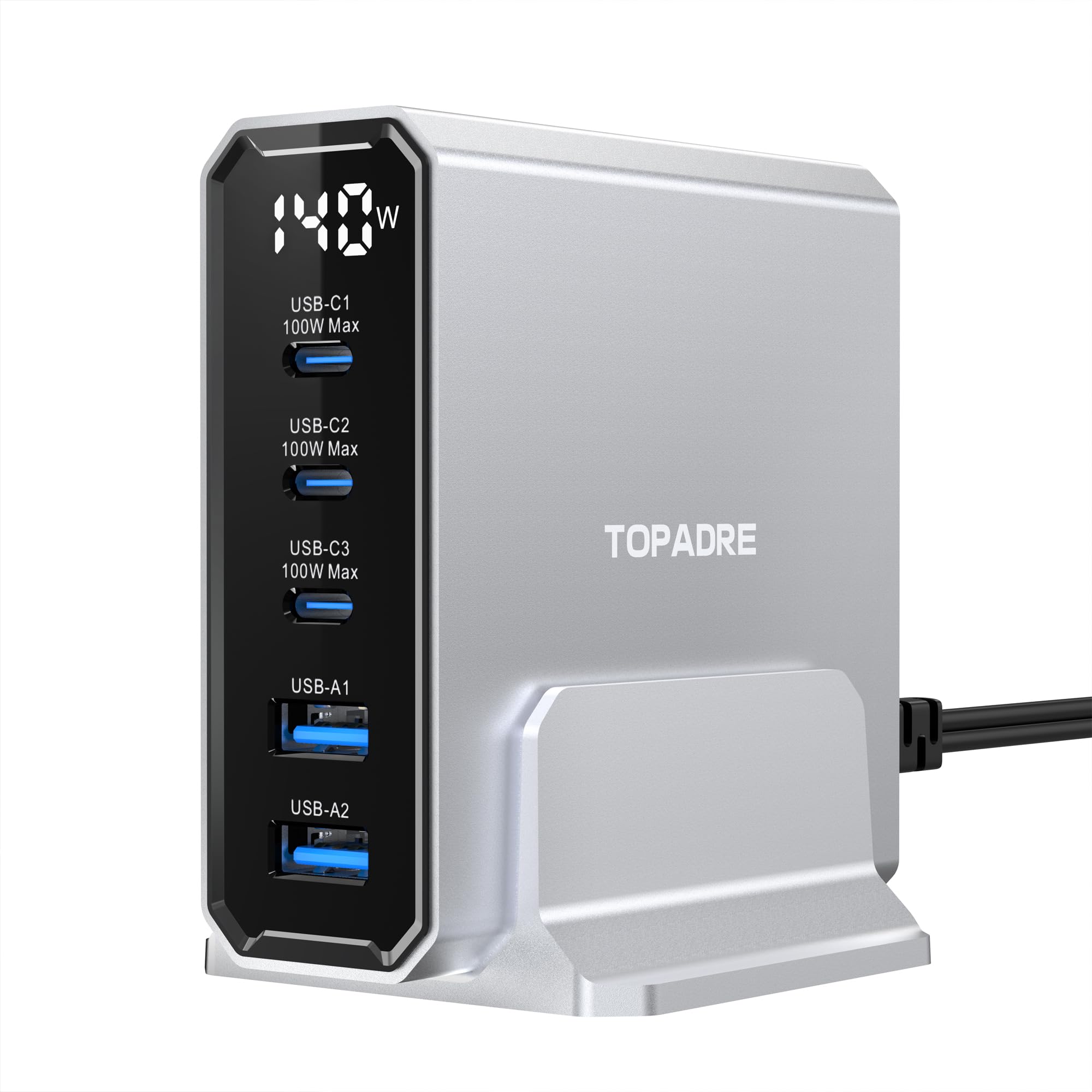
Image: The charging station connected to a power source and charging a laptop, demonstrating its 100W max output capability.
5. Bedienungsanleitung
- Geräte verbinden: Plug your USB-C compatible devices into the USB-C ports (USB-C1, USB-C2, USB-C3) and your USB-A compatible devices into the USB-A ports (USB-A1, USB-A2).
- Aufladen des Monitors: The integrated digital display screen will show the real-time wattage being delivered to your connected devices. This allows you to confirm active charging and power distribution.
- Optimale Leistung: For best results with high-power devices like laptops, use the USB-C ports. The charger intelligently distributes power based on the connected devices' needs.

Image: The unique digital display screen provides real-time wattage information for connected devices.
6. Charging Capabilities and Power Distribution
The TOPADRE 140W USB C Charging Station is designed for flexible and efficient power delivery:
- Einzelport-Nutzung: Any single USB-C port can deliver up to 100W, ideal for fast-charging laptops like MacBook Pro/Air.
- Aufladen mehrerer Geräte: The total power output is 140W, intelligently distributed across all active ports.
- Example Scenarios:
- When charging two laptops, one might receive 65W and the other 45W.
- When charging three devices, a common distribution could be 65W, 45W, and 30W.
- When charging five devices, power might be distributed as 65W, 25W, 20W, 12W, and 12W.

Image: The charging station delivering 100W max output to a single MacBook Pro, achieving 0-50% charge in 30 minutes.

Image: The GaN 140W Max Charger providing fast charging for three laptops, demonstrating its multi-device capability.
Video: A demonstration of the TOPADRE 140W USB C Charging Station's power distribution and thermal performance when charging multiple devices.
7. Safety Protocols
Your safety is paramount. The TOPADRE 140W USB C Charging Station incorporates multiple protection features:
- Temperaturschutz: Verhindert Überhitzung während des Betriebs.
- Überstromschutz: Schutzmaßnahmen gegen übermäßigen Stromfluss.
- Übervolumentage Schutz: Schützt Geräte vor Voltage Wellen.
- Überladeschutz: Verhindert das Überladen von Geräten.
- Überlastschutz: Manages power distribution to prevent overloading.
- Überhitzungsschutz: Additional thermal management for safety.
- Kurzschlussschutz: Schaltet die Stromzufuhr im Falle eines Kurzschlusses automatisch ab.

Image: The internal GaN III Pro chip and its integrated safety features, ensuring secure charging.
8. Universelle Kompatibilität
This charging station is compatible with a broad range of devices and charging standards:
- Unterstützte Protokolle: PD3.0, PPS, QC3.0, 2.4A, AFC, FCP, and more.
- Kompatible Laptops: MacBook Pro/Air, Dell XPS13, Chromebook, Surface Pro, HP, Google Pixelbook, ASUS ROG Ally.
- Kompatible Smartphones: iPhone 15/15 Pro/15 Plus/15 Pro Max, iPhone 14/14 Pro/14 Plus/14 Pro Max, iPhone 13/13 Pro/13 Mini/13 Pro Max, iPhone 12/12 Pro/12 mini/12 Pro Max, iPhone 11/11 Pro/11 Pro Max, iPhone XS/8/7 Plus, Samsung Galaxy S23 Ultra/S22/S21+/S21/S21 Ultra/S21 FE/S20+/S20, Google Pixel, HTC, LG, Motorola, Sony, and other USB devices.
- Kompatible Tablets: iPad, Kindle Fire HD 10, Samsung Galaxy Tab S9/S8.
- Andere Geräte: Nintendo Switch, Steam Deck, AirPods, power banks, drones, etc.
Video: The TOPADRE 140W USB C Charging Station demonstrating its ability to charge various devices, including laptops, tablets, and smartphones, with optimal speed.
9. Spezifikationen
| Besonderheit | Detail |
|---|---|
| Marke | TOPADRE |
| Modell | 140W USB C Charging Station |
| Steckertyp | 2-Pin (for AC input) |
| Eingangslautstärketage | 120 Volt |
| Anzahl USB-Anschlüsse | 5 (3 x USB-C, 2 x USB-A) |
| Gesamt Wattage Ausgang | 140 watts Max |
| USB-C-Port-Ausgang | 100W Max (each, dynamic distribution) |
| USB-A-Anschlussausgang | 60W Max (each, dynamic distribution) |
| Besondere Merkmale | Charging Indicator, Fast Charging, Short Circuit Protection, Digital Display |
| Farbe | Silber |
10. Wartung
To ensure the longevity and optimal performance of your TOPADRE 140W USB C Charging Station, follow these maintenance guidelines:
- Reinigung: Use a soft, dry cloth to wipe the surface of the charging station. Avoid using liquid cleaners or aerosols.
- Lagerung: Bewahren Sie das Gerät an einem kühlen, trockenen Ort fern von direkter Sonneneinstrahlung und extremen Temperaturen auf.
- Handhabung: Avoid dropping or subjecting the device to strong impacts. Do not attempt to disassemble or modify the charging station, as this will void the warranty and may cause damage or injury.
- Kabelpflege: Ensure all charging cables are in good condition. Replace any frayed or damaged cables to prevent potential hazards.
11. Fehlerbehebung
If you encounter any issues with your charging station, please refer to the following common troubleshooting steps:
- Gerät wird nicht geladen:
- Ensure the AC power cord is securely plugged into both the charging station and a working wall outlet.
- Try plugging a different device or cable into the port to isolate the issue.
- Verify that your device's charging cable is fully inserted into the charging station port.
- Langsamer Ladevorgang:
- Confirm that your device and cable support fast charging protocols (e.g., PD3.0, QC3.0).
- If multiple high-power devices are connected, the total 140W output is shared. Disconnect less critical devices to prioritize power to specific devices.
- Check the digital display to see the actual wattage being delivered to your device.
- Digitalanzeige funktioniert nicht:
- Unplug the AC power cord from the wall outlet, wait a few seconds, and then plug it back in.
- Wenn das Problem weiterhin besteht, wenden Sie sich an den Kundendienst.
- Überhitzung:
- Ensure the charging station is placed in a well-ventilated area and not covered.
- Reduce the number of connected devices or disconnect high-power devices if the unit feels excessively hot. The built-in protection should prevent dangerous temperatures.
12. Garantie und Support
TOPADRE offers a 24 Monate Garantie for this product. If you encounter any issues or have questions regarding your 140W USB C Charging Station, please do not hesitate to contact TOPADRE customer service. Our team is committed to providing prompt assistance and will respond within 24 hours.
For support, please visit the official TOPADRE webBesuchen Sie die Website oder konsultieren Sie die Kontaktinformationen auf Ihrer Produktverpackung.