
1. Produktüberschreitungview
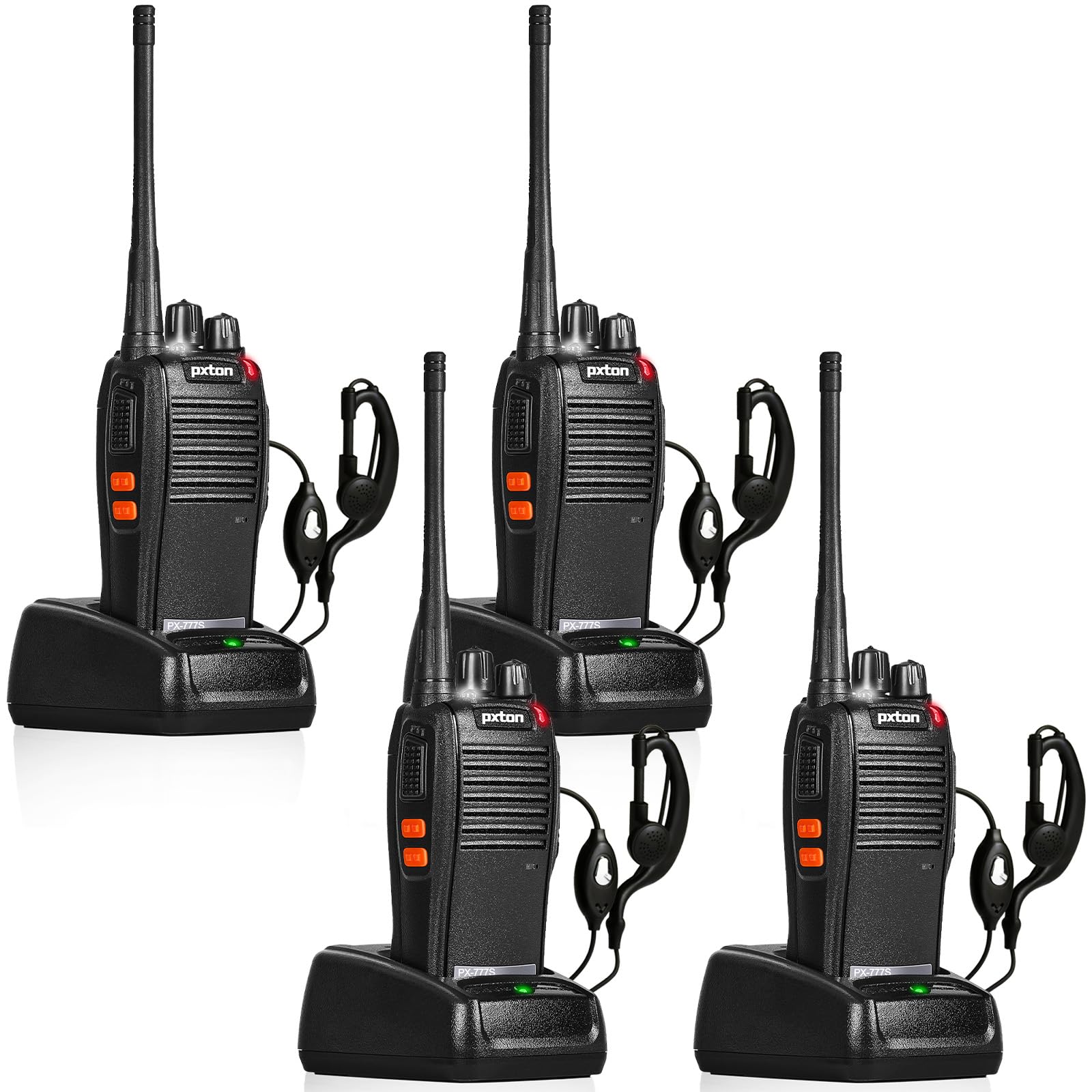
The pxton 777S is a versatile two-way radio designed for reliable communication. It features 16 memory channels, 165 privacy codes, VOX functionality, an emergency alarm, noise reduction, automatic squelch, a low battery alert, power-saving mode, scanning, monitoring, and an LED flashlight.
2. Packungsinhalt
Bitte überprüfen Sie vor der Einrichtung, ob alle Artikel in Ihrem Paket enthalten sind:
- 4 x pxton 777S Walkie Talkies
- 4 x Ladestationen
- 4 x 1500mAh Lithium-Batterien
- 4 x Gürtelclips
- 4 x Ohrhörer
- 2 x Benutzerhandbücher

3. Einrichtungsanweisungen
3.1 Komponentenidentifikation
Familiarize yourself with the various parts and controls of your pxton 777S walkie talkie:

3.2 Einlegen der Batterie
- Stellen Sie sicher, dass das Funkgerät ausgeschaltet ist.
- Suchen Sie das Batteriefach auf der Rückseite des Geräts.
- Align the 1500mAh lithium battery with the contacts and gently push it into place until it clicks securely.
- Schließen Sie den Batteriefachdeckel.
3.3 Laden des Akkus
Laden Sie den Akku vor dem ersten Gebrauch vollständig auf. Eine vollständige Ladung dauert in der Regel 3–4 Stunden.
- Connect the charging dock to a power outlet using the provided adapter.
- Place the walkie talkie (with battery installed) into the charging dock.
- The LED indicator on the walkie talkie or charging dock will show the charging status (e.g., red for charging, green for fully charged).

3.4 Anbringen von Zubehör
- Gürtelschnalle: Attach the belt clip to the designated slot on the back of the walkie talkie.
- Hörmuschel: Insert the earpiece plug into the SP/MIC jacks on the side of the walkie talkie.
4. Bedienungsanleitung
4.1 Ein-/Ausschalter und Lautstärkeregelung
Drehen Sie den Netzschalter/Lautstärkeregler knob clockwise to power on the walkie talkie. Continue rotating to increase the volume. Rotate counter-clockwise to decrease volume and power off the unit.
4.2 Kanalauswahl
Drehen Sie den Kanalschalter knob to select one of the 16 available channels. Ensure all radios in your group are set to the same channel for communication.
4.3 Senden und Empfangen
- Zum Senden die Taste gedrückt halten PTT-Taste (Push-To-Talk). on the side of the walkie talkie. Speak clearly into the microphone.
- Release the PTT button to receive messages.
4.4 VOX-Funktion (Sprachgesteuerte Vermittlungsstelle)
The VOX function allows hands-free operation. When activated, the radio will transmit automatically when it detects your voice.
- The pxton 777S offers 5 levels of VOX sensitivity adjustment. Refer to the full user manual for detailed programming instructions to adjust VOX sensitivity.
4.5 Überwachungsfunktion
Halten Sie die MONI Button to temporarily disable the squelch and listen for weak signals on the current channel.
4.6 LED Taschenlampe
Drücken Sie die Taschenlampentaste um die LED-Taschenlampe ein- oder auszuschalten.
4.7 Notfallalarm
The walkie talkie includes an emergency alarm function. Consult the full user manual for specific activation and deactivation procedures.
4.8 Scanfunktion
The scanning function allows the radio to automatically scan through active channels. Refer to the full user manual for details on activating and managing channel scanning.
4.9 Kommunikationsreichweite
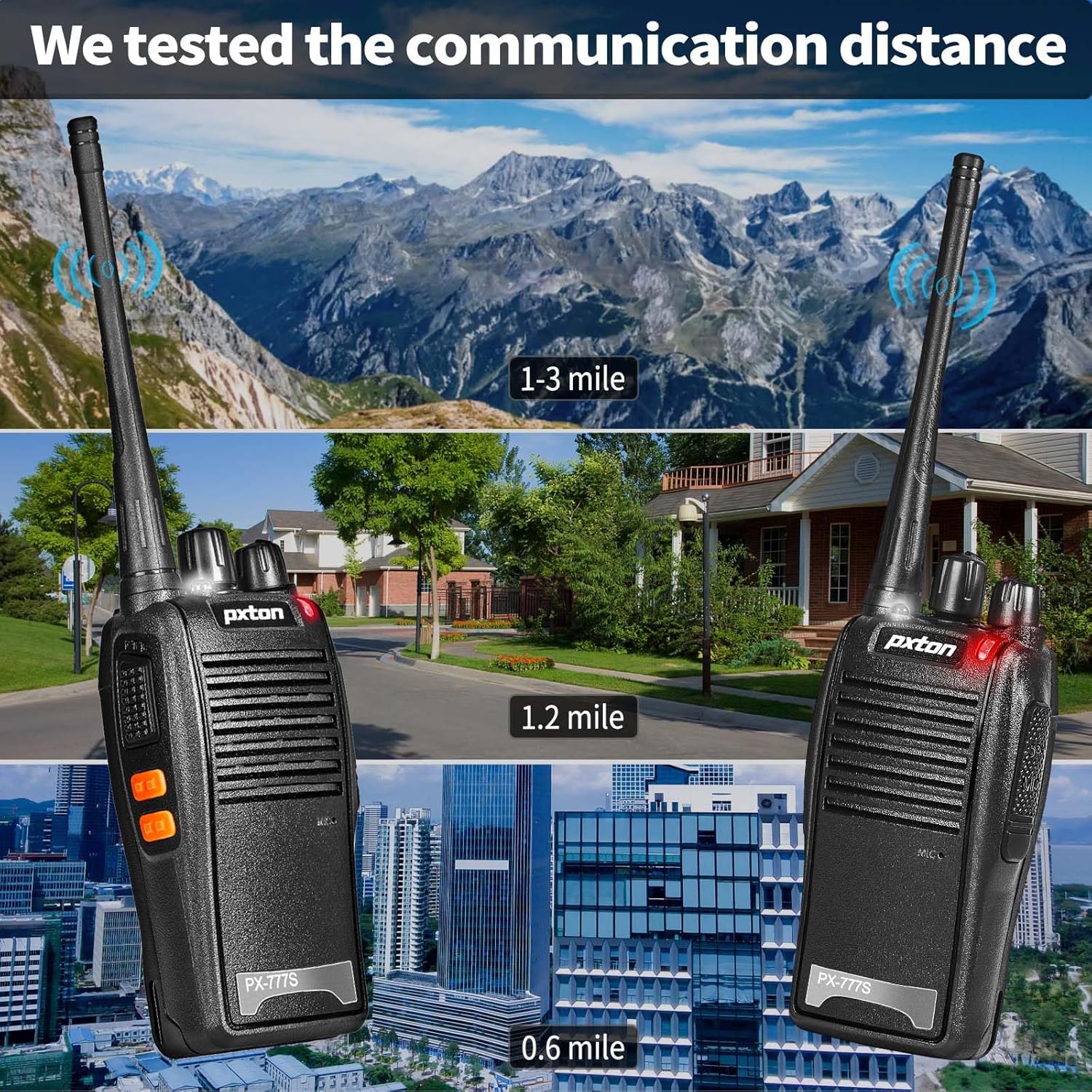
The effective communication range varies based on terrain and obstacles:
- Unobstructed Areas (e.g., flat terrains, mountain peaks): Bis zu 3 Meilen.
- Suburban or Rural Areas: Approximately 1.2 miles.
- Within Cities: Approximately 0.6 miles.
Actual range may vary significantly depending on environmental conditions and obstructions.
5. Wartung
5.1 Batteriepflege
- To maximize battery life, fully charge the 1500mAh lithium battery before initial use.
- Vermeiden Sie ein Überladen oder vollständiges Entladen der Batterie.
- If the walkie talkie will not be used for an extended period, remove the battery and store it in a cool, dry place.
- A full charge typically takes 3-4 hours. Under normal usage, the battery can last up to 120 hours on standby or up to 12 hours of continuous usage.
5.2 Reinigung
- Clean the exterior of the walkie talkie with a soft, damp Tuch.
- Verwenden Sie keine aggressiven Chemikalien oder Scheuermittel.
- Ensure the unit is dry before use or storage.
5.3 Speicherung
Store the walkie talkie in a cool, dry environment away from direct sunlight and extreme temperatures.
6. Fehlerbehebung
If you encounter issues with your pxton 777S walkie talkie, refer to the following common problems and solutions:
| Problem | Mögliche Ursache | Lösung |
|---|---|---|
| Kein Strom | Batterie schwach oder nicht richtig eingesetzt | Laden Sie den Akku auf oder setzen Sie ihn korrekt wieder ein. |
| Senden und Empfangen nicht möglich | Incorrect channel, out of range, or squelch too high | Ensure all radios are on the same channel. Move closer to other radios. Adjust squelch level or use MONI button. |
| Schlechte Audioqualität | Weak signal, interference, or low volume | Move to an area with fewer obstructions. Adjust volume. Check earpiece connection if applicable. |
| Der Akku entlädt sich schnell | Frequent transmission, old battery, or high power setting | Reduce transmission time. Consider replacing the battery if it's old. Ensure power-saving mode is active. |
If the problem persists after attempting these solutions, please contact pxton customer support.
7. Spezifikationen
| Besonderheit | Detail |
|---|---|
| Modellnummer | PX-777S-0002 |
| FCC-ID | 2AX68GTR8 |
| Anzahl der Kanäle | 16 |
| Datenschutzcodes | 165 (CTCSS/DCS) |
| Frequenzbereich | UHF |
| Maximale Sprechreichweite | 3 Miles (unobstructed) |
| Akku-Typ | 1500 mAh Lithium-Ionen-Akku (im Lieferumfang enthalten) |
| Bandtage | 3.7 Volt (DC) |
| Technische Daten | 9.9 x 4.4 x 6.9 Zoll (25.1 x 11.2 x 17.5 cm) |
| Artikelgewicht | 2.82 Pfund (1.28 kg) |
| Wasserbeständigkeit | Wasserfest |
| Besondere Merkmale | Battery Saver Mode, Emergency Alarm, Long Range, Noise Reduction, Rechargeable, VOX, TOT, Flashlight, Scan Function |

8. Garantie und Support
8.1 Garantieinformationen
pxton offers a 30-tägiges bedingungsloses Rückgaberecht Und lebenslanger Kundendienst for the PX-777S walkie talkies.
8.2 Kundendienst
If you have any questions, concerns, or require assistance with your pxton 777S walkie talkies, please contact pxton customer service. Refer to the product packaging or the official pxton webFür detaillierte Kontaktdaten besuchen Sie bitte die Webseite.
8.3 Kompatibilitätshinweis
The PX-777S walkie talkie is compatible with the PX-888S, PX-666S, and PX-888S Pro models. These models can operate together and utilize the same programming tools and cables. Please note that programming cables must be purchased separately and are not included with this product.