
Einführung
This manual provides detailed instructions for the installation, operation, and maintenance of your GeeekPi Game5Pi Case for Raspberry Pi 5, which includes the Armor Lite V5 Active Cooler. Please read this guide thoroughly to ensure proper assembly and optimal performance of your device.
Packungsinhalt
Bitte überprüfen Sie, ob alle unten aufgeführten Artikel in Ihrem Paket enthalten sind:
- 1 x ABS Upper case for Raspberry Pi 5
- 1 x ABS Button case for Raspberry Pi 5
- 1 x Armor Lite V5 Adjustable Speed Fan
- 6 x Thermal pads (various sizes)
- 1 x Schraubendreher
- 4 x Anti-slipper pads
- 2 x M2.5-Schrauben
- 4 x Self-tapping screws

Image: Contents included in the GeeekPi Game5Pi Case package.
Kompatibilität
This Game5Pi case is designed exclusively for the Himbeer-Pi 5 models (8GB, 4GB, and 16GB versions). It is not compatible with other Raspberry Pi models.
Setup und Installation
Follow these steps to assemble your GeeekPi Game5Pi Case with the Raspberry Pi 5 and Armor Lite V5 Active Cooler:
- Prepare Thermal Pads: Carefully peel off the protective film from both sides of the thermal pads. Apply the appropriate sized pads to the designated areas on your Raspberry Pi 5 board as shown in the diagram.
- Install Armor Lite V5 Cooler: Place the Armor Lite V5 Active Cooler onto the Raspberry Pi 5 board, ensuring the heatsink makes firm contact with the thermal pads. Secure it with the provided screws if necessary. Connect the cooler's fan cable to the appropriate GPIO pins on the Raspberry Pi 5.
- Insert Raspberry Pi into Case: Carefully place the assembled Raspberry Pi 5 with the cooler into the bottom part of the Game5Pi case. Ensure that the mounting holes of the Raspberry Pi are accurately inserted into the case's standoffs.
- Attach Upper Case: Align the upper ABS case with the bottom part and gently press them together until they snap securely. Ensure all ports align with the case cutouts.
- Sicherer Fall: Use the provided self-tapping screws to secure the upper and lower case parts together, if applicable.

Image: Detailed installation steps for the Raspberry Pi 5 into the Game5Pi case with the Armor Lite V5 cooler.
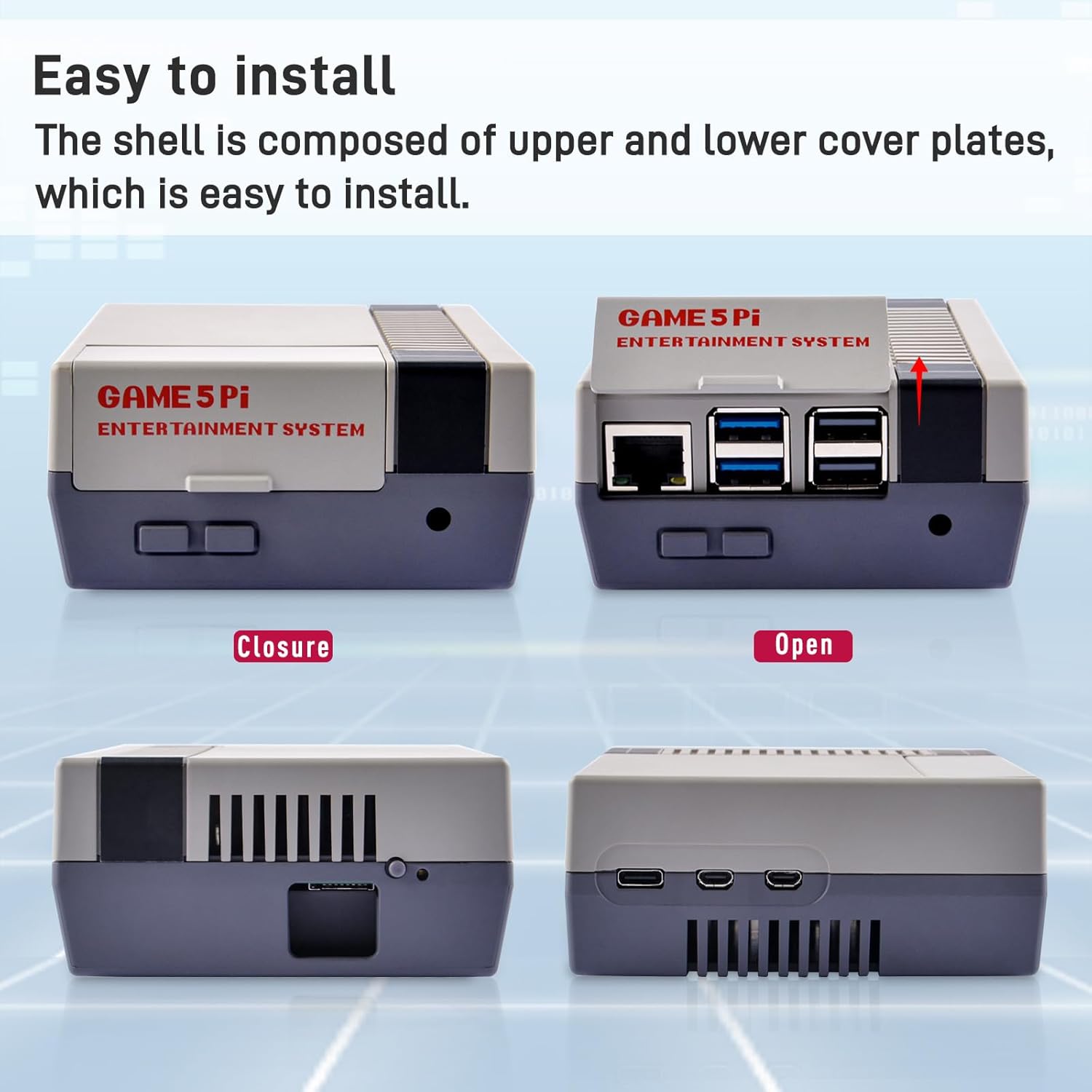
Image: The two-part design of the case facilitates easy installation of the Raspberry Pi 5.
Betrieb
Once assembled, the Game5Pi case provides full access to all necessary ports and features of your Raspberry Pi 5:
- Hafenzugang: The case offers accurate access to the USB-C power jack, micro HDMI ports (HDMI0, HDMI1), USB ports (USB 3.0 x2, USB 2.0 x2), Gigabit Ethernet jack, and 4-lane MIPI DSI/CSI connectors.
- SD-Kartensteckplatz: The SD card slot is easily accessible from the outside of the case, allowing for convenient insertion and removal of the SD card without disassembling the case.
- Netzschalter: A dedicated power button hole is provided for the Raspberry Pi 5's power button functionality.
- Aktive Kühlung: The integrated Armor Lite V5 Active Cooler works to dissipate heat from the Raspberry Pi 5 board, maintaining optimal operating temperatures.
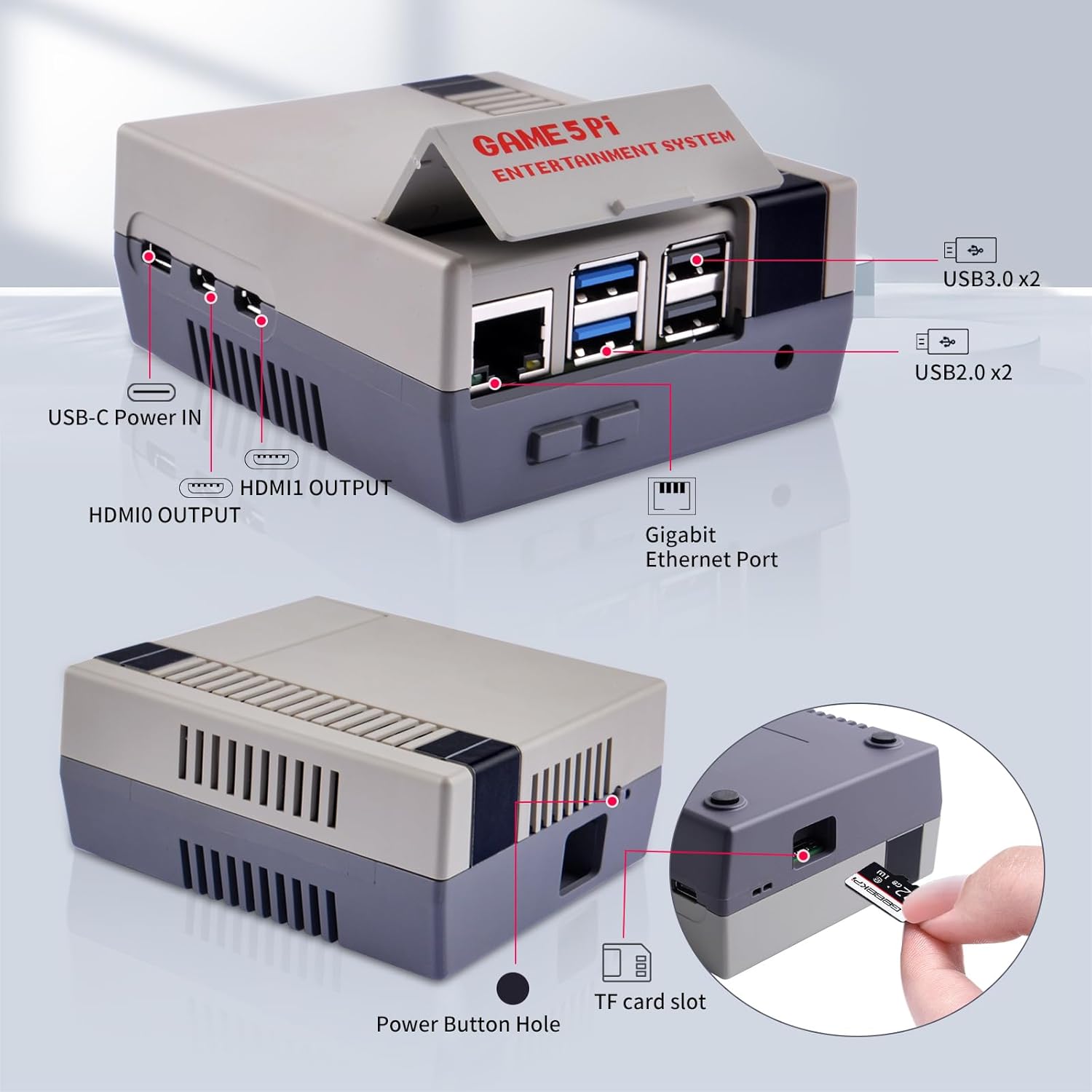
Bild: Überview of accessible ports on the Game5Pi case.

Image: The design allows for easy insertion and removal of the SD card.

Image: The dual cooling system, featuring a radiator and fan, works to accelerate heat dissipation.
Wartung
To ensure the longevity and optimal performance of your Game5Pi Case and Raspberry Pi 5:
- Reinigung: Periodically clean the exterior of the case with a soft, dry cloth. Avoid using harsh chemicals or abrasive materials.
- Luftstrom: Ensure that the ventilation grilles on the case are not obstructed to allow for proper airflow and efficient cooling by the Armor Lite V5.
- Staubentfernung: If dust accumulates on the cooler's fan or heatsink, carefully use compressed air or a soft brush to remove it. Disconnect power before cleaning internal components.
Fehlerbehebung
- Issue: Micro HDMI cable does not fit securely or causes unstable connection.
Lösung: Ensure the micro HDMI cable is fully inserted and properly aligned with the port. Some users have reported that the plastic around the HDMI port may be slightly thick, requiring careful insertion or minor adjustment to the case opening for a snug fit. - Issue: Auxiliary fan runs continuously.
Lösung: The Armor Lite V5 fan is designed to connect to the Raspberry Pi's GPIO pins and will operate continuously as long as the Raspberry Pi receives power. This is expected behavior for active cooling. If continuous operation is not desired, the fan can be disconnected from the GPIO pins, though this may impact cooling performance. - Issue: Case screws do not fit or damage mounts.
Lösung: Verify that you are using the correct screws for each part as indicated in the installation steps. Ensure screws are not overtightened, which can damage plastic mounts. - Issue: Case lid does not attach firmly.
Lösung: Ensure that the Raspberry Pi board and the Armor Lite V5 cooler are correctly seated within the bottom half of the case and that no cables or components are obstructing the closure. Align the upper and lower case parts carefully before snapping them together.
Technische Daten
| Marke | GeeekPi |
| Modellname | Game5Pi Case |
| Produktabmessungen (L x B x H) | 1.69 x 1.69 x 1.57 Zoll (4.29 x 4.29 x 3.99 cm) |
| Artikelgewicht | 5 Unzen (141.75 Gramm) |
| Farbe | Grau |
| Material | Aluminum (cooler), ABS (case) |
| Kühlsystem | Armor Lite V5 Active Cooler (Heatsink + Fan) |
| Konnektivitätstechnologie | USB, micro HDMI, Ethernet, MIPI DSI/CSI (via Raspberry Pi 5) |
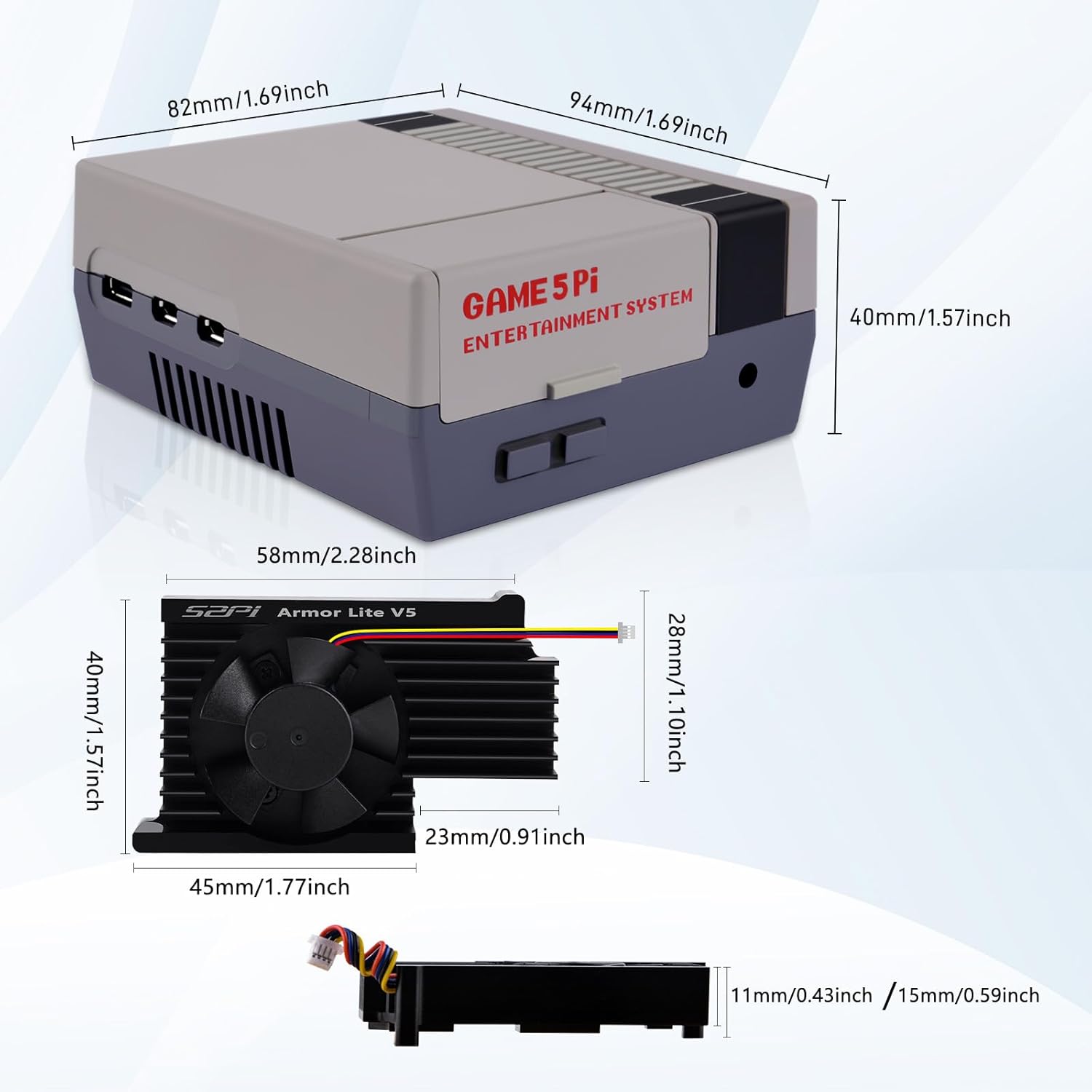
Image: Physical dimensions of the Game5Pi case and the Armor Lite V5 cooler.
Garantieinformationen
Specific warranty details for the GeeekPi Game5Pi Case are not provided in the product information. Please refer to the seller's return policy or contact GeeekPi directly for warranty inquiries.
Kundenservice
For further assistance, technical support, or product inquiries, please visit the official GeeekPi store or contact their customer service department.
GeeekPi Store: Visit the GeeekPi Store on Amazon
Offizielle Produktvideos
Based on the provided product data, no official seller-created videos with m3u8 format are available for embedding in this manual.