
PQWT M200
PQWT M200 Water Detector Instruction Manual
Modell: M200
1. Einleitung
The PQWT M200 Water Detector is a geophysical instrument designed for underground water detection. It utilizes the natural electric field frequency selection system to analyze changes in the earth's electromagnetic field, providing millivolt data (Self-potential) to identify potential water sources.
2. Packungsinhalt
Überprüfen Sie, ob alle Komponenten im Paket vorhanden sind:
- Host Machine (PQWT M200 Detector)
- Electrode Bars
- Copper Electrodes
- Kabel
- Gürtel
- Ladegerät
- Tragetasche
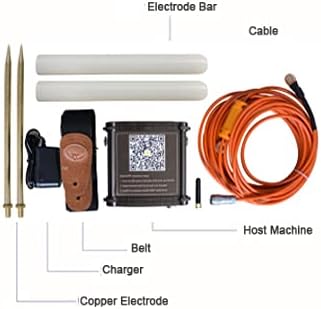
Figure 2.1: Included components of the PQWT M200 Water Detector kit.

Figure 2.2: The PQWT M200 Water Detector and its accessories stored in the carrying case.
3. Technische Daten
| Parameter | Wert |
|---|---|
| Produktmodell | PQWT-M100/200/400 (M200 variant) |
| Messen der Tiefe | 100/200/400 meters (M200: 200 meters) |
| Measurement Data Unit | Electric field component of different frequencies of the earth electromagnetic field ΔVs (mV) |
| Messbereich | 0mV-1000mV, automatic range conversion |
| Messgenauigkeit | 0.001mV |
| Measuring Channel | 4 / 6 / 8 Kanäle |
| Kanalverstärkung | 1-200,000 mal |
| Messfrequenz | 30/36/48 frequency |
| Gewicht (Host) | 0.55 kg |
| Leistung | 18650*2 3000mAh rechargeable lithium battery |
| Anzeige | LED-Anzeige |
| A / D-Umwandlung | 8-bit 1Msps |
| Eingangsimpedanz | ≥10 MΩ |
| Relative Luftfeuchtigkeit | ≤ 85 % |
| Energieaufnahme | Über 1W |
| Arbeitsumgebungstemperatur | -20°C ~ +50°C |
| Technische Daten | 16.4 Zoll L x 6.1 Zoll B x 13.2 Zoll H |
| Kontrollmethode | App, Fernbedienung |
| Sensor Technology | Electric Field Sensor |
| Kompatible Geräte | Android-Geräte |

Figure 3.1: Detailed technical specifications for the PQWT M-series water detectors.
4. Einrichtung und Installation
4.1. Installation der mobilen App
The PQWT M200 operates with a dedicated mobile application on Android devices. Follow these steps to install the app:
- Locate the QR code on the side of the host machine.
- Scannen Sie den QR-Code mit Ihrem Mobilgerät.
- Open the download link provided by the QR code in your browser.
- Install the application named "PQWT water finder" or "PQWT_MobileAPP_PRO.APK".
Alternativ können Sie die App direkt hier herunterladen: http://www.pqwtcs.com/download/PQWT_MobileAPP_PRO.APK

Abbildung 4.1: Vorderseite view of the PQWT M200 device with the mobile app QR code visible.

Abbildung 4.2: Oben und seitlich views of the PQWT M200 device, highlighting the QR code for app download.

Abbildung 4.3: Ausführlich view of the QR code and instructions for mobile app installation.
4.2. Hardware-Verbindung
- Connect the cable to the host machine.
- Connect the electrode bars and copper electrodes to the cable.
- Secure the host machine to your person using the provided belt for ease of use during surveys.
- Ensure the device is charged using the provided charger before use.
5. Bedienungsanleitung
5.1. Powering On and Connecting
- Press and hold the white button on the host machine to turn it on.
- Open the "PQWT water finder" app on your Android device.
- The app should automatically connect to the device. Verify the connection status within the app.

Figure 5.1: Visual guide for initial setup and software interface navigation.
5.2. Conducting a Survey
The PQWT M200 offers high-speed and efficient detection of underground water sources. It is suitable for various geological structures including plains, hills, mountains, highlands, and basins.
- Messmodus auswählen: In the software operation interface, choose your desired measurement mode (e.g., "Three frequency" for rough tests or "Profile survey").
- Parameter einstellen: Adjust parameters such as "Lines", "Sites", and "Gain" as needed. Click "OK" to confirm.
- Messung starten: Click "Record" to begin measuring the first point.
- Continue Measurement: After the data for the first point is measured and the app indicates "record completed", move to the next measurement point and click "Record" again. Repeat this process for all desired points.
- Datenanalyse: The instrument automatically generates geological section drawings without the need for a computer (Android system only). Analyze the generated curves and maps to identify potential water locations.
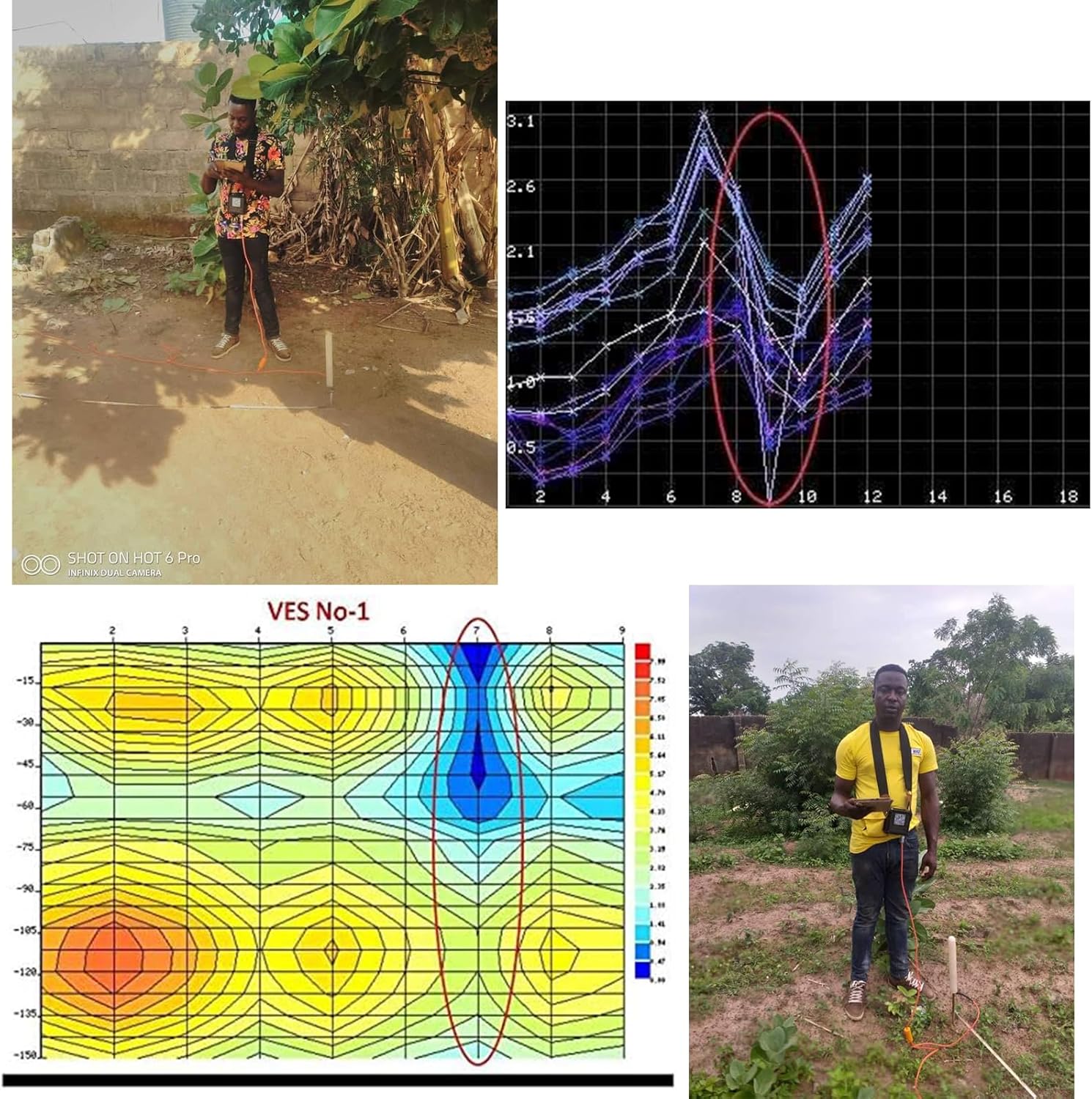
Figure 5.2: User conducting a water survey in the field with the PQWT M200.
Video 5.1: A demonstration of the PQWT M100 (similar model) in a real-world water survey application in Zambia, showing the process from survey to drilling.
6. Wartung
- Halten Sie das Gerät sauber und frei von Staub und Feuchtigkeit.
- Store the device and accessories in the provided carrying case when not in use to prevent damage.
- Charge the battery regularly, even during periods of inactivity, to maintain battery health.
- Vermeiden Sie es, das Gerät über längere Zeit extremen Temperaturen oder direkter Sonneneinstrahlung auszusetzen.
- Inspect cables and electrodes for wear or damage before each use. Replace damaged components as necessary.
7. Fehlerbehebung
| Problem | Mögliche Ursache | Lösung |
|---|---|---|
| Gerät lässt sich nicht einschalten. | Niedriger Batteriestand oder nicht richtig gedrückter Netzschalter. | Charge the device. Press and hold the power button firmly for a few seconds. |
| App fails to connect to the device. | Bluetooth/wireless issue, app not installed correctly, or device not powered on. | Ensure the device is on. Restart the app and device. Check your Android device's wireless settings. Reinstall the app if necessary. |
| Ungenaue oder widersprüchliche Messwerte. | Poor electrode contact, environmental interference, or incorrect survey procedure. | Ensure electrodes are firmly inserted into the ground. Avoid areas with significant electromagnetic interference. Review operating instructions for correct survey methods. |
| Die App stürzt ab oder friert ein. | Software bug or insufficient device resources. | Restart the app. Ensure your Android device meets the minimum system requirements. Check for app updates. |
Weitere Hilfe finden Sie im Supportbereich oder wenden Sie sich an den Kundendienst.
8. Garantie und Support
The PQWT M200 Water Detector comes with a two-year instrument warranty and free maintenance. For any inquiries, concerns, or expert remote assistance regarding well position fixing, please contact our dedicated after-sales support group.
Kontaktinformationen: Refer to the product packaging or the official PQWT webAuf dieser Website finden Sie die aktuellsten Kontaktinformationen für den Support.