
1. Einleitung
Vielen Dank für Ihren Einkauf.asing the Kaiser Professional 15-inch Speaker System, Model GEM-9520. This manual provides essential information for the safe and efficient operation of your new speaker system. Please read it thoroughly before use and retain it for future reference.
2. Sicherheitshinweise
- Energiequelle: Verwenden Sie ausschließlich das angegebene Netzteil. Stellen Sie sicher, dass die Lautstärketage passt zu Ihrer örtlichen Stromversorgung.
- Wasser und Feuchtigkeit: Do not expose the speaker to water, rain, or high humidity. Avoid placing liquid-filled objects on the speaker.
- Belüftung: Sorgen Sie für ausreichende Belüftung um den Lautsprecher herum. Blockieren Sie keine Belüftungsöffnungen.
- Hitze: Halten Sie den Lautsprecher von Wärmequellen wie Heizkörpern, Heizlüftern, Öfen oder anderen Geräten fern, die Wärme erzeugen.
- Reinigung: Vor der Reinigung die Stromzufuhr unterbrechen. Ein trockenes, weiches Tuch verwenden. Keine flüssigen oder Aerosolreiniger verwenden.
- Wartung: Versuchen Sie nicht, dieses Produkt selbst zu warten. Überlassen Sie alle Wartungsarbeiten qualifiziertem Servicepersonal.
- Platzierung: Place the speaker on a stable, flat surface or securely mount it on the provided tripod. Avoid placing it in direct sunlight or near strong magnetic fields.
3. Packungsinhalt
Überprüfen Sie, ob alle Artikel im Paket vorhanden sind:
- Kaiser GEM-9520 Professional 15-inch Speaker System
- Kabelgebundenes Mikrofon
- Lautsprecherstativ
- Stromkabel
- Benutzerhandbuch (dieses Dokument)

Image: Kaiser GEM-9520 speaker system with included microphone and tripod stand.
4. Produktüberschreitungview
The Kaiser GEM-9520 is a versatile 15-inch professional speaker system designed for various audio applications. It features multiple input options, LED lighting, and a robust design.
Vorderseite
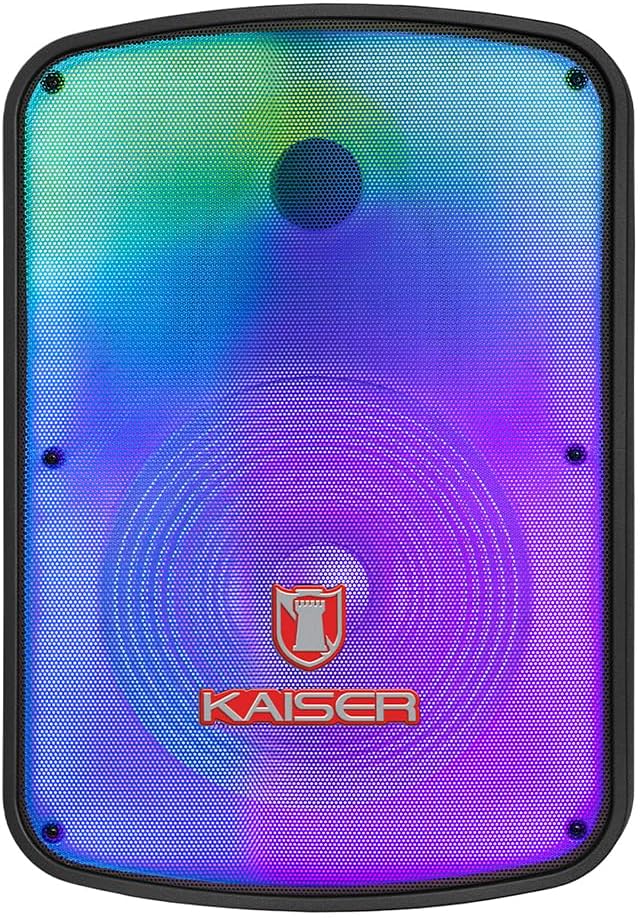
Bild: Vorderseite view of the Kaiser GEM-9520 speaker, showcasing the 15-inch driver and integrated LED lighting.
Hinteres Bedienfeld
The rear panel houses all input/output connections and control knobs.

Bild: Rückseite view of the Kaiser GEM-9520 speaker, displaying the control panel with various inputs and adjustments.

Bild: Detailliert view of the control panel, showing the display, volume, equalizer, and input ports.
Included Microphone and Tripod

Image: The wired microphone included with the Kaiser GEM-9520 speaker system.
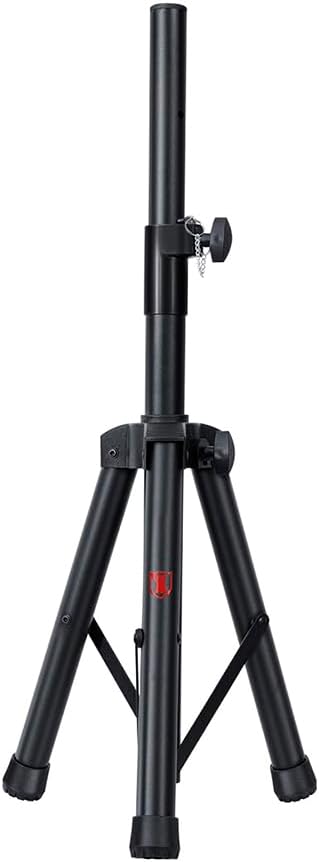
Image: The adjustable tripod stand for mounting the speaker.
5. Einrichtung
5.1 Auspacken und erste Platzierung
- Entnehmen Sie vorsichtig alle Komponenten aus der Verpackung.
- Place the speaker on a flat, stable surface or prepare for tripod mounting.
5.2 Tripod Assembly and Speaker Mounting
- Unfold the tripod legs and extend them to a stable position. Ensure all locking mechanisms are secure.
- Adjust the height of the tripod to your desired level and secure the locking pin and knob.
- Carefully lift the speaker and place its bottom mounting hole onto the tripod pole. Ensure it is seated firmly.

Image: Close-up of the tripod stand, showing its adjustable components.
5.3 Stromanschluss und Erstladung
- Connect the provided power cable to the speaker's power input port on the rear panel.
- Stecken Sie das andere Ende des Stromkabels in eine geeignete Steckdose.
- For optimal battery life, fully charge the speaker before its first use. The charging time is approximately 3 hours.
6. Bedienungsanleitung
6.1 Ein-/Ausschalten
Locate the power switch on the rear control panel. Flip it to the 'ON' position to power on the speaker. Flip it to 'OFF' to power off.
6.2 Modusauswahl
Press the 'MODE' button on the control panel to cycle through available input modes: Bluetooth, USB, Micro SD, AUX, and FM Radio.
6.3 Volume and Equalizer Controls
- Volumen: Rotate the 'VOLUME' knob to adjust the overall output volume.
- Treble (Agudos): Use the 'AGUDOS' knob to adjust the high-frequency response.
- Bass (Bajos): Use the 'BAJOS' knob to adjust the low-frequency response.
6.4 Bluetooth-Verbindung
- Switch the speaker to Bluetooth mode. The display will show 'BLUE' and a pairing indicator will flash.
- Aktivieren Sie auf Ihrem Mobilgerät (Smartphone, Tablet, Laptop) Bluetooth und suchen Sie nach verfügbaren Geräten.
- Select 'Kaiser GEM-9520' (or similar name) from the list.
- Sobald die Kopplung hergestellt ist, gibt der Lautsprecher einen Bestätigungston von sich und die Bluetooth-Anzeige hört auf zu blinken.
6.5 USB/Micro-SD-Wiedergabe
- Stecken Sie einen USB-Stick oder eine Micro-SD-Karte ein (vorinstalliert mit MP3-Audiodateien). files) in den jeweiligen Anschluss.
- The speaker will automatically switch to USB/Micro SD mode and begin playback. If not, press the 'MODE' button.
- Use the playback controls (Play/Pause, Next/Previous Track) on the control panel to manage your music.
6.6 AUX-Eingang
- Connect an external audio device (e.g., MP3 player, computer) to the 'AUX' input port on the speaker using a 3.5mm audio cable.
- Switch the speaker to AUX mode using the 'MODE' button.
- Steuern Sie Wiedergabe und Lautstärke über Ihr angeschlossenes Gerät.
6.7 Mikrofonnutzung
- Connect the wired microphone to the 'MIC' input port on the rear panel.
- Adjust the microphone volume using the 'VOL MIC' knob.
- Adjust the echo effect using the 'ECO' knob.

Image: Close-up of the wired microphone, showing its ON/OFF switch.
6.8 Microphone Audio Priority Function
This function automatically lowers the background music volume when the microphone is in use, making the voice clearer and more prominent. To activate/deactivate this function, refer to the specific button or switch on the control panel labeled for 'Mic Priority' or similar.

Image: Diagram illustrating the microphone audio priority function, which lowers music volume when the microphone is active.
6.9 KSR-LINK Function
The KSR-LINK function allows you to wirelessly connect two compatible Kaiser speakers for a stereo sound experience. Refer to the specific instructions for KSR-LINK pairing, usually involving pressing a dedicated button on both speakers simultaneously.
7. Wartung
- Reinigung: Wipe the speaker's exterior with a soft, dry cloth. Do not use abrasive cleaners, waxes, or solvents.
- Lagerung: Bei längerer Nichtbenutzung sollte der Lautsprecher an einem kühlen, trockenen Ort, fern von direkter Sonneneinstrahlung und extremen Temperaturen aufbewahrt werden.
- Batteriepflege: Um die Akkulaufzeit zu verlängern, vermeiden Sie häufiges vollständiges Entladen des Akkus. Laden Sie den Lautsprecher regelmäßig auf, auch wenn er nicht benutzt wird.
8. Fehlerbehebung
| Problem | Mögliche Ursache | Lösung |
|---|---|---|
| Kein Strom | Netzkabel nicht angeschlossen; Batterie entladen; Netzschalter ausgeschaltet. | Ensure power cable is securely connected and plugged in. Charge the battery. Turn the power switch to 'ON'. |
| Kein Ton | Volume too low; Incorrect input mode; External device not playing. | Increase the master volume. Select the correct input mode. Ensure the connected device is playing and its volume is up. |
| Bluetooth stellt keine Verbindung her | Speaker not in pairing mode; Device too far; Previously paired device connected. | Ensure speaker is in Bluetooth pairing mode. Move device closer to speaker. Disconnect from other Bluetooth devices. |
| Mikrofon funktioniert nicht | Microphone not connected; Microphone volume too low; Microphone switch off. | Ensure microphone is securely plugged in. Increase 'VOL MIC' knob. Turn the microphone's ON/OFF switch to 'ON'. |
| Schlechter UKW-Radioempfang | Weak signal; No external antenna. | Reposition the speaker. Extend any built-in antenna or connect an external one if available. |
9. Spezifikationen
| Besonderheit | Spezifikation |
|---|---|
| Modell | GEM-9520 |
| Ausgang Wattage | 25000 Watt (PMPO) |
| Lautsprechergröße | 15 Zoll |
| Stromquelle | Batterie |
| Akkulaufzeit (Durchschnitt) | 6 Stunden |
| Ladezeit | 3 Stunden |
| Konnektivitätstechnologie | AUX, Bluetooth, USB |
| Audioeingänge | Microphone, USB, Micro SD, 3.5 mm, 6.3 mm |
| Besondere Merkmale | High-resolution audio, LED light, USB port, Microphone Audio Priority, KSR-LINK |
| Montagetyp | Floor Mount (Tripod included) |
| Material | Plastik |
| Produktabmessungen (L x B x H) | 45 x 35 x 64 cm |
| Produktgewicht | 10.85 kg |
10. Garantie und Support
This Kaiser product is covered by a manufacturer's warranty. For specific warranty terms and conditions, please refer to the warranty card included in your product packaging or contact Kaiser customer support. For technical assistance or service inquiries, please visit the official Kaiser webWebsite oder wenden Sie sich an die Kundendienstabteilung.