1. Einleitung
Welcome to the Easyfone Star Kids Safety Phone user manual. This guide provides essential information for setting up, operating, and maintaining your device. The Easyfone Star is designed to provide a secure communication solution for children, featuring parental controls, GPS tracking, and emergency functions.
Lieferumfang
- Mobilteil
- Dock-Ladegerät
- Adapter
- Batterie
- Benutzerhandbuch (dieses Dokument)
2. Sicherheitshinweise
Read all safety instructions before using the device to ensure proper and safe operation.
Allgemeine Sicherheit
- Halten Sie das Gerät von Wasser und Feuchtigkeit fern.
- Vermeiden Sie es, das Gerät extremen Temperaturen auszusetzen.
- Versuchen Sie nicht, das Gerät selbst zu zerlegen oder zu reparieren. Wenden Sie sich an autorisiertes Servicepersonal.
- Use only Easyfone approved accessories.
Batteriesicherheit
- Use only the provided battery and charger.
- Schließen Sie die Batteriepole nicht kurz.
- Entsorgen Sie Batterien ordnungsgemäß entsprechend den örtlichen Vorschriften.
- Avoid puncturing or damaging the battery.
3. Geräteeinrichtung
Einlegen der SIM-Karte und des Akkus
- Carefully remove the back cover of the Easyfone Star handset.
- Insert the 2G SIM card into the designated slot. Ensure it is correctly oriented. (Note: This device does not support JIO SIM cards.)
- Insert the provided Lithium-Ion battery into its compartment.
- Bringen Sie die hintere Abdeckung wieder fest an.
Aufladen des Geräts
The Easyfone Star comes with a convenient dock charger for effortless and safe charging.
- Connect the adapter to the dock charger.
- Stecken Sie den Adapter in eine Steckdose.
- Place the Easyfone Star handset into the dock charger. Ensure it is seated correctly and the charging indicator appears on the screen.

Image: Easyfone Star handset in its charging dock, connected to an adapter. This illustrates the effortless and safe charging method.
Ein-/Ausschalten
- Zum Einschalten: Halten Sie die Ein-/Aus-Taste gedrückt, bis der Bildschirm aufleuchtet.
- To power off: Press and hold the Power button, then select 'Power Off' from the options.
4. CareTouch App and Parental Control
The Easyfone Star's settings are tamper-proof and can only be configured by parents or guardians through the dedicated CareTouch App (available for Android) or the Easyfone website. This ensures that children cannot alter critical safety settings.

Image: Screenshot of the CareTouch App interface, demonstrating the range of parental control settings available for the Easyfone Star.
Key Parental Control Features via CareTouch:
- Restricted Calls: Configure up to 20 pre-set numbers for outgoing calls. Restrict incoming calls to only these pre-defined numbers to prevent contact from strangers.
- "Do Not Disturb" Time Zones: Set specific periods during which the phone operates in silent mode, ensuring no disturbance during sleep or study time.
- Tamper-Proof Settings: All configurations are managed remotely via the app or website, preventing unauthorized changes on the device itself.
5. Hauptmerkmale und Bedienung
Foto-Wählscheibe
The Easyfone Star features large photo buttons for quick dialing of important contacts. Parents can assign photos to up to four contacts, allowing children to call them with a single press.
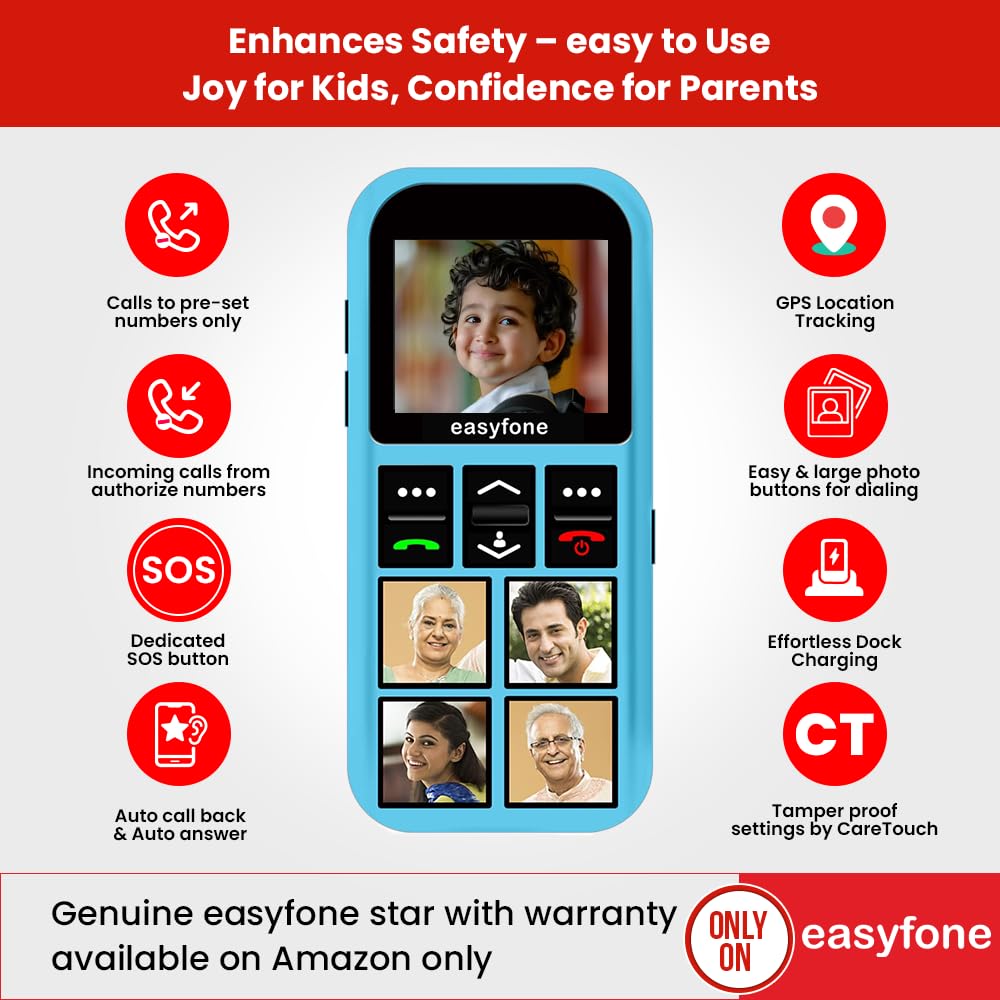
Image: The Easyfone Star phone with four photo contacts displayed on its keypad, enabling easy dialing for children.
Spezielle SOS-Taste
In emergencies, the dedicated SOS button provides immediate assistance. When triggered, the device automatically sends help messages with the GPS location and calls up to 5 emergency contacts repeatedly (up to 3 times) until someone answers.

Image: The Easyfone Star phone, highlighting the red SOS button located on the back of the device for quick access during emergencies.
GPS-Standortverfolgung
Parents can track their child's location at any time using the built-in GPS. This feature allows for monitoring during activities or when the child triggers the emergency help button, providing peace of mind.

Image: The Easyfone Star phone with a visual representation of GPS location tracking on a map, indicating the child's whereabouts.
Discreet Listening and Auto Call Back
- Diskret abhören: This feature allows parents to remotely listen to the child's surroundings, useful for ensuring their well-being when not directly supervised.
- Auto Call Back: If a child doesn't answer, parents can send a command from an authorized phone, and the Easyfone Star will automatically call back with the loudspeaker activated.
Official Product Video: Features Demonstration
Video: A demonstration of the Easyfone Star's key features, including photo dial, SOS functionality, GPS tracking, and discreet listening capabilities. This video provides a visual guide to using the phone's safety features.
6. Bedienungsanleitung
Anrufen
- To call a photo contact: Press the corresponding photo button.
- To call other pre-set contacts: Navigate through the address book using the navigation buttons and press the green call button.
Anrufe entgegennehmen
- When an authorized call comes in, press the green call button to answer.
- To reject a call, press the red end call button.
Using the SOS Function
In an emergency, press and hold the red SOS button on the back of the device. The phone will automatically initiate the emergency protocol: sending location messages and calling pre-set emergency contacts.
7. Wartung
- Reinigung: Verwenden Sie zum Reinigen des Geräts ein weiches, trockenes Tuch. Vermeiden Sie die Verwendung von scharfen Chemikalien oder scheuernden Materialien.
- Lagerung: Bewahren Sie das Gerät bei längerer Nichtbenutzung an einem kühlen, trockenen Ort und vor direkter Sonneneinstrahlung geschützt auf.
- Batteriepflege: Um die Akkulaufzeit zu verlängern, vermeiden Sie häufiges vollständiges Entladen des Akkus. Laden Sie das Gerät regelmäßig auf.
8. Fehlerbehebung
| Problem | Mögliche Ursache | Lösung |
|---|---|---|
| Gerät lässt sich nicht einschalten. | Niedriger Batteriestand oder Batterie nicht richtig eingesetzt. | Charge the device using the provided charger. Ensure the battery is properly seated. |
| Ich kann keine Anrufe tätigen oder empfangen. | No SIM card, incorrect SIM, or out of network coverage. | Check SIM card insertion. Ensure it's a 2G SIM (not JIO). Verify network coverage. Check parental control settings via CareTouch App. |
| GPS tracking is inaccurate or not working. | Poor satellite signal, device indoors, or GPS feature disabled. | Move to an open area. Ensure GPS is enabled via the CareTouch App. |
| Der Akku entlädt sich schnell. | Frequent use of features like GPS, or old battery. | Reduce usage of power-intensive features. Consider replacing the battery if it's old. |
9. Spezifikationen
| Besonderheit | Detail |
|---|---|
| Marke | Easyfone |
| Modellname | Samfe 3 |
| Technische Daten | 10 x 4 x 1.5 cm |
| Artikelgewicht | 90 g |
| RAM-Größe | 32 MB |
| Installierte Flash-Speichergröße | 32 MB |
| Prozessortyp | Cortex A7 |
| Auflösung | 720p |
| Besondere Merkmale | Parental Control, Built-In GPS, Safety Features |
| Batteriebeschreibung | Lithium-Ionen |
| Batteriekapazität | 800 Milliamp Std |
| Durchschnittliche Batterielebensdauer | 10 Days (standby) |
| Steckertyp | 2G (Does not support JIO SIM) |
| Geräteschnittstelle | Buttons, Dial, Keypad |
| Ursprungsland | China |
10. Garantie und Support
For warranty information, please refer to the documentation included with your purchase or visit the official Easyfone website. For technical support or customer service, please use the contact details below:
- Customer Care: 8800688007 (Mon-Fri, 10AM to 5PM)
- E-Mail: support@easyfone.in
- Manufacturer/Importer: Enovus Enterprises Private Limited
Additional support and resources, including the CareTouch App, can be found on the Easyfone webWebsite.