
1. Einleitung
Thank you for choosing the ORDRO Z88 4K Video Camera. This manual provides essential information for setting up, operating, and maintaining your device. Please read it thoroughly before use to ensure proper functionality and to maximize your camera's potential. Keep this manual for future reference.
2. Sicherheitshinweise
- Do not expose the camera to water or moisture. This device is not waterproof.
- Vermeiden Sie es, die Kamera fallen zu lassen oder starken Stößen auszusetzen.
- Halten Sie die Kamera von starken Magnetfeldern fern.
- Versuchen Sie nicht, die Kamera zu zerlegen oder zu verändern. Reparaturen dürfen nur von autorisiertem Servicepersonal durchgeführt werden.
- Verwenden Sie ausschließlich das angegebene Netzteil und Zubehör.
- Bewahren Sie die Kamera bei Nichtgebrauch an einem kühlen, trockenen Ort auf.
3. Packungsinhalt
Bitte überprüfen Sie, ob alle unten aufgeführten Artikel in Ihrem Paket enthalten sind:
- ORDRO Z88 4K Video Camera
- USB-C-Kabel
- Micro-HDMI-zu-HDMI-Kabel
- Netzteil/Ladegerät
- Lithium-ion Batteries (2 included)
- Fernbedienung
- 32 GB SD-Karte
- SD-Kartenadapter
- Camera Bag/Pouch
- Handschlaufe

Image: The ORDRO Z88 4K camera displayed with its full set of accessories, including cables, batteries, remote, and storage card.
4. Produktüberschreitungview
The ORDRO Z88 is a compact 4K video camera designed for ease of use and high-quality recording. It features a 3.0-inch IPS touchscreen, 10x optical zoom, and various connectivity options.

Bild: Vorderseite view of the ORDRO Z88 camera, highlighting its 4K resolution, 1/3" CMOS sensor, 28.0MP still image capability, 3.0" IPS touchscreen, and 10x optical zoom.
Kamerakomponenten
- Linse: 10x optical zoom lens.
- LCD Bildschirm: 3.0-inch IPS touchscreen, rotatable for various viewwinkeln.
- Mikrofon: Eingebautes Mikrofon zur Audioaufnahme.
- Lautsprecher: Zur Audiowiedergabe.
- Bedientasten: Power, Record, Zoom lever, Menu, Playback, etc.
- Häfen: USB-C, Mini HDMI, External Microphone input.
- Stativgewinde: Standard 1/4 inch thread for mounting on tripods.

Abbildung: Eine detaillierte Seite view of the ORDRO Z88 camera, illustrating the external microphone input, Mini HDMI port, and USB-C output.
5. Einrichtung
5.1 Einlegen der Batterie
- Öffnen Sie die Batteriefachabdeckung an der Unterseite der Kamera.
- Insert the Lithium-ion battery, ensuring the correct polarity.
- Schließen Sie den Batteriefachdeckel fest.
5.2 Installation der Speicherkarte
The camera supports SDHC flash memory cards up to 256GB. A 32GB SD card is included.
- Suchen Sie den SD-Kartensteckplatz, der sich normalerweise an der Seite oder Unterseite der Kamera befindet.
- Setzen Sie die SD-Karte so ein, dass die Metallkontakte in die richtige Richtung zeigen, bis sie einrastet.
- Zum Herausnehmen die Karte vorsichtig drücken, bis sie herausspringt.
5.3 Laden des Akkus
Connect the camera to a power source using the provided USB-C cable and power adapter. The camera supports recording while charging.
5.4 Erstes Einschalten
Press and hold the Power button to turn on the camera. The LCD screen will illuminate. You may need to set the date and time upon first use.
6. Bedienungsanleitung
6.1 Grundlegende Videoaufzeichnung und Fotoaufnahme
- Einschalten: Schalten Sie die Kamera ein.
- Auswahlmodus: Use the mode dial or touchscreen menu to select video recording or photo capture mode.
- Fokus: The camera features automatic focus. Ensure your subject is within the focus range.
- Aufzeichnen/Erfassen: Press the Record button to start/stop video recording. Press the Shutter button to take a photo.
6.2 Zoomfunktion
The ORDRO Z88 features a 10x optical zoom and a 120x intelligent (digital) zoom.
- Optischer Zoom: Use the zoom lever to adjust the optical zoom. This maintains image quality.
- Digitalzoom: Beyond the 10x optical zoom, the camera can engage 120x digital zoom. Note that digital zoom may reduce image quality.

Image: A visual comparison demonstrating the clarity of 10x optical zoom versus the extended reach of 120x digital zoom, showing a distant tower.
6.3 Wi-Fi-Verbindung
Connect your camera to a smartphone via Wi-Fi using the "D Video" application for remote control, preview, sharing, and downloading files. The effective range is up to 10 meters.
- Download and install the "D Video" app on your smartphone.
- Enable Wi-Fi on your camera through the menu settings.
- Stellen Sie mit Ihrem Smartphone eine Verbindung zum WLAN-Netzwerk der Kamera her.
- Open the "D Video" app to establish the connection and control the camera.
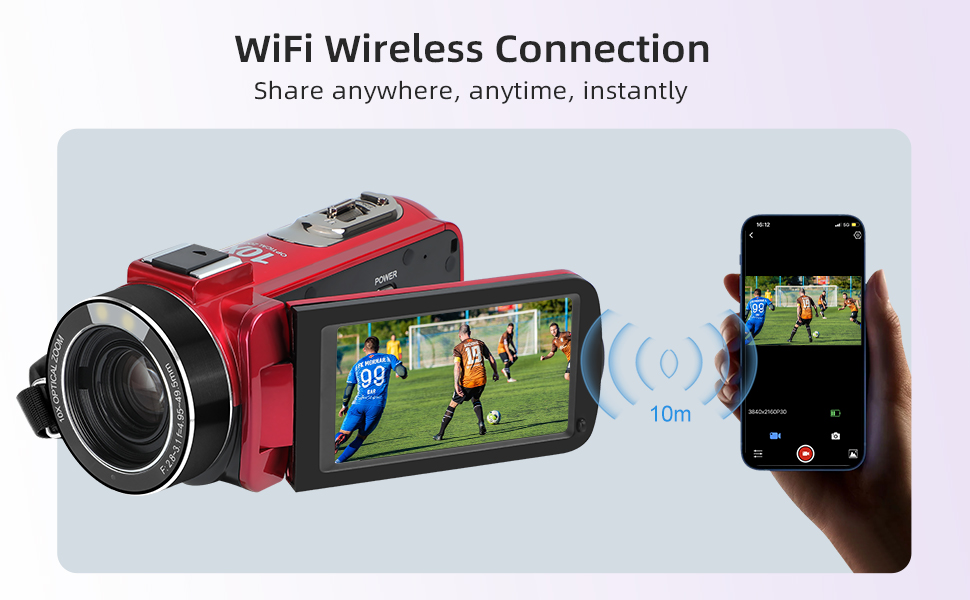
Image: The ORDRO Z88 camera wirelessly connected to a smartphone, demonstrating remote viewing and control capabilities via the "D Video" app.
6.4 WebCam-Modus
The camera can function as a high-definition webKamera für Live-Streaming.
- Connect the camera to your computer using the USB-C cable.
- On the camera's screen, select "PC Camera" mode when prompted.
- Ihr Computer sollte die Kamera als solche erkennen. webcam, allowing you to use it with video conferencing or streaming software.

Image: The ORDRO Z88 camera mounted on a mini tripod, connected to a laptop via USB-C, demonstrating its functionality as a webKamera für Videoanrufe.
6.5 Wiedergabe und Verbindung zum Fernseher
Review your recorded videos and photos directly on the camera's LCD screen or connect to a larger display.
- Vor der Kamera: Drücken Sie die Wiedergabetaste, um view Ihre Medien files. Use the touchscreen or navigation buttons to browse.
- Zum Fernsehen: Connect the camera to a 4K compatible television using the Mini HDMI to HDMI cable. This allows for high-resolution playback of your 4K content on a larger screen.
6.6 Sonderfunktionen
The ORDRO Z88 offers several advanced shooting modes:
- Zeitraffer: Capture a series of images over time and combine them into a video.
- Zeitlupe: Record videos at a higher frame rate for smooth slow-motion playback.
- Pausenfunktion: Pause and resume recording within the same video file.
- Gesichtserkennung: Erkennt und fokussiert automatisch Gesichter im Bildausschnitt.
- Zeitgesteuertes Schießen: Stellen Sie einen Timer für die Fotoaufnahme ein.
- Quick 3 Burst Shot: Machen Sie mehrere Fotos in schneller Folge.

Bild: Eine Collage zeigtasing the camera's diverse shooting capabilities, including time-lapse, slow motion, pause function, and various event recordings like weddings and graduations.
7. Wartung
7.1 Reinigung
- Verwenden Sie ein weiches, trockenes Tuch, um das Kameragehäuse zu reinigen.
- Verwenden Sie für die Linse ein spezielles Linsenreinigungstuch und eine spezielle Linsenreinigungslösung.
- Keine Scheuer- oder Lösungsmittel verwenden.
7.2 Speicherung
- Bei längerer Nichtbenutzung sollte die Batterie entfernt werden.
- Store the camera in its protective bag in a cool, dry, dust-free environment.
8. Fehlerbehebung
If you encounter issues with your ORDRO Z88 camera, refer to the following common solutions:
- Die Kamera lässt sich nicht einschalten: Stellen Sie sicher, dass die Batterie richtig eingesetzt und vollständig geladen ist.
- Aufzeichnung nicht möglich: Check if the SD card is inserted correctly and has sufficient free space. Ensure the camera is in the correct mode.
- Schlechte Bildqualität: Stellen Sie sicher, dass die Linse sauber ist. Überprüfen Sie die Lichtverhältnisse.
- Probleme mit der Wi-Fi-Verbindung: Ensure the "D Video" app is installed and updated. Verify Wi-Fi is enabled on the camera and your smartphone.
- Webcam mode not recognized: Ensure the USB-C cable is securely connected and "PC Camera" mode is selected on the camera. Try a different USB port on your computer.
Für weitere Unterstützung wenden Sie sich bitte an den Kundendienst.
9. Spezifikationen
| Besonderheit | Spezifikation |
|---|---|
| Marke | ORDRO |
| Modellnummer | HDR-Z88 |
| Fotosensor-Technologie | CMOS |
| Auflösung der Videoaufzeichnung | 1080p, 4K (2880x2160@24fps) |
| Einzelbildauflösung | 5 MP (interpoliert auf 28.0 MP) |
| Optischer Zoom | 10x |
| Digital Zoom | 120x |
| Bildschirmgröße | 3.0 Zoll (IPS-Touchscreen) |
| Flash-Speichertyp | SDHC (up to 256GB expansion) |
| Konnektivitätstechnologie | HDMI, USB-C, Wi-Fi (802.11ac) |
| Bildstabilisierung | Optical (Note: Product specs state 'No' for 'Posiada stabilizację obrazu' but 'Optyczny' for 'Stabilizacja obrazu'. Assuming optical stabilization is present as per feature bullets.) |
| Wasserdichtigkeit | Nicht wasserdicht |
| Artikelgewicht | 300 Gramm |
| Batterien im Lieferumfang enthalten | Ja (2 Lithium-Ionen) |
| Empfohlene Verwendung | Vlogging, daily video recording, beginner use |
10. Garantie und Support
The ORDRO Z88 4K Video Camera comes with a standard manufacturer's warranty. Please refer to the warranty card included in your package for specific terms and conditions. For technical support, troubleshooting, or warranty claims, please contact ORDRO customer service through the contact information provided with your purchase or on the official ORDRO webWebsite.