
Einführung
This manual provides instructions for the setup, operation, and maintenance of your Lamzu Atlantis OG V2 PRO Wireless Gaming Mouse. Please read this manual thoroughly before using the product to ensure proper functionality and longevity.

Bild: Oben view of the Lamzu Atlantis OG V2 PRO Wireless Gaming Mouse in Elegant Blue.
Aufstellen
1. Packungsinhalt
Bitte überprüfen Sie, ob die folgenden Artikel in Ihrem Paket enthalten sind:
- Lamzu Atlantis OG V2 PRO Wireless Gaming Mouse
- 2.4-GHz-Funkdongle
- USB-Typ-C-Kabel (für kabelgebundene Verbindung und zum Laden)
- Benutzerhandbuch (dieses Dokument)
- Additional accessories (e.g., grip tape, extra skates) may be included.
2. Anschließen der Maus
The mouse supports both 2.4G wireless and wired connections.
2.1. Wireless Connection (2.4G)
- Locate the 2.4G wireless dongle.
- Stecken Sie den Dongle in einen freien USB-Anschluss Ihres Computers.
- Turn on the mouse using the switch located on the underside. The mouse should automatically connect to the dongle.
- If connection is not established, ensure the mouse is sufficiently charged.
2.2. Kabelgebundene Verbindung
- Connect one end of the provided USB Type-C cable to the mouse.
- Verbinden Sie das andere Ende des USB-Typ-C-Kabels mit einem freien USB-Anschluss an Ihrem Computer.
- Die Maus funktioniert im kabelgebundenen Modus und wird gleichzeitig aufgeladen.

Image: Illustration of the dual mode connection options for the mouse, showing the USB Type-C cable and 2.4G wireless dongle.
3. Treiber- und Softwareinstallation
For full customization of DPI settings, button assignments, and other advanced features, download the official driver software from the Lamzu webSeite? ˅. Beziehen Sie sich auf die website for specific instructions on software installation and usage.
Betrieb
1. DPI-Anpassung
The mouse features a high-precision sensor with up to 26000 DPI. DPI settings can be adjusted through the dedicated software. The software allows users to set custom DPI levels according to their preferences.

Image: Screenshot of the software interface showing DPI adjustment options, with a maximum setting of 26000 DPI.
2. Abfragerate
The mouse supports a 1000Hz / 1ms polling rate. When used with an optional 4K wireless adapter (sold separately), it supports a 4K polling rate for enhanced responsiveness.
3. Ergonomie und Griff
The Lamzu Atlantis OG V2 PRO features a symmetrical design, suitable for both left-handed and right-handed users. Its shape is particularly optimized for a claw grip style, providing comfort and control during use.

Image: Diagram illustrating the optimal claw grip for the Lamzu Atlantis OG V2 PRO mouse.
Wartung
1. Reinigung
Um eine optimale Leistung zu gewährleisten, reinigen Sie Ihre Maus regelmäßig. Verwenden Sie ein weiches, trockenes Tuch, um die Oberfläche abzuwischen. Bei hartnäckigem Schmutz kann ein leicht feuchtes Tuch hilfreich sein.amp cloth with mild soap can be used, ensuring no liquid enters the mouse's internal components. Avoid abrasive cleaners or solvents.
2. Batteriepflege
The mouse is equipped with a rechargeable Lithium Ion battery. To prolong battery life:
- Vermeiden Sie häufiges vollständiges Entladen des Akkus.
- Bewahren Sie die Maus an einem kühlen, trockenen Ort auf, wenn Sie sie längere Zeit nicht verwenden.
- Charge the mouse using the provided USB Type-C cable.
Fehlerbehebung
If you encounter issues with your Lamzu Atlantis OG V2 PRO mouse, refer to the following common solutions:
| Problem | Mögliche Ursache | Lösung |
|---|---|---|
| Maus reagiert nicht (drahtlos) | Low battery, dongle not connected, interference, mouse not paired. | Charge the mouse. Ensure dongle is securely plugged in. Move dongle closer to mouse. Re-pair the mouse if necessary (refer to software instructions). |
| Maus reagiert nicht (kabelgebunden) | Cable not connected properly, faulty cable, USB port issue. | Ensure USB-C cable is securely connected to both mouse and computer. Try a different USB port. Test with another USB-C cable if available. |
| Die Cursorbewegung ist unregelmäßig oder sprunghaft. | Dirty sensor, unsuitable mouse pad surface, software conflict. | Clean the optical sensor on the underside of the mouse. Use a clean, uniform mouse pad. Check for conflicting software or drivers. |
| Maustasten funktionieren nicht | Softwareproblem, physischer Schaden. | Restart your computer. Reinstall mouse drivers. If the issue persists, contact customer support. |
If the problem persists after attempting these solutions, please contact Lamzu customer support for further assistance.
Technische Daten
The following are the technical specifications for the Lamzu Atlantis OG V2 PRO Wireless Gaming Mouse:
- Modell: LA-OG
- Konnektivität: 2.4G Wireless, USB Wired (Type-C)
- Sensor: Optischer Sensor PAW3395
- DPI: Bis zu 26000 DPI
- Abfragerate: 1000Hz (1ms), 4000Hz with optional 4K dongle
- Schalter: Mechanical Switches (Silver TTC Encoder)
- MCU: Nordic 52840
- Gewicht: Ca. 57g
- Abmessungen: 4.84 x 2.6 x 0.1 Zoll (123 mm x 66 mm x 38 mm)
- Batterie: 1 Lithium-Ionen (im Lieferumfang enthalten)
- Farbe: Elegant Blue (variant)

Image: Technical diagram showing the dimensions of the Lamzu Atlantis OG V2 PRO mouse.
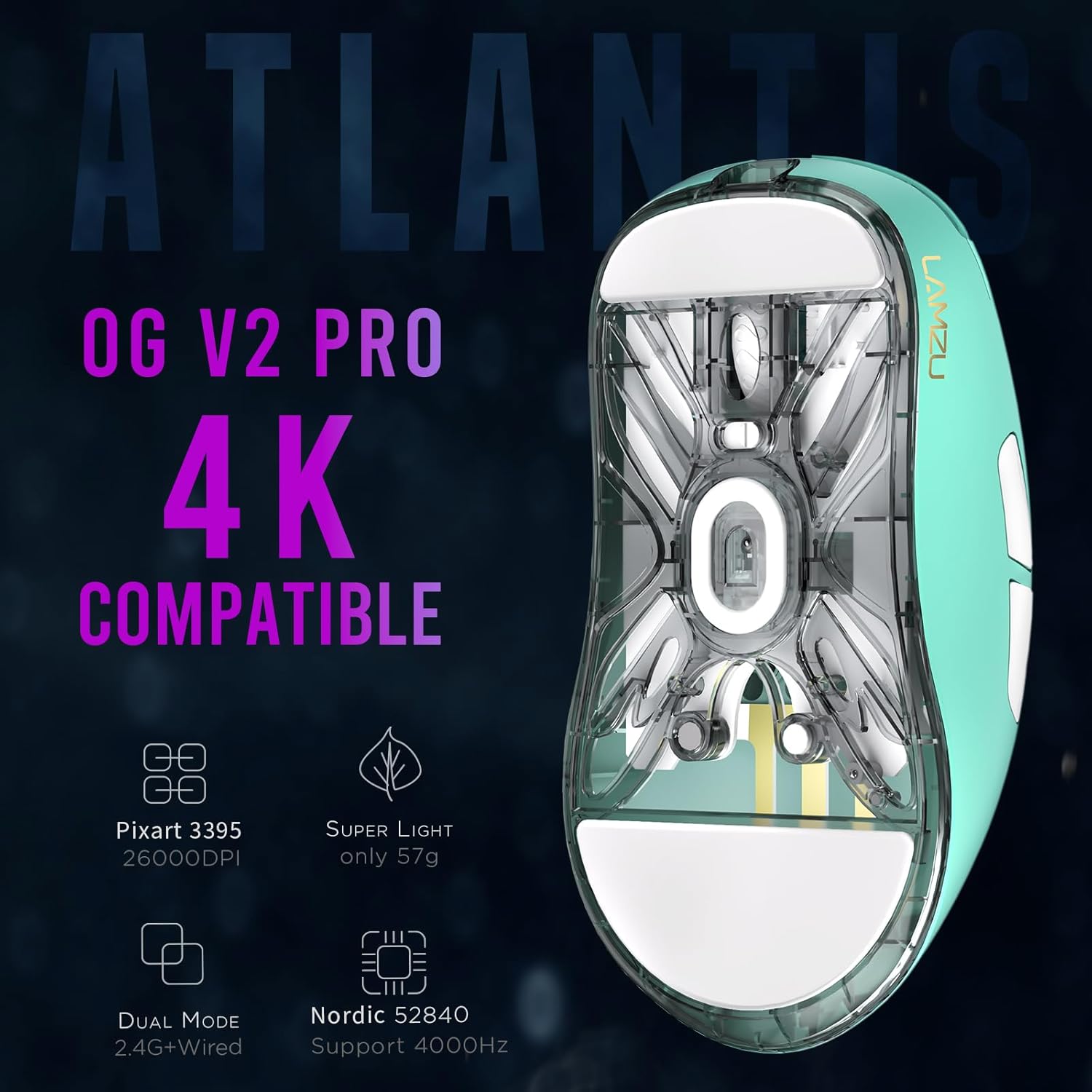
Abbildung: Unten view of the Lamzu Atlantis OG V2 PRO mouse, highlighting key features like Pixart 3395 sensor, 57g weight, dual mode, and Nordic 52840 MCU.
Garantieinformationen
Lamzu products are covered by a limited warranty. For detailed information regarding warranty terms, conditions, and duration, please refer to the official Lamzu webBesuchen Sie die Website oder kontaktieren Sie direkt den Kundendienst. Bewahren Sie Ihren Kaufbeleg für Garantieansprüche auf.
Kundenservice
For technical assistance, troubleshooting, or general inquiries about your Lamzu Atlantis OG V2 PRO Wireless Gaming Mouse, please visit the official Lamzu webWebsite:
You may also find FAQs and additional resources on their support pages.