
1. Erste Schritte
1.1 Packungsinhalt
Bevor Sie beginnen, vergewissern Sie sich bitte, dass alle Artikel in Ihrem Paket vorhanden sind:
- 2 x QCY T13X Earbuds
- 1 x Ladekoffer
- 3 x Pairs of Eartips (Small, Medium - pre-installed, Large)
- 1 x USB-C Ladekabel
- 1 x Benutzerhandbuch
1.2 Erstaufladung
The earbuds must be fully charged before first use. Place both earbuds into the charging case. Connect the USB-C cable to the charging case and a power source. A full charge takes approximately 120 minutes. If the earbuds are not used for more than two weeks, charge them regularly to maintain battery health.
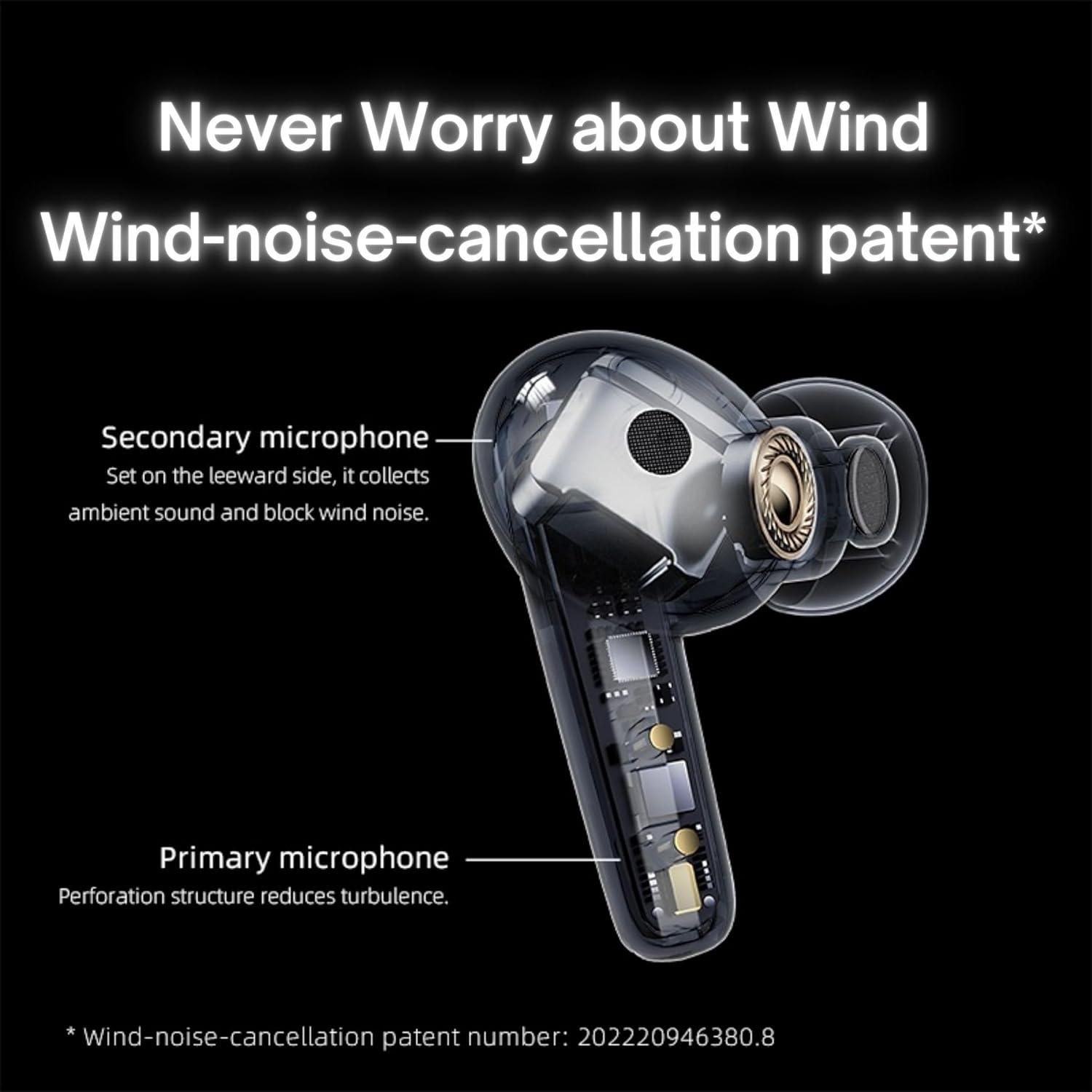
Image: QCY T13X Earbuds in their charging case, connected with a USB-C cable for charging. The image illustrates the charging process and the compact design of the case and earbuds.
1.3 Eartip Selection
For optimal sound quality and comfort, choose the eartips that best fit your ears. The package includes small, medium, and large sizes. The medium size is pre-installed. A proper seal is crucial for bass response and noise isolation.
1.4 Koppeln mit Ihrem Gerät
- Stellen Sie sicher, dass die Ohrhörer aufgeladen sind und sich im Ladecase befinden.
- Öffnen Sie den Deckel des Ladecase. Die Ohrhörer wechseln automatisch in den Kopplungsmodus.
- Öffnen Sie die Bluetooth-Einstellungen auf Ihrem Smartphone oder Bluetooth-fähigen Gerät.
- Suchen nach available devices and select "QCY T13X" from the list.
- Sobald die Verbindung hergestellt ist, hören Sie einen Bestätigungston.

Image: QCY T13X Earbuds and their charging case, highlighting the Bluetooth 5.3 connectivity. This image demonstrates the wireless technology used for pairing.
2. Bedienung Ihrer Ohrhörer
2.1 Ein-/Ausschalten
- Einschalten: Open the charging case, and the earbuds will automatically power on. Alternatively, press and hold the touch panel on both earbuds for 1-2 seconds.
- Ausschalten: Place the earbuds back into the charging case and close the lid. They will automatically power off and begin charging. Alternatively, disconnect them from your device, and they will power off after a few minutes of inactivity.
2.2 Musikwiedergabesteuerung
The QCY T13X earbuds feature touch controls for easy management of your audio:
- Abspielen/Pause: Tippen Sie zweimal auf das Touchpanel an einem der Ohrhörer.
- Nächster Titel: Tippen Sie dreimal auf den rechten Ohrhörer.
- Vorheriges Lied: Tippen Sie dreimal auf den linken Ohrhörer.

Image: A person wearing a QCY T13X earbud, demonstrating the discreet design and the area for touch controls. This image helps visualize how the earbuds are worn and interacted with.
2.3 Anrufmanagement
- Anruf annehmen/beenden: Tippen Sie zweimal auf das Touchpanel an einem der Ohrhörer.
- Anruf ablehnen: Drücken und halten Sie das Touchpanel an einem der Ohrhörer 1.5 Sekunden lang.
2.4 Lautstärkeregelung
Volume control is managed through the QCY application on your smartphone. Download the QCY app to customize settings and adjust volume levels directly.
2.5 QCY Application
For enhanced features and customization, download the official QCY app from your device's app store. The app allows you to:
- Lautstärke anpassen.
- Touch-Bedienelemente anpassen.
- Select from various EQ presets (e.g., Pure Vocals, Boosted Original, Soft and Immersive).
- Firmware aktualisieren.

Image: QCY T13X Earbuds with a graphic indicating three default EQ settings: Pure Vocals, Boosted Original, and Soft and Immersive. This highlights the sound customization options available through the app.
2.6 Konnektivität mehrerer Geräte
The QCY T13X supports seamless switching between multiple paired devices. Once paired with several devices, the earbuds can intelligently connect to the active audio source.

Image: QCY T13X Earbuds shown connected to both a smartphone and a tablet, illustrating the multi-device connectivity feature. This image demonstrates the flexibility of using the earbuds with different devices.
3. Wartung und Pflege
3.1 Aufladen der Ohrhörer und des Ladecase
The charging case has a capacity of 350 mAh, with each earbud having a 45 mAh battery. A single charge provides up to 8 hours of playback, and the charging case extends total playback time to up to 30 hours. The earbuds support fast charging. Ensure regular charging if not used for extended periods.
3.2 Reinigung
Regularly clean your earbuds and charging case to ensure optimal performance and hygiene. Use a soft, dry, lint-free cloth. For eartips, remove them and gently wipe with a damp Das Tuch anschließend gründlich trocknen lassen, bevor es wieder angebracht wird.
3.3 Speicherung
Store your QCY T13X earbuds in their charging case when not in use. Avoid exposing them to extreme temperatures, such as below 10 degrees Celsius (50°F) or above 60 degrees Celsius (140°F), to prevent battery damage and ensure longevity.
4. Fehlerbehebung
4.1 Werksreset
If you experience persistent connection or functionality issues, a factory reset may resolve them:
- Delete the previous connection record for "QCY T13X" from your phone's Bluetooth settings.
- Legen Sie beide Ohrhörer in das Ladecase und vergewissern Sie sich, dass sie geladen werden.
- Halten Sie die Taste am Ladeetui 10 Sekunden lang gedrückt.
- The red and blue LED indicators will flash alternately 3 times, indicating a successful reset.
4.2 Verbindungsprobleme
- Stellen Sie sicher, dass Bluetooth auf Ihrem Gerät aktiviert ist.
- Make sure the earbuds are charged and within the 10-meter Bluetooth range.
- Try restarting your device and the earbuds.
- Führen Sie einen Werksreset wie oben beschrieben durch.
4.3 Tonprobleme
- Check the volume levels on both your device and through the QCY app.
- Ensure the eartips provide a proper seal in your ear.
- Reinigen Sie die Ohrhörerlautsprecher von sämtlichem Schmutz.
- If only one earbud is working, try placing both back in the case, closing the lid, and then reopening to re-establish the connection between them.
5. Spezifikationen
| Besonderheit | Spezifikation |
|---|---|
| Modellname | T13X (BH23QT26A) |
| Treibergröße | 7.2 mm dynamischer Treiber |
| Mikrofone | 4 (ENC Noise Reduction, Mic Amplification, Echo Cancellation) |
| Bluetooth-Version | 5.3 |
| Bluetooth-Reichweite | Bis zu 10 Meter |
| Unterstützte Protokolle | HFP / A2DP / AVRCP |
| Audio-Codecs | AAC, SBC |
| Akkukapazität der Ohrhörer | 45 mAh (jeweils) |
| Akkukapazität des Ladegehäuses | 350 mAh |
| Gesamtwiedergabezeit | Bis zu 30 Stunden (mit Ladeetui) |
| Single Use Playback Time | Bis zu 8 Stunden |
| Ladezeit (Case) | Ca. 120 Minuten |
| Wasserbeständigkeit | IPX5 |
| Gewicht (Ohrhörer) | 6.34g |
| Gesamtgewicht (Ladecase + Ohrhörer) | 48.15g |
| Kontrollmethode | Berühren |
| Lärmschutz | Aktive Geräuschunterdrückung (ANC) |
| Frequenzgang | 20000 KHz |
| Empfindlichkeit | 105 dB |
| Impedanz | 100 Ohm |

Image: An exploded diagram of a QCY T13X earbud, illustrating the internal 7.2mm dynamic driver. This image provides insight into the audio technology within the earbud.

Image: A detailed diagram of a QCY T13X earbud, highlighting the placement of its multiple microphones for Environmental Noise Cancellation (ENC) and wind noise reduction. This image explains the technology behind clear calls.
6. Garantie und Support
6.1 Herstellergarantie
The QCY T13X Bluetooth Earbuds come with a 1 Jahr HerstellergarantieBitte bewahren Sie Ihren Kaufbeleg für eventuelle Garantieansprüche auf. Die Garantie deckt Material- und Verarbeitungsfehler bei normalem Gebrauch ab.
6.2 Kundendienst
Für weitere Unterstützung, technischen Support oder Garantieanfragen besuchen Sie bitte die offizielle QCY-Website. website or contact their customer service. You can also refer to the QCY app for additional resources and FAQs.