
TEYES CC3 2K
TEYES CC3 2K Car Radio Multimedia Navigation System User Manual
Modell: CC3 2K | Marke: TEYES
Einführung
This manual provides comprehensive instructions for the installation, operation, and maintenance of your TEYES CC3 2K Car Radio Multimedia Navigation System. Designed for Toyota Sienna 3 XL30 models from 2014-2020, this Android 10 head unit offers advanced multimedia, navigation, and connectivity features. Please read this manual thoroughly before using the device to ensure proper function and safety.
Packungsinhalt
Bitte prüfen Sie, ob alle unten aufgeführten Artikel in Ihrem Paket enthalten sind. Sollten Artikel fehlen oder beschädigt sein, kontaktieren Sie bitte unseren Kundenservice.

Head Unit CC3 2K: Die Hauptanzeige- und Verarbeitungseinheit.
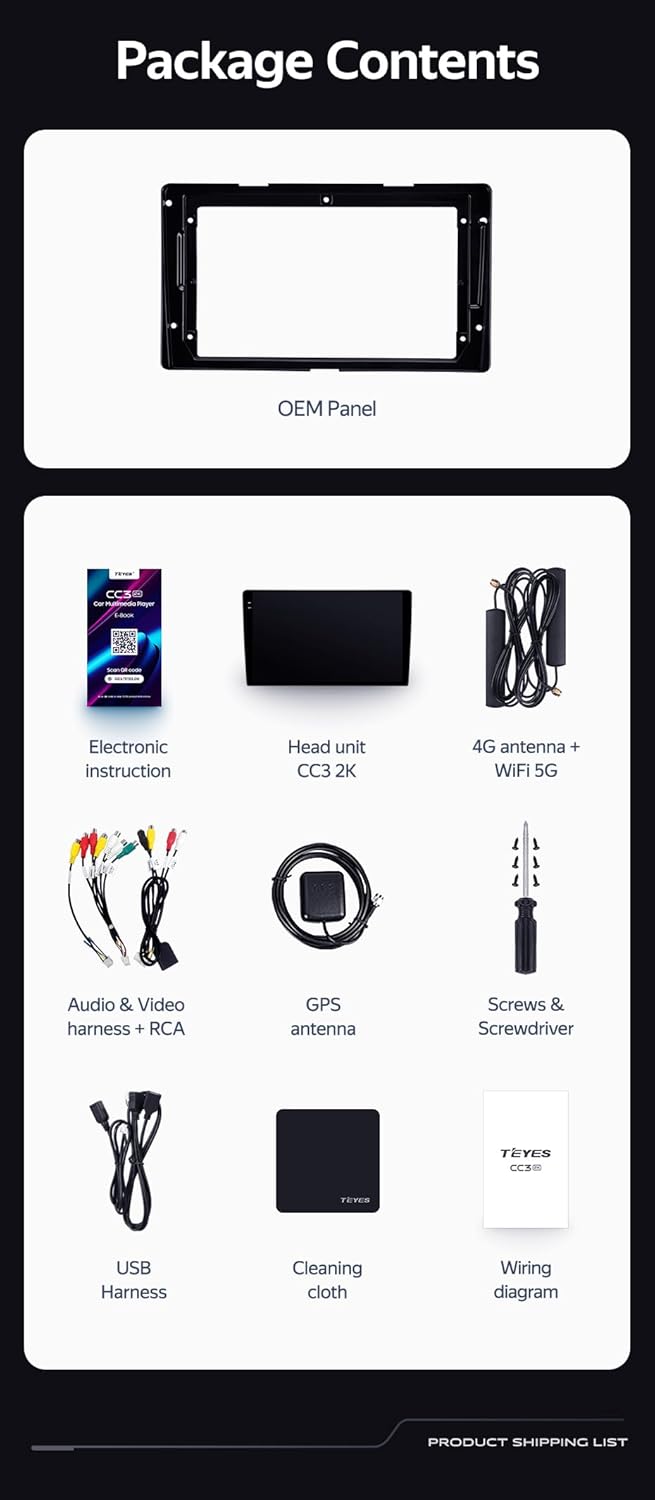
OEM Panel (Frame): Custom-fit panel for seamless integration into your vehicle's dashboard.

USB-Kabel: Zum Datentransfer und Anschluss externer Geräte.

GPS-Antenne: Für präzise Navigations- und Ortungsdienste.

AUX-Kabel: Für zusätzlichen Audioeingang.

4G WiFi Antenna: Für die Netzwerkkonnektivität.

AHD 1080p Rear Camera: For enhanced reverse visibility.

Stromkabel: For connecting the head unit to the vehicle's power supply.
Schaltplan: Essential for correct electrical connections.
Electronic Instruction: Digital manual for detailed guidance.

Putztuch: For maintaining the display's clarity.
Setup und Installation
Installation of the TEYES CC3 2K head unit requires technical knowledge and familiarity with car audio systems. It is recommended to seek professional installation to avoid damage to your vehicle or the device. Always disconnect the vehicle's battery before beginning installation.
Installation abgeschlossenview
- Vorbereitung: Ensure the vehicle's power is off. Remove the original car radio and dashboard trim.
- Mounting the OEM Panel: Secure the provided OEM panel to the head unit.
- Kabelverbindungen: Connect the power cable, USB cables, GPS antenna, 4G WiFi antenna, AUX cable, and rear camera according to the wiring diagram. Ensure all connections are secure.
- Integration der Lenkradsteuerung: The unit supports original car steering wheel buttons. Connect the appropriate wires as per the wiring diagram. Configuration may be required in the unit's settings.
- Testen: Before fully reassembling the dashboard, connect the battery and power on the unit to test basic functions.
- Endmontage: Carefully reassemble the dashboard trim and secure the head unit in place.

Bildbeschreibung: This image displays a side-by-side comparison of a Toyota Sienna dashboard before and after the installation of the TEYES CC3 2K head unit. The 'before' image shows the original car radio, while the 'after' image shows the integrated TEYES CC3 2K unit, demonstrating a seamless fit and updated aesthetic.

Bildbeschreibung: Eine Nahaufnahme view of a car's steering wheel with integrated control buttons. The text indicates that the TEYES CC3 2K supports these original car steering wheel buttons, allowing for convenient control of the multimedia system.
Bedienungsanleitung
The TEYES CC3 2K operates on an Android 10 system, providing a user-friendly interface. The 2K in-cell touch screen offers responsive interaction.
Grundlegende Bedienung
- Ein-/Ausschalten: Press and hold the power button (if physical) or use the vehicle's ignition.
- Touchscreen-Navigation: Swipe, tap, and pinch to navigate through menus and applications.
- Startbildschirm: Access frequently used apps and widgets. Customize the layout as desired.
- Lautstärkeregelung: Die Lautstärke kann über die Bedienelemente auf dem Bildschirm oder über die Tasten am Lenkrad eingestellt werden.
Multimedia-Funktionen
- Radio: Access the built-in radio tuner. Supports RDS for enhanced information display.
- Bluetooth: Pair your smartphone for hands-free calling and audio streaming via the upgraded QCC3031QFN Qualcomm Bluetooth module.
- USB-Wiedergabe: Schließen Sie USB-Laufwerke an, um Audio- und Videodateien abzuspielen. files.
- Videoplayer: Play various video formats on the 2K display.
- Audioausgang: Utilize the 2*DSP ADAU1701 + ROHM32107 for high-quality audio, including optical and coaxial digital audio output.
Navigation und Konnektivität
- GPS Navigation: Use pre-installed navigation apps or download others from the app store. Supports North America maps.
- 4G Internet & WiFi: Connect to the internet via 4G or WiFi hotspot for online services, app downloads, and real-time traffic updates.
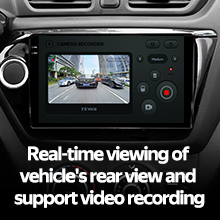
- Rückfahrkamera: The included AHD 1080p rear camera provides real-time viewing when reversing and supports video recording.
Videobeschreibung: This video demonstrates the TEYES CC3 2K head unit's user interface and features, including its responsive touch screen, multimedia playback, and integration into a car dashboard. It highlights the visual quality and various functionalities of the system.
Bildbeschreibung: Eine detaillierte view of the TEYES CC3 2K head unit's display, showcasing its modern user interface with various application icons for video, radio, folders, and Teyes Yahu. It also displays a music player widget and a car speed indicator, illustrating the system's multimedia and informational capabilities.
Wartung
Proper maintenance ensures the longevity and optimal performance of your TEYES CC3 2K head unit.
- Bildschirmreinigung: Use the provided cleaning cloth or a soft, lint-free cloth with a screen-safe cleaner. Avoid abrasive materials or harsh chemicals.
- Software-Updates: Regularly check for and install software updates to ensure the system has the latest features and security patches.
- Umgebungsbedingungen: Vermeiden Sie es, das Gerät extremen Temperaturen, direkter Sonneneinstrahlung über längere Zeiträume oder übermäßiger Feuchtigkeit auszusetzen.
- Kabelverbindungen: Überprüfen Sie regelmäßig alle Kabelverbindungen, um sicherzustellen, dass sie fest sitzen und keine Beschädigungen aufweisen.
Fehlerbehebung
If you encounter issues with your TEYES CC3 2K, refer to the following common troubleshooting steps. For persistent problems, contact customer support.
- Gerät lässt sich nicht einschalten:
- Überprüfen Sie den Batterieanschluss des Fahrzeugs.
- Verify power cable connections to the head unit.
- Stellen Sie sicher, dass die Zündung des Fahrzeugs eingeschaltet ist.
- Kein Ton:
- Check volume levels on the unit and vehicle.
- Überprüfen Sie die Lautsprecherkabelanschlüsse.
- Ensure correct audio source is selected.
- GPS funktioniert nicht:
- Stellen Sie sicher, dass die GPS-Antenne ordnungsgemäß angeschlossen ist und eine freie Sicht hat. view des Himmels.
- Überprüfen Sie die GPS-Einstellungen im Menü des Geräts.
- Touchscreen reagiert nicht:
- Starten Sie das Hauptgerät neu.
- Stellen Sie sicher, dass der Bildschirm sauber und frei von Verunreinigungen ist.
- Probleme mit der Bluetooth-Konnektivität:
- Stellen Sie sicher, dass Bluetooth sowohl am Autoradio als auch an Ihrem Gerät aktiviert ist.
- Vorherige Kopplungen löschen und das Gerät erneut koppeln.
- Move devices closer to the head unit.
Technische Daten
| Besonderheit | Detail |
|---|---|
| Modellnummer | CC3 2K |
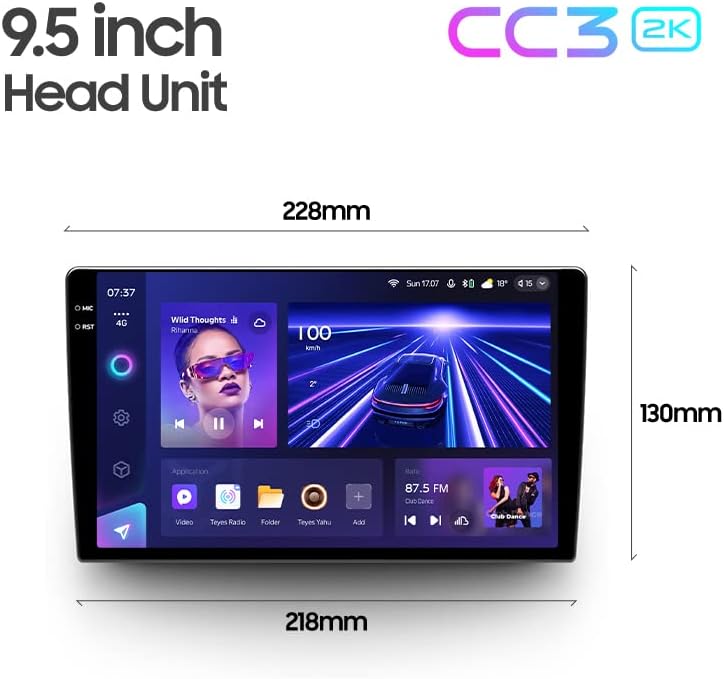
| Anzeigegröße | 9.5 Zoll |
| Betriebssystem | Android 10 |
| RAM | 6 GB |
| ROM | 128 GB |
| Prozessor | 8 Kerne 2.0 GHz |
| Display-Technologie | 2K In-cell Display, Gamut Coverage 157% |
| Bluetooth-Modul | QCC3031QFN Qualcomm |
| Audioprozessoren | 2*DSP ADAU1701 + ROHM32107 |
| Audioausgang | Optical and Coaxial Digital Audio Output, Stereo |
| Konnektivität | Bluetooth, USB, WiFi, Hotspot, 4G Internet |
| Kartentyp | Nordamerika |
| Besondere Merkmale | Touchscreen, RDS Support, Real-time Rear View, Video Recording Support, 3D Software (TEYES Vision & TEYES Yahu) |
| Fahrzeug-Servicetyp | Car (Toyota Sienna 3 XL30 2014-2020) |

Bildbeschreibung: This image provides a dimensional diagram of the TEYES CC3 2K 9.5-inch head unit, showing its width (228mm at the top, 218mm at the bottom) and height (130mm). The display also shows the user interface with music playback and car speed information.
Garantieinformationen
The TEYES CC3 2K Car Radio Multimedia Navigation System comes with a 1 Jahr Garantie from the date of purchase. This warranty covers manufacturing defects and malfunctions under normal use. It does not cover damage caused by improper installation, accidents, misuse, unauthorized repairs, or normal wear and tear. Please retain your proof of purchase for warranty claims.
Kundenservice
For technical assistance, troubleshooting, or warranty inquiries, please contact TEYES customer support. Refer to the contact information provided with your product packaging or visit the official TEYES webSite für Supportressourcen.
Hersteller: Shenzhen TEYES High tech Co., Ltd.
Zugehörige Dokumente - CC3 2K
 |
TEYES R2 Front and Rear Parking Sensors: Intelligent Blind Spot Detection Enhance driving safety with TEYES R2 Front and Rear Parking Sensors. This system offers intelligent blind spot detection, accurate distance alerts, wireless reception, and compatibility with TEYES head units for superior parking assistance. |
 |
TEYES CC3 2K Benutzerhandbuch Dieses Handbuch enthält umfassende Anweisungen für das Auto-Infotainmentsystem TEYES CC3 2K. Es behandelt die Ersteinrichtung, technische Daten, die Navigation im Interface, die Anwendungsnutzung (einschließlich VM Connect, Vietmap Entertainment, Vietmap Store und Car Link 2.0), Bluetooth-Konnektivität, Split-Screen-Funktionalität, Lenkradsteuerung, elektronische Garantieaktivierung und Kundensupport. |
 |
Benutzerhandbuch für Android-Autoradios – Teyes Ausführliches Benutzerhandbuch für das Teyes Android-Autoradio, das Installation, Einrichtung, Funktionen wie Navigation, Musik, Video, Bluetooth und Fehlerbehebung abdeckt. |
 |
Shenzhen TEYES High-Tech CC4PRO Autoradio – FCC-Teil-27-Testbericht Dieses Dokument enthält den Testbericht für das Shenzhen TEYES High tech CC4PRO Autoradio und umfasst die Konformitätsprüfung gemäß FCC Teil 27. Es beinhaltet Ergebnisse für HF-Ausgangsleistung, Spitzen-zu-Mittelwert-Verhältnis, belegte Bandbreite, Bandkantenkonformität, Störaussendungen und Frequenzstabilität. |
 |
Universal Power Cable & CANbus Decoder Installation Guide - TEYES Detailed installation guide for the Universal Power Cable and CANbus Decoder kit, including setup instructions, troubleshooting power issues, connecting reverse cameras, and CANbus configuration for TEYES car navigation systems. |
 |
Vertraulichkeitsantrag für TEYES Autoradios (FCC-ID: 2BF4O-CC32K) Offizieller Antrag auf Vertraulichkeit der technischen Dokumente, die von Shenzhen TEYES High tech Co., Ltd. für die Autoradio-Modelle CC3, CC4, CC5, LUX1, LUX2 und zugehörige Varianten eingereicht wurden, gemäß den FCC-Bestimmungen. |
Ask a question about this manual
Ask about setup, troubleshooting, compatibility, parts, safety, or missing instructions. Manuals+ will review the question and use this page’s manual context to help answer it.