
GoodBaby FC-IR202-Green
GoodBaby Non-Contact Forehead Thermometer
Model: FC-IR202-Green
1. Einleitung
Thank you for choosing the GoodBaby Non-Contact Forehead Thermometer. This device is designed for safe and accurate temperature measurement of the human body (forehead) and objects. Its non-contact design ensures hygiene and ease of use, making it ideal for infants, children, and adults. Please read this manual thoroughly before use to ensure proper operation and to maintain the device's longevity.

Image: The GoodBaby Non-Contact Forehead Thermometer, displaying a temperature of 98.6°F, alongside visual representations of its color-coded fever indicator system (green, orange, red).
2. Wichtige Sicherheitshinweise
Bitte beachten Sie die folgenden Sicherheitsvorkehrungen, um eine sichere und effektive Verwendung des Thermometers zu gewährleisten:
- This thermometer is intended for household use only. It is not a substitute for professional medical advice, diagnosis, or treatment. Always consult a healthcare professional for any health concerns.
- Keep the device out of reach of children and pets. Small parts may pose a choking hazard.
- Das Thermometer darf nicht in Wasser oder andere Flüssigkeiten getaucht werden. Es ist nicht wasserdicht.
- Do not expose the thermometer to direct sunlight, extreme temperatures, high humidity, or dust.
- Do not drop or subject the device to strong shocks.
- Batterien sind gemäß den örtlichen Vorschriften zu entsorgen. Batterien dürfen nicht ins Feuer geworfen werden.
- Aussagen zu Nahrungsergänzungsmitteln wurden von der FDA nicht geprüft und sind nicht zur Diagnose, Behandlung, Heilung oder Vorbeugung von Krankheiten oder Gesundheitszuständen bestimmt.
3. Produktüberschreitungview
The GoodBaby Non-Contact Forehead Thermometer features a user-friendly design with a large display and intuitive controls.
3.1 Hauptmerkmale
- Non-contact measurement for hygiene.
- Schnelle Messung in 1 Sekunde.
- Large display with 3-color intelligent indicator (Green, Orange, Red) for easy interpretation.
- Forehead and Object measurement modes.
- Fever alarm function.
- Silent-Modus für geräuschlosen Betrieb.
- 35-set memory recall.
- °C/°F conversion.
- Automatische Abschaltung.

Image: An illustrative diagram highlighting the key features of the thermometer, including Forehead/Object Mode, Mute/Unmute, Fever Alarm, °C/°F Convert, 35 Sets Memory Recall, Backlight Display, Carry Pouch Included, and Battery Included.

Image: A graphic emphasizing the thermometer's fast and accurate performance, detailing features like 1-second measurement, fever alert, automatic shutdown, high-precision infrared probe, smart calibration, and temperature compensation adjustment.
4. Einrichtung
4.1 Einlegen der Batterie
Das Thermometer benötigt 2 AAA-Batterien (im Lieferumfang enthalten). So legen Sie die Batterien ein oder tauschen sie aus:
- Open the battery cover located at the bottom of the handle.
- Legen Sie die 2 AAA-Batterien ein und achten Sie dabei auf die richtige Polarität (+ und -).
- Schließen Sie die Batterieabdeckung fest.
4.2 Grundeinstellungen
Upon first use or after battery replacement, you may need to set the temperature unit.
- With the device off, press and hold the 'Mem' button for a few seconds until the unit symbol (°C or °F) starts flashing.
- Press the measurement button to toggle between °C and °F.
- Once your desired unit is displayed, wait a few seconds for the setting to be saved automatically, or press the measurement button briefly to confirm.
5. Bedienungsanleitung
5.1 Taking Forehead Temperature
- Ensure the thermometer is in Forehead Mode (indicated by a person icon on the display). If not, press the mode button to switch.
- Halten Sie das Thermometer etwa 1 bis 4 cm von der Mitte der Stirn entfernt.
- Press the measurement button once. The reading will appear on the display within 1 second, accompanied by a beep (if silent mode is off).
- Interpret the result using the color-coded backlight:
- Grün: Normaltemperatur (89.6 °F ≤ T ≤ 99.2 °F / 32.0 °C ≤ T ≤ 37.3 °C)
- Orange: Slight fever (99.3°F ≤ T ≤ 100.3°F / 37.4°C ≤ T ≤ 37.9°C)
- Rot: Hohes Fieber (100.4°F ≤ T ≤ 109.2°F / 38.0°C ≤ T ≤ 42.9°C)

Image: The thermometer's intelligent indicator system, showing how the display color changes (green, orange, red) to signify different temperature ranges, from normal to high fever.
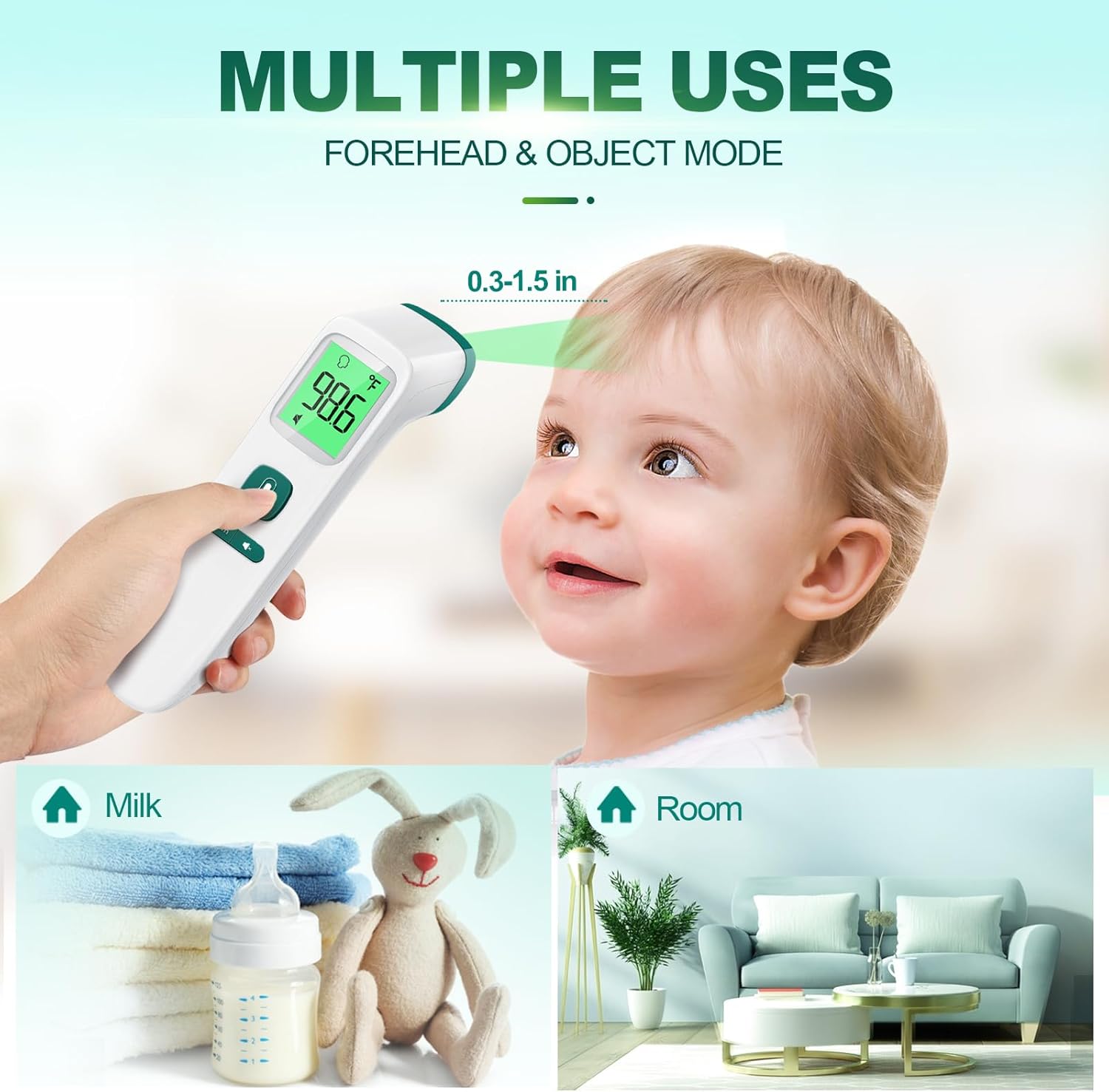
Image: Demonstrates the multiple uses of the thermometer, including forehead temperature measurement on a baby, and object temperature measurement for milk and room temperature.
5.2 Taking Object Temperature
- With the device on, press the mode button to switch to Object Mode (indicated by a house or object icon).
- Hold the thermometer approximately 0.3 to 1.5 inches (1-4 cm) from the object's surface.
- Press the measurement button. The temperature of the object will be displayed.
5.3 Silent-Modus
To activate or deactivate silent mode (mute/unmute the beep sound):
- With the thermometer on, locate the mute/unmute button (often combined with the memory button or a dedicated speaker icon button).
- Press this button briefly to toggle the sound on or off. A speaker icon with a cross through it will appear on the display when silent mode is active.

Image: The thermometer in use in a dimly lit environment, demonstrating its clear reading capabilities in the dark with a large backlit screen, intelligent color indicator, mute function, and auto shut-down.
5.4 Speicherabruf
The thermometer can store up to 35 previous temperature readings.
- With the thermometer on, press the 'Mem' button briefly.
- Each subsequent press of the 'Mem' button will cycle through the stored readings, from most recent to oldest.
6. Wartung
6.1 Reinigung
- Use an alcohol swab or a cotton swab moistened with 70% alcohol to clean the thermometer casing and the measurement probe.
- Ensure no liquid enters the interior of the thermometer.
- Do not use abrasive cleaning agents or thinners.
- Allow the thermometer to dry completely before next use.
6.2 Speicherung
- Bewahren Sie das Thermometer an einem kühlen, trockenen Ort, fern von direkter Sonneneinstrahlung und extremen Temperaturen auf.
- If not in use for an extended period, remove the batteries to prevent leakage and damage to the device.
7. Fehlerbehebung
| Problem | Mögliche Ursache | Lösung |
|---|---|---|
| Kein Display/Gerät lässt sich nicht einschalten | Die Batterien sind leer oder falsch eingelegt. | Ersetzen Sie die Batterien durch neue AAA-Batterien und achten Sie dabei auf die richtige Polarität. |
| Ungenaue Messwerte | Sensor dirty; incorrect measurement distance; environmental factors (drafts, direct sunlight). | Clean the sensor with an alcohol swab. Ensure proper distance (0.3-1.5 inches). Measure in a stable environment. |
| Low beep volume | This is a characteristic of the device. | Ensure silent mode is off. If a louder beep is required, consider alternative models. |
| Fehlermeldung auf dem Display | Measurement out of range; device malfunction. | Refer to the specific error code in the full manual (if available). Re-attempt measurement. If persistent, contact customer support. |
8. Spezifikationen
| Besonderheit | Detail |
|---|---|
| Modellnummer | FC-IR202-Green |
| Modellname | FC-IR2000 |
| Anzeigetyp | Digitales |
| Außenmaterial | Plastik |
| Batterien | 2 AAA-Batterien erforderlich (im Lieferumfang enthalten) |
| Ansprechzeit | 1000 Milliseconds (1 second) |
| Obere Temperaturbewertung | 109.2°F (42.9°C) |
| Artikellänge | 6.7 Zoll |
| Einheitenanzahl | 1.0 Anzahl |
| Wiederverwendbarkeit | Wiederverwendbar |
| Hersteller | Gutes Baby |
| Datum der ersten Verfügbarkeit | 15. September 2023 |
9. Garantie und Support
GoodBaby products are manufactured to the highest quality standards. This product comes with a limited warranty against defects in materials and workmanship under normal use. For specific warranty terms, registration, or technical support, please refer to the warranty card included with your product or visit the official GoodBaby webBitte bewahren Sie Ihren Kaufbeleg als Kaufnachweis auf.
For further assistance, you may contact GoodBaby customer support through their official channels.
Zugehörige Dokumente - FC-IR202-Green
 |
Viproud FC-IR202 Infrarot-Thermometer Benutzerhandbuch - Genaue Temperaturmessung Ausführliches Benutzerhandbuch für das berührungslose Infrarot-Thermometer Viproud FC-IR202. Erfahren Sie mehr über Funktionen, Bedienung, Fehlerbehebung, Spezifikationen und Sicherheitsvorkehrungen für genaue Stirntemperaturmessungen. |
 |
Bedienungsanleitung für das kontaktlose Infrarot-Thermometer Berrcom JXB-182 Ausführliche Bedienungsanleitung für das berührungslose Infrarot-Thermometer Berrcom JXB-182. Beinhaltet Anwendungshinweise, Sicherheitsvorkehrungen, Bedienungshinweise, technische Daten, Wartung und Entsorgung für die präzise Messung der Stirntemperatur im Haushalt und in Kliniken. |
 |
Benutzerhandbuch für berührungsloses IR-Stirnthermometer (Modell V11) Umfassende Bedienungsanleitung für das berührungslose Infrarot-Stirnthermometer V11 mit detaillierten Produktinformationenview, Spezifikationen, Bedienungsanleitungen, Temperaturmessung, Einstellungen, Vorsichtsmaßnahmen, Fehlerbehebung und Packungsinhalt. |
 |
TMT3 Stirnthermometer – Benutzerhandbuch und Spezifikationen Benutzerhandbuch und Spezifikationen für das Stirnthermometer TMT3 mit detaillierten Angaben zu Messmodi, Bedienung, Installation und technischen Spezifikationen. |
 |
Femometer Infrarot-Thermometer Benutzerhandbuch: Funktionen, Bedienung und Sicherheit Ihr Leitfaden zur Verwendung des Femometer Infrarot-Thermometers. Erfahren Sie mehr über seine Funktionen, wie Sie genaue Temperaturmessungen durchführen, wichtige Sicherheitsvorkehrungen treffen, Tipps zur Fehlerbehebung erhalten und die technischen Daten lesen. |
 |
Rossmax HC700 berührungsloses Schläfenthermometer Benutzerhandbuch Umfassendes Benutzerhandbuch für das berührungslose Infrarot-Thermometer Rossmax HC700 mit detaillierten Informationen zu Funktionen, Betrieb, Fehlerbehebung und Spezifikationen für eine genaue Messung der Körper- und Objekttemperatur. |
Ask a question about this manual
Ask about setup, troubleshooting, compatibility, parts, safety, or missing instructions. Manuals+ will review the question and use this page’s manual context to help answer it.